Last Tuesday, a critical production line at a mid-sized manufacturing plant sat idle for six hours because a $15 seal was missing from the shelf. This isn't a freak accident. Industry data shows that up to 50% of a technician's time is wasted simply searching for parts or waiting for deliveries. You're essentially flying blind during every breakdown without a clear Bill of Materials (BOM) attached to your assets.
We know the headache of digging through a disorganized stockroom while the downtime clock ticks. It's a high-pressure situation that leads to expensive emergency shipping and inaccurate inventory counts. This guide will show you how to build a Maintenance Bill of Materials that eliminates part shortages and slashes equipment downtime.
We'll provide a stupid-simple framework for organizing parts by asset, reducing your mean time to repair (MTTR), and creating a seamless connection between your parts and work orders.
Key Takeaways
- Stop confusing simple inventory lists with a true BOM and learn how a hierarchical parts list eliminates maintenance guesswork.
- Bridge the gap between engineering and maintenance by converting complex EBOMs into functional lists that actually work for your plant floor team.
- Connect your parts directly to assets within your CMMS to enable one-click ordering and slash equipment downtime.
- Apply the 80/20 rule to prioritize your most critical assets and build a data foundation that keeps your facility organized.
- Keep things stupid simple by managing your spare parts list on the go with mobile updates and cloud-based tracking.
What is a Bill of Materials (BOM) in Maintenance Management?
A Bill of Materials (BOM) in manufacturing is a comprehensive list that outlines the raw materials, components, parts, and assemblies required to build or manufacture a product. In asset management, it refers to the parts needed to repair or conduct preventive maintenance on equipment.
A maintenance BOM is a hierarchical list of every part, component, and sub-assembly required to maintain a specific asset. It acts as a comprehensive recipe for your machinery. Without it, your technicians are just guessing.
Equipment uptime is crucial in maintenance, especially for industries such as manufacturing, aerospace, or energy. In a facility with 500 or more assets, guessing leads to downtime that costs thousands per hour. We believe in the "Keep It Stupid Simple" (KISS) philosophy.
A clear BOM removes the complexity from repairs by telling your team exactly what they need before they even crack open a toolbox. For example, when a machine breaks down or requires regular servicing, the maintenance team can refer to the BOM to determine the necessary parts.
Having a BOM readily available reduces downtime and ensures that the correct components are available without the need for guesswork or delays due to sourcing parts at the last minute.
Every critical asset in your facility requires its own dedicated list. If a conveyor belt fails, you shouldn't be digging through a general spreadsheet of 10,000 spare parts. You need the specific data for that exact model.
This level of organization ensures that critical spares are always identified, preventing the "missing bolt" syndrome that stalls production lines. When you realize that 50% of maintenance time is often wasted just looking for parts, the value of a dedicated list becomes clear.
The Anatomy of a Maintenance BOM
A functional BOM goes beyond a basic part name. It includes core data points like part numbers, technical descriptions, required quantities, and average lead times from suppliers. It also establishes "Parent-Child" relationships within your asset hierarchy. For example, a gearbox (parent) contains specific seals and bearings (children). A well-structured bom serves as a roadmap that eliminates parts-searching delays, directly slashing your Mean Time to Repair (MTTR).BOM vs. Inventory List: What is the Difference?
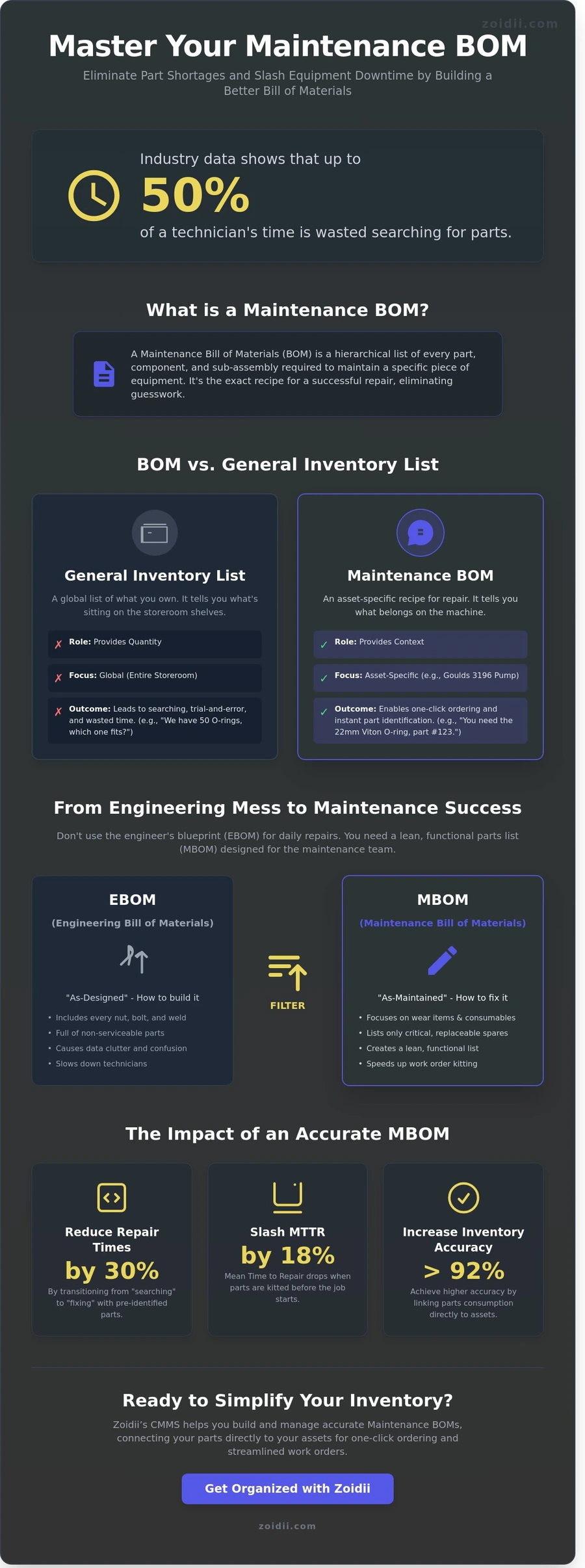
It's common to confuse a BOM with a general inventory list, but they serve different masters. An inventory list is global; it tells you what is sitting on the shelves in the storeroom. A BOM is asset-specific; it tells you what belongs on the machine. One provides quantity, while the other provides context. You need both to run an efficient shop, but relying only on an inventory list is a recipe for chaos.Think about a pump repair. A standard inventory list shows you have 50 different types of O-rings in stock. Without an asset-specific BOM, your technician might spend 25 minutes measuring or using trial-and-error to find the right one.
With a BOM, the work order automatically identifies the exact 22mm Viton O-ring required for that specific Goulds 3196 pump. This transition from "searching" to "fixing" can reduce repair times by as much as 30% in high-pressure environments.
EBOM vs. MBOM: Understanding the Different Types of BOMs
Most maintenance managers inherit a mess. They get a technical manual from the OEM and try to use that parts list for daily repairs. This document is usually an Engineering Bill of Materials (EBOM). It represents the "As-Designed" state of the machine.
It's great for the people who built the asset; it's often useless for the people keeping it running. You need to transition to an "As-Maintained" document to stop the chaos in your stockroom.
The Engineering Bill of Materials (EBOM)
Engineers design for assembly. Their BOM includes every single component, including structural welds, permanent fasteners, and internal wiring harnesses that are never meant to be serviced in the field. Relying on an EBOM for maintenance planning is a recipe for data clutter. If your database is packed with 4,000 parts but only 250 are actually replaceable, your team will waste time.Industry data suggests that technicians spend up to 25% of their shift just looking for parts or information. Much of this waste comes from filtering through "junk" data in an over-complicated EBOM.
The Maintenance Bill of Materials (MBOM)
The MBOM is the lean, functional version of your parts list. It focuses strictly on wear items, consumables, and critical spares. Think bearings, belts, and sensors. This list makes work order kitting stupid simple. Instead of hunting through a 50-page manual, the tech sees a curated list of what actually breaks. No more digging. An optimized MBOM ensures that the 10% of parts responsible for 90% of your breakdowns are always staged and ready. It turns a chaotic stockroom into a precision tool for the guys doing the work.How do you know which one your facility needs right now? If your inventory accuracy is currently below 92%, or if your "part search time" exceeds 12 minutes per work order, you don't need more data. You need a better structure.
You can get organized with a modern CMMS that separates the engineering noise from the maintenance reality. Start by identifying your top 5 critical assets and stripping their EBOMs down to the essential repair parts. This shift alone can reduce your "mean time to repair" (MTTR) by as much as 18% within the first 90 days of implementation.
- EBOM: Focuses on how to build it. Includes every nut, bolt, and frame piece.
- MBOM: Focuses on how to fix it. Includes filters, seals, and high-wear components.
- Goal: Transition from "As-Designed" to "As-Maintained" to save time.
Why Your CMMS Needs a Robust Bill of Materials
A CMMS without an accurate BOM is just a digital filing cabinet. To achieve real efficiency, you need to connect your parts directly to your assets. This connection is the secret to automated inventory tracking. When a part is used, the system knows exactly where it went and why. It stops the guessing game that plagues most maintenance departments.
Reliability starts with visibility. Data from the Society for Maintenance and Reliability Professionals (SMRP) indicates that technicians spend up to 25% of their shift searching for parts. An asset-linked parts list eliminates this waste. It provides a clear map of what's required for every repair. Your team spends more time turning wrenches and less time wandering through aisles.
Accuracy also solves the problem of "Ghost Inventory." In many facilities, 15% of the storeroom consists of parts for machines that were decommissioned years ago. By linking every part to a live asset, you can identify these dead stocks and clear them out. This frees up capital and shelf space for items you actually need.
Automating the Parts-to-Work-Order Workflow
A robust Bill of Materials enables "One-Click" parts ordering. When a recurring PM is triggered, the system automatically suggests the necessary components. This prevents the frequent "walk to the storeroom" time-waste where a tech discovers they're missing a seal halfway through a job.Zoidii makes this stupid simple by allowing you to link parts to assets in seconds, ensuring every work order comes with a pre-populated list of requirements. This level of organization keeps your PM schedules on track and your downtime to a minimum.
Reliability and Data-Driven Decisions
Data isn't helpful if it isn't actionable. With a detailed BOM, you can track the consumption rates of specific components across your entire facility. This allows you to identify "Bad Actor" parts that fail more frequently than the manufacturer's specs suggest. You'll gain a true understanding of your Total Cost of Ownership (TCO).Instead of just seeing what a machine costs to run, you'll see exactly which components are draining your budget. This granular detail improves the quality of your maintenance reports, turning them from simple logs into strategic tools for operational improvement.
5 Steps to Building an Accurate Maintenance BOM
Building a maintenance BOM shouldn't feel like a trip to the DMV. It's a practical exercise in getting your house in order. If you try to do everything at once, you'll fail. Most successful teams focus on high-impact wins first. Follow these five steps to get your data clean and your parts organized.
- Step 1: Prioritize your critical assets. Use the 80/20 rule. Focus on the 20% of machines that cause 80% of your downtime or maintenance costs. Don't waste time cataloging every lightbulb in the breakroom.
- Step 2: Gather existing documentation. Dig up the original equipment manufacturer (OEM) manuals and Engineering Bills of Materials (EBOMs). Check your last 12 months of invoices to see what you've actually been buying.
- Step 3: Conduct a physical audit. Manuals are a starting point, not the final word. You need to see the equipment and the storeroom with your own eyes.
- Step 4: Standardize part naming conventions. This is where you stop the "screw" vs. "bolt" confusion. Use a consistent format to avoid duplicate entries.
- Step 5: Upload and link the data in your CMMS. A bom is useless if it lives in a three-ring binder. Link it to the asset in your software so it's available when a work order is generated.
The Physical Audit: Trust but Verify
You cannot trust a manual for a 10-year-old machine. Modifications happen. Parts get swapped for whatever was available during a midnight breakdown. If you rely on a manual from 2014, you'll order the wrong bearings and lose another day of production.During the audit, look for "orphan parts." These are the dusty components sitting in the back of the storeroom with no clear home. Involve your senior techs in this process. They hold the tribal knowledge about which specific seal actually stops the leak, regardless of what the original documentation says.
Standardization and Data Cleanliness
Consistency is king. Use a stupid simple naming convention: Noun, Attribute, Size. For example, "Bolt, Hex, M10x50mm" is much better than "50mm hex bolt." This structure makes searching fast and prevents you from buying the same part twice under different names. Use QR codes or barcodes to link physical bins to your digital bom records. This allows techs to scan a part and see exactly which assets it belongs to.Finally, include "Substitute Parts" in your structure. If the OEM motor has a 16-week lead time, your system should immediately show the compatible alternative you verified last year.
Ready to stop the guesswork and start realizing your maintenance goals? Use Zoidii to get your inventory under control today.
Simplify Your Inventory with Zoidii’s BOM Management
Managing a Bill of Materials shouldn't feel like a second job. If you're still using spreadsheets, you're likely dealing with outdated data and missing parts. Zoidii’s cloud-based platform replaces those static files with a real-time digital bom that stays accurate.
You can build your list of essential parts in minutes, ensuring every asset has a clear blueprint for maintenance. This digital transition eliminates the manual data entry errors that plague traditional inventory systems.
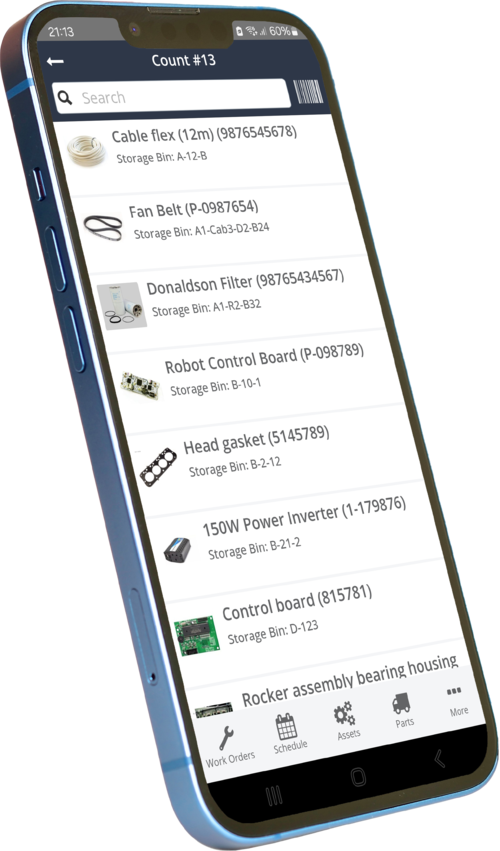
The real power lies in mobile access. Maintenance doesn't happen in an office; it happens on the plant floor. Technicians can update BOMs or check part availability directly from their phones while standing at the machine. This immediate data entry cuts down on "memory-based" inventory management, which often leads to 15% discrepancies in stock levels. With Zoidii, what you see on the screen matches what’s on the shelf, every single time.
Visualizing your data is just as vital. Zoidii’s reporting and analytics tools show exactly which parts you're burning through. You can track usage trends and identify high-failure components before they cause a total shutdown. It turns your inventory from a cost center into a strategic advantage, helping you make informed purchasing decisions based on actual consumption rather than guesswork.
KISS: Keeping Your BOMs Stupid Simple
We believe in the KISS principle. Over-engineering your inventory is a fast track to failure. You don't need to track every single 5-cent washer if you never replace them individually. Zoidii helps you focus on the critical components that actually impact uptime. This approach prevents data bloat and keeps your asset management system lean and functional.For quick requests, guest work orders allow staff to report issues and request parts without needing a full user license. It’s a direct, no-nonsense way to keep the parts flowing where they're needed most. By tracking only the parts you actually replace, your team spends less time clicking and more time fixing equipment.
Realize Your Maintenance Goals Faster
Stop the "part hunting" culture. When a bom is correctly mapped in Zoidii, your team moves from reactive chaos to proactive planning. You'll know exactly what’s required for a PM before the machine even stops. This shift can reduce your mean time to repair (MTTR) by as much as 20% in the first six months of implementation.Zoidii is the top choice for teams who hate complex, bloated software. We’ve stripped away the fluff to give you a tool that simply works. Ready to see how easy inventory can be? Chat with a Zoidii product expert to see our BOM features in action.
Take Control of Your Maintenance Inventory
Stop wasting hours digging through disorganized spreadsheets or guessing which part fits which machine. Building an accurate maintenance bom isn't just about listing parts; it's about eliminating the 20% of maintenance time typically lost to hunting for inventory. By following a structured 5-step process and clearly distinguishing between your EBOM and MBOM, you ensure your team has the right tools at the right moment.
High-performing facilities don't leave their parts strategy to chance. They use data-driven lists to reduce stockouts and keep production lines moving without unexpected interruptions.
A well-maintained Bill of Materials is essential for efficient maintenance and asset management. A BOM helps organizations maintain equipment uptime, plan for preventive maintenance, and manage asset lifecycles effectively by providing a detailed, accurate list of parts and components.
Integration with a CMMS further enhances its utility, ensuring seamless operations and minimizing downtime across various industries.
Managing these complex lists doesn't have to be a headache. Zoidii provides the #1 cloud-based CMMS designed to keep your operations stupid simple.
We've built a mobile-first inventory system that's already trusted by maintenance teams worldwide to track thousands of critical assets in real time. You can finally ditch the paperwork and realize your goals for a more organized, efficient facility. It's time to stop the chaos and start hitting your maintenance KPIs with total confidence. You've got the strategy, now get the tool that makes it work.
Book a demo to see how Zoidii simplifies BOM management