
Unlocking Efficiency
What is CMMS? The No-Nonsense Guide to Computerised Maintenance Management Systems

What if your lead technician retired tomorrow, taking every boiler quirk and equipment secret with him? If you’re currently relying on a single person’s memory or a coffee-stained binder, you’re one resignation away from a total operational shutdown. You likely agree that "firefighting" through your shift is no way to run a facility, especially when missing paperwork leads to a failed audit. Understanding what is cmms is the first step to getting your time back. According to Plant Engineering’s 2023 Maintenance Report, 50% of facilities still use spreadsheets or paper to track maintenance, which explains why so many teams feel stuck in a loop of reactive repairs.We promise to show you exactly how a computerized maintenance management system works and why it beats manual tracking every single time. You’ll learn how to choose a platform that stays "stupid simple" for your technicians while providing the expert-level data you need to realize your operational goals. This guide covers everything from work order automation to audit-proof reporting, giving you a clear path to a more organized and predictable maintenance department.
Key Takeaways
- Stop the firefighting and learn exactly what CMMS is and how it acts as a central hub for all your maintenance data.
- Explore the five pillars of a modern system to turn your physical assets into digital twins and simplify work order management.
- Realize significant ROI by eliminating the "emergency premium" and extending the lifespan of your critical machinery by 20%.
- Escape the "spreadsheet trap" and understand why manual tracking tools are secretly draining your facility's budget.
- Follow a "stupid simple" implementation guide to audit your assets and define the KPIs that actually matter for your team.
What is CMMS? Defining the Computerised Maintenance Management System
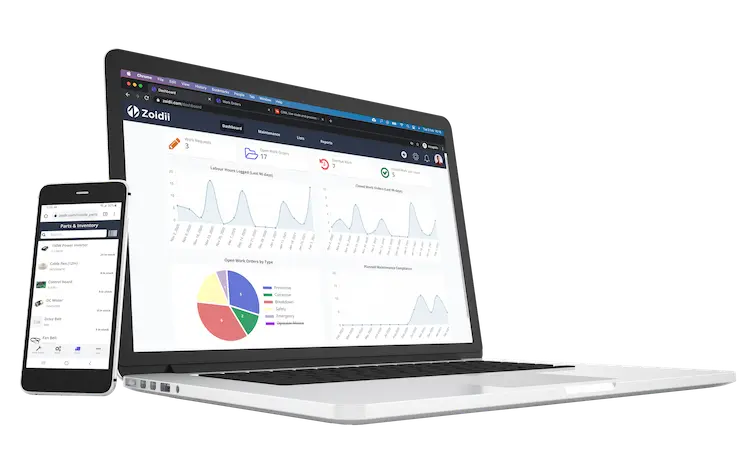
A Computerized Maintenance Management System (CMMS)is computer software that makes maintenance management easier. At its core, it's the digital central hub for every piece of maintenance data you own. It replaces the messy piles of paper and forgotten spreadsheets with a single, reliable source of truth. The goal is simple: stop firefighting. Instead of reacting to broken machines, you use a CMMS to build a proactive, planned maintenance schedule that keeps the floor running. It's the difference between a chaotic shift and a productive one.
- Computerized:This means your data lives in a digital database. No more lost work orders, unreadable handwriting, or "missing" logs.
- Maintenance: This is the work you do every day. It covers PMs, emergency repairs, asset history, and spare parts inventory.
- Management: This gives you control. You decide who does what, when they do it, and how long it should take. It provides the visibility needed to lead.
- System: This is the framework. It connects your people, your assets, and your inventory into one organized machine that functions without constant supervision.
Also called preventive maintenance software, asset management software, and work order software, a CMMS system's primary function is maintenance management.
Maintenance CMMS software gives users valuable insight into their maintenance processes, from detailed work order schedules to KPIs and reports. The most sophisticated CMMS software applications help improve current maintenance procedures while adding time-saving capabilities. Everyone in the company uses the system differently. Technicians use mobile apps to close work orders on the fly. Maintenance managers use it to track PM completion rates and schedule the week ahead. Even the C-suite looks at the data to calculate ROI and justify new equipment purchases. When 80% of maintenance activities in some industries are still reactive, a CMMS provides the only clear path toward operational order.
Maintenance management systems are proven to help increase productivity, reduce the total cost of ownership, and reduce spare parts.
The Evolution: From Paper Logs to Cloud-Based SaaS
Maintenance tracking started in the "black book" era. A single lead mechanic held all the knowledge in a physical notebook. If they retired, the knowledge left with them. By the late 1990s, companies moved to clunky, on-premise software. These legacy systems are dying out in 2026 because they're too hard to update and even harder to use. Modern teams now demand cloud-based SaaS (Software as a Service) platforms. These tools are mobile-first. They allow for real-time data entry from the factory floor rather than making a tech walk back to a desktop computer to type in notes.
CMMS vs. Spreadsheets: The Hidden Cost of 'Free' Tools
Excel feels like a shortcut until the bill comes due. Maintenance managers often fall into the "spreadsheet trap" because the software is already on their computer. It feels free. In reality, relying on manual files builds "maintenance debt" every single day. When you use a static file instead of a dedicated system, you’re operating in the dark. A single deleted cell or a broken formula can wipe out 12 months of asset history. Since research from the University of Hawaii shows that 88% of spreadsheets contain significant errors, your compliance audits are essentially a coin flip.
The mobility gap is where the real damage happens. You can't lug a laptop to the top of a 20-foot ladder to check a part number or verify a serial code. Technicians end up scribbling notes on scraps of paper and entering them hours later. This creates lagging data. By the time you save that Excel file at the end of the shift, the inventory levels are already wrong. Understanding what CMMS is starts with realizing that spreadsheets are just digital paper. They don't talk back, they don't alert you, and they certainly don't help you scale.
Double-entry is a silent killer of efficiency. Maintenance teams spend an average of 2.5 hours per week just transcribing paper notes into digital files. It's a total waste of talent. Spreadsheets also fail miserably at inventory management. Tracking parts across multiple tabs leads to stockouts 15% more often than automated systems. Without automated reminders, 30% of critical preventive tasks often fall through the cracks simply because no one opened the right file that morning.
Who uses CMMS software?
Any organization with physical assets that require regular equipment maintenance should use CMMS software. Even a one-person maintenance operation could use a computerized maintenance management system to manage their work orders, PMs, and inventory. Here are some industries that benefit from using maintenance management software:
- Manufacturing
- Transportation
- Facilities management
- Energy
- Mining
- Construction
- Telecommunications
How does CMMS enhance maintenance efficiency?
The CMMS is a database of maintenance-related information on buildings, equipment, and vehicles. It is a consolidated online and mobile platform that can store all of your maintenance data. This includes work orders, preventative maintenance schedules, assets, logs, work histories, labor, parts inventories, suppliers, standard operating procedures, purchase orders, and maintenance reports. It also helps companies manage, automate, and streamline their maintenance activities. This reduces equipment downtime, improves asset health, and optimizes maintenance costs.
- Consolidates disparate approaches into one central system
- Automates many processes like the generating of PMs
- Becomes the database of record for all maintenance-related information
- Eliminates redundancy and double-entry
- Provides a central intake for guest work requests
- Facilitates the capture and sharing of knowledge
- Provides a tool to enable continuous improvement
- Maintenance reporting & KPIs help in making informed decisions about maintenance planning and budgeting.
How to know if you need CMMS software?
The best way to know if you need a CMMS solution is to identify the maintenance problems within your organization. Issues experienced by those organizations not using computerized maintenance management systems include:
- Difficult to access or recall maintenance information
- Drowned in paperwork
- Little or no automation
- No communication or sharing of knowledge
- Double entry into disparate systems such as logbooks, spreadsheets, and wall calendars
- Audits are difficult and time-consuming
- Issues fall through the cracks
- Maintenance reporting is next to impossible
- Unexpected breakdowns and rushed parts orders are the norm
- Maintenance costs are unpredictable
What are the advantages of using a CMMS?
CMMS software has countless benefits, but ultimately, it comes down to two things: CMMS programs will help increase productivity and reduce costs. The following outlines the advantages of CMMS:
1. Efficient management of work orders
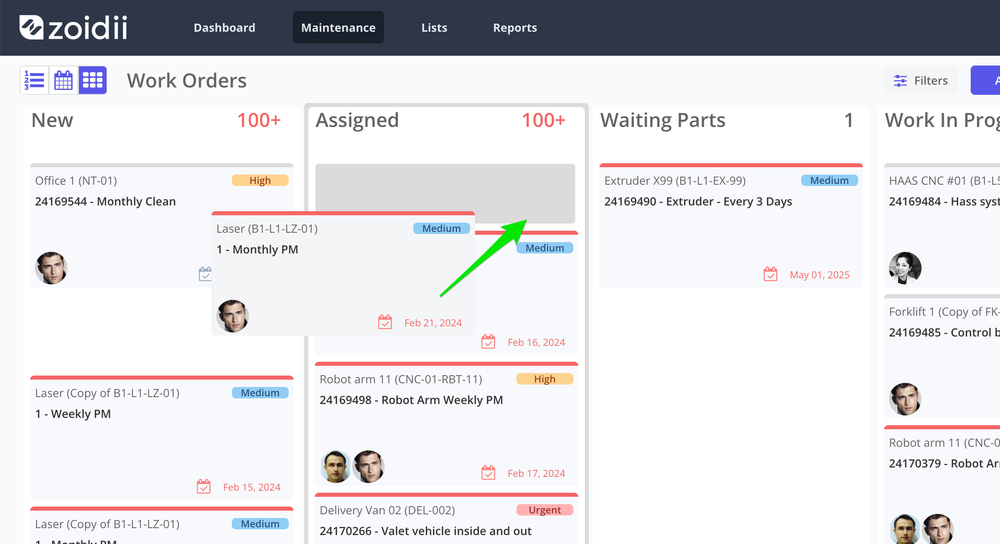
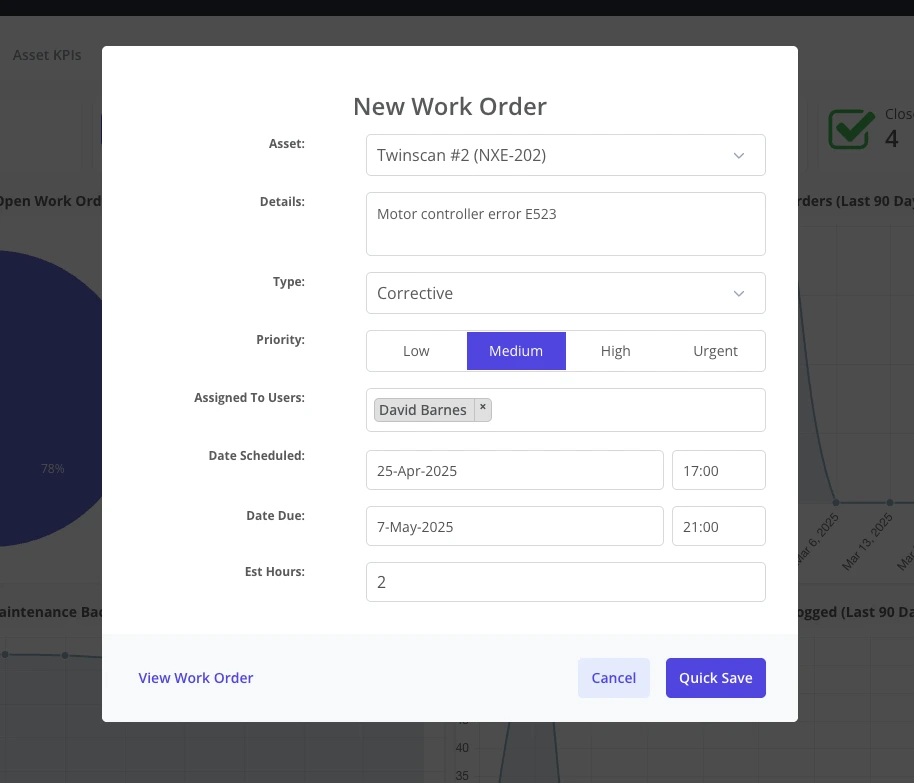
Despite advancements in computers and automation, many maintenance departments still receive work requests via phone, post-it notes, WhatsApp, or email. A CMMS gives you a formal work order process to put in place. It aids in the creation, completion, and tracking of digital work orders by enabling you to:
- Submit, review, filter, assign, and analyze your work orders.
- Schedule and trigger repeating work orders.
- Receive notifications when the CMMS generates new work orders.
- Include checklists, manuals, and notes in your work orders.
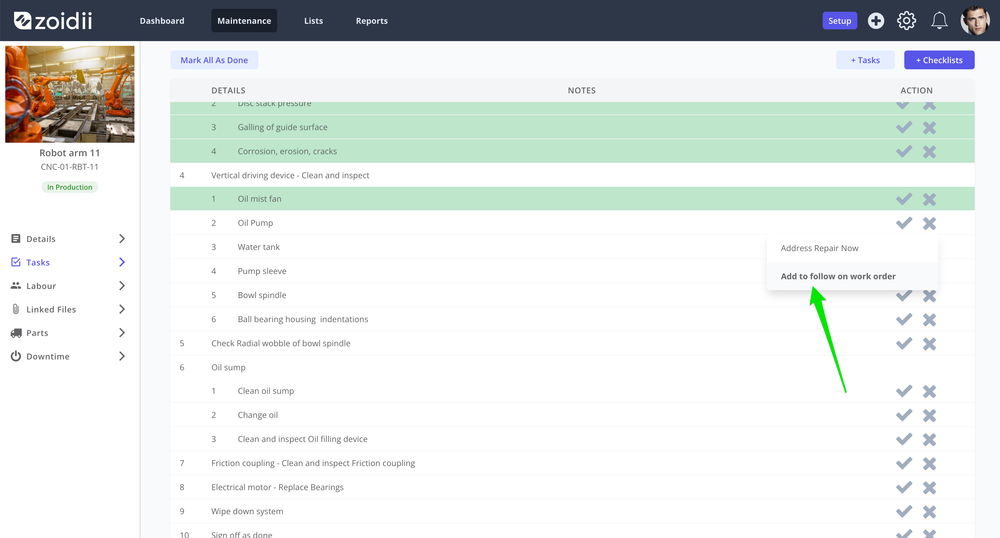
- Automatically generate follow-on work orders when inspections fail.
2. Access to real-time information
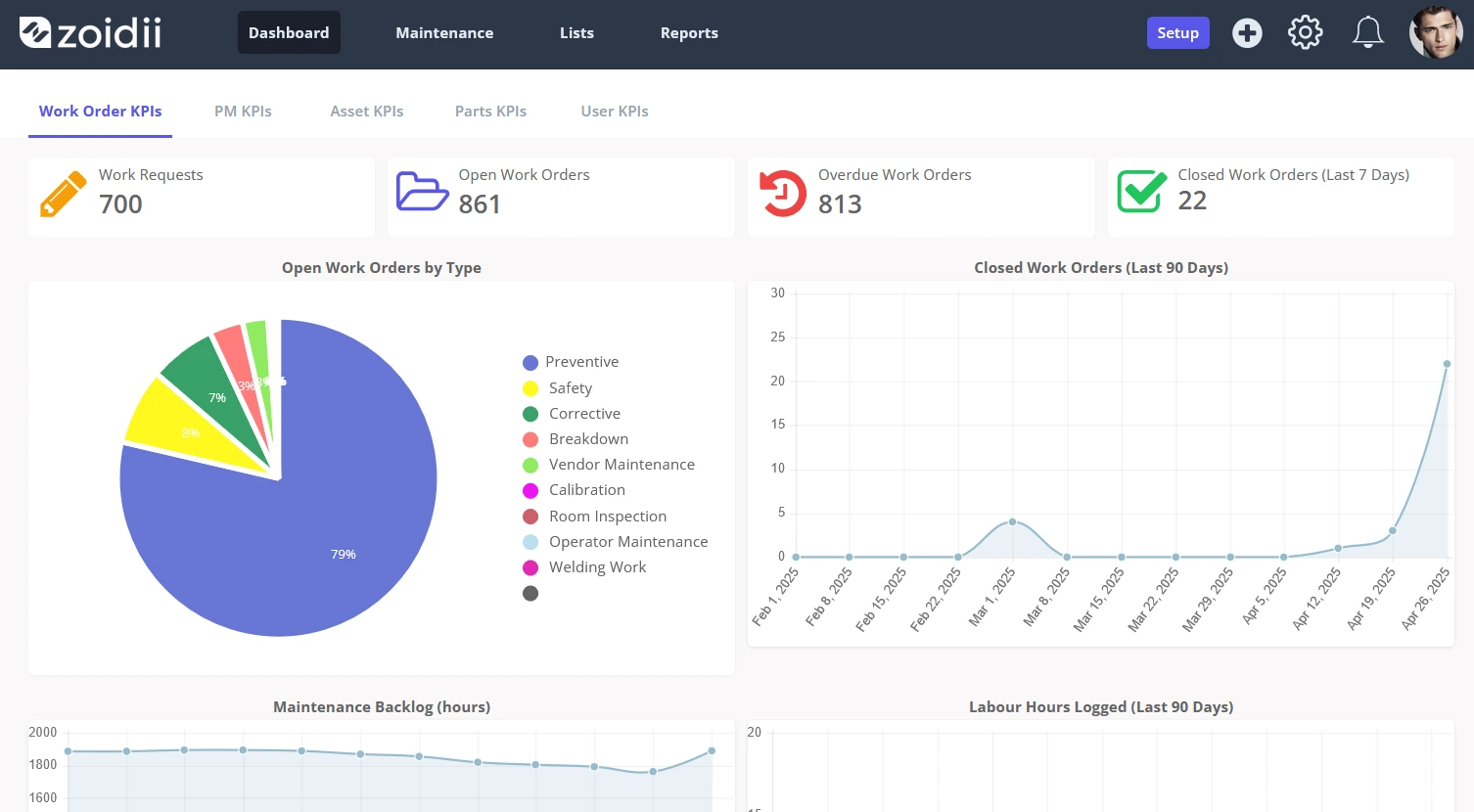
CMMS software gives maintenance managers a 20,000-foot view of their operation. They can quickly see the organization's KPIs and metrics, new requests the instant they come in, and where they need to focus their attention. Technicians can access vital equipment resources such as files, manuals, and schematics in real time as they complete the work. CMMS software provides detailed reports and maintenance analytics on operations, asset performance, and maintenance costs, which can be used to make informed decisions about maintenance strategy, planning, and budgeting.
3. Mobile workforce
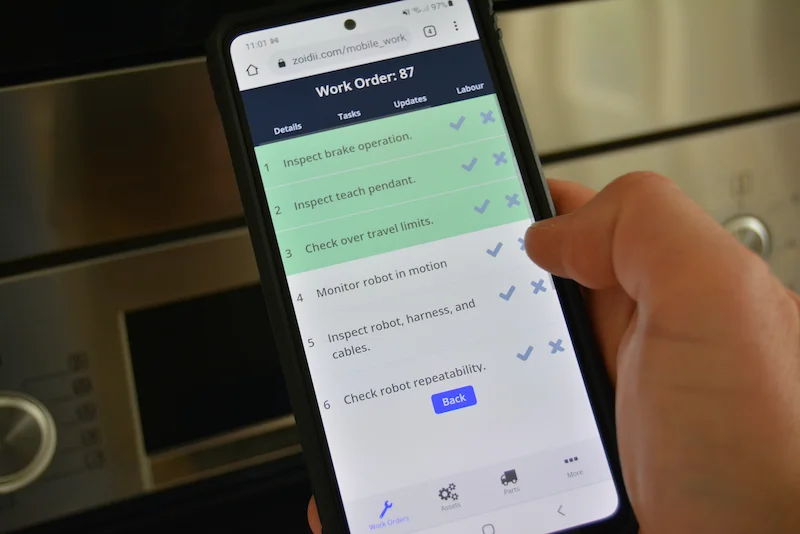
Maintenance has always been mobile, so CMMS softwareneeds to be mobile too. Technicians don't want to walk back and forth from terminals all day. The best CMMS software offers advanced mobile connectivity for users who need access to maintenance history as they complete their work in the field.
4. Better resource utilization
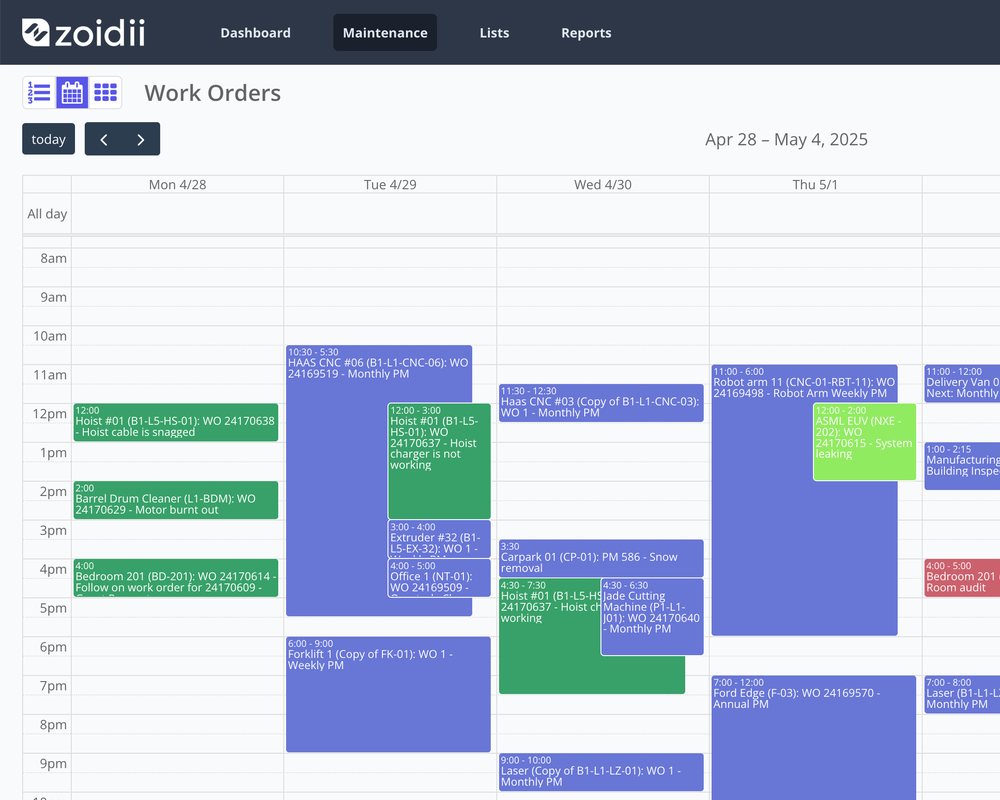
Planning and scheduling work orders helps: CMMS software enables organizations to better utilize resources by optimizing maintenance schedules, reducing reactive maintenance, and identifying opportunities to consolidate or eliminate redundant tasks. Work order scheduling allows managers to allocate resources, plan their activities, and coordinate multiple teams more efficiently. Planning work orders can help optimize maintenance efficiency, improve maintenance workflows, and enhance customer service.
- Maximize resource use
- Limit the use of outside contractors
- Reduce the number of emergency parts shipments needed
- Maximize production capabilities
- Limit scrap and rework
- Control the budget
5. Automation of preventive maintenance schedules
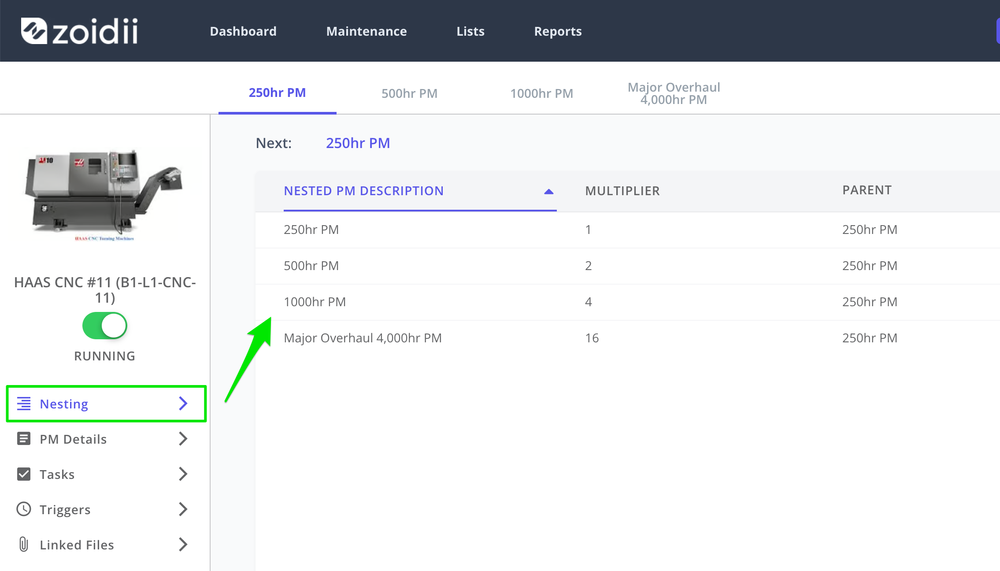
Preventive maintenancemanagement can get very complicated, particularly in large businesses with many assets. The preventive maintenance required can also vary depending on the equipment, process, environment, and operation. The CMMS software's preventive maintenance module is the best way to plan, track, and optimize preventive maintenance. System administrators can configure PMs with calendar or meter-based triggers that fire off a PM work order when equipment meets specific criteria. Reducing equipment downtime through effective preventive maintenance and helps increase equipment uptime, productivity, and unexpected repair costs.
6. Audits and regulatory compliance
Audits with many local, regional, state, national, and worldwide compliance requirements can be challenging. CMMS software helps organizations comply with regulatory requirements by providing detailed maintenance records, schedules, and reports, which can be used to demonstrate compliance during audits. The CMMSprovides the digital paper trail that most compliance audits use to assess a company's compliance with standards.
7. Knowledge capture
When maintenance personnel leave the organization, 70% of their knowledge walks out the door with them. The easiest way to limit the amount of knowledge leaving is by continually capturing as much information as possible during day-to-day operations in the CMMS. Over time, the CMMS becomes a critical database of records for your maintenance operations, tracking everything maintenance-related.
8. Inventory management and optimization
Track and optimize spare parts using CMMS software. Parts records hold essential details such as storage locations, supplier information, min and max inventory levels, and part costs. The CMMS automatically depletes the stock level as the work order consumes the part. It sends out notifications to inventory folks if the stock level breaches the reorder point.
Cost benefits of using CMMS software
A properly implemented CMMS can provide significant savings for any organization:
Increase labor productivity by 10% to 30%
Users save time accessing work orders in real-time in their mobile CMMS app, inputting repair steps and labour hours, searching parts, scanning QR codes, and searching asset histories.
Reduce emergency downtime by 10%
CMMS software helps reduce downtime by automating preventive and condition-based maintenance, giving users real-time access to maintenance records, and
Lower asset total cost of ownership by 5-20%
Effectively maintaining equipment by performing PMs and inspections will reduce repairs and parts replacements, extend asset life, and increase its salvage value.
Reduce parts costs by 5-20%
CMMS software can help organizations cut spare parts inventory levels by 10-30%, increase warranty recoveries by 10-50%, reduce stock-outs by 5-10%, and reduce emergency parts orders by 5-15%
If you want to learn more, we have compiled a detailed list of reasons to invest and the benefits of CMMS software.
Why Your Facility Needs a CMMS (The ROI of Order)
Stop paying the "emergency premium." Most maintenance teams spend their days firefighting, which is the most expensive way to run a facility. When you move beyond messy spreadsheets and truly understand what CMMS is, you transition from reactive chaos to planned precision. This shift isn't just about being organized; it's about protecting your bottom line with a system that's stupid simple to use but powerful enough to transform your operations.
Reducing Costly Downtime
Downtime is a silent profit killer. In the manufacturing sector, an hour of unplanned downtime can cost $260,000 or more in lost production and wasted labor. A CMMS uses Preventive Maintenance (PM) schedules to stop the "domino effect" where one small component failure brings down an entire production line.
Mean Time Between Failures (MTBF) is the average time an asset operates between breakdowns and serves as the primary KPI for tracking your reliability progress.
Safety, Compliance, and Risk Mitigation
Safety shouldn't be a separate binder gathering dust on a shelf. By linking Lockout/Tagout (LOTO) procedures directly to digital work orders, you ensure technicians see critical safety steps on their mobile devices before they touch a machine. This setup automates compliance reporting by tracking every safety check as it happens.
You get a timestamped, unalterable history of maintenance that reduces liability and proves to regulators that your facility follows every safety protocol. It's a no-nonsense way to move from "we hope we're safe" to "we know we're compliant."
- Eliminating the Emergency Premium: Planning your maintenance tasks reduces labor costs by 12% to 18%. You stop paying for overnight shipping on parts and last-minute technician overtime because you have the resources ready before the machine fails.
- Extending Asset Lifespan: Regular, documented upkeep helps expensive machinery last 20% longer on average. For a facility managing $1 million in equipment, that is $200,000 in deferred replacement costs.
- Audit Readiness: You stay "Always Ready" for OSHA or ISO inspections. Instead of a two-week panic to find paper logs or signed work orders, you pull a digital report in seconds.
- Team Accountability: Managers gain a clear view of who is doing what, when they started, and exactly how long the job took. It replaces the "I think we fixed that" excuse with hard data.
What are the 7 critical features of CMMS software?
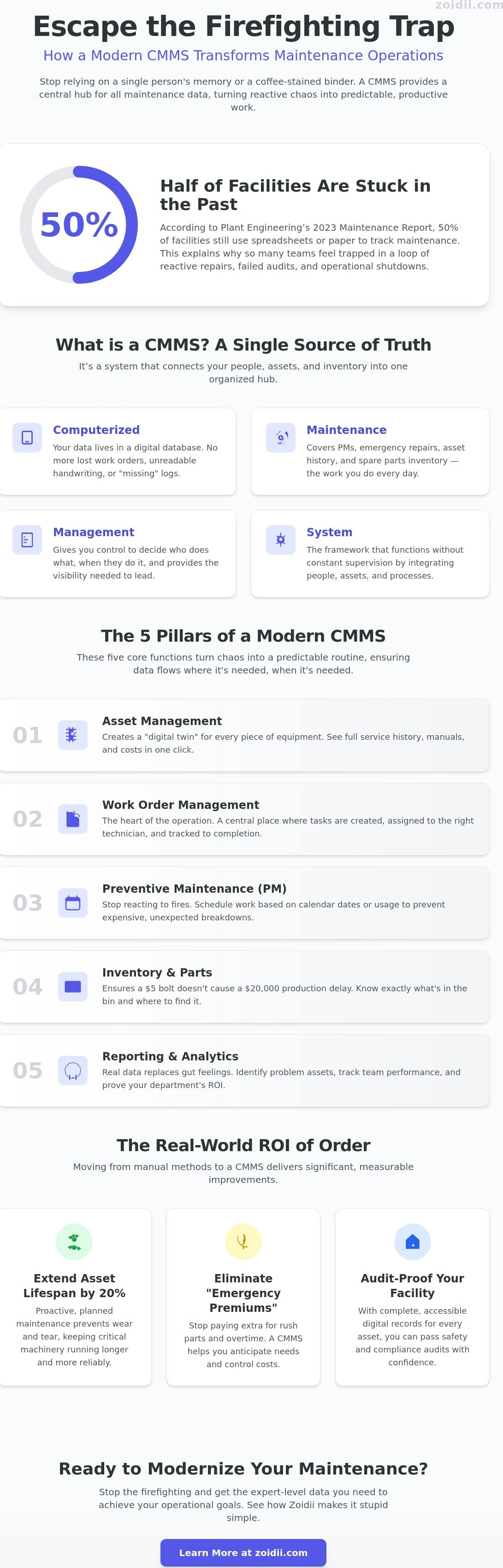
Understanding what is cmms requires looking past the software interface and into the daily mechanics of the shop floor. It's the engine room of your facility. Five core pillars support a modern maintenance strategy, turning chaos into a predictable routine. These pillars ensure that data flows where it's needed, when it's needed.
CMMS software comes in all shapes and sizes, but they all have the same seven core features:
1. Asset registry
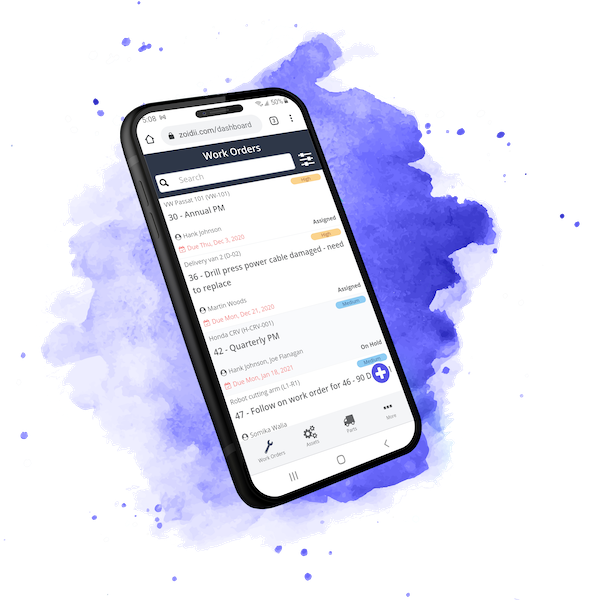
A list of your physical assets in the business. The asset record holds valuable information such as make, model, location, work orders, parts installed, offline status, manuals & schematics, and meter reading history. Asset tracking is a key feature of any CMMS.
2. Work orders
The work order module in the CMMS holds a list of jobs that have yet to start, are currently in progress or have been completed on the asset.
Tracking the jobs in the system means they are less likely to fall through the cracks and get missed. Over time, work order history becomes a valuable repository of information.
3. Guest request portal
Simplifies and streamlines the way folks outside the maintenance department report issues.
4. Preventive maintenance
The CMMS automates PM work order generation based on time, meter, or measurement-based triggers.
5. Checklists
The CMMS can hold an inventory of maintenance checkliststhat get pulled into work orders or PMs.
6. Inventory management
The CMMS helps track and optimize parts and inventory on hand, ensuring the parts are available when needed for a breakdown repair or PM. This ensures a $5 bolt doesn't cause a $20,000 production delay. You know exactly what's in the bin.
7. Reporting & Analytics
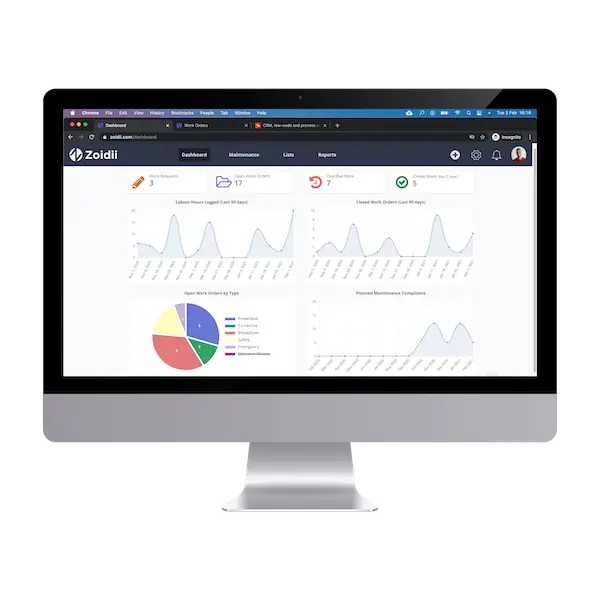
You cannot improve what you cannot measure. The CMMS typically comes with a dashboard and reports that give CMMS administrators the real-time data they need to make informed decisions, such as repairing or replacing equipment.
Common CMMS metrics include planned maintenance percentage, scheduled maintenance compliance, MTTR, MTBF, and maintenance backlog.
Enterprise CMMS may include more complex features, such as work order schedulers, master meters, nested PMs, and artificial intelligence.
Work Order Lifecycle: From Request to Completion
Maintenance shouldn't be a black hole. Guest work orders allow anyone in the facility to report an issue in under 30 seconds without needing a full login.
Once a request enters the system, Kanban boards visualize the team's capacity. You can see exactly which tasks are "In Progress" and where bottlenecks are forming. To keep things moving, techs capture tribal knowledge by attaching digital photos or videos to the order.
This ensures the next person knows exactly how to fix that specific valve without asking for help. It makes the entire process organized and manageable for the whole team.
Asset Tracking and the Digital Registry
A centralized asset list is the single source of truth for your facility. You can't manage what you can't find.
Modern systems use QR codes for instant identification. A technician scans a tag on a pump and instantly pulls up its entire repair history on their phone.
This registry also tracks parent-child relationships. If a sub-component on a complex assembly fails, the system shows how that affects the larger machine.
90% of maintenance managers agree that having this data at their fingertips reduces diagnostic time by at least 15 minutes per call.
When you know what is cmms at its core, you realize it's the ultimate tool for asset longevity.
CMMS versus EAM: What's the difference?
Enterprise Asset Management (EAM)is often seen as the "big brother" to CMMS. While a CMMS focuses on maintenance execution, an EAM tracks the entire lifecycle of an asset, including deep financial depreciation and procurement.
For most facilities, a full EAM is overkill. It's expensive and over-engineered. Modern cloud software has blurred the line between the two. You can now realize EAM-level results with a CMMS that stays stupid simple to use. Unless you're managing global infrastructure across dozens of countries, a dedicated CMMS is usually the right tool for the job.
CMMS
- Optimizes daily maintenance duties
- Assigns and completes work requests
- Performs preventive maintenance tasks and inspections
- Manages inventory and labor resources
- Ensures equipment availability
EAM
- Builds on the foundation established by CMMS
- Includes all CMMS functionalities
- Focuses on the entire equipment lifecycle
Choosing between cloud-based and on-premise CMMS
Organizations all over the world are currently gravitating towards SaaS (Software-as-a-Service). SaaS is also called "hosted cloud" or "cloud-based". SaaS is hosted centrally by a vendor and is available on-demand over the internet.
It is vital to have robust CMMS software that will not compromise data or its current functionality. As Cloud-based CMMS is becoming the preferred software to use by users, here are prime function factors that users need to be aware of:
1. Smaller investment
SaaS CMMS runs on the vendor's servers, so the vendor manages servers, firewalls, anti-virus, and security.
SaaS with CMMS offers users the flexibility to expand and contract with their data demands.
Users can benefit from using SaaS CMMS by only paying for the data resources they require rather than committing to a significant initial investment.
2. Manage staff more efficiently
SaaS can help users with staffing and resource challenges. Compared to on-premises CMMS deployments, SaaS requires less intervention and support from IT.
3. Keeps up with the pace
SaaS integrates new technologies quicker with little risk. It enables organizations to test new approaches and offers users new insights and operating models to maintain a competitive advantage.
4. Automatic updates
Typically, the CMMS vendor automatically updates the software at regular intervals with bug fixes, security patches, and new features.
Be sure to get CMMS advice before deciding on the best CMMS maintenance software for your business.
What is the total cost of ownership of CMMS software?
The total cost of ownership includes the initial investment in establishing the system and the ongoing cost of maintaining the software.
There are several costs to consider when buying CMMS software. Be sure to ask the following questions when purchasing CMMS software:
What are the upfront implementation costs?
Are there ongoing subscription costs?
Do I need any additional hardware?
Are there any ongoing software maintenance costs?
Are there training costs?
Will we require addional resources to manage the CMMS system?
How do you calculate the ROI of CMMS software?
The return on investment (ROI) is an approximate measure of the CMMS project's profitability.
It is an educated estimate as it cannot account for future changes or growth in the business. The formula for calculating the CMMS ROI is as follows:
ROI = (CMMS Value - CMMS Costs) / CMMS Costs
CMMS value is the dollar amount associated with the expected benefits. You could also include some inherent value from the intangible benefits such as improved quality or customer satisfaction. See our CMMS ROI Calculator for an estimated return on investment of using CMMS software. The best way to justify new CMMS software and get stakeholder buy-in is to prepare a CMMS business case. That way, all stakeholders understand the expected costs, benefits, and return on investment.


CMMS Return on Investment Calculator
Answer 5 questions to determine the return on investment of using CMMS software
How many people will use the CMMS?
What is the hourly rate?
$25
What is the monthly spend on parts?
How many hours of production downtime per month?
50
What is the cost of 1hr of downtime?
Estimated Annual Savings *
* for illustrative purposes only.
Tips for selecting the right CMMS software for your business
The CMMS benefits are well documented, so getting it right the first time when choosing any software is important.
Ripping and replacing a CMMS can be costly if you get it wrong, and your team will be less likely to adopt future incarnations. There are several things to look out for when choosing CMMS software.
1. Understand your business requirements
Document your maintenance needs before meeting the CMMS providors. That way, you are less likely to get blinded by all the bells and whistles you'll never use.
2. Understand your end users
They will be critical to the project's success. If the system is too complicated for their skill set, they won't use it.
Every CMMS platform claims to be "easy to use", so try out their demo and see how quickly you can figure it out without any CMMS training.
3. Make sure it fits your company
Right size the software and the implementation for the capabilities of your business.
If you plan to go from pen and paper to a CMMS integrated with your ERP and machines, ensure you have the resources to execute the project and manage the system long term.
4. Select modern maintenance solutions
If the software looks like it was designed and built in the 1990s, it probably was. Be sure to pick a current cloud-based application built on the latest technologies.
5. Evaluate vendor reputation thoroughly
Make sure the vendor has the resources, experience, and capability to make you successful. Ensure they are not sayers; they are doers.
Getting the CMMS implementation right the first time is critical. Ask to speak to customer references before selection. There are too many "CMMS experts" out there with virtually no CMMS or maintenance experience.
When you call customer success for advice, you want to talk to someone who has spent more than 5 minutes in a factory. Background check the vendor employees on LinkedIn before selecting.
6. Consider technical support quality and reliability
If you run into problems in the future, you want to be sure you get stellar technical support. Technical support is crucial to CMMS success in the long term. Test out vendor customer support by calling their support line with a fictional issue before signing up.
7. The total cost of ownership - Understand all your costs upfront, so there are no surprises down the line.
CMMS Implementation: How to Get Started Without the Headache
Most CMMS implementations fail because they are too complex. Industry data suggests that nearly 70% of enterprise software projects fall short of their original goals due to over-engineering. Y You don't need a three-year plan to understand what CMMS is and how it fits your workflow. You need a direct path to results. Follow these four steps to get up and running without the typical corporate friction.
Zoidii is built for teams that are tired of the clutter found in traditional enterprise software. We stripped away the useless tabs and buried menus to focus on what actually moves the needle. Our intuitive Kanban maintenance board lets you visualize your entire workload at a glance. You can drag, drop, and prioritize tasks without clicking through endless screens. While other systems take months to configure, Zoidii helps you realize your maintenance goals in days. We believe that understanding what is cmms should be the hardest part; using it should be the easiest.
- Step 1:Audit your assets. You can't manage what you can't see. List every critical piece of equipment, its location, and its current condition. Start with the top 20% of assets that cause 80% of your downtime.
- Step 2: Define your 'Must-Have' KPIs. Decide what success looks like before you log in. Whether it is reducing Mean Time to Repair (MTTR) by 15% or hitting 95% PM compliance, pick three metrics and stick to them.
- Step 3: Choose 'Stupid Simple' software. If your technicians need a week of training to close a work order, they won't use the system. Adoption is the only metric that actually matters during rollout.
- Step 4: Pilot and Pivot. Don't try to boil the ocean. Start with one department or one production line for 30 days. Learn what works, fix the bottlenecks, and then roll it out facility-wide.
Key CMMS Roles
A CMMS Solution Architectis an expert who’ll be vital in helping you acquire or develop a tailored solution that aligns with your business requirements. They will also ensure the solution can seamlessly integrate with your current systems.
Whether implementing, upgrading, or integrating a CMMS, their expertise ensures smooth transitions and effective solutions. Their involvement significantly increases the likelihood of a successful CMMS implementation and maximizes the potential of your CMMS system.
They possess the knowledge and skills to guide you through the array of CMMS options available, ranging from traditional on-premise applications to contemporary cloud-based solutions.
Once the CMMS is live, a CMMS Coordinator will be pivotal in the success of an asset management program. They will:
- Oversee and optimize the utilization of the CMMS for efficient asset management.
- Manage and maintain the CMMS to ensure assets function efficiently and remain within budget.
- Reduce downtime and enhance productivity through organized maintenance tasks.
- Minimize repair expenses by streamlining maintenance operations.
- Apply extensive knowledge in maintenance management to improve overall efficiency.
- Contribute to cost savings and informed decision-making regarding asset management.
For any organization that relies on a computerized maintenance management system to fulfill its asset management requirements, the presence of a dedicated CMMS Coordinator can yield substantial benefits.
Take Control of Your Maintenance Operations
Stop wasting hours on broken spreadsheets and lost work orders. Now that you understand what is cmms, it's clear that modern maintenance requires a central hub for assets and PMs. Ditching manual tools helps facilities see a massive reduction in downtime while extending asset life. You don't need a PhD to get started. Most complex systems take 6 months to deploy, but the right tool gets you moving immediately.
Zoidii is the #1 Rated Cloud-Based CMMS for Ease of Use because we focus on what works. We've earned the trust of maintenance teams in Dublin, Toronto, and across the globe by stripping away the fluff. You can be set up and running in minutes, not months. It's time to realize your operational goals without the headache of over-engineered software.
You have the knowledge to move forward. Now go make your facility run like clockwork.
Find out how Zoidii’s CMMS can simplify maintenance, improve efficiency, and cut costs. Our customized, intuitive platform is designed to fit your business needs. Get in touch today to learn more.
Frequently Asked CMMS Questions
What is the primary goal of a CMMS?
The primary goal of a CMMS is to centralize maintenance info and automate tasks. When you understand what is CMMS, you see it's about moving from reactive to proactive maintenance. This shift can reduce equipment downtime by up to 35% according to industry benchmarks. By tracking every repair, you extend asset life and keep your facility organized without the chaos of paper or spreadsheets.
Is CMMS software only for large manufacturing plants?
No, CMMS software works for facilities of all sizes, from small schools to massive industrial complexes. If you have 5 assets or 5,000, you need a system to track them. Modern cloud-based options make it stupid simple for small teams to get organized without needing a massive budget or a dedicated maintenance department. It's about efficiency, not the square footage of your plant.
How much does a CMMS typically cost?
CMMS costs vary based on your choice of a cloud subscription or an on-premise license. Software Advice reports that typical monthly subscriptions range from $30 to $150 per user. On-premise setups often require a one-time fee plus annual maintenance costs. You should choose a plan that fits your headcount and specific feature needs to ensure you get a high return on your investment.
Can a CMMS help with OSHA and safety compliance?
Yes, a CMMS provides a digital paper trail that is essential for OSHA and safety compliance. You can store safety manuals, attach lockout procedures to work orders, and prove that 100% of your required safety inspections were completed on time. Having this data ready for an auditor transforms a stressful inspection into a routine check of your organized records. It keeps your team safe and legal.
What is the difference between CMMS and a work order system?
A work order system is just one piece of the puzzle, while a CMMS is the entire toolbox. A work order system handles the "what" and "who" of a repair. In contrast, what is CMMS? It's a comprehensive platform that manages inventory, asset history, labor costs, and preventive maintenance schedules in one place. It gives you the big picture rather than just a single task list.
Do I need an IT degree to set up a CMMS?
You don't need an IT degree or a background in coding to set up a modern CMMS. Most systems today are designed to be stupid simple, allowing you to upload your asset list via a CSV file and start creating work orders in under 20 minutes. If you can use a smartphone or send an email, you have the technical skills needed to master the software quickly.
How does a mobile maintenance app improve technician productivity?
Mobile maintenance apps increase technician productivity by eliminating the need to walk back and forth to a central office for paperwork. Studies show that mobile access can increase wrench time by 25% or more. Technicians update work orders, take photos of repairs, and scan QR codes directly at the machine. This keeps them on the floor where they are most valuable and reduces data entry errors.
What happens if our internet goes down? Does the CMMS still work?
Most modern CMMS platforms include an offline mode that allows you to keep working even without a signal. Your technicians can complete tasks and log data on their mobile devices. Once the connection is restored, the app automatically syncs the data to the cloud. This ensures that a 10 minute internet outage doesn't bring your entire maintenance operation to a grinding halt or cause data loss.

Jeff O'Brien
Jeff O’Brien is the Director of Operations and a co-founder of Zoidii. With 25 years experience in maintenance and CMMS, Jeff has helped implement CMMS software in over 600 of the worlds largest companies. Jeff has also written over 250 industry articles on CMMS, maintenance best practices, leadership, manufacturing, and operational excellence