
What are Nested PMs?
Background - Nested PMs
Nested preventive maintenance (nested PMs) is very relevant to organizations with multiple PMs on their equipment that increases complexity as the interval increases. For example, we have a laser cutter that gets a Monthly PM, Quarterly PM, and Annual PM.
When we complete the quarterly PM, we also sign off the tasks from the monthly PM at the same time. The same is true for the annual PM - it incorporates the monthly and quarterly PM tasks.
In this article, we will reference time-based PMs such as monthly, quarterly, and annual for demonstration purposes. However, nested PMs also apply to meter based PMs such as mileage or machine hours - 250hr PM, 1,000hr PM, 10,000 Km etc.
When we complete the quarterly PM, we also sign off the tasks from the monthly PM at the same time. The same is true for the annual PM - it incorporates the monthly and quarterly PM tasks.
In this article, we will reference time-based PMs such as monthly, quarterly, and annual for demonstration purposes. However, nested PMs also apply to meter based PMs such as mileage or machine hours - 250hr PM, 1,000hr PM, 10,000 Km etc.
Disadvantages of individual PMs
Most CMMS software applications satisfy this scenario through multiple PMs that trigger simultaneously. That can get messy for several reasons:
- You have multiple PMs to manage for each piece of equipment.
- Techs have to close out numerous work orders when they trigger.
- Schedules can become misaligned.
- The order of operations for your PM tasks can be confusing.
- Difficult to schedule labour when different people perform the different PMs.
- Techs may complete tasks they don't need to do.
Monthly PM
Complete the following:
1. Perform visual inspection
2. Record the hours
3. Inspect belts
4. Check error logs for issues
5. Verify air pressure in spec
Annual PM
Everything in the monthly and quarterly PMs plus:
1. Replace filters
2. Replace oil
3. Replace all belts
Quarterly PM
Everything in the monthly PM plus:
1. Drain condensate
2. Check battery level
3. Clean all filters
4. Empty the overflow tank
5. Grease bearings
6. Wipe down the system
What are Nested PMs?
Nested PMs allow organizations to incorporate preventive maintenance of increasing complexity and duration into one single PM. Nested PMs functionality lets minor PMs get bypassed by major PMs when due at the same time.
To the end-user, the PM grows and shrinks depending on its position in the schedule. In the example above, when the system triggers an annual PM, it incorporates the quarterly and monthly PMs.
To the end-user, the PM grows and shrinks depending on its position in the schedule. In the example above, when the system triggers an annual PM, it incorporates the quarterly and monthly PMs.
When do you need Nested PMs?
Nested PMs are ideal when equipment assets have multiple PMs at different intervals. Nested PMs limit the number of PMs and PM work orders to manage and execute within the CMMS.
Advantages of using Nested PMs
There are several advantages to using nested PM functionality:
- Nested PMs schedules are easier to manage as you only have one PM (unless the CMMS employs the suppression method as outlined below).
- Nested PMs are easier to execute - Nested PM functionality prevents multiple unnecessary work orders from opening up and creating extra admin work.
- Less prone to error - As nested PM functionality triggers one PM work order, there is less confusion regarding job tasks. The technician completes the tasks in the order outlined in the PM without jumping between different work orders.
- Reduce downtime by minimizing the number of service visits to each asset.
How do Nested PMs typically work?
Very few CMMS vendors do Nested PMs. Of the few that do, most CMMS vendors adopt one of the following methods:
Suppression - CMMS software apps using this technique still require multiple PMs. The major PM suppresses the minor PMs when they trigger. In the example above, if the annual PM was due next, the three PMs would be due simultaneously, but only the annual PM would appear in the PM work order list. The other two are either skipped or, in some cases, closed off automatically by the system as done.
Additive - CMMS software apps employing this method allow users to build one PM that grows and shrinks per the PM cycle. The system adds the job plans or tasks from the minor PM to the major PM's job plan.
Hybrid - This method utilizes both the additive and suppression methods. That way, you get the best of both worlds. CMMS administrators build one nested PM that transforms depending on the PM cycle.
Suppression - CMMS software apps using this technique still require multiple PMs. The major PM suppresses the minor PMs when they trigger. In the example above, if the annual PM was due next, the three PMs would be due simultaneously, but only the annual PM would appear in the PM work order list. The other two are either skipped or, in some cases, closed off automatically by the system as done.
Additive - CMMS software apps employing this method allow users to build one PM that grows and shrinks per the PM cycle. The system adds the job plans or tasks from the minor PM to the major PM's job plan.
Hybrid - This method utilizes both the additive and suppression methods. That way, you get the best of both worlds. CMMS administrators build one nested PM that transforms depending on the PM cycle.
Nested Preventive Maintenance in Zoidii
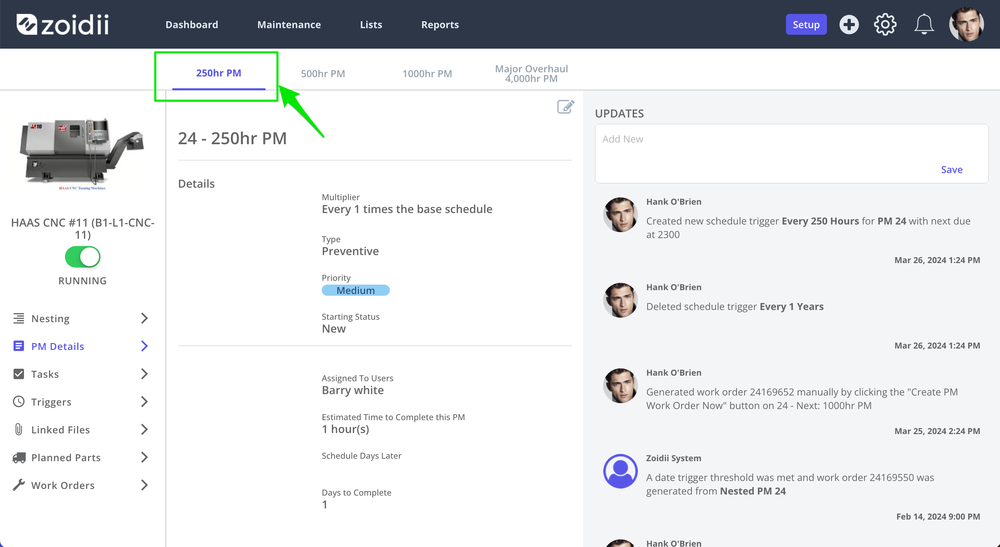
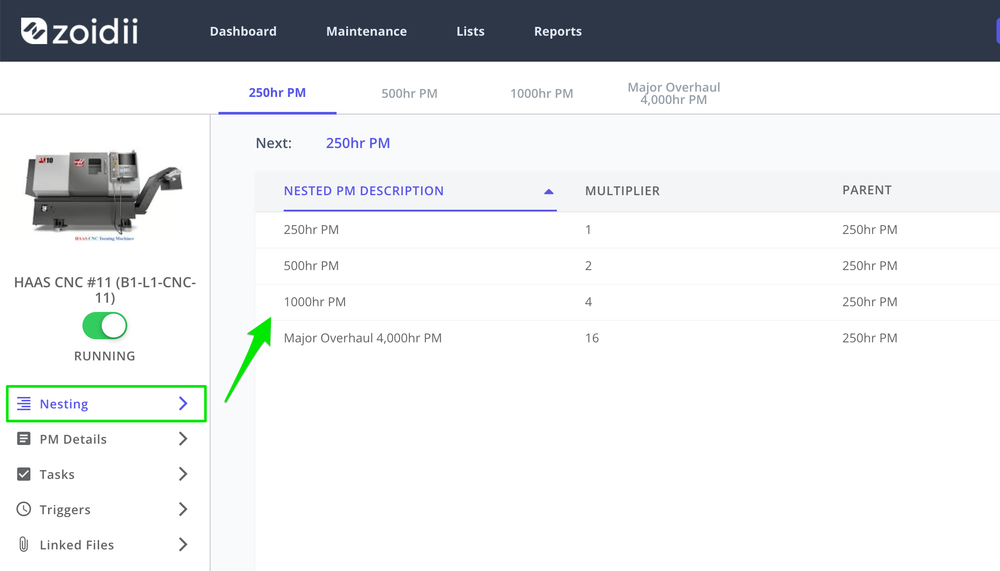
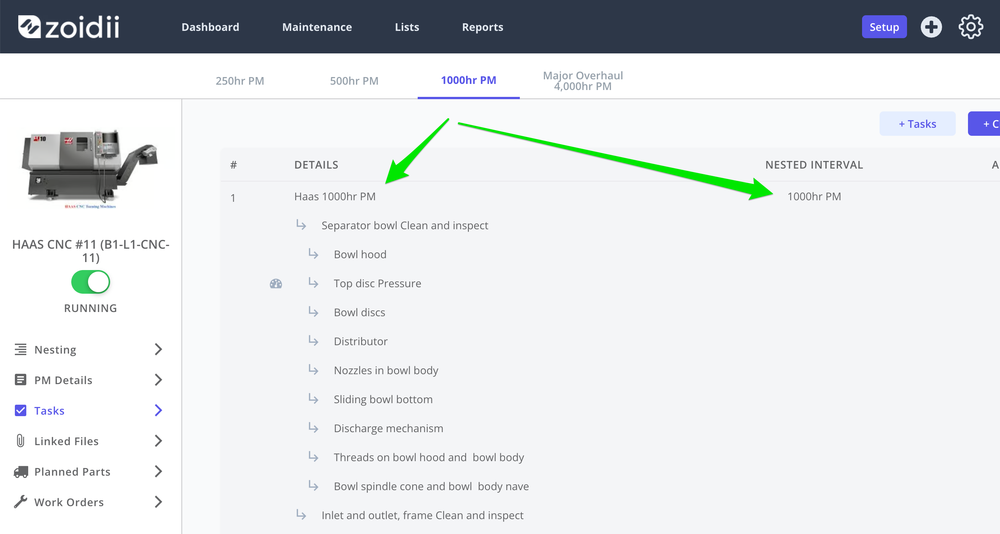
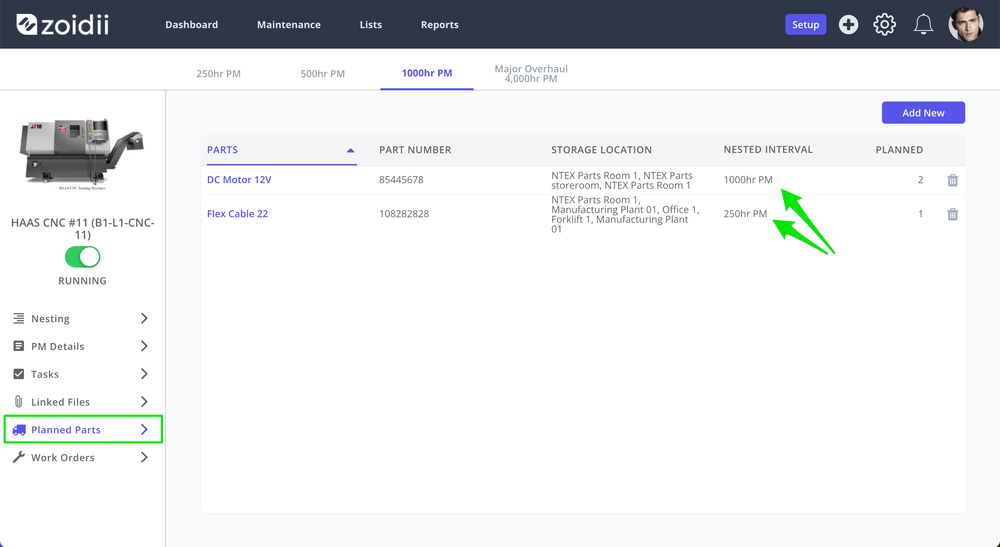
Zoidii employs the hybrid method. Key elements of the nested PM such as the job plan, assigned users, or the priority change depending on the position in the PM cycle. Other PM details that don't require suppression, such as parts needed, are additive.
The following outlines what we did differently:
For more information on nested PMs in Zoidii, see our Nested PM feature spotlight blogpost.
The following outlines what we did differently:
- Key fields on the nested PM such as description, priority, assigned users, days to complete and estimated hours change depending on the PM cycle. Maintenance managers get visibility on the work due without opening the PM or PM work order and doing the calculations.
- Each nesting level has its own preventive maintenance checklist. For example, the quarterly job plan is added separately to the PM nesting level rather than add the quarterly tasks to the end of the monthly job plan. The advantage of using this method is the CMMS respects the order of operations in all job plans. It also eliminates unwanted tasks from minor PMs at major PMs.
- Parts are additive - Whereas each nesting level gets a dedicated job plan, the system adds additional parts for each level. For example, we replace the filter every 1,000 hours and the fan belt every 2,000hrs. At the 2,000 hour PM level, the system will add the filter and fan belt to the PM work order.
For more information on nested PMs in Zoidii, see our Nested PM feature spotlight blogpost.
Why we're excited about Nested PMs in Zoidii:
- You only have to manage one PM.
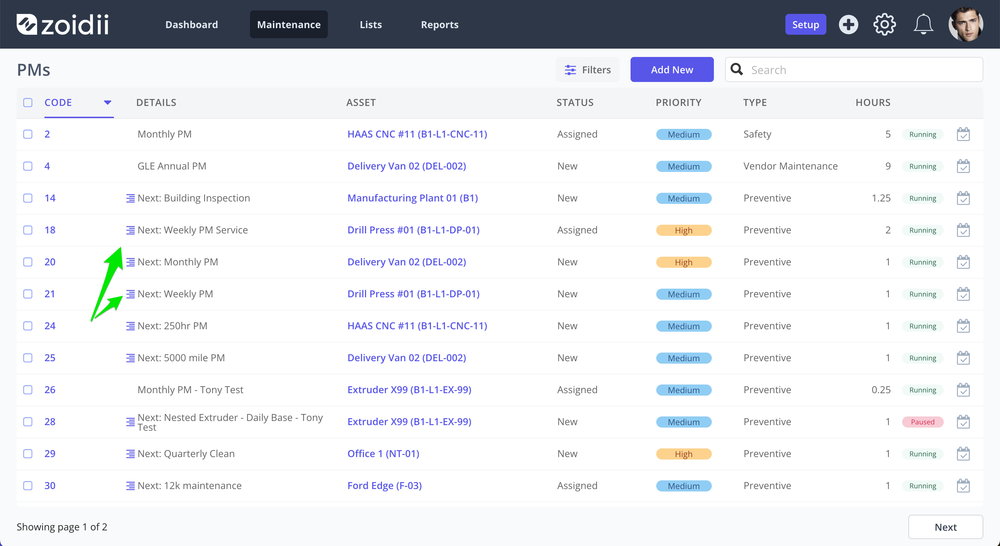
- You can see the next nested PM type due throughout the system:
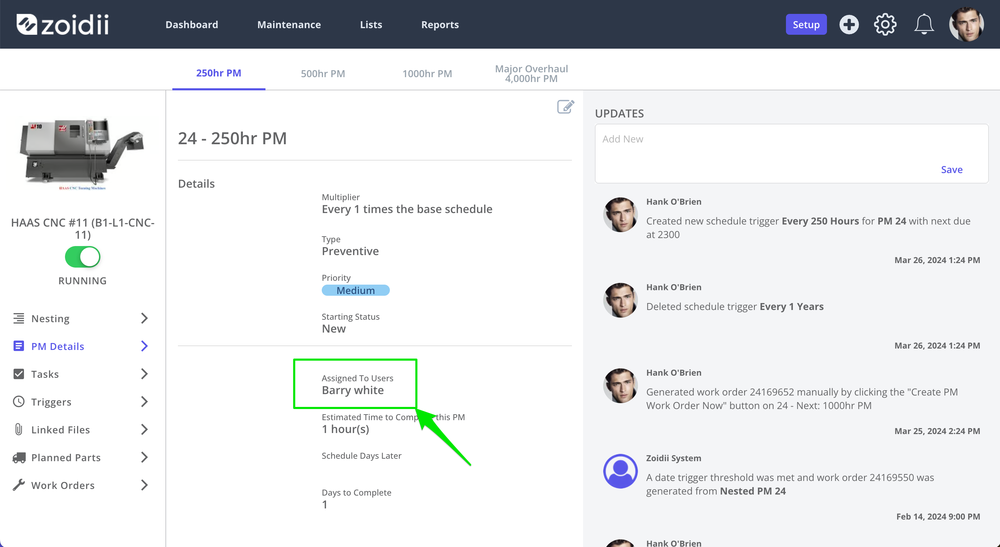
- You can change each nesting level's key PM description fields. For example, the 250 hour PM could be medium priority assigned to Barry White...
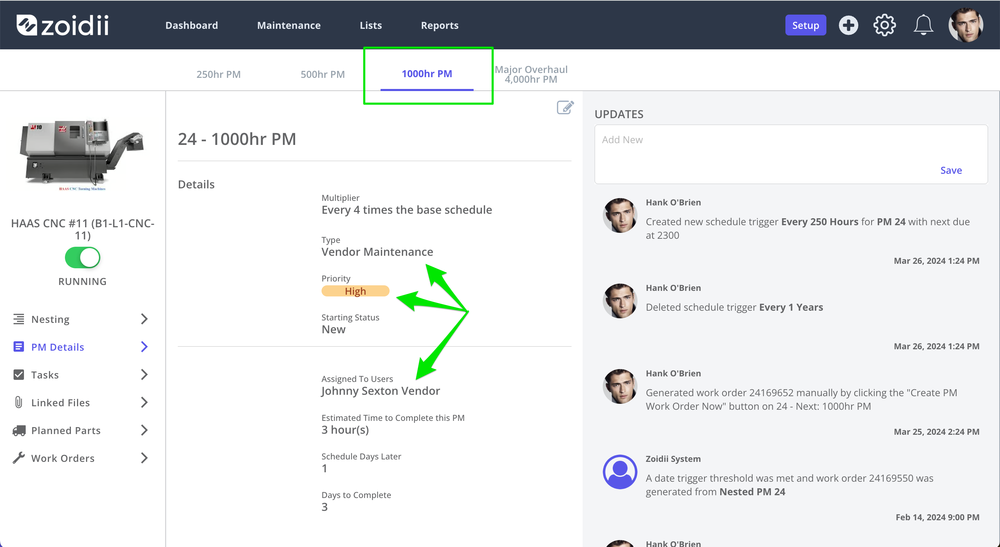
- while the 1000hr PM is high priority vendor maintenance assigned to an external vendor.
- Replacement nature of tasks/checklist area of the nested PM means the tasks follow the job plan's correct order of operations. In addition, CMMS administrators can remove unwanted tasks from minor nested levels.
How can I access Nested PMs in Zoidii?
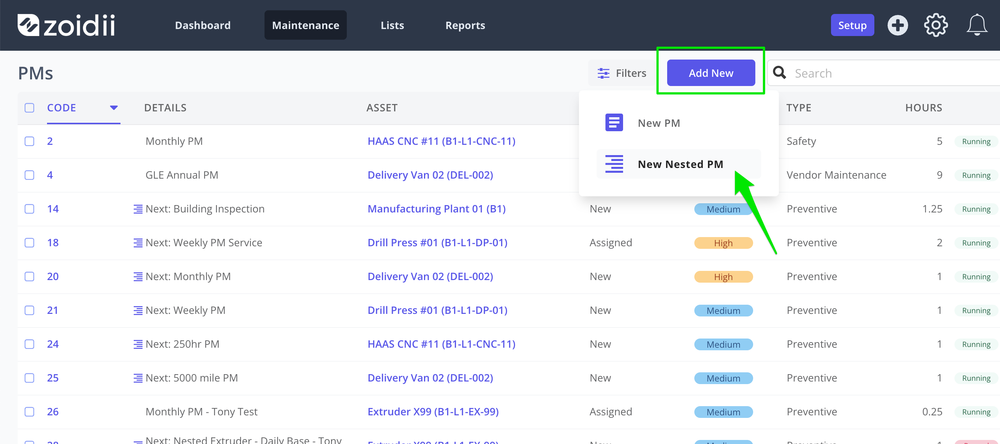
Nested PMs comes with the Enterprise tier. When you click New on the Preventive Maintenance page in Zoidii, you will see the option to Create a nested PM.
What to look out for when using Nested PMs
1. Floating schedulesBe mindful when using nested PMs and floating maintenance schedules. The floating schedule will cause your start dates to drift, meaning you may not complete the major PMs on schedule. Late PMs may cause warranty or regulatory/compliance issues.
For example, let's say we have a monthly and annual PM. If we use floating schedules and typically complete the monthly PM five days late, the annual PM will trigger 60 days late (12x5).
2. The Gregorian calendar
Would you believe the Romans have caused a nested PM complication? We have seven days in a week, whereas months have 28, 29, 30 or 31 days. Your weekly PM will only line up with your monthly PM in February.
Adjust your monthly PM to every four weeks (28 days) to work around this. Alternatively, use traditional non-nested preventive maintenance for weekly and monthly PMs.
3. Customizable PM fields/settings
Avoid CMMS software that does not allow for variations in the nested PM. For example, the CMMS software should allow for different PM descriptions for each nesting level/iteration in the PM. Otherwise, you have to open the PM work order and identify the parts and tasks to see what PM is due.
For example, let's say we have a monthly and annual PM. If we use floating schedules and typically complete the monthly PM five days late, the annual PM will trigger 60 days late (12x5).
2. The Gregorian calendar
Would you believe the Romans have caused a nested PM complication? We have seven days in a week, whereas months have 28, 29, 30 or 31 days. Your weekly PM will only line up with your monthly PM in February.
Adjust your monthly PM to every four weeks (28 days) to work around this. Alternatively, use traditional non-nested preventive maintenance for weekly and monthly PMs.
3. Customizable PM fields/settings
Avoid CMMS software that does not allow for variations in the nested PM. For example, the CMMS software should allow for different PM descriptions for each nesting level/iteration in the PM. Otherwise, you have to open the PM work order and identify the parts and tasks to see what PM is due.

4. Misaligned suppressionSome CMMS software apps that employ the suppression method demand strict rules to keep the PMs lined up. During the CMMS selection process, ask yourself if your organization will have difficulties keeping those PMs aligned.
5. The nesting multiplier is typically a number
CMMS applications with nested PM functionality assume the major PMs happen every X times the minor PM happens. For example, the quarterly PM happens every three monthly PMs. That number is called the nesting multiplier and is a number, not a decimal.
6. The nesting buffer
Some CMMS apps using the suppression method employ a nesting buffer. Rather than have all the PMs line up, they allow for some flexibility through a nesting buffer. If the minor PM falls within a certain percentage of the major, it will trigger the two PMs at the same time.
Nested buffers can add a lot of confusion and break the nesting if the PMs fall too far out of range of each other.
7. Does the nested PM respect the order of operations?
Generally, as the PM interval increases, the PM increases in complexity as technicians complete additional tasks. "Additional" does not mean "add to the end". In many cases, these extra steps from the major PM happen between tasks of the minor PM. The tasks area of the nested PM should cater for this obvious scenario.
In addition, your major PMs may make tasks on minor PMs redundant. For example, there's no point inspecting the fan belt per the 250hr PM if the 1000hr PM calls for a belt replacement.
5. The nesting multiplier is typically a number
CMMS applications with nested PM functionality assume the major PMs happen every X times the minor PM happens. For example, the quarterly PM happens every three monthly PMs. That number is called the nesting multiplier and is a number, not a decimal.
6. The nesting buffer
Some CMMS apps using the suppression method employ a nesting buffer. Rather than have all the PMs line up, they allow for some flexibility through a nesting buffer. If the minor PM falls within a certain percentage of the major, it will trigger the two PMs at the same time.
Nested buffers can add a lot of confusion and break the nesting if the PMs fall too far out of range of each other.
7. Does the nested PM respect the order of operations?
Generally, as the PM interval increases, the PM increases in complexity as technicians complete additional tasks. "Additional" does not mean "add to the end". In many cases, these extra steps from the major PM happen between tasks of the minor PM. The tasks area of the nested PM should cater for this obvious scenario.
In addition, your major PMs may make tasks on minor PMs redundant. For example, there's no point inspecting the fan belt per the 250hr PM if the 1000hr PM calls for a belt replacement.