

Great maintenance leaders do more than fix what’s broken; they build strategies and guide their teams toward real business value.
The problem is finding the time to lead when you're constantly putting out fires. To go from reactive taskmaster to proactive leader, you need the right tools. A computerized maintenance Management system (CMMS) is one of the most important.
A CMMS takes routine tasks off your plate, gives you a clear view of your operations, and provides the data you need for smart decisions. It helps you manage your team’s workload, improve asset health, and show the real value your department brings to the organization.
Here are eight ways a CMMS can make you a more strategic and successful maintenance leader.
1. Shift From Reactive Firefighter to Proactive Strategist
Chasing down emergency repairs day after day is exhausting and inefficient. A CMMS helps you get ahead of breakdowns by automating preventive maintenance.
This change frees you from the cycle of constant emergencies, giving you the space to focus on strategic planning, resource allocation, and long-term improvements.
Automate Preventive Maintenance Schedules
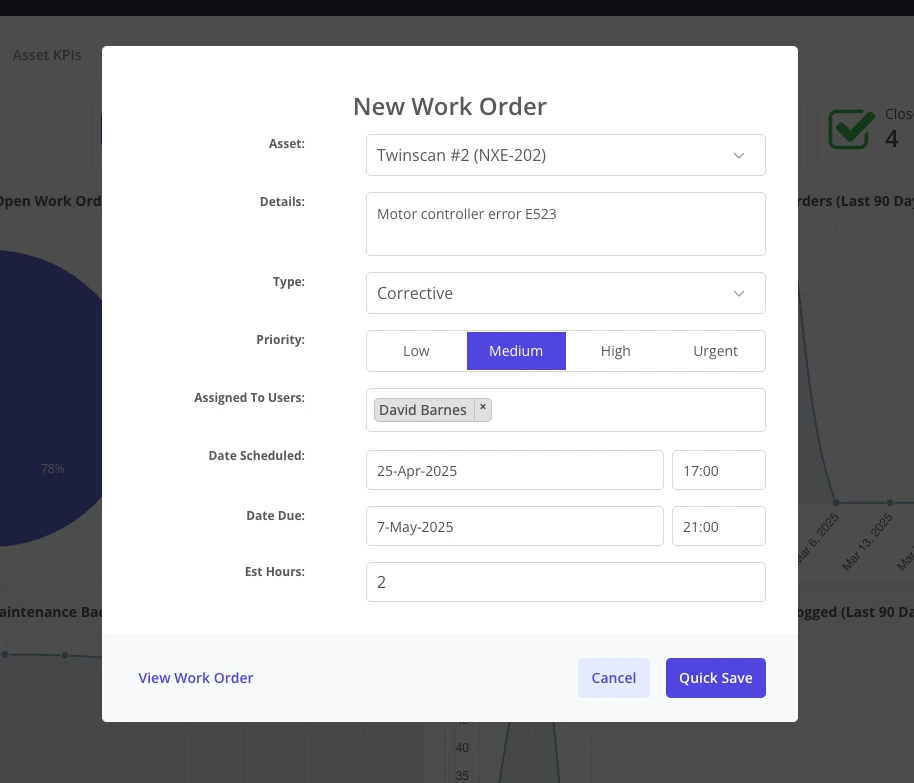
You can set up recurring maintenance schedules for your most important assets right in the CMMS. The system automatically generates work orders for routine inspections, lubrication, and servicing, eliminating the need to rely on spreadsheets or memory.
This consistent attention helps reduce unplanned downtime and lets your team work on planned tasks instead of just reacting to failures. A dedicated preventive maintenance software solution makes the entire process simple and reliable.
Predict Asset Failure Trends
A CMMS logs every work order, repair, and part used for each asset, creating a detailed performance history over time.
You can analyze this information to spot trends. Maybe a certain pump fails every nine months, or a specific motor overheats in the summer. These insights let you anticipate issues and schedule corrective actions before a critical failure happens.
2. Gain Full Visibility Over Your Entire Operation
Trying to manage a maintenance department without a central system feels like conducting an orchestra where every musician has different sheet music.
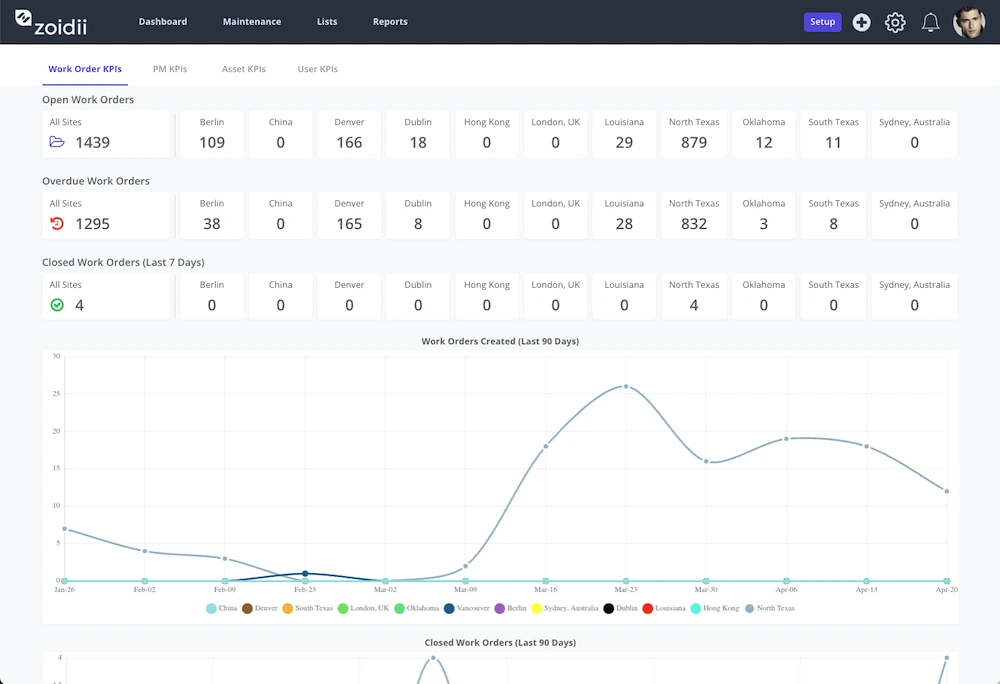
A CMMS dashboard becomes the one place to see everything. It gives you a real-time, at-a-glance view of all maintenance activities, team workloads, and asset statuses, so you always know what’s happening.
Centralize Work Order Management
Lost paper requests and verbal miscommunications become a thing of the past. A CMMS centralizes every maintenance request from submission to completion.
You can track who requested the work, when it was assigned, who is working on it, and its current status. The complete digital trail means no more lost jobs. A modern work order software system streamlines this entire workflow, giving you and your team total clarity.
Monitor Technician Workloads
Good leaders make sure work is distributed fairly. A CMMS lets you see every technician’s current assignments and upcoming tasks. This view helps you balance the workload, so some team members aren't overloaded while others are underutilized. You can reassign tasks with a simple drag-and-drop, improving team output and preventing burnout.
3. Empower Your Team With Mobile Accessibility
Your technicians do their best work in the field, not behind a desk. A mobile CMMS puts all the information and tools they need right in their hands. This accessibility gives them the ability to do their jobs with more independence and ownership, which builds a stronger team.
Instant Access to Job Details
Using a Mobile CMMS, technicians can pull up work orders on their phones or tablets right at the job site. They get instant access to job details, asset histories, repair manuals, and safety procedures.
No more walking back to the office to print a work order or ask for information. This immediate access helps them finish jobs faster and more accurately.
Real-Time Status Updates
Constant check-ins and radio calls interrupt workflow and waste time. A mobile CMMS lets technicians update the status of a work order in real time.
They can change the status in the app when a job is started, paused, or completed. This simple action keeps you informed without breaking their focus, which builds trust and improves workflow.
Simplified Work Requests
If a team member in another department spots an issue, they can submit a request right away. Guest work requests let them use their phone to snap a photo of the problem, add a short description, and send it directly into the CMMS. You get clear, immediate context, which eliminates guesswork and helps you assess priority.
4. Make Confident, Data-Backed Decisions
Leadership is about making the right calls. A CMMS turns raw operational data into clear, useful information.
The system’s analytics and reporting tools give you the hard evidence to justify budgets, staffing changes, and new initiatives, replacing gut feelings with facts.
Track Key Performance Indicators
A CMMS automatically calculates important maintenance metrics that show your team’s performance.
You can easily track:
- Mean Time to Repair (MTTR)
- Mean Time Between Failures (MTBF)
- Preventive Maintenance (PM) compliance
Identify Cost-Saving Opportunities
Data analysis reveals which assets are draining your budget. Tracking labor hours and parts costs for each piece of equipment helps you pinpoint assets that need frequent, expensive repairs. This information gives you what you need to make smart repair-versus-replace decisions that save the company money.
5. Master Your Inventory and Budget Control
Running out of a critical spare part can shut down production and undo all your proactive work.
A CMMS with integrated inventory management helps you avoid stockouts, lower carrying costs, and connect parts usage directly to work orders for accurate budget tracking.
Automate Parts Reordering
You can set minimum stock levels for all your important parts. When the quantity on hand drops below that threshold, the CMMS automatically generates a purchase order suggestion.
This automation helps you keep necessary spares available without tying up capital in excess inventory. Good inventory management is fundamental to a well-run maintenance storeroom.
Link Parts to Work Orders
When a technician uses a part for a repair, they log it against the work order in the CMMS. This gives you exact job costing, showing precisely how much was spent on labor and materials for any task. It also offers a clear view of where your inventory budget is going, helping you create more accurate financial plans.
6. Simplify Compliance and Audit Preparedness
Safety audits and regulatory checks are stressful without proper documentation.
A CMMS acts as your automatic record-keeper, creating a permanent digital trail of all maintenance activities.
This makes preparing for an audit a straightforward, low-stress process.
Generate Instant Audit Trails
When an auditor asks for the maintenance history of a specific asset, you won't be digging through filing cabinets.
With a CMMS, you can pull a complete, time-stamped history for any piece of equipment in just a few clicks. The report shows every work order, inspection, and repair ever performed on that asset.
Standardize Safety Procedures
You can attach digital maintenance checklists to work orders to make sure safety procedures are followed every time. Technicians must complete the checklist before they can close out the work order, which creates a documented record that safety protocols were met. This standardizes best practices and keeps your team focused on safety.
7. Improve Communication With Other Departments
Maintenance doesn't exist in a silo. Your work directly affects production, finance, and other departments.
A CMMS acts as a central communication point, letting you provide clear, proactive updates to people across the company.
Transparent Work Request Status
When a production manager submits a maintenance request, they can see its status right in the system. They know if the request has been received, when it’s scheduled, and when it’s complete.
This transparency cuts down on follow-up emails and phone calls, letting your team focus on the actual work.
Scheduled Maintenance Reports
A CMMS can automatically generate and email reports to other department heads. You could schedule a weekly report for the production team that lists all planned maintenance for the upcoming week. This simple update helps them plan for downtime and improves how everyone works together.
8. Demonstrate Your Department’s Value
Good leaders know how to show their team’s contribution to the company’s success. A CMMS provides reports and dashboards that translate maintenance activities into tangible business outcomes, such as increased production uptime, extended asset life, and controlled spending.
Create Compelling Performance Dashboards
You can build and share dashboards that display your team’s effect on business goals. Visualize improvements in PM compliance, reductions in downtime, and a shrinking maintenance backlog.
These visual reports make it easy for executives to see the positive results of your leadership and your team’s hard work.
Justify ROI with Real Data
A CMMS gives you concrete data on cost savings and efficiency gains. You can show exactly how much money was saved by preventing downtime or by extending the life of a critical asset. Use a CMMS ROI calculator to quantify these benefits and build a strong case for the value of your maintenance department and its tools.
Evolve Your Maintenance Leadership with Zoidii
Going from managing daily tasks to leading a high-performing maintenance strategy is the mark of a great leader.
A CMMS provides the visibility, control, and data you need to make that change. It gives you the tools to build a proactive, efficient, and data-driven maintenance operation that adds real value to your organization.
See How Zoidii Empowers Leaders
Zoidii was built to be the simple, reliable partner for maintenance managers who want to improve their leadership and operational control.
We provide the tools you need to streamline workflows, support your team, and prove your department’s impact. Ready to see how easy it can be? Book a tour to see Zoidii in action.



