

If your maintenance team is still tracking work orders, assets, and PMs in spreadsheets, you're not alone — but the gap between spreadsheet-based maintenance and modern CMMS software is growing fast.
In 2026, the global CMMS market is valued at approximately $1.45 billion and is projected to nearly triple to $3.56 billion by 2035. That growth reflects a clear industry shift: organizations that want to reduce downtime, control maintenance costs, and stay competitive are moving away from spreadsheets and toward purpose-built CMMS platforms.
This article breaks down exactly how spreadsheets and CMMS software compare — and helps you decide which tool is right for your team.
What Is a CMMS?
A Computerized Maintenance Management System (CMMS) is software designed specifically to manage maintenance operations. It centralizes work orders, asset data, preventive maintenance (PM) schedules, parts inventory, and reporting in one place — accessible from any device, anywhere.Unlike a spreadsheet, a CMMS is built around how maintenance teams actually work: assigning tasks, tracking completions, setting automated triggers, and producing the KPIs management needs to make decisions. For more on "What is a CMMS", check out this article.
Spreadsheets for Maintenance: The Basics
Spreadsheets have been the go-to maintenance tool for decades — and it's easy to understand why. They're free (or near-free), familiar, and flexible. Most maintenance managers can build a basic asset list or PM schedule in Excel or Google Sheets without any training.
For very small operations — a single technician, a handful of assets — a spreadsheet can be adequate. But as soon as teams grow, assets multiply, or compliance requirements kick in, the limitations start to surface.
Where Spreadsheets Fall Short
1. No real-time visibility Spreadsheets live on someone's desktop or in a shared drive. There's no live dashboard showing what's overdue, who's working on what, or which assets are offline right now. Managers are always working from yesterday's data.
2. Error-prone by design Manual data entry means human error — a wrong date, a missed cell, a formula that breaks when someone adds a row. In maintenance, those errors translate to missed PMs, inaccurate asset histories, and compliance gaps.
3. Not built for mobile Technicians in the field can't efficiently update a spreadsheet on their phone while working on a machine. In practice, work gets tracked on paper first and entered into spreadsheets later — creating delays, transcription errors, and incomplete records.
4. Poor accountability and audit trails Spreadsheets don't record who changed what, when, or why. When something goes wrong — a machine fails, an audit flags a gap — there's no reliable history to reference.
5. No automation Scheduling preventive maintenance in a spreadsheet means manually creating rows, setting reminders, and remembering to act on them. Nothing happens automatically. Work orders don't generate themselves.
6. Limited collaboration Only one person can update a spreadsheet at a time (without version conflicts). Multiple technicians, managers, and departments can't all work from the same live source of truth.
What CMMS Software Offers That Spreadsheets Don't
Automated Work Order Management
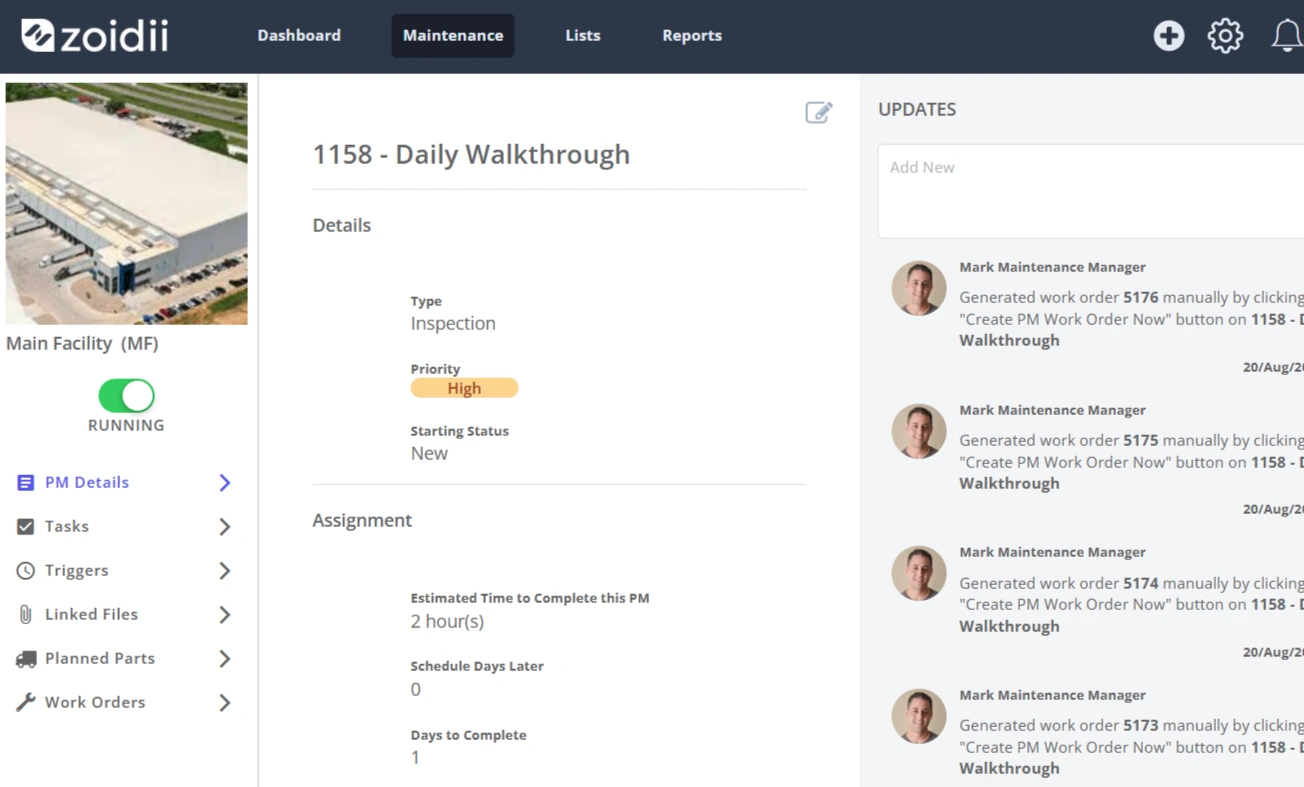
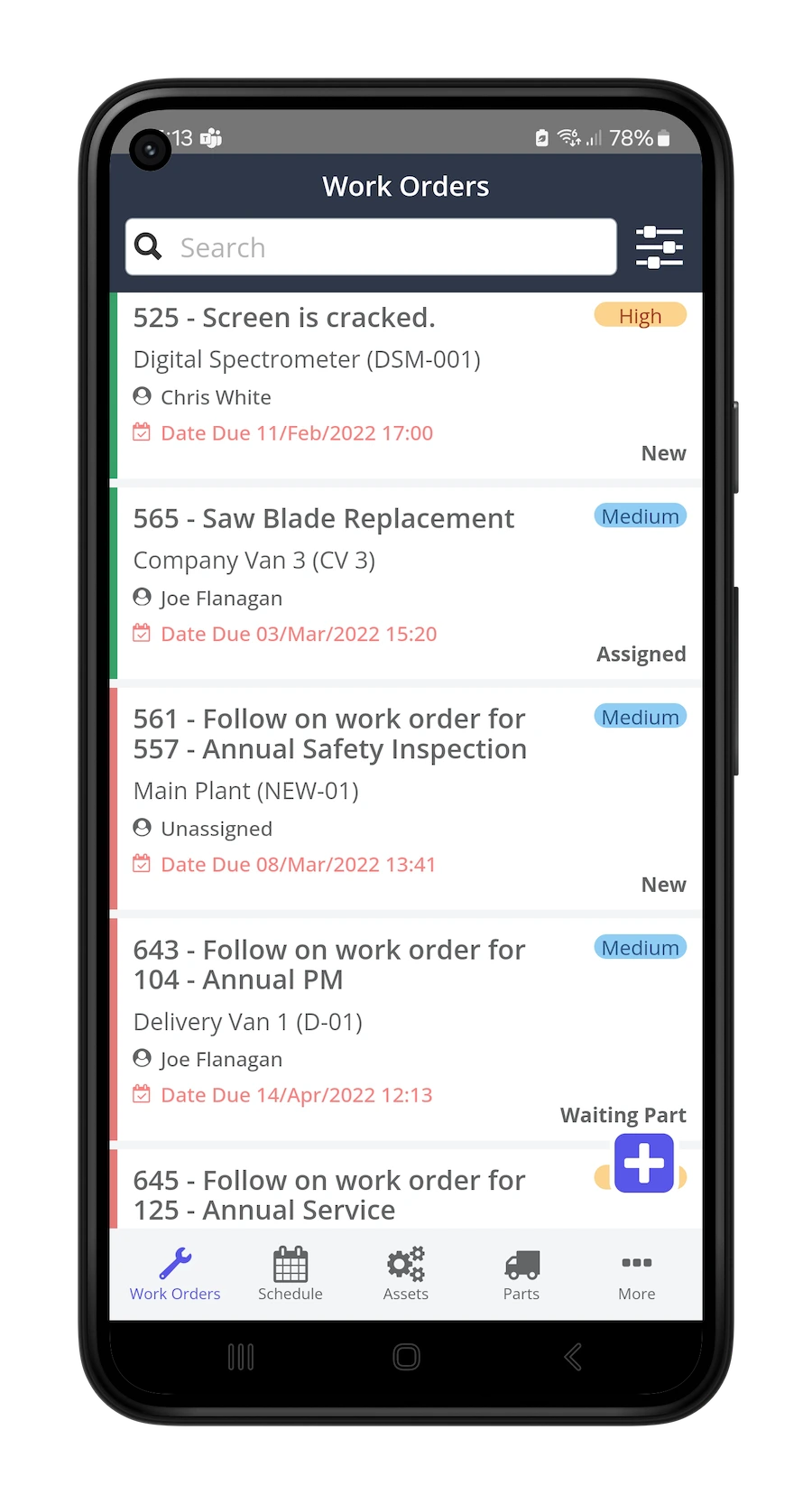
A CMMS automatically generates work orders based on schedules, meter readings, or triggered events. Technicians receive assignments on their mobile devices, update progress in real time, and close out tasks with photos, notes, and signatures — all captured in a searchable history.
Preventive Maintenance Scheduling
With CMMS software, preventive maintenance is scheduled once and runs automatically. PMs are triggered by time, usage, or condition — reducing the reactive "run to failure" cycle that drives up costs. According to Zoidii's 2026 Global Trends, Benchmarks, and Insights report, 71% of maintenance professionals now use preventive maintenance as their primary strategy, and teams with mature PM programs report up to a 25% reduction in maintenance costs (Deloitte).
Asset Management and History
Every asset has a complete digital record: installation date, maintenance history, parts used, downtime incidents, and cost tracking. This makes it straightforward to analyze which assets are underperforming, plan replacements, and demonstrate compliance.
Real-Time Reporting and KPIs
CMMS platforms track key performance indicators (KPIs) like:
- MTBF (Mean Time Between Failures)
- MTTR (Mean Time to Repair)
- PM compliance rates
- Maintenance cost per asset
Mobile Access
Cloud-based CMMS software means your team works from their phones — submitting work requests, updating work orders, and scanning QR codes on assets from anywhere on the floor. No more clipboard-to-spreadsheet delays.
Parts Inventory Management
CMMS platforms track parts in real time, depleting stock automatically when work orders are completed and alerting managers when levels drop below minimums. Spreadsheet-based inventory is always a step behind.
The Real Cost of Sticking with Spreadsheets in 2026
The business case for CMMS software isn't abstract. The costs of unmanaged or poorly managed maintenance are well-documented:
- Unplanned downtime costs manufacturers an average of $260,000 per hour across industries (McKinsey).
- Fortune 500 companies collectively lose an estimated $1.4 trillion annually to unplanned equipment downtime — roughly 11% of total revenue.
- Organizations implementing CMMS software report an average 27% reduction in downtime (Aberdeen Group).
- Maintenance and repair investment programs decrease overall downtime by an average of 44%.
- 95% of organizations implementing predictive maintenance report positive ROI, with 27% achieving full payback within 12 months.
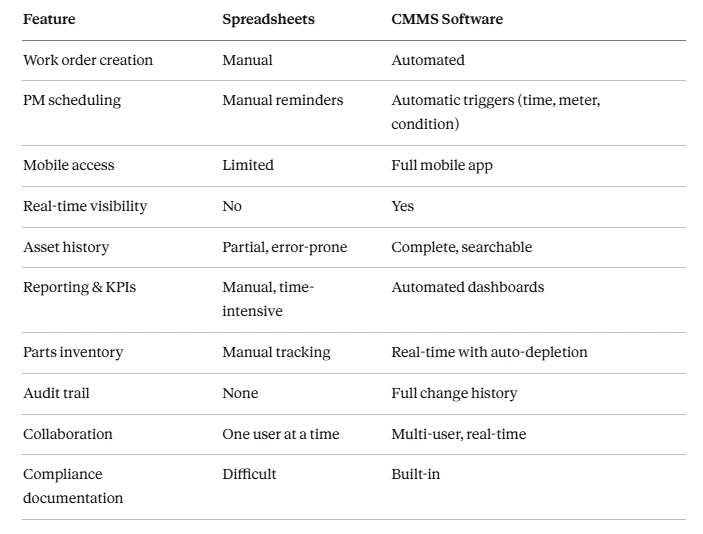
CMMS vs. Spreadsheets: Side-by-Side Comparison
Who Should Still Use a Spreadsheet?
Spreadsheets may still make sense if:
- You have fewer than 3–5 assets to track
- You have a single technician with no coordination needs
- You're in the early stages of building a maintenance program and need a temporary placeholder
Is 2026 the Right Time to Switch?
The data says yes. As of 2026:
- 59% of facilities already use a CMMS to manage operations — meaning nearly 4 in 10 plants are still running without centralized maintenance data.
- The CMMS market is growing at 10.5% annually, driven by cloud adoption, mobile workforce needs, and the demonstrable ROI of preventive maintenance.
- Nearly 58% of companies are shifting toward automated maintenance workflows.
- Teams that adopt CMMS report a 45% improvement in equipment uptime on average.
Getting Started with CMMS Software
Switching from spreadsheets to a CMMS doesn't have to be disruptive. The key steps:
- Audit your current data — identify your asset list, PM schedules, and any existing work order records worth migrating.
- Choose a CMMS built for your team size — enterprise platforms can be overkill for smaller operations; look for purpose-built tools designed for first-time CMMS adopters.
- Start with your highest-priority assets — don't try to migrate everything at once. Begin with the equipment where downtime is most costly.
- Train your team on mobile — the biggest adoption hurdle is getting technicians to update the system in the field. Choose a platform with a strong mobile experience.
- Track your KPIs from day one — set a baseline so you can demonstrate ROI to leadership within the first 90 days.
The Bottom Line
Spreadsheets are a workaround. CMMS software is a system. The difference shows up in your downtime numbers, your PM compliance rates, your audit readiness, and ultimately your maintenance costs. In 2026, the tools available to maintenance teams — cloud-based, mobile-first, affordable, and fast to implement — make there has never been a better time to make the switch.
Ready to see the difference for yourself? Start your free Zoidii trial and be up and running in days.



