
Timing preventive maintenance perfectly is a constant headache for any maintenance manager. Schedule it too soon, and you’re wasting labor and parts. Wait too long, and you risk unplanned downtime and costly repairs.
The foundation of a successful preventive maintenance program is its scheduling triggers; the rules that decide when work gets done. The two main methods are fixed and floating triggers.
Here, we’ll define fixed and floating PM triggers, lay out their pros and cons, and give you clear guidance on picking the right strategy for your assets. It’s all about improving asset performance, increasing maintenance reliability, and getting a handle on maintenance costs. A modern Computerized Maintenance Management System (CMMS) is the tool that helps you implement and manage either strategy with precision and ease.
What Are Preventive Maintenance Triggers?
Preventive maintenance triggers or PM triggers are the rules that decide when a task is due. When a condition is met, a work order is created. These triggers are usually based on a few common factors:
- Calendar time - every 30 days, quarterly, annually
- Usage - run hours, cycles, mileage
- Condition - sensor/inspection hits a threshold
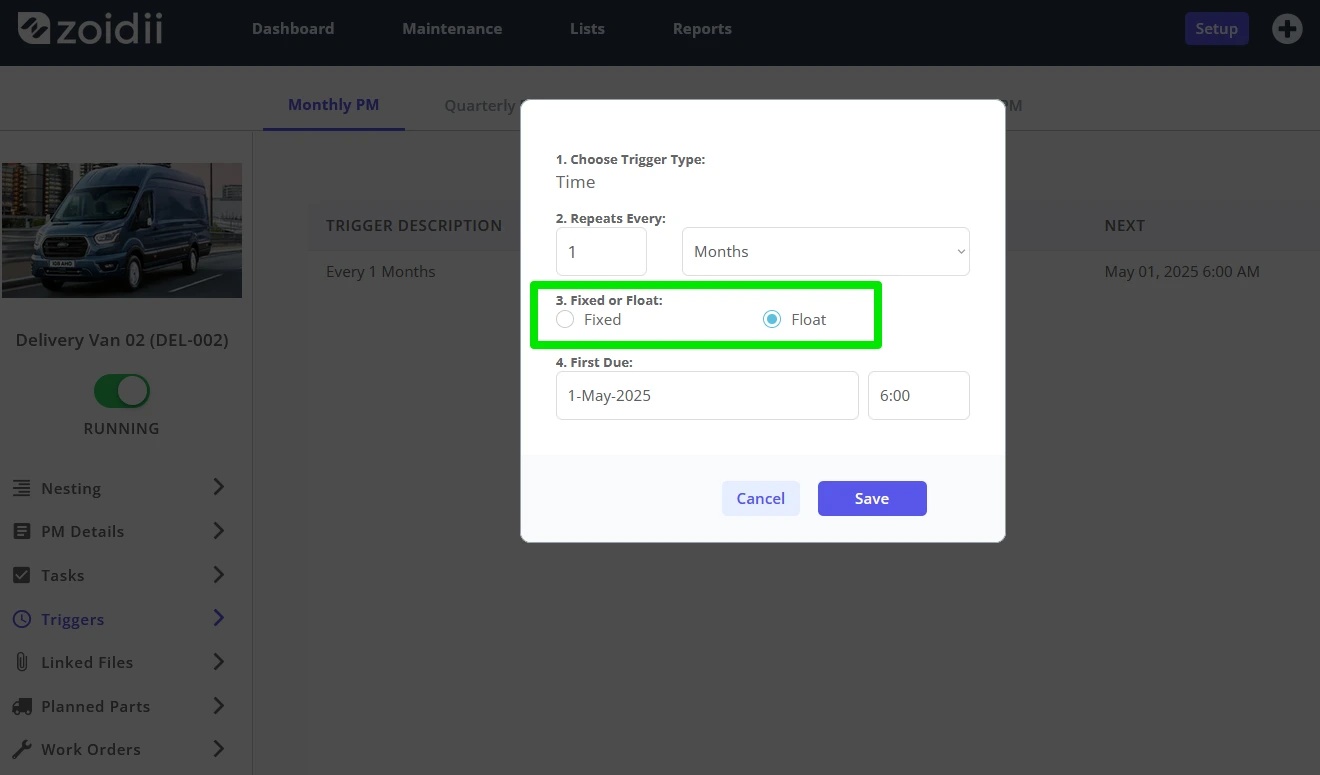
Fixed PM Triggers: The Power of Predictability
A fixed trigger follows a calendar date that does not move. Even if last month’s PM was late, the next due date stays put (e.g., first Monday each month).
What is a Fixed PM Trigger?
A fixed PM trigger follows a schedule based on a recurring calendar interval that never changes, no matter when the last PM was actually finished. The due date is set in stone.
For example, a critical air handler must be inspected on the first Monday of every month. If last month's inspection was completed a week late because of a parts delay, the next inspection is still due on the first Monday of the following month. The schedule does not shift.
Pros of Fixed PM Triggers
A fixed schedule offers several distinct advantages for maintenance planning and compliance.
- Unwavering Consistency: This method guarantees that maintenance happens at precise, regular intervals. A must-have for meeting safety regulations and compliance standards where timing is non-negotiable.
- Simplified Forecasting: With due dates locked in, it becomes very easy to predict long-term labor needs, inventory requirements, and maintenance budgets. You know exactly what work is coming and when.
- Audit-Ready: A fixed schedule provides a clear, simple-to-follow record of maintenance activities. This makes it easy to satisfy regulatory audits and prove that you are meeting strict warranty conditions.
Cons of Fixed PM Triggers
While predictable, a fixed schedule can create some inefficiencies.
- Potential for "Over-maintaining" - If a task is done late, the time until the next scheduled PM gets shorter. This can lead to doing maintenance sooner than needed, which eats up extra labor hours and spare parts.
- Inflexibility - The rigid nature of a fixed schedule doesn't account for operational downtime or situations where a task is completed early. The schedule proceeds no matter what is happening on the ground.
When to Use Fixed PM Triggers
Fixed triggers are the best choice for assets where timing is a top priority. Use them for:
- Safety checks (extinguishers, emergency lighting, alarms)
- Assets with strict warranty terms
- Regulated or critical equipment where timing is non-negotiable
Floating PM Triggers: The Smart Path to Efficiency
A floating PM strategy prioritizes resource optimization. It adapts to the real-world completion of work, making sure you get the maximum value out of every maintenance task.
What is a Floating PM Trigger?
A floating PM trigger, also called a completion-based trigger, sets the next PM due date from the completion date of the last one. The schedule simply "floats" forward every time a task is finished.
For example, a conveyor motor needs lubrication every 90 days. If the technician completes the task on June 15th, the system automatically generates the next work order to be due 90 days after that date, around September 13th.
If the task were completed late on June 20th, the next due date would be adjusted accordingly.
Pros of Floating PM Triggers
This flexible approach offers real benefits for team productivity and resource management.
- Maximum Efficiency - Floating triggers make sure the full interval passes between PMs. This stops wasted labor and extends the life of spare parts by preventing premature replacement.
- Operational Flexibility - The schedule adapts to the reality of the maintenance team. It prevents PM backlogs from compounding because a late completion simply pushes the next due date back.
- Optimized Workload - With this method, work naturally spaces out. This can lead to a more balanced and manageable schedule for your technicians.
Cons of Floating PM Triggers
The flexibility of floating triggers has one main risk you need to manage.
- Risk of "Schedule Creep" - If tasks are consistently finished late, the schedule can gradually drift further and further into the future. This could push maintenance intervals beyond a safe or recommended window.
- Reduced Predictability - Long-term forecasting for labor and parts can be less precise. Due dates shift based on completion times, making it harder to predict needs many months in advance.
When to Use Floating PM Triggers
Floating triggers are ideal for assets and tasks where efficiency is more important than rigid timing. Consider using them for:
- Non-critical or redundant assets where a slight variation in the schedule poses little operational risk.
- General maintenance tasks like lubrication, filter changes, or cleaning in facilities management.
- Teams that are looking to balance workloads and improve the overall efficiency of their PM program.
Head-to-Head: Fixed vs. Floating PM Triggers
This table provides a simple comparison to help you see the differences at a glance. 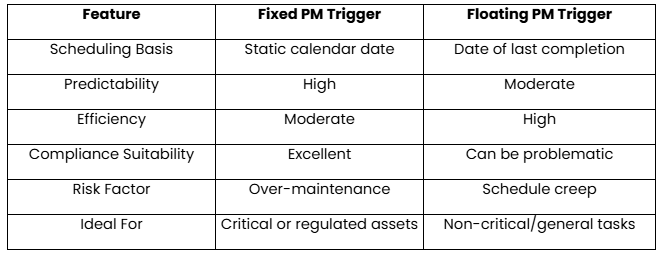
Managing mixed schedules in spreadsheets is error-prone. Zoidii makes it simple:
- Flexible triggers - Choose fixed or floating per asset/task in seconds.
- Auto work orders - Due PMs create and route Work Orders automatically.
- Nested PMs - Combine daily/weekly/monthly routines into one consolidated work order to cut admin.
- Mobile CMMS - Techs complete PMs on site; dates are time-stamped for floating accuracy with our Mobile CMMS
- Reports & Dashboards - Track PM compliance, backlog, and cost; share saved reports with leadership.
- ROI - Estimate savings with the ROI Calculator.
Build a smarter PM program.
The best teams use both triggers, fixed for compliance and critical assets, and floating for efficiency on general work. A CMMS like Zoidii keeps it organized and automated. Ready to take control of your preventive maintenance schedule? Book a tour of Zoidii today to see how easy it is to implement the perfect PM strategy for your facility.