

In the rapidly evolving landscape of facility management, choosing the right Computerized Maintenance Management System (CMMS) is essential for optimizing operations, minimizing downtime, and extending asset life. In 2026, businesses across industries like manufacturing, healthcare, education, and hospitality are increasingly relying on advanced CMMS solutions to streamline work orders, preventive maintenance, inventory tracking, and reporting. These tools not only enhance efficiency but also support data-driven decision-making through real-time analytics and mobile access. This comprehensive article ranks and rates the 17 best facility management solutions based on user reviews, feature sets, ease of use, and market adaptability. For each solution, we’ll explore top features, what users like and dislike (drawn from actual reviews on Software Advice and GetApp), and pricing details. Whether you’re managing a small facility or a multi-site operation, these rankings will help you find the perfect fit to future-proof your maintenance strategy.
Key Takeaways:
- Zoidii CMMS Leads the Pack: As the top-ranked solution, Zoidii stands out for its user-friendly interface, affordable pricing starting at $39/user/month, and features like preventive maintenance, asset tracking, and mobile access, making it ideal for businesses transitioning to digital maintenance without complexity.
- Mobile Accessibility and Customization Are Key Trends: Across solutions like Limble, MaintainX, and UpKeep, users consistently praise mobile apps for real-time updates and offline capabilities, while customizable dashboards and workflows help tailor systems to specific industries such as manufacturing, healthcare, and education.
- User Feedback Highlights Support and Ease of Use: Positive reviews from sites like Software Advice and GetApp emphasize excellent customer support and intuitive designs in tools like Fiix and FMX, but common dislikes include limited reporting granularity, occasional bugs, and the need for better offline functionality or integrations.
- Pricing Varies by Scale and Features: Entry-level plans often start around $25–$45 per user/month (e.g., MaintainX, Fiix), with enterprise options upon request for advanced features like IoT and AI; free trials or basic versions are common, but users note escalating costs for premium add-ons in larger deployments.
- Focus on Predictive and Preventive Maintenance: High-ranking CMMS like IBM Maximo and Fracttal One incorporate AI, IoT integrations, and predictive analytics to minimize downtime, appealing to enterprises, while simpler tools like Maintenance Care suit smaller operations with straightforward task scheduling and unlimited users.
#1 Zoidii CMMS
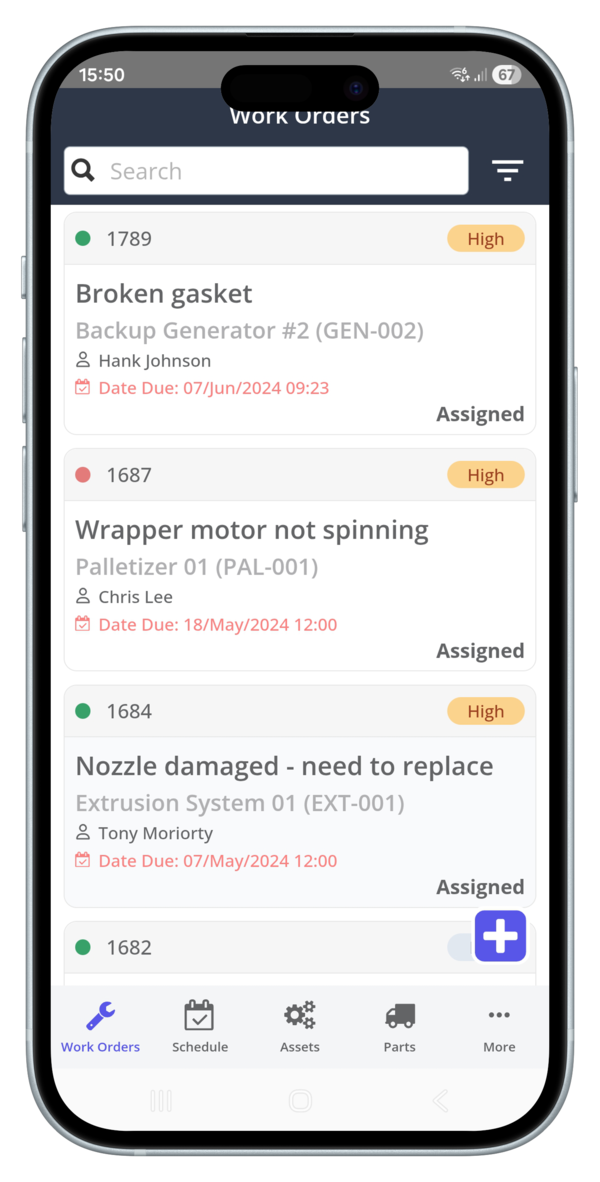
Zoidii CMMS tops our list for 2026 as a cloud-based solution designed for simplicity and efficiency. It’s ideal for businesses transitioning from manual processes to digital maintenance management, offering robust tools for asset tracking, work orders, and preventive maintenance. With strong mobile support and integrations, it suits industries like manufacturing and facilities management, providing a user-friendly platform that reduces downtime and ensures compliance.
Top Features
- Work order management for creating and completing tasks with Kanban boards and status updates.
- Preventive maintenance scheduling with checklists for inspections and part replacements.
- Asset tracking and logbook for viewing history without switching screens.
- Inventory management with a centralized repository for parts details and costs.
- Mobile access for real-time notifications and updates on the go.
- Reporting and analytics for work orders categorized by maintenance type.
- A guest request portal for end-users to submit maintenance requests.
- Calibration management and equipment tracking.
- Alerts/notifications for escalations and updates.
- Document storage and search/filter capabilities.
What Do Users Like About the CMMS
From Software Advice:
- “As a daily user of Zoidii, I am certain that is the best CMMS program out there! Super intuitive, easy to use on a daily basis and gives me and my team all the information that we need to keep ourselves compliant and ahead of the curve. Would recommend to any company that is looking for a CMMS system for them!!!! After seeing all the functionalities that it has to offer, it’s a no brainer!” – Eduardo P., 5/5, August 2025.
- “Zoidii has streamlined our maintenance processes, reduced downtime, and improved our overall efficiency. I highly recommend it to any organization looking for a reliable and effective CMMS solution.” – Don A., 5/5, September 2024.
- “Our group of eight nursing homes has been using this maintenance application, and it has truly been a game-changer. It keeps work orders organized, response times fast, and clear communication. The app is easy for staff to use, improves efficiency, and helps ensure our buildings stay safe and well-maintained for residents. Highly recommended!” – Dejan S., 5/5, November 2025.
- “Configuring PMs is super easy using the step by step process. The asset logbook is great for getting a single view of asset history without having to toggle through different work order screens.” – Mauro D.
- “It was straightforward to implement and is pretty easy to use. In particular, I like the ability to bookmark and follow critical work orders.” – Sami A.
- “The mobile app is just as user friendly. Customer support has been excellent throughout.” – Susie O.
What Do Users Dislike About the CMMS
From Software Advice:
- “The only thing is you cant use it off line. we have a large area and not always a good 4G signal.” – Sarah B., 5/5, April 2025.
- “Needs some experience before you’re used to it.” – Thomas W., 4/5, April 2025.
- “It seems to be missing an end of shift type logbook.” – Thomas G.
Pricing
Zoidii CMMS starts at $39/user/month on a subscription basis. Free trial available, no credit card required. Users praise its affordable and easy-to-understand structure, though some note it’s on the higher end for customization options.
#2 Limble CMMS
Limble CMMS ranks second for its focus on asset lifecycle management and predictive maintenance. It’s suitable for businesses seeking to automate work orders and integrate IoT for real-time insights, making it a strong choice for manufacturing and facilities with high asset demands.
Top Features
- Work order management with creation, completion, and automation.
- Preventive maintenance with scheduling and IoT integration.
- Asset management for tracking health and performance.
- Customizable dashboards and reporting for data-driven decisions.
- Mobile app for field updates and offline mode.
- Parts inventory management and vendor tracking.
- Time and cost tracking.
- Workflow automation and custom notifications.
- Multi-location tools and AI-powered duplicate checks.
- Inventory cycle counts and REST API access.
What Do Users Like About the CMMS
From Software Advice:
- “It has been a great experience from start to finish and the after sales support you get is phenomenal. For instance, the people manning the live support chat always answer extremely fast and are super knowledgeable. If they don’t know the answer to something, they actually research it and get you a real answer instead of feeding you a word salad.” – Kerie R., 5/5, December 2025.
- “Our organization had been using one of those big name CMMS platforms — you know the one: clunky, painfully expensive, impossible to customize without a certified’ system wizard,’ and riddled with error messages. ... Limble has completely transformed how we manage maintenance. We’re lightyears ahead of where we’d be if we’d stayed with our old system.” – Garrett R., 5/5, October 2025.
- “My experience has been 5 star. I have done over 8 major implementations of CMMS over the last 40 years and Limble has been the best overall system for the price by far!” – Joe B., 5/5, October 2025.
- “Anyone in the facility can enter a work order at any time, then it can be assigned to a tech, and the system keeps track of everything associated with that WO, time, parts, downtime, etc.” – Will F
- “The fact that our employees can easily scan a code, create a work order and it automatically send to the supervisor is a huge benefit. Our employees can submit work orders instantly and no chance of forgetting.” – Amanda A.
- “Having the ability to customize a work order is very beneficial. Being a power generating facility, there is very specialized equipment and parts. We have the ability to create work orders that suits our needs.” – Justin M.
What Do Users Dislike About the CMMS
From Software Advice:
- “The metrics you can pull from Limble are great but I do wish that you could have a little bit more granularity when making reports or generating charts.” – Kerie R., 5/5 (con noted), December 2025.
- “Default Roles – It appears that the default roles (Managers, Technicians, Operators) cannot be removed. This limits flexibility for organizations that prefer to use fully customized role titles, as these defaults remain visible even if not in use. Use of the Term “Template” – I found the terminology around “templates” a bit confusing at first.” – Garrett R., 5/5 (con noted), October 2025.
- “Automatic downtime tracker, have made a suggestion this would really come in handy.” – Francisco F., 5/5 (con noted), December 2020.
- “Limble keeps changing features and then asking for more money if i want those features back.” – Mike S.
Pricing
Limble CMMS pricing is available upon request. Plans include Standard (unlimited recurring work orders and advanced analytics), Premium Plus (unlimited work orders, parts inventory, and vendor management), and Enterprise (custom roles, IoT integrations, and AI features). Users appreciate competitive pricing but note extra charges for advanced features.
#3 MaintainX
MaintainX is a mobile-first CMMS ideal for small to mid-sized teams, emphasizing real-time collaboration and simplicity. It’s perfect for manufacturing and facilities that need quick work-order resolution and predictive insights.
Top Features
- Work order management with attachments and prioritization.
- Preventive maintenance automation and reminders.
- Mobile access for real-time messaging and updates.
- Asset tracking with maintenance history and costs.
- Custom reporting dashboards and advanced analytics.
- Meter-based maintenance and parts inventory (Premium).
- Purchase order management and time tracking (Premium).
- IoT sensor integrations and root cause analysis (Enterprise).
- Barcode scanning and offline access.
- API access and escalation protocols (Enterprise).
What Do Users Like About the CMMS
From Software Advice:
- “MaintainX has been a essential minute by minute tool for managing our multi-location operations, and I want to highlight how great and supportive [sensitive content hidden] has been throughout the entire process. He has taken the time to understand our workflows and has been extremely responsive in helping us get our reporting and setup exactly how we need it.” – Elena G., 5/5, December 2025.
- “From our rollout team to the Success Manager, and even the online support staff, I feel like we are never ‘forgotten about.’ The staff is all very knowledgeable about their products and are extremely helpful. Bringing in MaintainX has been a value-added decision that still continues to make gains every week for us.” – Joe T., 5/5, November 2025.
- “Very pleased, easy to maintain and keep up with all of our assets and the ability to keep up with all of our workorders. The ability to track our assets, PM’s and workorders. This product has met all of our expectations.” – Philip E., 5/5, September 2025.
- “I am able to insert work orders and allocate the orders to specific team members. I can also set due dates, alarms and add additional info.” – Lourens S.
- “Having the ability to complete work orders on my phone or tablet is a game changer. Gone are the days of taking a clipboard out to do a pm with the work order attached, filling it out, and then having to go to a computer to complete the work order digitally.” – Benjamin B.
- “Preventative maintenance assists in tracking all of our services and upcoming services without having to keep track of it on excel which makes it much easier.” – Bailey B.
What Do Users Dislike about the CMMS
From Software Advice:
- “Reporting really needs to keep up with the advances they are making in other areas of the system. I can now capture Planned Downtime, but it is difficult/impossible to report it. The meter capability is good but there is room for growth there as well.” – John C., 4/5, November 2025.
- “I don’t like the bugs I find as I work my way on MX and minor fixes because it takes a while to fix.” – Payton M., 5/5 (con noted), December 2025.
- “Sometimes when there is an update it messes with our special made fields (our Cost Codes) and when I send out a Hard Copy PO, sometimes it will take 20-30 minutes to download (but that is just me being nitpicky).” – Amber H., 4/5, November 2025.
- “So fetchers like ‘MTBF’ isn’t available on the normal package and its a extreme price difference to upgrade just for that.” – Jeffrey E.
- “Some users report that setup can be time-consuming and note occasional bugs or feature limitations, especially when switching between desktop and mobile versions.” – Bill K.
- “They also mention that the premium version is expensive and that certain features are locked behind higher-tier pricing.” – Nathaniel P.
Pricing
MaintainX starts at $25 per user per month for the Essential plan (unlimited work orders, custom reporting). Premium is $75 per user per month (meter-based maintenance, parts inventory). Enterprise pricing upon request (IoT integrations, SSO). Free plan available; users note it’s a good value for small teams, but costs too much for advanced features.
#4 Fiix
Fiix by Rockwell Automation is an AI-driven CMMS for enterprises, offering scalability and integrations. It’s excellent for industries that require advanced analytics and ERP integration.
Top Features
- Work order management and scheduling.
- Preventive maintenance with nested PMs.
- Asset management with QR codes and tracking.
- Inventory tracking and purchasing/RFQs.
- Mobile access for alerts and updates.
- Custom report builder and analytics.
- Multi-site management and downtime tracking.
- ERP and IoT integrations.
- Technician and job management.
- E-signatures and failure codes (Enterprise).
What Do Users Like About the CMMS
From Software Advice:
- “My overall experience with Fiix has been amazing. The customer service that is provided is second to none and is why I believe Fiix has set itself above the competition. They are quick to respond and stay with you until you are satisfied with the solution.” – Jeff P., 5/5, October 2024.
- “We have solved getting repairs and most importantly the correct parts available for our techs which has improved efficiency dramatically.” – Jim E., 5/5, March 2020.
- “The team is great, there have been issues but all can be resolved with good people.” – ROSS M., 5/5, December 2024.
- “Employees at different locations company wide can easily put in work order for their location with required fields set by our home office so the most pertinent information will be included.” – Jauna D.
- “It’s great! You can schedule all your preventive needs so they (techs) are notified when it’s approaching that time for the scheduled work to be done.” – Charles D.
- “We schedule all of our PM’s through FIXX including annual, monthly, and daily ones.” – Mike M.
What Do Users Dislike about the CMMS
From Software Advice:
- “Very easy to use but reporting is not accurate at all.” – Mario M., 3/5, March 2024.
- “The reports and charts are a function where there is opportunity for Fiix to grow. There are some simple charts that are not present, and it is not easy or intuitive to build these myself.” – Jeff P., 5/5 (con noted), October 2024.
- “The reports. I find that the reports are the weak link in that they usually do not pull all data.” – Kellie G., 4/5, October 2024.
- “Paying for each user - as a not for profit we can’t afford to have multiple users so we are still using paper.” – Lesley S.
- “In general, Fiix is slow to respond to customer service requests and feature additions.” – Seth M.
Pricing
Fiix starts at $45 per user per month for the Basic plan (unlimited PMs, reports). Professional is $75 per user per month (custom report builder, multi-site). Enterprise pricing upon request (custom API, SSO). Free plan available with 25 PMs; users highlight good value but note costs for advanced features.
#5 UpKeep
UpKeep is a mobile-centric CMMS for team collaboration, with a strong focus on work orders and asset QR codes. It’s suited for industries needing quick setup and analytics.
Top Features
- Work order management with checklists and priorities.
- Preventive maintenance planning with meter readings.
- Asset tracking with custom statuses and QR codes.
- Inventory management and purchasing.
- Mobile access for real-time insights and sync.
- Custom dashboards and reporting.
- Workflow automation and integrations (Slack, Zapier).
- Signature capture and external request portal (Professional).
- Asset depreciation and warranty tracking (Business Plus).
- API access and SSO (Business Plus).
What Do Users Like About the CMMS
From Software Advice:
- “Through UpKeep, we’ve been able to significantly improve our maintenance efficiency. Its features include asset tracking, work order management, inventory control, and task scheduling. The platform’s user-friendly interface, customization capabilities, and robust features, including the UpKeep mobile app, enable us to access it anytime, anywhere, for real-time updates.” – Jose B., 5/5, September 2024.
- “So far so good. the experience I have with UpKeep is amazing. UpKeep has been a consistent and friendly CMMS solution that suits our company’s needs. I love the ease of customization of UpKeep.” – Marika B., 5/5, December 2024.
- “Ease of use and helps keep everything organized.” – Daniel F., 5/5, November 2019.
- “For an institution new to the computer game, this is a very simple procedure to learn and use. If you only use it on certain occasions, you will not gain much benefit from its use.” – Gabriela L.
- “Using Upkeep has been an easy process, and it helps keep everything in one place.” – Rick D.
- “Upkeep promised very similar abilities for a fraction of the price and without having to train our entire staff. Upon implementation, Upkeep immediately enabled us to track machine hours and create work orders for scheduled maintenance.” – Maya M.
What Do Users Dislike about the CMMS
From Software Advice:
- “It has a learning curve and takes some time to get used to as there are many different options which can easily be messed up with one another.” – Mehran S., 4/5, March 2025.
- “UpKeep should release a version which is enriched in term of third party integrations.” – Mehmed Oğuz, 5/5, January 2025.
- “Some of the user functions are missing from the software, sometime when there are too many assets or parts listed, it gets hard to navigate.” – Allyson R., 4/5, May 2025.
- “Limited features in basic subscription plans: UpKeep’s more advanced features are only available in more expensive subscription plans, which can be a drawback for businesses that need these features but don’t can’t afford the extra cost.” – Elhadj S.
- “Some reviewers feel that UpKeep’s pricing structure can be expensive, particularly for small businesses or those needing advanced features.” – Arturo S.
- “Some users find the per-user pricing model steep and would prefer more flexible or bulk licensing options.” – Beckett L.
Pricing
UpKeep starts at $45 per user per month for the Starter plan (preventive maintenance, inventory). Professional is $75 per user per month (signature capture, external portal). Business Plus pricing upon request (workflow automation, custom dashboards). Lite at $20; users note good value, but escalating add-on costs.
#6 eMaint CMMS
eMaint CMMS is sensor-integrated for condition monitoring, ideal for manufacturing with custom workflows and compliance tools.
Top Features
- Work order management and preventive maintenance.
- Asset tracking with sensor-based monitoring.
- Inventory management and custom workflows.
- Mobile reporting and compliance tools.
- Scheduling and checklists for inspections.
- Document repository and Kanban boards.
- Reporting on categories like corrective maintenance.
- Calibration management and alerts.
- Equipment tracking and service history.
- Integration with ERP and IoT.
What Do Users Like About the CMMS
From Software Advice:
- “We have been working succesfully with the system, the mobile app and the training (eMaint University and Customer Sucess Portal). Overall the aftersales operationa have impproved efficiency and we have a stronger documented process.” – David Z., 5/5, August 2025.
- “Very easy to use, user-friendly, high capabilities, secured, all mistakes and deletions I can restore back, great User control and access rights defined and control.” – Goran N., 5/5, November 2025.
- “The ability to customize this software is amazing, you can set it up however you want it to look. It can be set up to accomplish whatever you need it to do. Great product.” – Chris R., 4/5, July 2019.
- “eMaint CMMS is a cloud-based maintenance management software that helps teams improve efficiency and optimize maintenance costs with a configurable and easy-to-use interface.” – Morgan M.
What Do Users Dislike about the CMMS
From Software Advice:
- “Some people have not embraced the change fully so this has proven to be a bit challenging. But are issolated cases.” – David Z., 5/5, August 2025.
- “Some sites that were using SAP PM had Asset Tree in use for a Asset search engine and eMaint tree is not having the same functionality so it is not very useful for those kinds of users.” – Goran N., 5/5, November 2025.
- “Implementation took a little longer than desired, that may have been on our users not really wanting to try something new.” – Chris R., 4/5, July 2019.
- “The UI can be confusing at times, especially when dealing with multiple options or navigating work orders.” – Ronald S.
Pricing
eMaint starts at $69 per user per month for the Team plan (standard CMMS features). Professional is $85 per user per month (workflow management, multiple forms). Enterprise pricing upon request (SSO, API). Users note flexibility but higher customization costs.

#7 FMX
FMX focuses on facility scheduling and space optimization, with strong preventive maintenance and reporting. It’s great for education and municipalities.
Top Features
- Work order management with assignment and tracking.
- Preventive maintenance with recurring schedules.
- Maintenance request handling and compliance scheduling.
- Equipment maintenance and inventory tracking.
- Reporting on labor hours and costs.
- Mapping tool for equipment locations.
- Mobile access and API integration.
- Calendar management and billing/invoicing.
- Asset tracking and customizable reports.
- Workflow management and real-time notifications.
What Do Users Like About the CMMS
From Software Advice:
- “I love FMX and all the available features it provides to keep us paperless and more productive completing work orders more timely.” – Brandi S., 5/5, December 2025.
- “Our overall experience with FMX has been great! It’s user-friendly, flexible, and makes data tasks easy.” – Krissi E., 5/5, May 2025.
- “This software is incredible, the customer support is amazing, and I have nothing bad to say about it.” – Kyle H., 5/5, October 2019.
- “I love that the work orders can be virtually assigned to users who immediately get a notification. This feature allows our Facilities team to organize their information in a much cleaner, clearer way.” – Samantha C.
- “It is very easy to adjust due dates and move work orders around. It is simple to retrieve completed work orders with the filters.” – Mike D.
- “Our Techs use FMX almost exclusively on their smartphones. It also makes it easy to enter or check on work orders when I am out at the sites.” – Mark P.
What Do Users Dislike about the CMMS
From Software Advice:
- “I feel that the reporting options could be a little more user friendly and easier to customize the data you want.” – Brandi S., 5/5, December 2025.
- “I wish FMX allowed multiple filter views without extra fees; manual updates are tedious when things change.” – Charles P., 5/5, May 2025.
- “It is pretty much preset on what you can and can’t add in. It has some presets that don’t work with every form, so you have to select information that is not necessary in order to complete the form.” – Jessie M., 3/5, December 2018.
- “The monthly billing is our biggest challenge.” – Brian D.
Pricing
FMX pricing available upon request. Users praise its cost-effectiveness and versatility, though some note limited reporting without additional fees.
#8 Brightly Asset Essentials
Brightly Asset Essentials emphasizes compliance for education and government, with preventive work orders and asset management.
Top Features
- Work order management with assignment and tracking.
- Preventive maintenance scheduling and workflows.
- Asset management with history and location tracking.
- Inventory and vendor management.
- Mobile access for updates and photos.
- Real-time reporting and dashboards.
- Compliance tracking and audit trail.
- Equipment tracking and depreciation.
- Multi-site management and IoT integration.
- Document management and notifications.
What Do Users Like About the CMMS
From Software Advice:
- “Uptime !! Real time maintenance requests. Mobile apps and the ability to track labor and costs. Not to mention spare parts and inventory.” – Darryl E. R., 5/5, December 2020.
- “It was a good product for the work order needs we had. It helped keep work orders organized and offered great reporting options.” – Asa G., 3/5, October 2025.
- “I have used SAP, Tabware, and several others over the years, and Brightly is a good program for a Small Business.” – Bill C., 5/5, September 2025.
- “It is easy to customize the program to meet the needs of your company’s specific work order management needs, and the flow of information/work cannot be easier to manage.” – Charles D.
- “I like that you can get real time updates on work order progress, parts on order, scheduling, etc.” – Jason W.
- “This is my favorite feature. It gives you the ability to write up work that you have done will in the work field.” – Arthur R.
What Do Users Dislike about the CMMS
From Software Advice:
- “It’s a joke. Multiple days without access to the system because of their technicians.” – Mathew R., 1/5, October 2025.
- “Limited viewing capabilities for users that can only submit maintenance requests, Free users.” – Michael Y., 4/5, December 2024.
- “The mobile ‘app’ needs some work to make it easier to use. I wish it was a real app and not just a website link.” – Joe K., 5/5, February 2025.
Pricing
Brightly Asset Essentials pricing is available upon request. Users highlight strong value but note rising costs for underused features.
#9 Fracttal One
Fracttal One is cloud-based for global operations, with IoT for preventive maintenance and AI insights.
Top Features
- Work order management and asset tracking.
- Preventive maintenance with IoT and automation.
- Inventory management and SLA tracking.
- Mobile app with offline mode.
- Custom analytics and integrations.
- Real-time notifications and dashboards.
- Predictive maintenance and failure prevention.
- Vendor management and purchase orders.
- Audit trail and document storage.
- Multi-location tools and AI insights.
What Do Users Like About the CMMS
From Software Advice:
- “Implementing Fracttal in a maintenance services and installation of HVAC sistems enterprise... Consolidation and distribution of technical information, giving a new order to those date -Controlling through KPIs -Dashboard show a global panoramic about how is working every service and new installation -Save time -Less repetition of process -Better communication between customers and us.” – Jesus A. A., 4/5, October 2019.
- “Flexible and easy to use is the best definition I can give for Fracttal. It increases performance and reduce unplanned downtime helping us get the most value out of our assets.” – Jennifer W., 5/5, October 2024.
- “It’s a very practical and easy to use software, that helps me have my work organized and visually available at anny time.” – Edwin Arturo V., 5/5, September 2025.
- “Fracttal includes a broad collection of features that rate it among the best solutions for CMMS but with a price much more convenient.” – Javier L.
- “It’s high-quality software at a very affordable price, great features, and such an excellent CMMS for every Maintenance Management System.” – Ena A.
- “great support from consultors, always available to answer any questions about the use of the platform.” – Luis O.
What Do Users Dislike about the CMMS
From Software Advice:
- “Massive charging of information -Due to Fracttal is a cloud-web app, this necessary having a sure and fast internet connection to internet.” – Jesus A. A., 4/5, October 2019.
- “It could improve it’s mananging capabilities and let the user organize the dashboard as he wishes.” – Edwin Arturo V., 2/5, September 2025.
- “Fracttal can have a better version which has a wider range of third party integrations.” – Martin P., 3/5, January 2025.
- “With respect to the development of improvements, there is a lot of delay when responding to the clients, since they are basic needs.” – Nestor Z.
- “Some users report high costs for licenses and features, and they find the free version limited.” – Juan H.
- “Some reviewers indicate that the demo period is too short and that the software can be slow and prone to crashes.” – Colter A.
Pricing
Fracttal One pricing available upon request. Free plan available; users praise affordability for SMEs but note high license costs.
#10 Maintenance Care
Maintenance Care is straightforward for hospitality and healthcare, with task scheduling and vendor management.
Top Features
- Work order management with customizable forms.
- Preventive maintenance and asset tracking.
- Parts inventory and reporting.
- Mobile access and vendor management.
- Task scheduling and calendar integration.
- Custom fillable forms and dashboards (Enterprise).
- Capital planning and API (Enterprise).
- Audit logs and duplication checker (Work Order Edition).
- Multi-language support and unlimited users.
- Transaction tracking and expenses (Enterprise).
What Do Users Like About the CMMS
From Software Advice:
- “This is the 6th different CMMS I have used in my career, and I feel like MC is one of the easier to use out of the systems I have experience with.” – Scott K., 4/5, June 2024.
- “Customer service team is exceptional. From tech service to billing department, they are all knowledgeable and efficient.” – Beth S., 5/5, May 2024.
- “My overall experience has been GREAT. From the first introduction, to downloading us on the upcoming events to get us connected, the staff is super friendly and wants to assist you in every step of the way.” – Crystal W., 5/5, October 2025.
- “I love the ease of use and how it keeps me up to date with maintenance needs.” – Imani S.
- “Additionally the ability for it to remind us of things like annual filter changes, battery replacements is super helpful.” – Becca A.
What Do Users Dislike about the CMMS
From Software Advice:
- “Would like to see PM schedules for Monthly, Quarterly, Semi-Annual, Annual tied together more, and would like if they adjusted based on PM closed date.” – Scott K., 4/5, June 2024.
- “Not being able to create custom forms ourselves and having to pay to have one created.” – Austin R., 4/5, December 2025.
- “There are areas that could be improved upon to help smaller organizations continue to grow; better information inputting, tracking of vital statistics related to facilities management.” – Joseph R., 3/5, January 2023.
- “We started out and this was perfect to get our new system up and running, however we are outgrowing the functionality of the current version we are using and would like to see more of what it can do to meet our needs.” - Kinslee K.
Pricing
Maintenance Care starts at a flat rate of $100 per month for the Work Order Edition (detailed reporting, unlimited users). Enterprise is a flat rate of $250 per month (preventive maintenance, asset management). Free Edition at $0; users note great value compared to competitors.
#11 Click Maint CMMS
Click Maint is affordable and easy to use for small businesses, with features for requests, PMs, and assets.
Top Features
- Work order management with assignment and tracking.
- Preventive maintenance scheduling.
- Asset management and equipment tracking.
- Inventory and parts management.
- Customizable reports and KPI dashboard.
- Mobile app with QR scanning and image upload.
- Maintenance request portal with unlimited requesters.
- Technician management and vendor profiles.
- Audit logs and workflow customization.
- Multi-location support and compliance management.
What Do Users Like About the CMMS
From Software Advice:
- “From dealing with true sales team, working through the implementation process and working with support it has been such a refreshing change to deal with Click Maint CMMS...” – Tomas G., 5/5, June 2024.
- “Excellent, from ease of use and the help of the support staff, things have been great.” – Sharef O., 5/5, September 2025.
- “Excellent experience. Great, fluent and knowledgeable communication.” – Sergio C., 5/5, December 2025.
- “My experience with Click Maint CMMS is being great, again i love the fact is super easy to use and the picture feature is a plus.” – Luis C.
- “There are so many things I have liked so far about Click Maint and here are a few; I like how easy it is to use, I like how they set it up it is very user friendly.” – Maegen B.
- “Every question was being asked was answered very professional and they were really helpful on helping us understand the new updates.” – Miguel V.
What Do Users Dislike about the CMMS
From Software Advice:
- “Some features feel a little limited, especially the reporting and customization options. The mobile version could be smoother.” – Angel V., 5/5, December 2025.
- “So far... There is no Inventory Category on the phone app.” – Hobie, 4/5, September 2025.
- “It’s not the most intuitive for property management maintenance needs.” – Jaycee H., 5/5, November 2025.
- “It’s a newer site, so there are some growing pains that come with that, like bugs and functionality limitations.” - Mason S.
- “I wish the app worked as good as the website. It logs me out often and doesn’t allow me to upload pictures directly from my phone to the app. If I take pictures, I need to email them to myself and then use the web browser.” - Darius B.
Pricing
Click Maint starts at $35 per user per month, with subscriptions including all features. Free trial available; users highlight affordability and quick setup.
#12 eWorkOrders CMMS
eWorkOrders is scalable for work order and asset tracking, with custom integrations and a mobile app.
Top Features
- Work order management with automation.
- Preventive maintenance and asset tracking.
- Inventory control and reporting.
- Mobile access with QR and barcode scanning.
- Employee and materials management.
- Customer service requests and dashboards.
- Systems integration and API.
- GIS and SSO.
- Predictive maintenance and meter readings.
- Customizable reporting and time tracking.
What Do Users Like About the CMMS
From Software Advice:
- “The ease of creating work orders is very simple and easy for the novice user.” – Ben F., 5/5, January 2024.
- “What I liked most about eWorkOrders is the outstanding customer service. Also the system is genuinely easy to navigate.” – Tyler S., 5/5, November 2025.
- “It’s a simple platform. The other CMS systems we reviewed had extremely elaborate tools that would likely simply go unused.” – Logan C., 4/5, January 2025.
- “By far the best value for your money. I have used it for both large and small facilities and its a great fit for both.” – Bob M.
- “Very friendly, very patient with my limited knowledge of computer programs and very helpful in showing me a better way to accomplish what I am looking for.” – Susan T.
- “The initial set-up and implementation was super fast and all questions arising from it being new to my team were answered within minutes of reaching out to customer support.” – Jeff C.
What Do Users Dislike about the CMMS
From Software Advice:
- “The extreme ability to customize can be overwhelming initially.” – Ben F., 5/5, January 2024.
- “Lack of custom report generation.” – Logan C., 4/5, January 2025.
- “Too many e-mails. I found it difficult to manage the e-mails which come from the system.” – Christopher L., 5/5, October 2025.
- ““The only issue I dislike is if a query is too big it kicks me off and I have to retry.” - Emmanuel B.
- “Sometimes finding a specific work order it difficult because the type filters that are offered.” - Karen F.
Pricing
eWorkOrders starts at $45 per user per month for the Enterprise plan (dedicated manager, integrations). Starter is a flat rate of $380 per month (basic features). Advanced $480 flat rate. Users note the value for money with unlimited users.
#13 Asset Panda
Asset Panda is configurable for asset tracking, with barcode and depreciation features. It’s suitable for IT and inventory management.
Top Features
- Asset tracking with barcode and QR scanning.
- Inventory management and optimization.
- Maintenance management and work order creation.
- Depreciation and warranty tracking.
- Customizable reports and dashboards.
- Mobile access and offline mode (Enterprise).
- Integrations with Slack and Zapier.
- AI-enabled workflows (Enterprise).
- Check-in/check-out and audit trail.
- API access and multi-tenant structure (Business+).
What Do Users Like About the CMMS
From Software Advice:
- “it is absolutey perfect for my needs. I can change assets when I need to without losing space.” – Kim S., 5/5, June 2025.
- “A five star experience worth all the time and money. Give it a shot. Don’t be late.” – Emmanuel D., 5/5, January 2025.
- “Ability to keep track of assets and inventory.” – Ted S., 5/5, May 2022.
- “Price Performance is out standing - the flexibility of the product will allow us to track all the important items for OUR business.” – Frank G.
- “It includes many valuable features at no additional cost where competitors want to charge significant amounts for over their base product.” – Patrick C.
- “One of the big selling points for us was the customer service, everyone we have spoken with has been extremely helpful and welcoming.” – Josh T.
What Do Users Dislike about the CMMS
From Software Advice:
- “The search function of Asset Panda could be improved upon to search through item description.” – Ted S., 5/5, May 2022.
- “The mobile app can be slow at times, and occasional syncing issues make it less reliable for quick updates.” – Elias S., 5/5, September 2025.
- “Asset Panda can inprove its services in asset tracing side.” – Gage P., 5/5, January 2025.
- “The free limits the number of assets you can have, and then you have to go onto a paid plan, which can get quite expensive.” – Liam B.
- “JAMF Pros integration would allow for us to bring in information such as OS Version, MAC address, and other hardware information that would allow for greater reporting and views inside Asset Panda. However, the limitations prevent us from using it to its fullest capabilities.” – Justin E.
Pricing
Asset Panda starts at $50 per month for the Starter plan (up to 1,000 assets, 5 users). Business+ is $60 per user per month (up to 5,000 assets, integrations). Enterprise pricing upon request (unlimited assets, AI workflows). Free trial; users note costs rise for many assets.
#14 Cryotos
Cryotos is for facility and service management, with dynamic workflows and offline capabilities.
Top Features
- Work order management with chat and notifications.
- Preventive maintenance scheduling and checklists.
- Asset management and resource tracking.
- Inventory and parts management.
- Mobile app with offline support and image annotation.
- Calendar view and secured check-in (GPS, QR).
- Customizable workflows and report builder (Professional).
- GPS tracking and API integration (Professional).
- IoT monitoring and SSO (Enterprise).
- Video capture and dynamic reports.
What Do Users Like About the CMMS
From Software Advice:
- “It used to be a paper-based management system. Where cryotos play a key role in all key data on one platform.” – Padmanaban S., 4/5, December 2022.
- “Accessibility is easy. Data accountability is good.” – Nithin G., 5/5, February 2024.
- “Cryotos CMMS is an excellent platform which solves end user problems and it has been working efficiently for maintenance.” – Dhanasurya P., 4/5, May 2021.
- “It’s working fine, also it’s very important to resolve the issue on time.” – Braylen M.
- “It is very important for me as a maintenance planner. Cryotos is so intuitive and easy to use while providing the functionality needed to run daily equipment and facility operations.” – Swaminath S.
- “What I like the most about Cryotos is how I am always able to get support on the different issues and also on the new feature development.” – Deepa G.
What Do Users Dislike about the CMMS
From Software Advice:
- “The Cryotos mobile app has a terminal bug that sometimes made some features unsuitable for a mobile app.” – Padmanaban S., 4/5, December 2022.
- “Inventor Management is not user friendly, report generation needs to be developed further.” – Suresh S., 2/5, September 2021.
- “Improvements in Report Generation & Inventory Module can be implemented.” – Dhanasurya P., 4/5, May 2021.
- “We received an SLA notification after the complaint updated in Pending with reason.” – Swaminath S.
- “Without this software, earlier, we had to sit in a meeting and discuss the matters among management.” – Anuraj S.
Pricing
Cryotos starts at $29 per user per month for the Basic plan (work request, breakdown maintenance). Starter is $39 (includes preventive maintenance and asset management). Professional $69 (GPS, API). Enterprise upon request (ERP integration, IoT). Free trial; users note it’s good for data management, but there are minor bugs.
#15 IBM Maximo
IBM Maximo is an integrated EAM for enterprises that includes AI and predictive maintenance. It’s ideal for large organizations with complex assets.
Top Features
- Asset management with lifecycle tracking.
- Work order management and mobile EAM.
- Preventive and predictive maintenance.
- Inventory and equipment management.
- Compliance and audit trail.
- Real-time reporting and analytics.
- IoT and AI for computer vision.
- Schedule optimization and quality inspections.
- Integrations and workflow management.
- Risk and safety management.
What Do Users Like About the CMMS
From Software Advice:
- “I have been using IBM Maximo for nearly as long as I have been in the workforce. The flexibility that IBM Maximo offers allows my company to use a single software for numerous purposes.” – Nathaniel H., 5/5, March 2025.
- “Great experience with Maintenance management, I have not faced a lot of bugs or issues, and it is very helpful to make your process fully automated and organized.” – Omar S., 4/5, August 2025.
- “Maximo is an essential piece of software for any maintenance organization to track and manage work orders, manpower, and maintenance costs.” – Greg S., 5/5, January 2019.
- “Projetech is a fantastic company. Everyone is so very helpful; they are very organized, and they follow up quickly to see that your issue is resolved in a timely manner.” – Angie L.
- “User Friendly, Highly Configurable, Maximo Mobile, Feature rich in terms of Enterprise Asset Management, Integration Capabilities.” – Partheeban B.
What Do Users Dislike about the CMMS
From Software Advice:
- “I feel like in trying to be endlessly customizable, Maximo is endlessly complex. We have daily issues with users not being able to execute basic functions.” – Blake D., 3/5, January 2019.
- “For end users you may need some time to make the people used to it to make it easy to use for them, it may be a lit high in price but it worths it.” – Omar S., 4/5, August 2025.
- “Like most IBM products, it is bit expensive.” – Harris B., 5/5 (con noted), April 2022.
- “User interface is really really bad. Its user interface does not encourage you to use it. Even filling a simple from for raising a ticket is becoming a headache.” - Alayna W.
Pricing
IBM Maximo starts at $3,150 per month for Maintenance Essentials (asset management, mobile EAM). Inspection Essentials $3,675 (AI inspections). Standard $7,272 (predictive maintenance). Premium upon request. Users note robustness but high costs.
#16 Maintenance Connection
Maintenance Connection is a multi-site CMMS designed to prevent asset failure, with preventive maintenance and inventory management.
Top Features
- Work order management with unlimited orders.
- Preventive maintenance scheduling.
- Asset lifecycle management.
- Inventory and spare parts management.
- Workflow automations and notifications.
- Real-time reporting and dashboards.
- Mobile access and integrations.
- Multi-site scalability.
- Document management and audit trail.
- Vendor and technician management.
What Do Users Like About the CMMS
From Software Advice:
- “Uptime on equipment has improved, we are able to track the work and expense on our assets better to make more informed decisions.” – Chris O., 5/5, September 2019.
- “We switched programs to Maintenance Connect & it was a very good move for us. It is so much easier to work in and customize.” – Stephen S., 5/5, November 2025.
- “The reports module is great. Overall user friendly.” – Troy G., 5/5, December 2018.
- “The Maintenance Connection support team is wonderful. They help you get to the solution you need and they don’t nickle and dime you with extra charges.” – Conner V.
- “It is one of our most comfortable applications to keep track of equipment inventories, fix maintenance, with an excellent graphic interface.” – Antonio U.
- “Maintenance Connection has provided excellent customer support through on-line chat, on-line training through User Connect and follow-up email and phone calls.” – Matt M.
What Do Users Dislike about the CMMS
From Software Advice:
- “Difficulty to auto assign PMs to techs. Reports & rules are sql based & i wish i had received more training in them.” – Stephen S., 5/5, November 2025.
- “Running on our server has been a challenge from time to time.” – Troy G., 5/5, December 2018.
- “I wish some modules were more robust; I wish the procedure tasks were easier to use.” – Britt S., 5/5, September 2025.
- “The support system isn’t as structured and organized as other ERP systems we have worked with in the past.” – Ada F.
Pricing
Maintenance Connection starts at $110 per user per month for the Professional plan (unlimited work orders, analytics). Enterprise pricing upon request (inventory, financials). Users appreciate scalability but note the need for training.
#17 Eptura Asset
Eptura Asset (formerly ManagerPlus) is a comprehensive EAM platform for asset management and maintenance, ideal for medium- to large-sized operations across industries such as construction, transportation, and manufacturing. It helps with PM schedules, work orders, and inventory to maximize asset lifespan and reduce costs.
Top Features
- Work order management with creation, tracking, and customizable workflows.
- Preventive maintenance scheduling and checklists.
- Asset lifecycle management with tracking, depreciation, and warranty management.
- Inventory management with parts tracking, purchase orders, and automated reordering.
- Mobile access for real-time updates, barcode scanning, and electronic signatures.
- Reporting and analytics with customizable reports, historical data, and KPI dashboards.
- Vendor and technician management with service history and routing.
- Audit trail, compliance management, and third-party integrations.
- Equipment tracking, fuel tracking, and dispatch management.
- Document storage, drag & drop interface, and real-time notifications.
What Do Users Like About the CMMS
From Software Advice:
- “Made mobile app to make any task easier” – Josh P., 5/5, November 2023.
- “Easy non complicated software, our clients like it.” – Travis B., 4/5, September 2024.
- “All the modules integrate seamlessly with each other. Cloud based Mobility. Customer service. From small user to large, something for all. Good value.” – Mark S., 5/5, December 2022.
- “The tech support at Manager Plus are always helpful whenever I have a questions or issue with the program.” – Melissa K.
- “Support has been quick to respond and done there best to help with out software issues.” – Brandon Z.
What Do Users Dislike About the CMMS
From Software Advice:
- “The Lightning version of the app is not as user friendly as reported. I find it, at best, a beta version, and it has been this way for years now.” – David G., 3/5, February 2025.
- “Operates slowly on the MP end... The implementation phase was a disaster... Sometimes new POs and WOs were not showing up for almost 12 hours. The new chat help is terrible... We had Manager Plus Pro (CD Version) and that had much better reporting options that were built into the program.” – Kory J., 4/5, October 2022.
- “We have had poor customer support from day one, other than a few months with one good customer support representative.” – Kory J., 4/5, October 2022.
- “Double bookings, manual processes or skewed data, lack of reliability to site, Insights module, who owns the deactivated profiles” – Katie J., 1/5, January 2025.
- “The entry of new pieces of equipment was cumbersome and customer service would not respond to our efforts to find a better way to add each new item.” – Jack S.
Pricing
Eptura Asset pricing is available upon request. It offers customizable plans with add-on modules. Users note it’s suitable for various sizes but may require quoting for specific needs.
Conclusion
As we head into 2026, the facility management landscape is poised for greater innovation, with CMMS solutions evolving to incorporate AI, IoT, and predictive analytics for proactive asset care. From Zoidii’s top-ranked simplicity and affordability to enterprise-grade options like IBM Maximo, the 17 solutions highlighted here offer diverse capabilities to meet varying business needs, whether it’s streamlining work orders for small teams or scaling multi-site operations for large organizations. User reviews underscore the importance of ease of use, robust mobile features, and strong customer support. At the same time, common challenges like pricing tiers and reporting limitations remind us to evaluate based on specific requirements. Ultimately, selecting the right CMMS can drive efficiency, reduce costs, and ensure compliance, transforming reactive maintenance into a strategic advantage. Assess your organization’s size, industry, and priorities—perhaps starting with a free trial—to invest in a tool that not only solves today’s challenges but anticipates tomorrow’s demands in an increasingly digital world.



