

Facilities management sits right at the crossroads of safety, comfort, and cost control. You’re juggling HVAC, cleaning, grounds, security, production equipment, and endless compliance tasks… all while trying to keep downtime low and budgets under control.
Spreadsheets and siloed tools can’t keep up with the complexity of modern buildings (smart equipment, connected sensors, tighter reporting requirements, and higher occupant experience standards). That’s why facility management solutions have moved from “nice-to-have” to operational infrastructure.
Modern platforms (usually CMMS – computerized maintenance management systems) give you a single place to capture requests, assign and track work, schedule preventive maintenance, and report on costs and performance.
Below are the top options on the market today.
What are facility management solutions?
Facility management solutions are software platforms (and connected services) that help organizations plan, execute, and optimize building operations—typically spanning maintenance, asset management, compliance, space/workplace, vendor coordination, and increasingly energy and sustainability performance.
At a practical level, most facility management solutions centralize five things:
- Assets and locations: a structured asset register (hierarchies, criticality, warranties, lifecycle data)
- Work execution: reactive work orders, preventive maintenance, inspections, and permits
- People and partners: in-house techs, contractors, SLAs, dispatch, and performance tracking
- Data and documentation: manuals, compliance evidence, drawings/BIM links, audit trails
- Decision support: dashboards, alerts, analytics, and forecasting (from backlog to energy anomalies)
Key benefits decision-makers can measure
The value of facility management solutions shows up in metrics that matter to operations leaders, finance, and risk/compliance.
1. Higher asset uptime with fewer emergencies
Modern CMMS-driven preventive programs reduce reactive work and improve reliability by standardizing PM libraries, automating schedules, and surfacing chronic failure patterns. AI-enabled approaches increasingly analyze real-time operating data to flag early signs of failure (especially HVAC, pumps, and critical infrastructure).What to track
- % planned vs reactive work
- Mean time to repair (MTTR)
- Repeat work orders and top failure codes
- Backlog age by trade/site
2. Lower total cost of maintenance (not just labor)
The biggest savings often come from:- catching issues before catastrophic failure
- optimizing labor allocation and contractor spend
- improving parts availability and inventory turns
- extending asset life through condition-based strategies
3. Stronger compliance posture and audit readiness
Whether you operate under internal governance, client contracts, or standards like ISO frameworks, digitized work history and evidence capture makes audits less painful and less risky. ISO 41001, for example, defines requirements for an FM management system and is often used as a benchmark for “process maturity.”4. Better energy performance and sustainability reporting readiness
Energy and carbon are no longer “facilities-only” topics; they’re finance, brand, and regulatory topics. In the EU, sustainability reporting rules (CSRD and related requirements) are shaping what building data organizations must gather—though the scope and thresholds have been under active policy debate and proposed revisions.Operational implication: choose facility management solutions that can connect maintenance actions to energy outcomes (e.g., faulty dampers, drifting setpoints, short cycling) and produce defensible records.
5. Faster decisions through real-time visibility
A major 2025 trend is the shift toward connected operations—IoT data feeding analytics and work management so teams can act before issues become outages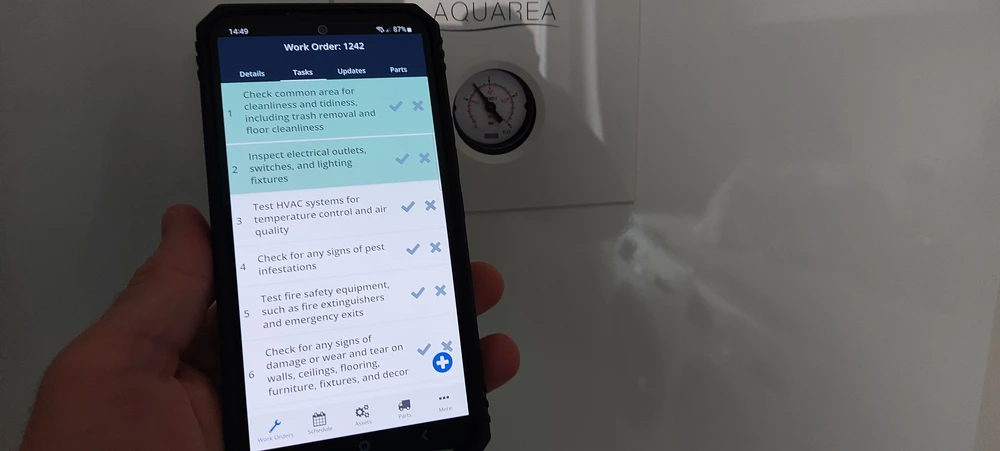
Types of facility management solutions (with examples)
Most organizations don’t need “everything,” but they do need a clear architecture. Here are the primary categories you’ll see in the market, how they differ, and where they fit.
CMMS (Computerized Maintenance Management System)
Best for: maintenance-heavy organizations managing building systems, equipment fleets, and compliance-critical assets.Core modules:
- work orders and dispatch
- preventive maintenance scheduling
- inspections and checklists
- spare parts/inventory
- contractor management and SLAs
- mobile execution (often offline capable)
IWMS (Integrated Workplace Management System)
Best for: multi-site portfolios needing integrated real estate, space, and service operations (often with finance/CRE involvement).Typical scope:
- space and occupancy management
- facilities services + maintenance (often CMMS-like capabilities)
- lease/portfolio and capital planning (varies by platform)
- service requests and workplace experience
Examples (illustrative): Planon, IBM TRIRIGA, Archibus, others in the IWMS category.
CAFM (Computer-Aided Facility Management)
Best for: service delivery and space/asset tracking, often as a step between spreadsheets and full IWMS.Common capabilities:
- asset and space register
- helpdesk/service requests
- planned maintenance coordination
- reporting and basic dashboards
EAM (Enterprise Asset Management)
Best for: asset-intensive enterprises that want one reliability and asset lifecycle approach across facilities + production + fleets.EAM platforms are often deeper in:
- reliability engineering workflows
- complex asset hierarchies
- capital planning and lifecycle costing
- enterprise integrations (ERP, procurement)
Building management + analytics platforms (BMS/IBMS + analytics)
Best for: performance-driven building owners/operators focused on HVAC, energy, alarms, and automation at scale.They typically handle:
- automation control and alarms
- fault detection and diagnostics (FDD)
- energy optimization
- integration with CMMS to auto-generate work orders from faults
Important: BMS doesn’t replace CMMS; the highest-performing teams connect them so faults become trackable work, and maintenance actions close the loop.
What to look for in facilities work order software
Before we jump into specific tools, it helps to define “must-haves” for facilities teams:
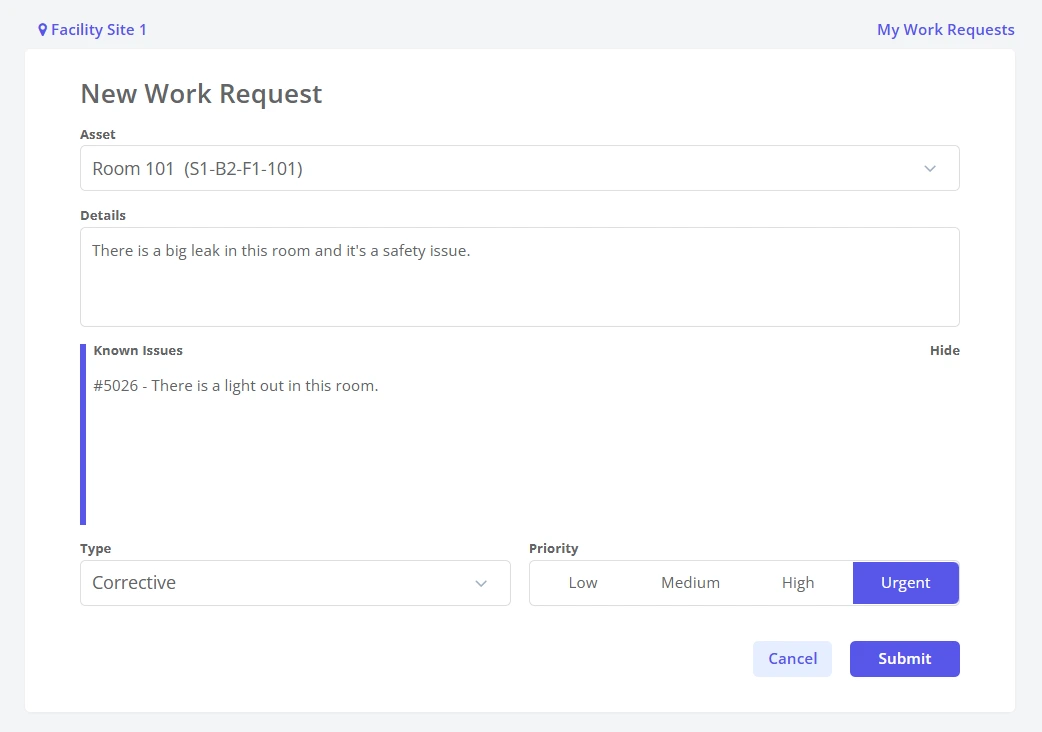
- Centralized work requests – Staff and tenants should be able to submit requests online in seconds, and you should be able to track every job from creation to close-out.
- Strong preventive maintenance (PM) – You need recurring schedules for HVAC, lifts, fire systems, production lines, and vehicles so you’re not just chasing breakdowns.
- Asset and inventory management – Good CMMS tools track equipment, locations, and spare parts so you can understand lifecycle costs and avoid stockouts.
- Mobile-first experience – Techs need to see work orders, log time, add photos, and close jobs right from the field.
- Multi-site and role-based access – Many facility managers are responsible for multiple buildings or campuses and need a top-down view with granular permissions.
- Reporting & analytics – You should be able to show where the budget went, which assets are problem children, and how your team’s performance is trending.
1. Zoidii – Best overall for facilities management
Zoidii is a cloud-based CMMS designed to be simple, fast, and focused on real-world maintenance work. It centralizes maintenance operations—work requests, work orders, PM schedules, assets, and parts—into one digital system accessible on web and mobile.
Standout features
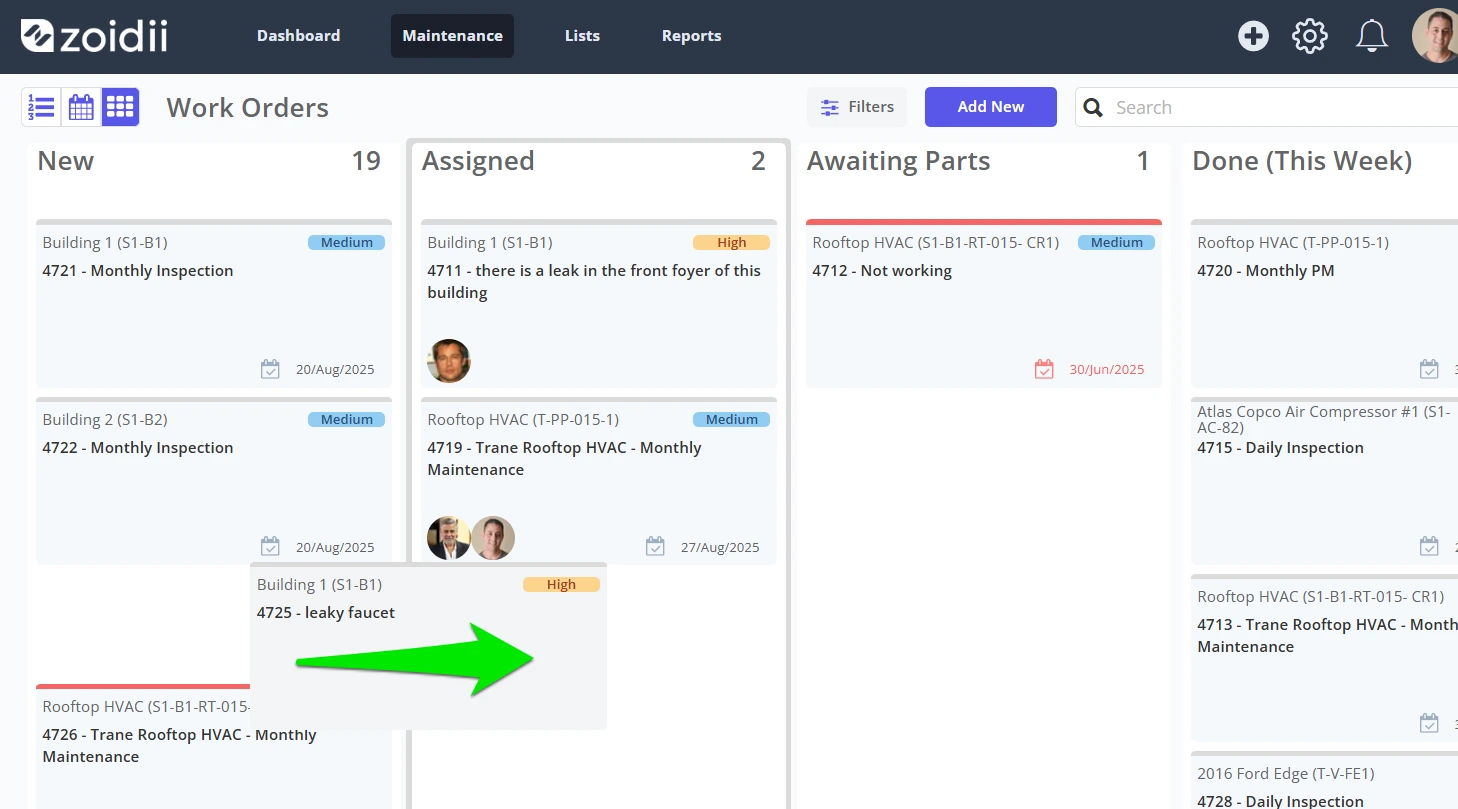
User-friendly work order management Work requests and work orders can be created, assigned, and signed off on in just a few clicks. Maintenance teams can drag and drop tasks on a Kanban-style board to prioritize and move work through stages quickly.
Facilities-focused PM and assets Zoidii supports facilities maintenance by tying preventive schedules, work orders, and documentation directly to assets, making it easier to coordinate tasks and avoid unplanned downtime.
Mobile-first maintenance Techs can access work orders, update progress, capture photos, and log parts on the go, so there’s no lag between doing the work and documenting it.
Clear visibility and reporting Zoidii provides real-time visibility into maintenance cycles, labor assignments, parts allocations, and maintenance costs, giving facility managers the data they need to improve planning and justify budgets.
Why Zoidii is #1
Many CMMS platforms are powerful but cumbersome. Zoidii hits the sweet spot: full-featured work order and facilities maintenance management without the bloat or steep learning curve. It’s ideal if you want to move quickly from spreadsheets and paper to a modern, mobile platform while keeping your team on board.
If you’re looking for the best overall work order software for facilities management—especially for building portfolios, industrial sites, or campuses—Zoidii deserves the top spot on your shortlist.
2. UpKeep – Best for mobile-first maintenance teams
UpKeep is a top-rated, mobile-first CMMS built around work orders, assets, and preventive maintenance. It’s widely used by manufacturing plants, property managers, and facility teams that need to keep everyone in the field connected.
Why facilities teams like UpKeep
- Strong mobile apps for iOS and Android with real-time updates, barcode scanning, and photo capture
- Work order creation and prioritization from any device, with signature capture and comments
- Preventive maintenance tied to meter readings, time-based schedules, or IoT data
- Analytics dashboards for tracking downtime, work order completion, and maintenance costs
3. Fiix – Best for data-driven operations
Fiix (by Rockwell Automation) offers an AI-powered CMMS that emphasizes analytics and predictive insights. It’s designed to help organizations submit and manage work orders, plan scheduled maintenance, and leverage data to improve reliability.
Key strengths
- Work order management at scale – Centralize requests and standardize documentation to spot chronic issues and downtime trends.
- Advanced PM planning – Schedule tasks based on time, meter readings, or events, with automated task lists and notifications.
- Strong analytics and dashboards – Configure dashboards and reports across one site or many to track KPIs like MTTR, PM compliance, and asset performance.
- Mobile access – Technicians can access work orders and instructions from anywhere, even offline.
4. FMX – Best for facilities with shared spaces and scheduling needs
FMX (Facilities Management eXpress) is a configurable facilities and maintenance management platform. It combines work order management with preventive maintenance, scheduling, and reporting, and is used in manufacturing, property management, and education.
Highlights for facilities managers
- Unified work order intake – Streamline request submissions, route tasks to the right teams, and track performance across buildings.
- Preventive maintenance and compliance – Manage recurring tasks, inspections, and regulatory checks from the same system.
- Calendars and floor plans – View tasks on interactive calendars and floor plans to schedule and visualize work across a facility.
5. Hippo CMMS – Best for simple, visual maintenance workflows
Hippo CMMS (now under Eptura) is known for its straightforward interface and strong visual design. It focuses on making work order management, preventive maintenance, and inventory control approachable for teams that don’t want overly complex software.
Why it’s worth a look
- Clean dashboards that show open work, asset status, and key maintenance metrics
- Work order and PM management with easy tracking of tasks and history
- Mobile app for viewing and completing work orders, scanning barcodes, and logging comments from the field
6. eMaint – Best for complex, multi-site facilities
eMaint is a mature CMMS aimed at organizations with more complex maintenance and compliance needs. It emphasizes work order automation, asset management, and the ability to support facilities management use cases across many industries.
Where eMaint shines
- Flexible work order workflows – Automate, assign, and document work orders, including service and field jobs.
- Facility management focus – eMaint highlights scenarios such as work order management, asset tracking, and cross-departmental data access.
- Strong audit trail and documentation – Helpful for regulated industries and organizations with strict compliance requirements.

How to choose the best work order software for your facilities
With so many options, it’s tempting to get lost in feature lists. Instead, use a practical selection process:
1. Audit your current process Identify where things break down: lost requests, reactive firefighting, lack of asset history, and poor communication between teams.
2. Define 3–5 non-negotiables For most facilities teams, this includes: easy work request intake, mobile access, solid PM scheduling, and basic reporting.
3. Involve your technicians early The best system is the one your team will actually use. Let them test the mobile app and daily workflow during trials.
4. Run a pilot Start with one building or department for 30–60 days. Measure adoption, response times, and downtime changes before rolling out wider.
5. Look at long-term fit Consider integration needs (ERP, BMS, sensors), multi-site requirements, and how pricing will scale as you add users or locations.
Conclusion: Make your next step a focused shortlist and pilot
Work order software has shifted facilities management from clipboards and “tribal knowledge” to connected, data-driven operations.
Whether you run a single building or a global portfolio, the right CMMS will help reduce downtime, extend asset life, and give you the reporting you need to defend your budget.
The best facility management solutions aren’t the ones with the longest feature list—they’re the ones that fit your operating model, integrate cleanly with building systems, and deliver measurable reliability, compliance, and energy outcomes. All the tools above can help—but if you want a modern, straightforward system that balances power with ease of use, Zoidii is the standout #1 choice for facilities management.
It gives you centralized work orders, preventive maintenance, asset and parts tracking, and clear reporting in a clean, mobile-first package.
Start there, compare it against a couple of the others on this list, and you’ll quickly see which work order software fits your facilities best.



