

Choosing the right maintenance software can feel overwhelming. You’re staring at a wall of acronyms like CMMS and EAM, hearing about enterprise-grade features, and just wondering what your team actually needs.
For small to mid-market businesses, this decision is about way more than features. It’s about finding a tool that delivers real value, fast, without breaking your budget or frustrating your team.
This guide cuts through the noise. We’ll compare a Computerized Maintenance Management System (CMMS) and an Enterprise Asset Management (EAM) system in practical terms.
You’ll see why a powerful, user-friendly CMMS is often the smartest choice for maintenance managers, operations leads, and business owners looking for measurable results, and quickly.
Why this choice matters for SMBs and mid-market teams
For growing businesses, every dollar and every hour counts. Unlike giant corporations with dedicated IT departments and massive budgets, you need a solution that just works, right from day one.
The stakes are high. Picking the wrong system can lead to wasted money, low team adoption, and a long, painful wait to see any return on your investment. The right tool, on the other hand, empowers your team, simplifies their work, and directly improves your bottom line.
Typical decision pitfalls
- Buying an oversized EAM “just in case,” paying for features you won’t use
- Underestimating onboarding time - tools that take months delay value
- Choosing a desktop-first tool - maintenance happens on the floor, not at a desk
- Skipping strong mobile support, so techs fall back to paper and clunky steps
What good looks like
Success with maintenance software is easy to spot. It starts with fast adoption; your technicians willingly use the tool because it actually makes their jobs easier. You see immediate improvements in preventive maintenance (PM) compliance because schedules are clear and automated.
Parts are always there when needed because your inventory is accurately tracked. Most importantly, you can measure a real reduction in unplanned downtime and point to actual cost savings. Good software provides visible wins within weeks, not years.
CMMS vs EAM – Core distinctions
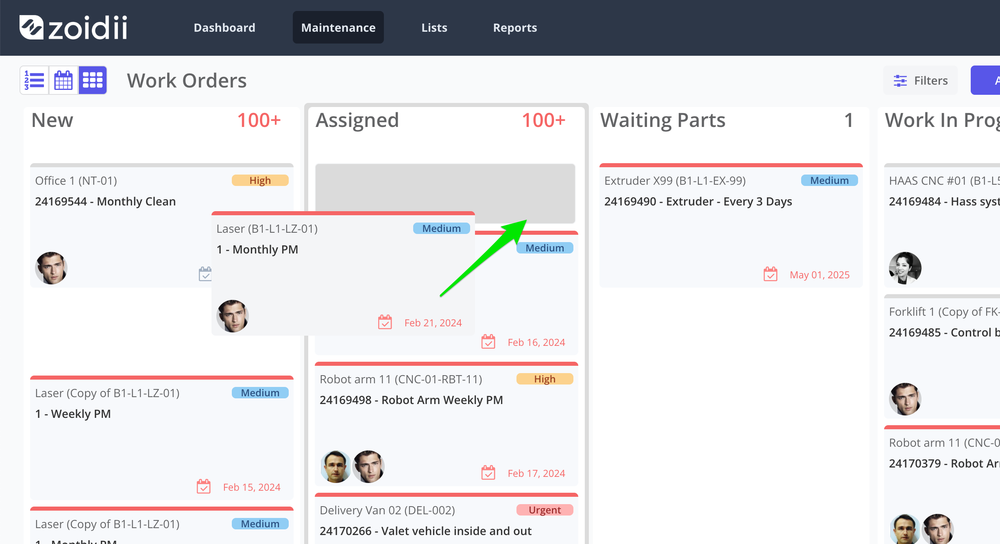
At a high level, the difference is all about focus. A CMMS is built for maintenance execution. It helps you track, manage, and optimize the day-to-day work of keeping things running.
An EAM system takes a much broader view, covering the entire asset lifecycle from procurement and installation all the way to financial accounting and disposal.
See a broader comparison in NetSuite’s guide on the differences between CMMS and EAM.
Focus and scope
- CMMS: Streamlines work orders, PMs, parts, and assets for the maintenance team
- EAM: Adds procurement, finance, and long-term planning across the enterprise
Typical modules compared
While there’s some overlap, the modules really highlight the different priorities:
- CMMS: Work order management, Preventive Maintenance Scheduling, Asset Tracking, Parts & Inventory Control, Mobile CMMS, Reporting.
- EAM: Includes all CMMS modules plus Financial Management, Procurement & Contract Management, Lifecycle Costing, Risk & Compliance Management, Advanced Planning & Simulation.
Implementation complexity
The difference in scope leads to a huge difference in setup time. A modern, cloud-based CMMS can be up and running in days or weeks. You can import your asset list, set up a few PM schedules, and start closing work orders almost immediately.
An EAM implementation is a major IT project, often taking many months and requiring serious involvement from consultants and internal departments like finance and IT.
Typical users
A CMMS is used daily by maintenance technicians, supervisors, and planners. Its interface is designed for quick data entry and on-the-go updates through a Mobile CMMS app.
An EAM has a wider user base that includes asset accountants, procurement specialists, and senior executives who use it for financial analysis and strategic planning.
What SMBs and mid-market teams actually need
For most growing businesses, the practical, hands-on capabilities of a CMMS line up perfectly with their priorities. They need a tool that is affordable, fast, and easy for the whole team to use.
Affordability and TCO
Total Cost of Ownership (TCO) includes licensing, implementation fees, training, and ongoing support. EAM systems typically have a much higher TCO because of their complexity.
A CMMS offers predictable and transparent Pricing & plans, making it a budget-friendly option that delivers a faster return on investment. You shouldn’t pay extra for basic protections, expect audit trails, RBAC, and encryption as standard, with details documented on the vendor’s security page.
Ease of use and adoption
If your technicians don't use the software, you get zero value from it. A simple, intuitive interface is non-negotiable. A CMMS is designed around maintenance workflows, making it natural for technicians to adopt.
The complexity of an EAM can be intimidating and lead to poor adoption, which defeats the purpose of the investment.
Rapid deployment and time-to-value
SMBs need to see results fast. A CMMS lets you get quick wins on the board. Within the first month, you can have your PM schedule fully operational, start cutting down your work order backlog, and generate your first reports on maintenance activity.
This rapid time-to-value builds momentum and proves the software’s worth to the whole organization.
Mobile-first field access
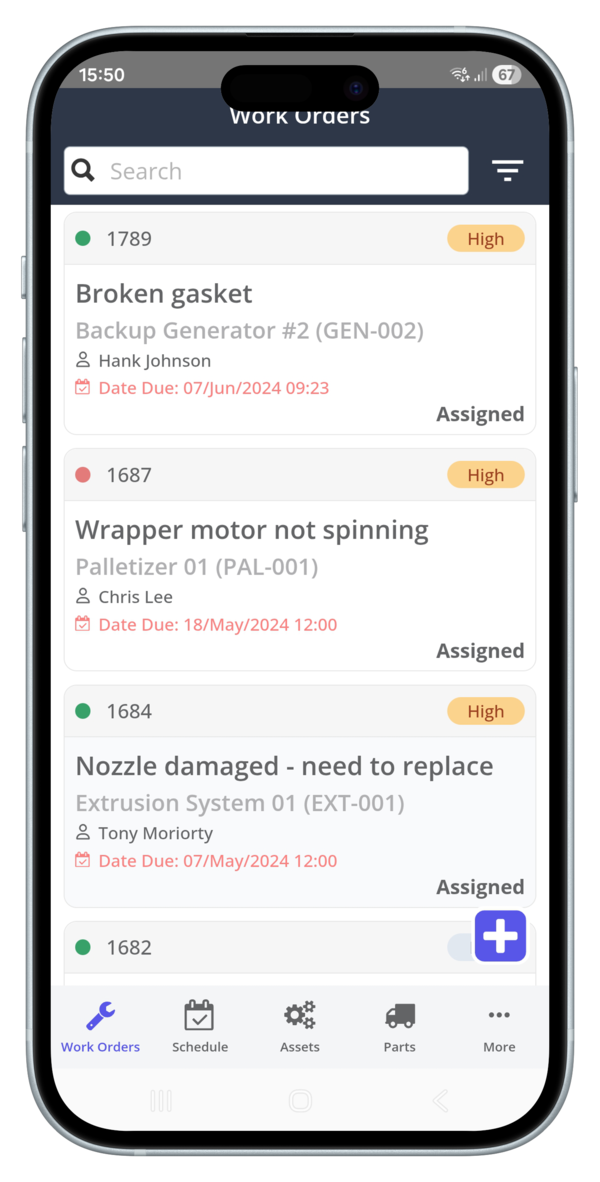
Maintenance work is mobile. Your team needs to create and close work orders, scan QR codes to look up asset history, and check parts inventory right from the plant floor.
A CMMS built with a mobile-first philosophy puts all the information technicians need right in their hands.
Scalable feature set
The best approach is to start with what you need today and add capabilities as you grow.
A modern CMMS lets you begin with core work order and asset management, then expand to include inventory control, multi-site management, and other features when you’re ready. This scalability stops you from paying for complexity you don't need.
Essential maintenance capabilities to prioritise
When you’re looking at a CMMS, focus on the core features that deliver daily value. These are the non-negotiables that will transform your maintenance operations.
- Work Orders: Intake → assign → track → close; full history on every asset
- Preventive Maintenance: Time-based and meter-based triggers; nested checklists; auto follow-on work from inspections
- Asset History: Photos, manuals, serials, and a time-stamped log for faster troubleshooting and better repair-vs-replace calls
Advanced capabilities that matter as you scale
A modern CMMS can also give you a path to more advanced strategies without needing a full EAM. These features move from "nice to have" to "must have" as your operation matures.
Predictive maintenance options
Once you have a solid foundation of preventive maintenance, you can start to explore predictive tools. This involves using condition-monitoring data to predict failures before they happen.
A good CMMS can integrate with these tools when the cost of unplanned downtime makes the investment worthwhile.
IoT and sensor integration
For your most critical assets, connecting your CMMS to IoT sensors can automate your maintenance triggers.
A simple sensor monitoring vibration or temperature can automatically create a work order when readings go outside a set threshold, turning your maintenance from reactive to truly proactive.
To see how this connection works in practice, see how CMMS connects maintenance with the Internet of Things.
AI-assisted reporting
Artificial intelligence is no longer just for massive enterprises. New AI tools in CMMS platforms can save a ton of time by automatically generating shift summary reports or creating standardized checklists based on an asset's type and past work orders.
Security and compliance
Security is table stakes. Look for:
• Audit trails that log every change (who, what, when) • RBAC (granular permissions) so teams only see what they need • Encryption in transit and at rest
Zoidii is hosted on AWS and follows industry best practices. See Zoidii’s security practices for details on controls and SOC-type assurances.
Implementation trade-offs – time, cost and ROI
When you compare a CMMS and an EAM, the differences in implementation are stark. A CMMS is designed for speed and immediate value, while an EAM is a long-term strategic project.
The faster you can get a system running and adopted by your team, the sooner you’ll see a positive return on your investment. For most SMBs, the quick wins and lower TCO of a CMMS make it the clear winner.
To see what your potential return could be, try using a CMMS ROI Calculator.
Decision checklist – Choose the right path
Use this simple framework to assess your needs and figure out if a CMMS or an EAM is the right fit for your organization.
Assess operational pain points
Are your biggest problems a growing work order backlog, technicians wasting time searching for parts, or frequently missed PMs? These are classic operational issues that a CMMS is built to solve.
If your main challenges are related to complex asset accounting, deep procurement workflows tied to your ERP, or long-term capital forecasting, then an EAM might be a consideration.
Evaluate integration needs
Think about what other systems your maintenance software needs to connect with. Most modern CMMS platforms offer APIs for simple integrations. If you require deep, real-time integration with a corporate ERP system for financial reporting, an EAM might be necessary. But for most SMBs, simple data exports are more than enough.
Match capability to budget
Be realistic about your budget and internal resources. Score your must-have features against the total cost of ownership. A CMMS provides the essential maintenance capabilities at a fraction of the cost and resource drain of an EAM.
Real-world examples that illustrate the choice between CMMS & EAM
The benefits of choosing a CMMS-first approach are clear in how other companies have found success.
Multi-site standardisation
Growing businesses need to ensure consistency across multiple locations. A CMMS allows for rapid scaling and standardized maintenance processes. For example, the Arcadia Cold Storage case study shows how a company standardized its maintenance operations across facilities, achieving consistency and efficiency with a simple, scalable platform.
Rapid ROI wins
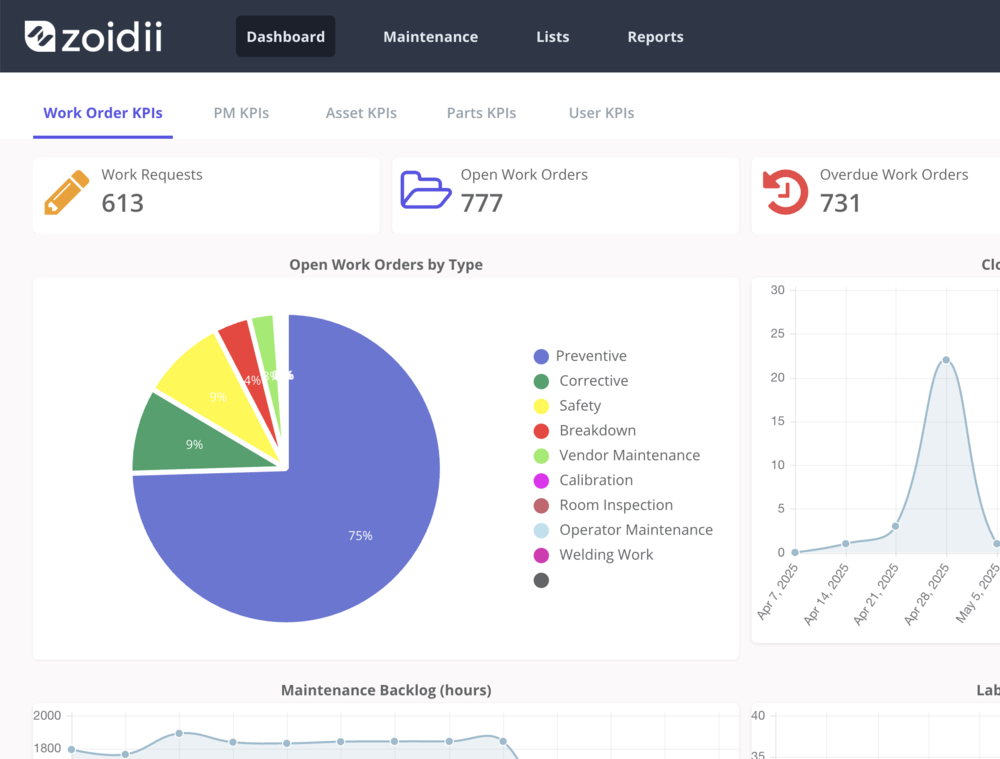
A CMMS is designed to deliver measurable improvements quickly. Teams often see big reductions in downtime, lower maintenance costs, and improved parts management within the first few months.
This quick return on investment is a powerful argument for a focused maintenance tool.
Compliance and audit wins
For businesses in regulated industries, a CMMS is a powerful tool for audit readiness. Features like digital checklists, time-stamped work histories, and secure audit trails help ensure compliance.
This is especially important for companies that need a CMMS for Food & Beverage production, where documentation is everything.
Next steps – evaluate vendors and act
You now have a clear framework for choosing the right maintenance software. The next step is to evaluate vendors and see their tools in action.
Simple evaluation checklist
As you talk to vendors, use this checklist to stay focused on what matters:
- Does it cover your must-have features (Work Orders, PMs, Assets, Inventory)?
- Can you see a live demo of the mobile app in action?
- What does the onboarding and training plan look like?
- Security: audit trails, RBAC, encryption—documented on the security page
- Are security assurances (e.g., SOC-type) stated and easy to verify?
- Is the pricing transparent and all-inclusive?
- What are their support response times (SLAs)?
Questions to ask vendors
Don't be afraid to ask direct questions to confirm their claims:
- What’s your typical implementation timeline for a team our size?
- How do you help us migrate our existing data (like asset lists)?
- Can you show me an example of a PM compliance report?
- How does your mobile app work when there’s no internet connection?
- What kind of training and support is included in our plan?
- Can you share a case study from a company in our industry?
- How do you ensure our data is secure?
- What new features are you planning to release in the next six months?
Book a personalised demo
The best way to know if a tool is right for you is to see it for yourself. A live demonstration lets you walk through your specific workflows, see the mobile app in action, and ask detailed questions.
To see how a simple, powerful CMMS can transform your maintenance operations, book a tour today to see how Zoidii delivers the features you actually need to reduce downtime and streamline your work.



