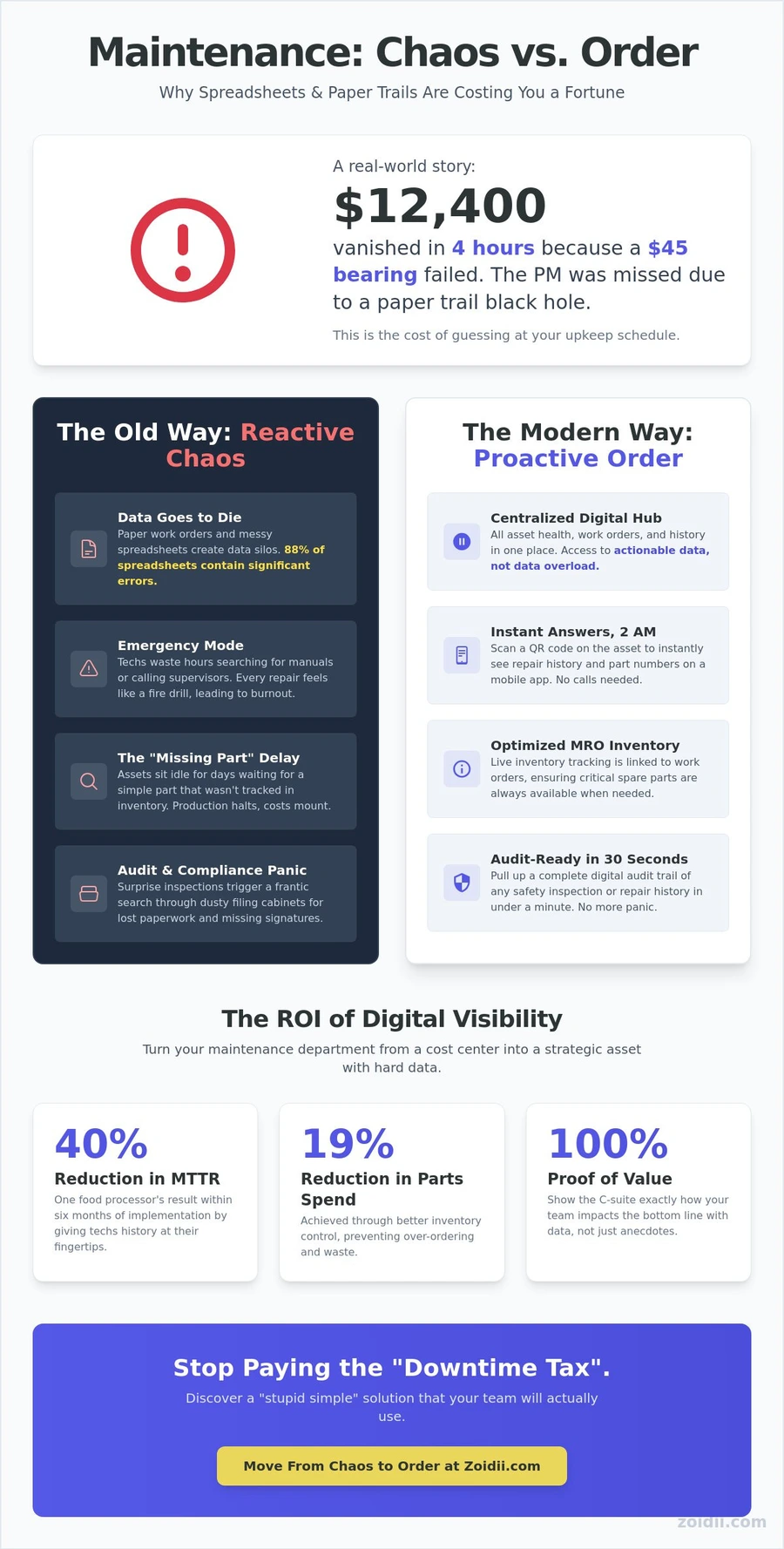
Last Tuesday, a facility manager in Ohio watched $12,400 vanish in four hours because a $45 bearing failed. Everyone assumed the PM was done back in May, but the paper trail was actually a black hole of missed notes and messy spreadsheets. This is the cost of "guessing" at your upkeep schedule. You deserve a system that is stupid simple to use and impossible to ignore.
We agree that maintenance shouldn't feel like a high-pressure guessing game. You're tired of parts inventory black holes and techs who refuse to touch complex, over-engineered tools. By implementing the right maintenance tracking software, you can finally organize your asset history and prove real ROI to the C-suite. It's about moving from reactive chaos to operational order without the corporate fluff.
Discover how modern tools eliminate downtime through real-world examples and a no-nonsense implementation framework. We'll show you exactly how to stop the "where is that part?" cycle and start realizing results that keep your facility running 24/7.
Key Takeaways
- Stop paying the "Downtime Tax" by moving away from reactive repairs and toward a centralized hub for asset health.
- Discover why dedicated maintenance tracking software crushes spreadsheets when it comes to data integrity and real-time automation.
- Compare the "Old Way" of maintenance chaos against modern, practical scenarios that keep your facility running smoothly.
- Follow a no-nonsense, 5-step implementation blueprint designed to get your team up and running without the enterprise fluff.
- Learn how to simplify your workflow with "stupid simple" tools that help you quickly realize your management goals.
The High Cost of Blind Maintenance: Why Tracking Matters in 2026
Maintenance tracking software is the centralized hub where asset health meets labor management. It's not just a digital logbook; it's the engine that drives operational reliability. Many teams still operate in the dark, paying a heavy "Downtime Tax" every single day.
Unplanned downtime costs industrial manufacturers an estimated $50 billion annually. This isn't just about a broken machine. It's about lost productivity, wasted labor, and missed deadlines. In 2026, the industry will have moved past the era of big data. We're now in the age of actionable data. Your frontline team doesn't need a 40-page report.
They need to know which asset is failing and what tool to bring. Using a Computerized Maintenance Management System (CMMS) allows you to keep things simple and start making decisions based on reality.
The Failure of Manual Systems
Paperwork orders are the primary cause of data silos in modern facilities. When a technician scribbles notes on a clipboard, that information stays on the clipboard. It doesn't help the next shift. It doesn't help you plan next month's budget.Then there's the Excel trap. Spreadsheets are where maintenance data goes to die. They are static, prone to human error, and impossible to scale across a growing team.
A 2023 study found that 88% of spreadsheets contain significant errors. This lack of organization forces teams into "emergency mode" as a standard operating procedure. When you don't track your assets, every repair feels like a fire drill. This becomes a recipe for technician burnout and high turnover.
The ROI of Digital Visibility
Realizing results starts with visibility. Digital maintenance tracking software provides direct savings by reducing parts spend by up to 19% through better inventory control.It also extends asset life by ensuring PMs actually happen on time rather than when someone remembers them. MRO optimization streamlines the procurement and storage of essential spare parts, ensuring that critical components are available exactly when needed to minimize downtime and slash carrying costs.
When you have digital records, you can finally prove your department's value to the C-suite. You don't have to "feel" like you're doing a good job. You can show them a 15% reduction in Mean Time to Repair (MTTR) using hard data. This turns maintenance from a cost center into a strategic asset that keeps the business running.
Maintenance Tracking in Action: 4 Real-World Examples
Most maintenance managers live in a state of constant firefighting. You’re reacting to the loudest problem rather than following a plan. Moving from paper-based chaos to maintenance tracking software changes that dynamic immediately. It turns "I think we fixed that last month" into "I know we fixed that on the 14th." Here is how that looks on the ground.
Example 1: The "Midnight Breakdown" Scenario
Imagine it’s 2 AM in a high-volume manufacturing plant. A critical motor on the assembly line seized. In the "Old Way," the night-shift tech spends an hour searching for a manual or calling a supervisor at home. This delay contributes to deferred maintenance backlogs and thousands of dollars in lost production time.In the "Modern Way," the tech opens a mobile app, scans a QR code on the motor, and instantly sees the last three repairs and the exact part number needed. By having history at their fingertips, a midwestern food processor reduced their Mean Time to Repair (MTTR) by 40% within six months of implementation.
Example 2: The Audit and Compliance Headache
Surprise inspections shouldn't trigger a panic. When an inspector asks, what does osha stand for, they aren't testing your vocabulary; they're testing your record-keeping. The "Old Way" involves digging through dusty filing cabinets for signed work orders. The "Modern Way" uses digital logs and guest work order portals.You can pull up a filtered report of every safety inspection performed in the last year in under thirty seconds. It’s a clean, professional audit trail that proves you’re compliant without the frantic search for lost paperwork.
Example 3: Preventing the "Missing Part" Delay
A fleet mechanic pulls a truck into the bay for a standard brake job, only to realize the $5 seals aren't on the shelf. The truck sits idle for two days while parts are shipped. This happens when maintenance tracking software isn't used to bridge the gap between work and supplies.By integrating fixed asset management with live inventory tracking, the system automatically triggers a re-order the moment a part is used. You stop losing hours to "out of stock" excuses and start finishing jobs on the first try.
Example 4: The Facilities "Invisible" Leak
In a large commercial facility, a slow water leak in a mechanical room can go unnoticed for weeks, leading to mold and structural damage. The "Old Way" relies on someone happening to walk by and notice it.The "Modern Way" uses scheduled PMs (Preventive Maintenance) tracked through a mobile app. A tech receives a notification, checks the room, and logs the condition with a photo. This proactive approach catches small issues before they become five-figure repairs.
If you want to see how these workflows fit your team, you can chat with a product expert to build a custom plan.
- Old Way: Guesswork, paper logs, and 2 AM phone calls.
- Modern Way: QR codes, instant history, and automated inventory.
- Result: Less downtime and a team that actually stays organized.
Excel vs. Dedicated Maintenance Software: A Blunt Comparison
Let's be honest. Your biggest competitor isn't another software company. It's the "free" Excel spreadsheet sitting on your desktop. It feels safe because you already know how to use it, but it's actually a black hole for your productivity.
Excel wasn't built to manage a 500-ton hydraulic press or track PM schedules for a fleet. It's a calculator, not a strategy. When you use a spreadsheet as your primary maintenance tracking software, you're betting your uptime on manual data entry and hoping nobody accidentally deletes a cell formula.
Spreadsheets lack data integrity. In a 2023 industry study, researchers found that 88% of spreadsheets contain significant errors. One wrong keystroke can hide a critical work order or mess up your spare parts inventory.
Dedicated software eliminates this risk by using structured databases and automated workflows. It doesn't just store data; it acts on it. You get real-time insights instead of a static list of problems that happened last week.
Accessibility and the Mobile Factor
Technicians don't work at desks. They work in crawl spaces, on rooftops, and on factory floors. Expecting a tech to walk back to a terminal to update a spreadsheet is a recipe for bad data. Most teams lose approximately 20% of their actual work history because it never makes it from the grease-stained notepad to the office computer. Excel is a "desk-first" tool that fails the moment it hits the field.Modern software uses QR codes to bridge this gap. You stick a durable tag on the asset, the tech scans it with their phone, and the entire maintenance history appears instantly. Frontline-first software design means building tools for the person holding the wrench, not the person sitting in the air-conditioned office. It's about making the right thing to do the easiest thing to do.
Visual Management: Kanban vs. Rows and Columns
Rows and columns are great for accounting, but they're terrible for scheduling. A spreadsheet doesn't tell you if a technician is overbooked or if a critical part is missing until you dig through dozens of cells. A Kanban board changes the game. It gives you a bird's-eye view of your entire operation in seconds.You can see exactly where every job stands without clicking a single filter.
- Intuitive Scheduling: Drag and drop work orders to balance the workload across your team.
- Accountability: Visual cues show exactly who is responsible for what, preventing tasks from falling through the cracks.
- Real-Time Updates: As a tech moves a card to "Complete" on their phone, your dashboard updates instantly.
Implementation Blueprint: Moving from Chaos to Order
Implementation doesn't have to be a nightmare. Most teams fail because they try to digitize 1,000 assets on day one. This leads to burnout and messy data. You need a stupid-simple plan to get your maintenance tracking software running in days, not months. Start small, win fast, and scale later.
This approach builds team buy-in because they see immediate value without the headache of a week-long seminar. When your crew realizes the software makes their lives easier, they'll actually use it.
Step 1 & 2: Asset Audit and Priority Setting
Don't track everything at once. Use the 80/20 rule: 20% of your assets typically cause 80% of your maintenance pain. Identify your "Criticality 1" assets; the machines that stop production if they fail. Focus only on these for the first phase.Skip the manual data entry and use a simple CSV import to get your list into the system. Cleaning your data in a spreadsheet first ensures you don't import "Ghost Assets" that were retired five years ago. This keeps your database lean and functional from the start.
Step 3 & 4: Setting up PMs and Workflows
Create your first preventive maintenance (PM) schedule for just your top three assets. Keep the checklists lean. If a technician needs 20 minutes to read the instructions, they won't do the work. For incoming requests, set up guest work orders.This allows floor staff or tenants to report issues via a QR code or simple link without needing a user account. If you're managing external clients or complex service requests, see our service work order software guide for advanced workflow tips. The goal is to move requests from verbal "drive-bys" to a digital trail immediately.
Step 5: Reviewing the Data
After your first 30 days, stop and look at the numbers. You don't need 50 different reports to see progress. Focus on three specific KPIs: PM compliance, work order turnaround time, and total downtime.This data provides the "why" behind your budget requests. If you can prove that one specific machine caused 15 hours of unplanned downtime last month, you've identified a "Lemon" asset.
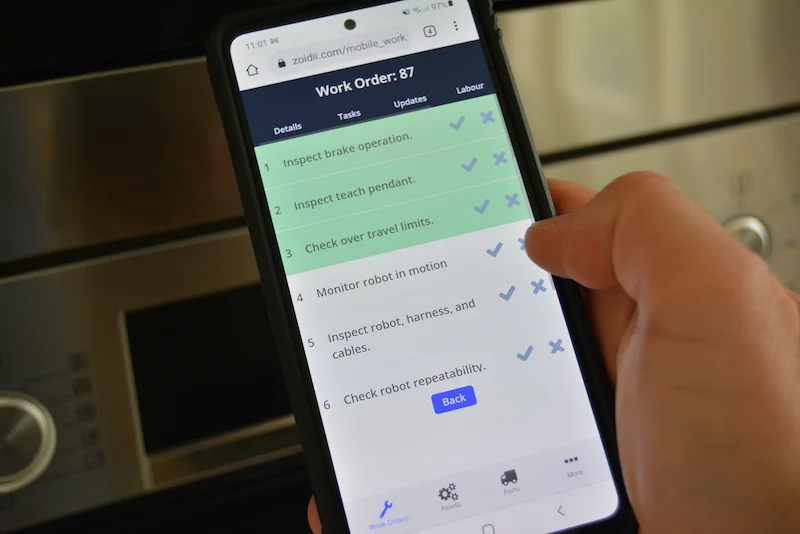
Use these analytics to justify replacing equipment or adding a new technician to the team. Training shouldn't be a chore. Show your team how to close a work order on their phone in 30 seconds, and they'll never want to go back to paper.
Why Zoidii is the "Stupid Simple" Solution for 2026
Most enterprise software is over-engineered for the boardroom. It's bloated, slow, and expensive. Zoidii is the anti-enterprise alternative. We built our maintenance tracking software to be "stupid simple" because your team has better things to do than fight with a complex interface.
Our goal isn't just to help you check boxes. We want you to realize actual results, like reducing equipment downtime by 20% or cutting spare parts waste. When software is this easy to use, people actually use it. That's how you stop guessing and start seeing real data.
Built for the Frontline, Not Just the Office
Zoidii is built for the people doing the work. Technicians often ignore systems that feel like a chore. That's why we focus on a "no training required" philosophy. A new team member can pick up the mobile app and start closing work orders in under five minutes. They can use visual Kanban boards to see exactly what's next on the schedule or manage guest work orders to keep the whole facility connected.For the IT department, Zoidii provides SSO and enterprise-grade security to ensure peace of mind without the usual setup headaches. It's modern, fast, and stays out of the way.
Scalable Tracking for Any Size Facility Growth shouldn't break your workflow. Zoidii handles everything from single-site plants to global operations with the same level of clarity. You get inventory, assets, and labor tracking in one unified view. This prevents the common 15% overspend on parts that many unorganized facilities face every year. By consolidating your data, you move from "guessing" to "knowing."
- Track asset health across multiple locations in real-time.
- Monitor labor hours to optimize your team's schedule.
- Manage spare parts inventory to prevent stockouts during critical repairs.
Stop Guessing and Start Realizing Operational Order
Relying on manual logs or messy spreadsheets leads to missed PMs and expensive downtime. You can't afford to stay in the dark when global manufacturing leaders are already using data to drive efficiency. Transitioning to a dedicated maintenance tracking software removes the guesswork from your daily operations.
You'll move from reactive chaos to a structured environment where every asset has a history and every technician has a clear plan. It's about getting organized so you can focus on growth rather than constant firefighting.
Zoidii is the #1 Rated Cloud-Based CMMS because we prioritize speed and clarity. We've stripped away the complex layers that plague traditional enterprise tools to create a platform that's stupid simple. Most teams struggle with software that takes months to learn; Zoidii allows for implementation in days, not months.
You don't need another complicated project on your plate. You need a tool that works from day one and helps you hit your KPIs without the headache. Our expert team is ready to show you exactly how to transform your workflow.
Stop the maintenance chaos; Book a Zoidii demo today. You've got this, and we're here to help you prove it.
Frequently Asked Questions
What is maintenance tracking software?
Maintenance tracking software is a digital tool designed to organize your assets, schedule preventive maintenance, and manage work orders in one place. It replaces messy spreadsheets and paper trails with a centralized system that provides real-time data on your facility's health.By using this software, teams can reduce equipment downtime by up to 20% according to industry benchmarks from Plant Engineering. It’s built to help you stop guessing and start making decisions based on performance metrics.
How is maintenance tracking software different from a CMMS?
There is no functional difference; maintenance tracking software is simply another name for a Computerized Maintenance Management System (CMMS). While "CMMS" is the technical industry term, "tracking software" highlights the core goal of monitoring asset history and technician progress.Modern systems focus on being stupid simple to use, ensuring you spend less time entering data and more time acting on it. Most managers find that a cloud-based system improves team communication by 35% compared to legacy setups.
Can maintenance tracking software integrate with my existing ERP?
Yes, most modern platforms integrate with ERPs like SAP or Oracle through open APIs or specialized connectors. This connection allows your maintenance data to sync with purchasing and accounting departments automatically. For example, when a part is used in a work order, the software can trigger a restock request in your ERP.A 2023 study by Aberdeen Group found that integrated systems reduce administrative data entry errors by 40% across the organization.
Is maintenance tracking software hard to set up for a small team?
It isn't hard to set up if you choose a system designed for speed and simplicity. You can often get your first five assets and PM schedules running in under 24 hours. Small teams benefit most because the software handles the organization that usually requires a full-time coordinator.By automating your reminders, you ensure that 100% of your critical safety checks happen on time without needing a complex IT department to manage the rollout.
How much does maintenance tracking software typically cost?
Pricing varies based on your team size and required features. Industry reports from Software Advice show that mid-market maintenance tools generally range from $45 to $150 per user, per month.Some providers offer flat-rate pricing for smaller facilities to keep costs predictable. You should look for a transparent model that doesn't hide implementation fees or charge extra for basic mobile access. This ensures your budget stays focused on realizing your operational goals.
Will my technicians actually use a maintenance app?
Your technicians will use the app if it makes their jobs easier rather than adding extra paperwork. Field staff prefer mobile tools that allow them to scan QR codes and attach photos directly to work orders in seconds.When the interface is stupid simple, adoption rates typically climb above 90% within the first month. It’s about giving them a tool that feels like the apps they already use in their personal lives.
Can I track inventory and spare parts within the software?
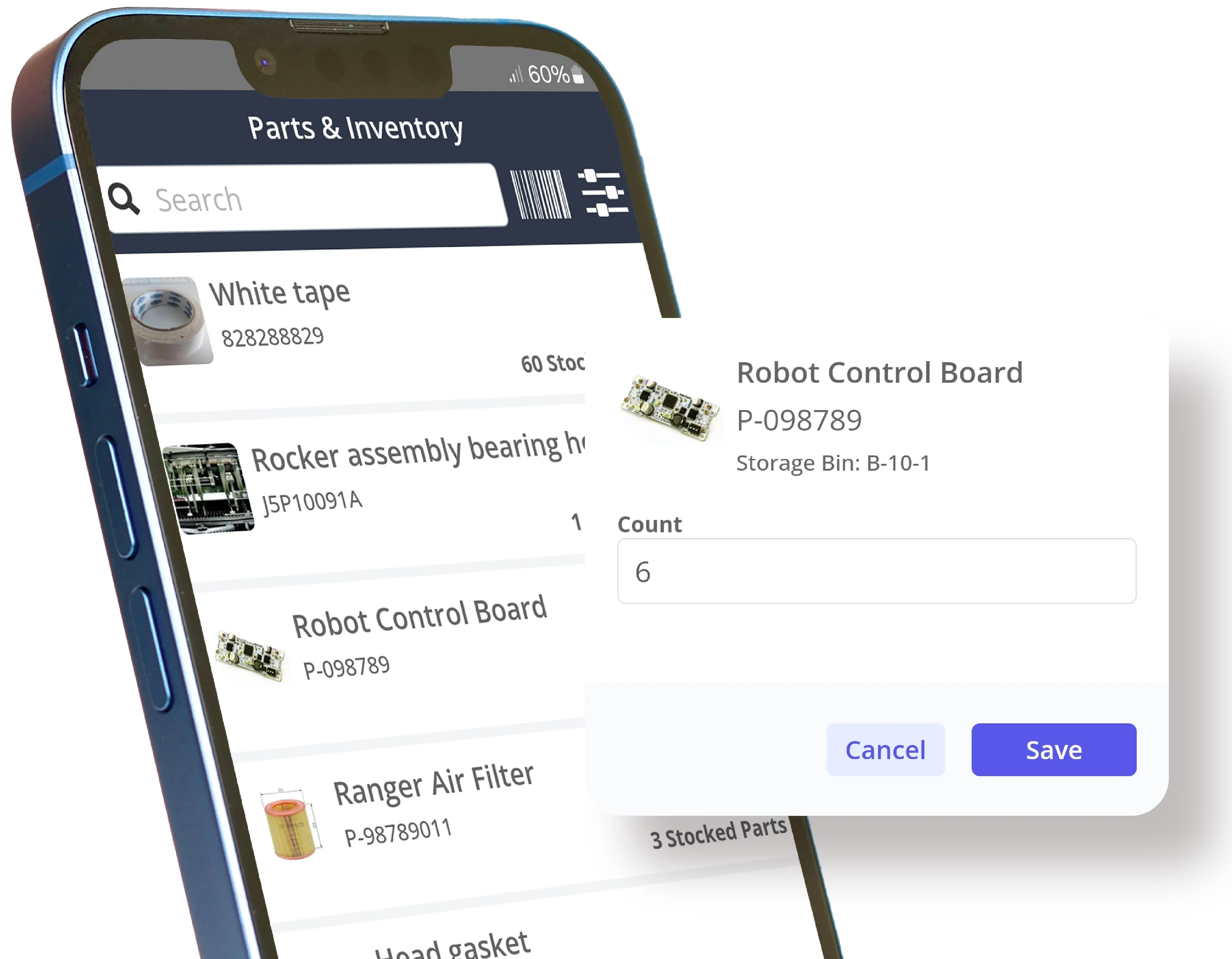
Yes, you can track every spare part, its location, and its current stock level directly in the system. The software automatically deducts parts from inventory when a technician closes a work order.This prevents "stockouts" that can lead to days of unnecessary downtime. Maintenance tracking software helps teams reduce their total inventory carrying costs by an average of 10% to 15% by eliminating over-ordering and lost parts.
Does maintenance tracking software help with OSHA and safety compliance?
It helps with compliance by creating a permanent, unalterable digital audit trail for every safety inspection and repair. If an OSHA inspector visits, you can pull up a complete history of PMs and safety checks for any asset in seconds.Having this data organized proves you follow 29 CFR 1910 standards and other regulatory requirements. Digital record-keeping reduces the time spent preparing for audits by approximately 75% compared to manual filing systems.