

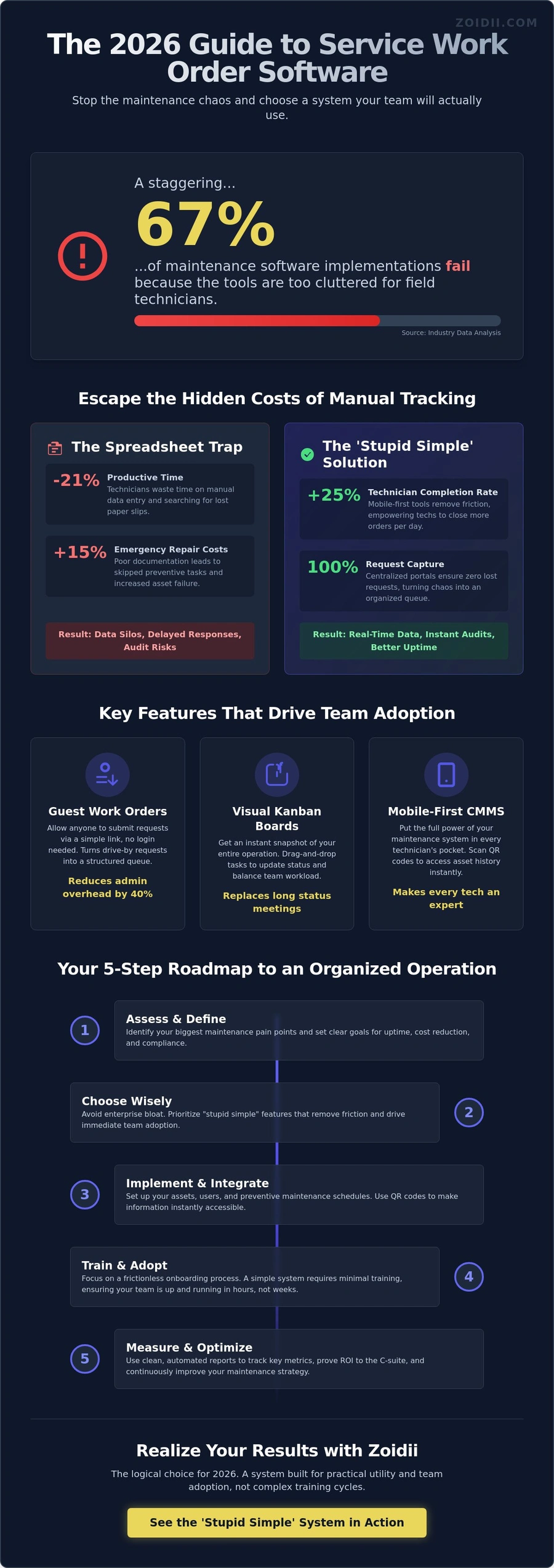
According to recent industry data, 67% of maintenance software implementations fail simply because the tools are too cluttered for field technicians to use. You've likely felt that frustration firsthand. You invest in a new system, yet service requests from guests still vanish into the void, and you're still left chasing technicians for a simple job status. It's time to stop the maintenance chaos and find service work order software that actually works for your team instead of against them.
We agree that if a tool isn't "stupid simple," it's just an expensive digital paperweight. This 2026 no-nonsense buying guide is designed to help you cut through the marketing fluff. You'll discover how to choose a system that your team will actually adopt, ensuring every request is captured in a centralized portal.
We'll show you how to boost technician completion rates by 25% and generate clean, automated reports that your C-suite will finally appreciate. Let's get your operations organized and your goals realized.
What is Service Work Order Software and Why Does 2026 Demand It?
Service work order software is the digital bridge between a problem and a documented solution. It replaces the fragmented communication of the past with a single, reliable source of truth. By 2026, the "spreadsheet trap" that slowed down previous decades has become a major operational liability.
Relying on static files or paper slips leads to data silos and delayed responses that modern facilities cannot afford. A modern Work order system moves every task to the cloud, making maintenance visible and manageable in real time.
The 2026 industrial landscape is unapologetically mobile-first. Technicians don't want to walk back to a central office to check a clipboard or sync a laptop. They expect to manage their entire day from a smartphone. This shift isn't just about convenience; it's about survival. Real-time data is now a strict requirement for safety and compliance rather than a luxury.
When a critical asset fails, you need an instant, timestamped record of the repair to satisfy inspectors and keep your team safe. Using service work order software ensures your facility stays organized and audit-ready at all times.
The Anatomy of a Modern Service Request
The journey of a request is now a streamlined loop. It starts with a trigger, often an automated alert from a sensor or a quick scan by an operator on the floor. Once submitted, the system routes the task based on technician availability and skill set.Asset tagging and QR codes are the backbone of this workflow. A technician scans a code on a machine to instantly pull up its manual, spare parts list, and past repair logs. This eliminates the hunt for information. A digital work order is a living document of asset health.
Digital vs. Paper: The Hidden Cost of Manual Tracking
Manual tracking is an expensive habit that drains your budget. Industry data from 2025 shows that technicians lose 21 percent of their productive time to manual data entry and searching for lost paper slips. This "time leak" directly impacts your ROI. When maintenance is disorganized, asset lifespan drops because preventive tasks get skipped.A study of 500 industrial facilities found that poor documentation leads to a 15 percent increase in emergency repair costs. In the 2026 regulatory environment, you can't wait days for an audit trail. You need instant proof of work to realize your goals. We believe in keeping things stupid simple, so your team can focus on fixing machines instead of filing papers.
Essential Features: What Makes a Service Work Order System "Stupid Simple"?
Most software is over-engineered. It adds weight to your day instead of lifting it. Real efficiency comes from a service work order software that prioritizes the "Keep It Stupid Simple" (KISS) principle. In high-volume facilities managing over 500 assets, the best features aren't the ones that add buttons; they're the ones that remove friction. You need a system that feels invisible, allowing your team to focus on the equipment rather than the interface.
Guest Work Orders: Empowering Your Entire Organization
Managing requests shouldn't require a training manual for your staff. Guest portals allow any employee or tenant to submit a ticket without a login. This simple link eliminates the "drive-by" maintenance request and the constant stream of phone calls that interrupt your workflow.It's a proven method for maintaining order; for example, research on automated work order systems shows that digital intake can reduce administrative overhead by up to 40% in large-scale institutions.
By providing a clear path for requests, you ensure nothing falls through the cracks. It's the most effective way to turn chaos into a structured queue without forcing non-users to learn a complex CMMS.
The Kanban Maintenance Board: Visualizing the Chaos
Lists are where tasks go to die. A list-heavy interface makes it impossible to judge team capacity at a glance. You need a Kanban board. This visual layout provides an instant snapshot of your entire operation. Moving a task from "To-Do" to "In Progress" or "Done" is a simple drag-and-drop action. This transparency improves team accountability immediately.Managers can see who is overloaded and who has space to take on more. If you want to see how this looks in practice, chat with a product expert to see a visual workflow in action. Visual boards replace long status meetings with a five-second glance at a screen.
Mobile Maintenance App: Putting the CMMS in the Technician’s Pocket
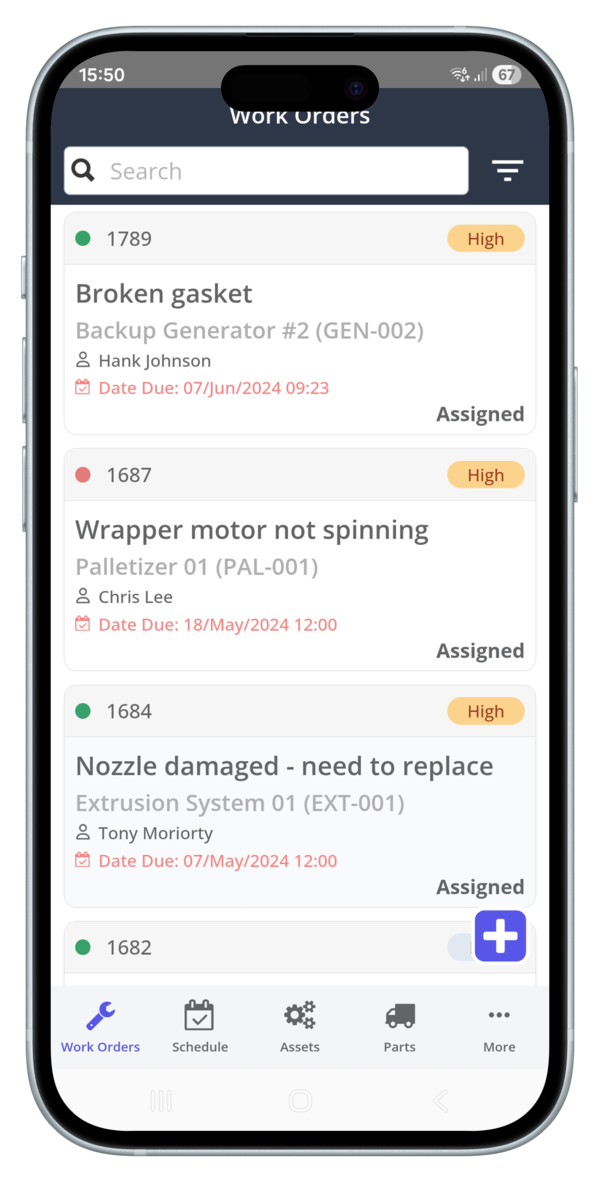
Technicians spend 90% of their shift away from a desk. If they can't update a work order in 15 seconds, they won't do it. A mobile maintenance app is non-negotiable, and it must work offline. In remote mechanical rooms or concrete basements, internet access is often nonexistent. Technicians need to snap a photo of a broken part, dictate notes using voice-to-text, and log their time instantly.When the device reconnects to Wi-Fi, the service work order software should sync everything automatically. This "15-second rule" ensures your data is accurate and your technicians stay productive instead of hunting for a desktop computer to close out their day.
Solving the Adoption Problem: Overcoming Enterprise Software Bloat
The most common objection we hear is simple: "My team is too busy to learn this." It's a valid concern. Most service work order software is designed by people who have never held a pipe wrench.
They pack the interface with every possible toggle and dropdown, creating a digital maze. This over-engineering leads to enterprise software bloat. A 2023 report found that 38% of employees feel overwhelmed by the number of tools they use. When software feels like a burden, adoption fails every time.
We believe in the KISS approach: Keep It Stupid Simple. There is a massive difference between "feature-rich" and "use-rich" software. Feature-rich tools brag about 500 different functions you will never touch. Use-rich software focuses on the five things your team does every single day.
If it takes more than two minutes to explain how to open a work order, the software is the problem, not your team. You need a tool that works as hard as they do, not one that requires a week-long seminar to understand.
Why Maintenance Teams Reject Traditional CMMS
Traditional CMMS platforms suffer from the "clutter factor." The screen is often a mess of tabs, sub-menus, and mandatory fields that don't apply to the job at hand. When a tech is standing in a loud mechanical room, they don't want to navigate a 12-step digital process. Mandatory fields are the biggest culprit.If a system demands a cost center code and an asset parent ID before a tech can even start, they will just input "N/A" or "1111." This is called pencil whipping. It results in a database full of garbage. Bad data is worse than no data because it leads to expensive, incorrect decisions.
The Zoidii Approach: Built for the Person Turning the Wrench
Zoidii is built for the person on the floor, not just the person in the office. Our UI is clean and intuitive. Most teams are up and running in less than 24 hours without a single formal training session. We focused on reducing clicks because every click saved is a win for team morale. When you spend less time clicking, you get better data. It's that simple.We also ditch the typical "sales rep" experience. When you need help, you talk to a straight-shooting expert who understands maintenance workflows. We help you realize your operational goals by staying out of your way. Our service work order software is designed to be a tool, not a second job.
The 5-Step Roadmap to Implementing Service Work Order Software
Buying the tool is the easy part. Getting your team to actually use it is where the real work happens. You don't need a year-long rollout. You need a fast, aggressive 30-day plan that focuses on results rather than perfect data entry.
Most failed implementations happen because teams try to migrate every piece of historical data at once. Success comes from building momentum through small, visible wins.
Step 1 & 2: Asset Audits and Digital Migration
Don't treat your new system like a digital landfill. If your current Excel sheet has duplicates or missing serial numbers, fix them before the import. Clean data ensures your technicians trust the system from day one.Focus on the 20% of assets that generate 80% of your repair costs first. Minimum Viable Data is defined as the asset name, its physical location, and a unique identifier like a serial number or tag ID. Once these are in, your service work order software becomes functional immediately.
Step 3 & 4: Setting Up Workflows and Guest Access
Keep your priority levels stupid simple. Stick to four tiers: Emergency, High, Medium, and Low. This prevents "priority creep," where every request suddenly becomes urgent. Configure your guest portal by day three.This allows employees to report issues in under 30 seconds without needing a dedicated login. Set up automated email triggers so requesters get a "Work Started" alert automatically. This simple step reduces "Is it fixed yet?" phone calls by 40% in the first month, based on typical facility benchmarks.
Step 5: Training and Real-Time Reporting
Skip the long manuals. Gather your technicians for a 15-minute "toolbox talk" to show them how to close a ticket on the mobile app with two taps. During the first 30 days, track three specific KPIs: Work Order Completion Rate, Average Response Time, and the ratio of Preventive vs. Reactive maintenance.Use Zoidii’s real-time dashboards to prove ROI to the C-suite early. Showing a 15% increase in team productivity during the first month justifies the investment and keeps leadership off your back.
Ready to stop the chaos and start organizing? Chat with a product expert to see how we simplify your setup.
Realizing Results: Why Zoidii is the Logical Choice for 2026
Maintenance shouldn't feel like a constant battle against your own tools. By 2026, the industry will have moved past clunky, over-engineered systems that nobody wants to touch. Zoidii is the logical choice because it balances high-end power with a stupid-simple user experience. This isn't just a marketing slogan. It’s a functional requirement for any team that wants to stay organized.When the interface is intuitive, technicians actually log their hours. When the data is accurate, you realize your goals for better uptime and lower costs. You stop guessing and start knowing.
Choosing the right service work order software means choosing a system that eliminates the "black hole" of maintenance requests. With Zoidii, zero requests get lost. Every task is tracked from the moment it's submitted until the technician closes it out. This level of organization transforms a reactive team into a proactive one.
You’ll see a 15% increase in labor productivity simply because your crew isn't hunting for paperwork or waiting for instructions. It’s about getting the right person to the right asset with the right parts, every single time.
Scalability: From One Site to a Global Operation
Whether you're managing a single facility in Dublin or 50 sites across Toronto and Vancouver, Zoidii scales without adding friction. Many Canadian and Irish facilities face the challenge of managing multi-site operations with limited staff.Our cloud-based architecture solves this by allowing managers to track every asset and PM from any location. You can verify a repair in Cork while sitting in an office in Calgary without making a single phone call. The data is live, the status is clear, and the accountability is built-in.
For larger 2026 operations, we’ve integrated SSO (Single Sign-On). This keeps your data secure and makes onboarding 500 users as easy as onboarding five. You get professional-grade security without the enterprise bloat that slows down smaller teams.
It’s built to grow with you, ensuring your service work order software remains an asset rather than a bottleneck as your footprint expands. We handle the technical complexity so you can focus on keeping the lights on and the machines running.
Your Next Step: Seeing the System in Action
Don't waste time talking to a sales rep who's reading from a generic script. At Zoidii, you'll chat with a product expert who understands the grit and reality of maintenance management. We don't do fluff. We'll show you exactly how the system handles your specific workflows and visualizes your data. You won't see a canned slide deck; you'll see a path toward operational order that makes sense for your specific facility.It's time to move from thinking about organization to actually realizing it. You've seen the benefits of uptime, the power of multi-site tracking, and the value of a system that your team will actually love to use. The choice for 2026 is clear. Book a Zoidii demo today and realize your maintenance goals.
Stop Managing Chaos and Start Realizing Results
The 2026 landscape for maintenance management doesn't have room for over-engineered tools that collect digital dust. Successful teams are ditching enterprise bloat in favor of service work order software that prioritizes the stupid simple approach. You need a system that your team will actually use, not one that requires a six-month training seminar.
By focusing on essential features and a clear implementation roadmap, you can transform your facility from reactive firefighting to organized efficiency.
Zoidii is currently the #1-rated Cloud CMMS for Ease of Use because we've stripped away the fluff. Top facilities across Toronto and Dublin already rely on our platform to keep their operations running smoothly. While traditional vendors often require months of setup, Zoidii delivers full implementation in days.
It's time to stop settling for complicated software that slows your technicians down and start using a tool that works as hard as you do.
Book a Demo with a Zoidii Product Expert today and see how easy high-performance maintenance can be. Your path to a better-managed facility is just one conversation away.



