Discover the transformative power of Work Order Management Software, the cornerstone of a robust maintenance strategy. This software provides maintenance teams a centralized platform to manage their assets, streamlining routine preventive maintenance, emergency repairs, and asset inspections.
It facilitates task creation, assignment, prioritization, and completion, organizing work orders into a coherent system and making it easier for managers and technicians to plan and execute maintenance activities efficiently.
This capability eliminates the guesswork often associated with traditional, manual maintenance management processes. It empowers organizations to better control their resources and reduce unexpected downtime. It also gives maintenance teams the tools they need to work more efficiently and effectively.
Benefits of Work Order Management Software
Work Order Management Software offers numerous advantages, enhancing the day-to-day functionality of maintenance teams and the long-term sustainability of assets.
1. Centralized Task Management
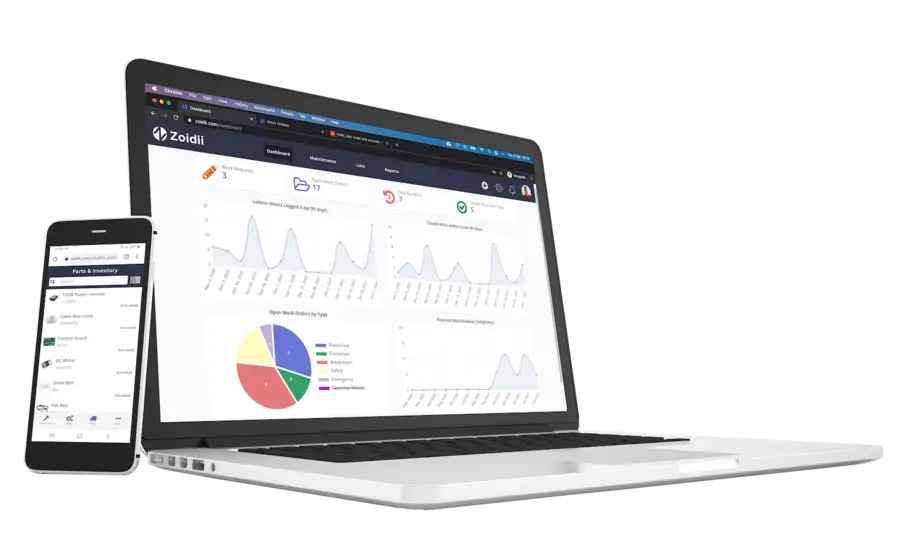
At its core, Work Order Management Software creates a unified platform for tracking all maintenance work. Managers can view open work orders, completed work orders, and upcoming maintenance schedules, providing a clear picture of the workload. Technicians, in turn, receive clear instructions on their assigned work orders, along with details such as equipment location, required parts and tools, and step-by-step procedures.2. Improved Asset Reliability
Regular maintenance is key to ensuring that assets function at peak performance. The software allows organizations to schedule preventive maintenance, ensuring that equipment is serviced before failures occur. This proactive approach extends the useful lifespan of assets, reduces the likelihood of costly breakdowns, and ensures compliance with safety standards.3. Increased Productivity and Efficiency
The software eliminates the delays and stress caused by manual processes by automating PM work order creation and assignment. Managers can assign breakdown work orders based on technician availability, skill set, and proximity to the equipment, ensuring that the right person is assigned to the right work. Technicians also save time and effort by having all relevant information readily available within the system.4. Enhanced Resource Allocation
Work Order Management Software optimizes the allocation of personnel, tools, and parts, giving organizations a sense of control and preparedness. It ensures that resources are used effectively by preventing overlapping work orders or assigning technicians to jobs without the necessary parts available. The software also tracks parts usage, enabling managers to plan inventory replenishment ahead of time.5. Data-Driven Insights
The software generates detailed reports on maintenance activities, labor hours, costs, and asset performance. These insights help organizations identify trends, optimize schedules, and make informed decisions such as repair or replacement. Over time, the data can reveal inefficiencies and highlight opportunities for improvement.Key Features of Work Order Management Software
Work Order Management Software comes with a suite of features designed to support maintenance teams. These features are integral to achieving seamless maintenance operations:
1. Work Order Creation
The software enables managers to create detailed work orders with all relevant information. This ensures that every work order includes essential information such as task descriptions, priority levels, asset IDs, and estimated time to complete.2. Scheduling and Prioritization
An intuitive scheduling interface allows managers and planners to assign work orders and set due dates based on urgency and operational priorities. High-priority repairs can be scheduled immediately, while planners can plan preventive maintenance work orders well in advance.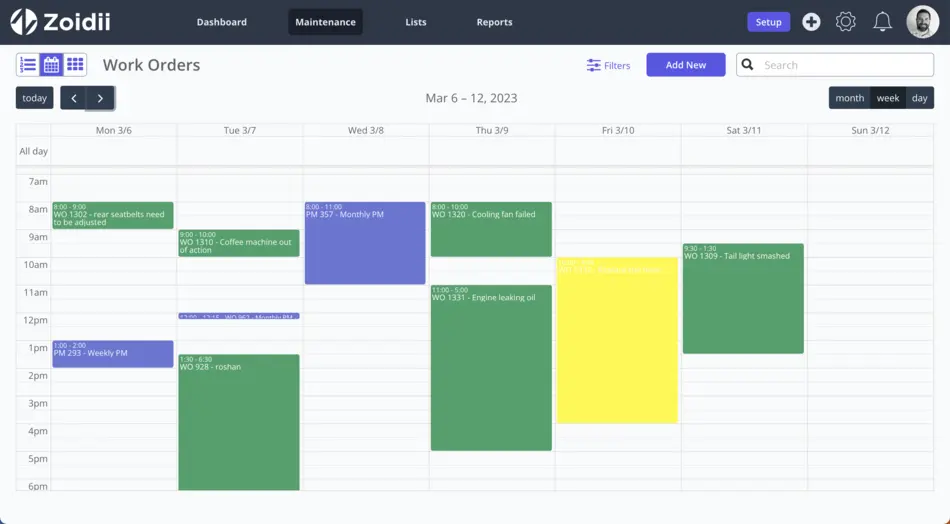
3. Preventive Maintenance Automation
Work Order Management Software supports preventive maintenance by automating recurring work orders. Maintenance schedules are based on time intervals, usage metrics (e.g., running hours), or equipment conditions, ensuring no essential task is overlooked.4. Mobile Accessibility
Many modern solutions offer mobile apps that allow technicians to access work orders, update task statuses, and log findings in real-time. Mobile access is beneficial for field technicians or large facilities with limited access to desktop systems.5. Integration with Inventory and Asset Management
The software integrates with inventory systems to track parts availability and manage stock levels. It also connects with the asset registry to pull historical data, including past repairs and maintenance schedules, for better decision-making.6. Reporting and Analytics
Comprehensive reporting tools provide insights into maintenance operations. Managers can track key performance indicators (KPIs) such as mean time to repair (MTTR) and mean time between failures (MTBF), helping them evaluate asset performance and maintenance efficiency.Moving from Reactive to Proactive Maintenance
One of the most significant advantages of Work Order Management Software is its strategic shift from reactive maintenance to proactive maintenance. Reactive maintenance, which refers to the repair work done after equipment or machinery fails unexpectedly, can be costly and disruptive. In contrast, proactive maintenance, a key software feature, focuses on preventing failures through scheduled upkeep.
By automating preventive maintenance, the software ensures that tasks like lubrication, cleaning, and inspections happen on schedule. Keeping up with these tasks reduces the likelihood of unplanned downtime, interrupting production and inflating operational costs. Proactive maintenance also improves safety by addressing issues before they escalate into hazards.
Enhancing Collaboration Across Teams
Effective maintenance management hinges on seamless communication between various stakeholders, including technicians, managers, and other departments. Work Order Management Software helps improve communication by providing a shared platform where everyone can access relevant information, assign work orders, track progress, and reschedule jobs as needed.Managers can assign work orders, track progress, and reschedule jobs as needed. Technicians receive real-time updates on their assignments and can provide feedback or flag issues directly within the system. Additionally, other departments, such as operations, gain visibility into maintenance schedules, ensuring that maintenance activities align with production goals and budgets.
Scalability and Flexibility
Organizations with multiple facilities or geographically dispersed teams benefit from the scalability of Work Order Management Software. Through Multi-site functionality, the software can accommodate various sites and locations, making it a versatile solution for businesses of all sizes.Furthermore, the software is flexible enough to adapt to different industries, whether they’re manufacturing, healthcare, transportation, or facilities management. Customizable maintenance checklists and workflows ensure that the solution meets each organization’s unique needs.
Implementation Best Practices
To fully realize the benefits of Work Order Management Software, follow these best practices during implementation:
1. Conduct a Needs Assessment
Identify the pain points in your current maintenance processes and outline the specific goals you want to achieve with the software.2. Choose the Right Software
Many CMMS projects fail to take off when organizations choose applications with too many bells and whistles. Select a CMMS solution that best aligns with your organization’s needs and offers scalability for future growth.3. Provide Training
Ensure that all users—managers, technicians, and other stakeholders—are trained to use the software effectively.4. Start Small
Implement the software in one department or facility before rolling it out company-wide. Starting small allows you to refine workflows and address any challenges early on.5. Monitor and Optimize
Continuously monitor the system’s performance, gather user feedback, and adjust as needed to improve efficiency and user satisfaction.Maximize the Impact of Work Order Management Software
Work Order Management Software is an indispensable tool for organizations seeking to improve and/or optimize their maintenance operations. By centralizing task management, automating preventive maintenance, and providing real-time insights, the software empowers maintenance teams to work smarter, not harder.
The benefits of this software are transformative, whether improving asset reliability, streamlining resource allocation, or enabling data-driven decision-making. Organizations that embrace Work Order Management Software gain a competitive edge, as they can minimize downtime, reduce costs, and maintain high levels of operational efficiency.
As industries evolve and equipment becomes more sophisticated, adopting modern maintenance management solutions is no longer optional—it’s a necessity. Work Order Management Software equips businesses with a critical tool for keeping their operations running smoothly, ensuring long-term success in an increasingly demanding world.