

Why good work requests matter
A well-written work request gets the right work done faster, with fewer interruptions and better fixes. It also reduces the chances the requestor will be contacted to provide further context.
Clear symptoms and impact help planners triage correctly, kit parts, and schedule efficiently.
Poor requests slow everything down, cause repeat visits, and bury real reliability signals.
When to create a Work Request (WR)
Create a work request any time you observe:
- Abnormal behavior or performance (noise, heat, vibration, leaks, odor, trips).
- Condition trends crossing thresholds (e.g., vibration route, thermal image).
- Safety, compliance, or quality concerns.
- Minor improvements that remove waste, risk, or rework.
Required fields in Zoidii (use these every time)
- Asset/Location: Choose the exact asset in the hierarchy; if unknown, pick the nearest location and type “Asset Unknown” in the notes.
- Description: A work order description clearly explains the job to be done, and why it’s necessary. Provide facts only - see guide on writing a strong description below.
- Type: Outlines the type of work required - breakdown, sanitation, calibration etc.
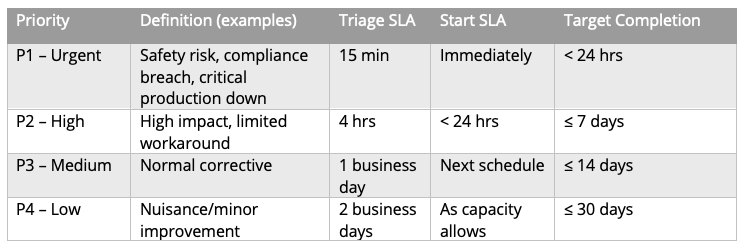
- Priority: A measure of the impact on Safety / Quality / Throughput / Cost Use your best guess; the planner will confirm.
- Photos/Video: If submitting the work request using a mobile device, take advantage of the built in camera and add some "as found" images. This adds evidence of the issue—clear, well-lit, and oriented.
How to write a strong description (the 5-bullet rule)
Keep it short, structured, and observable. Use bullets, not a paragraph.
- Symptom: What you see/hear/measure (no diagnoses yet).
- Context: When/frequency, operating state, load/speed.
- History: Last maintenance or similar issue (if known).
- Impact: Safety/quality/throughput; note if equipment is running/stopped.
- Evidence: Photos/videos/measurements attached.
Example of a good work request description:
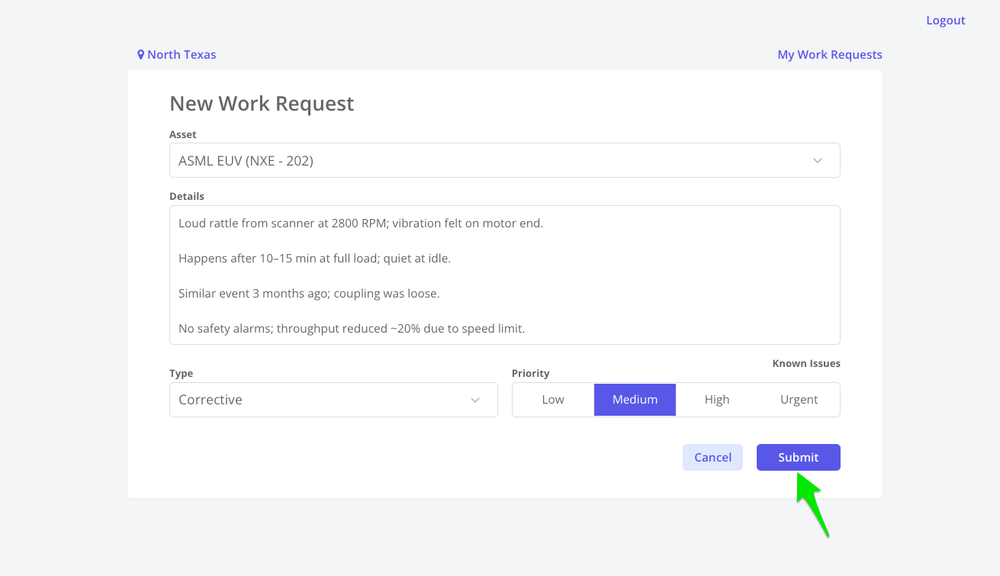
- Loud rattle from P-104 at 2800 RPM; vibration felt on motor end.
- Happens after 10–15 min at full load; quiet at idle.
- Similar event 3 months ago; coupling was loose.
- No safety alarms; throughput reduced ~20% due to speed limit.
- Attached image of damaged motor mounts
Example of a poor work request description:
“Pump broken—please fix ASAP.”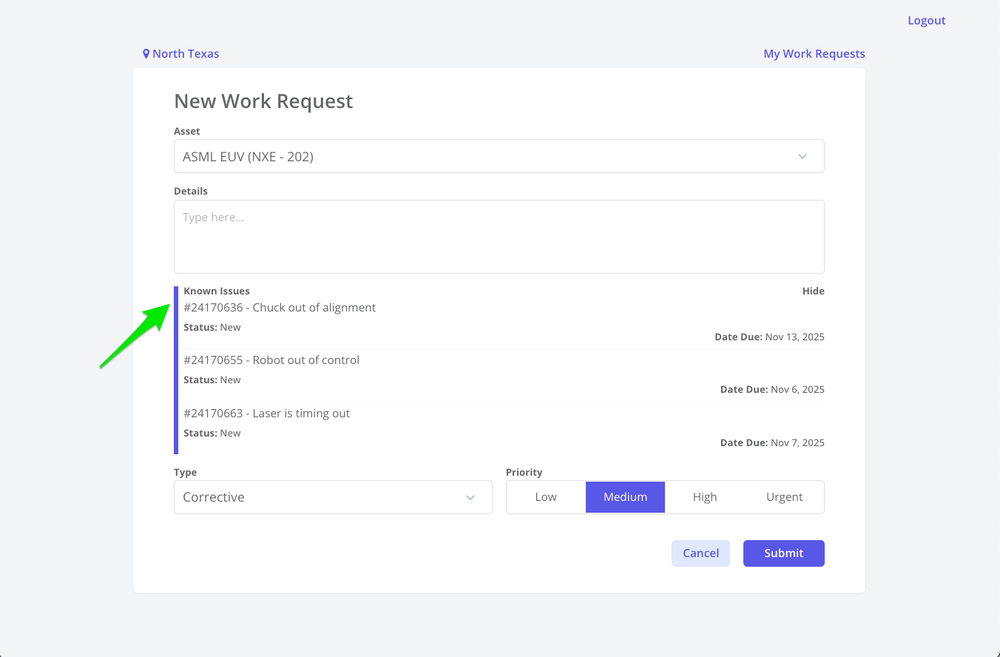
Review Known Issues before Submitting
Checking the Known Issues portal prevents unnecessary duplicates and speeds triage. If you find an exact match, best practice is to not create a new work request.
However, if severity has increased, create a guest request with your evidence (photos, readings, timestamp), and note impact/changes. Reference the existing known issue work order ID. Be sure to explain the difference to justify the duplicate work request.
What not to include
1. Diagnosis as fact (“bearing failed” or “needs new motor”) unless you’re certain and can attach proof. Stick to symptoms; let the planner/tech confirm cause.
2. Vague urgency (“ASAP,” “urgent”) without impact details.
3. Multiple assets/issues in one request. One asset/issue per WR to keep planning and history clean.
4. Rambling long winded work order descriptions—bullets are faster to read and plan.
Priority guidance (suggest—don’t overrule)
Use the site’s priority definitions. As a rule of thumb:
- Urgent - Reserve for immediate safety risk or critical production down.
- High - High impact with limited workaround.
- Medium - Standard corrective work.
- Low - Nuisance/minor improvement, project, or upgrade suggestion
Mobile best practices
1. Create the WR on your phone at the asset so the issue is submitted in real time, at at the earliest possible time.
2. Use voice-to-text but proofread. Replace “uh” with numbers and units.
3. If connectivity is poor, capture photos in on the phone and create the work request when connectivity improves, and before the end of shift.
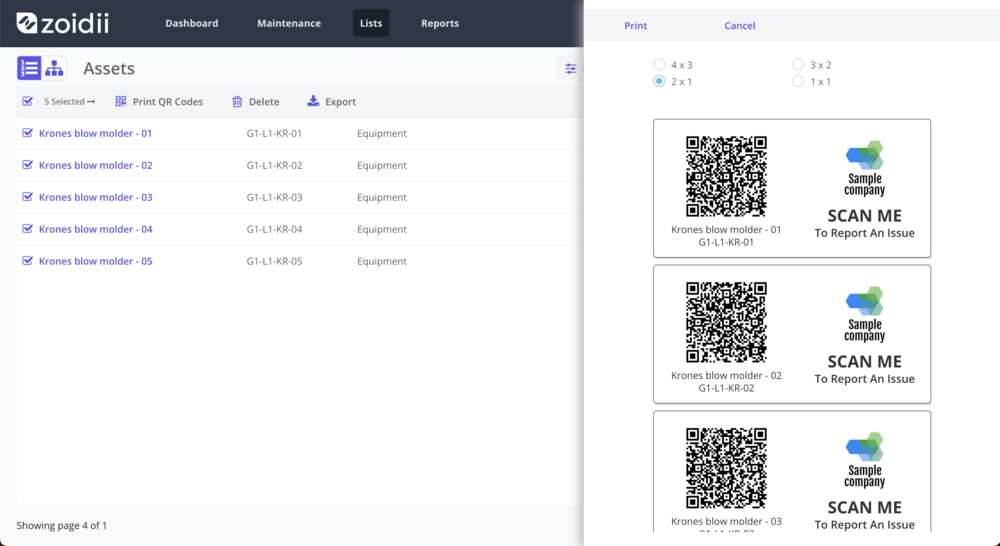
4. Use QR codes as they elimate any friction tyring to find the guest portal link, or searching through asset lists looking for the correct equipment.
Special cases
1. Unknown asset: Choose the nearest location, add photo of the nameplate or surrounding area, and type “Asset Unknown”—planning will resolve.
2. Repeated issue: Reference the previous WO/WR number if visible, or mention approximate date/shift.
3. Compliance/Calibration: Mark as such (if your asset has a tag) and include the standard or tolerance to be checked.
Final tip: your words power reliability
Your request isn’t just a ticket—it’s the start of the asset’s failure record. Clear symptoms + impact + evidence give planners what they need to act quickly, help technicians arrive prepared, and give reliability engineers data to stop repeats.
Write it once, write it well, and the whole system gets faster.