1. Purpose
Provide a clear, repeatable process for creating, triaging, planning, executing, and closing work orders (WOs) in Zoidii so that:
- Safety and asset uptime are prioritized
- Data quality enables reliability analysis and PM optimization
- KPIs (Downtime hours, backlog health, schedule compliance, wrench time, cost accuracy) can be trusted
2. Scope
This SOP covers all corrective, preventive, breakdown, compliance, and improvement work tracked in Zoidii.
3. Roles & RACI
- Requester (Operations/Anyone): Submits request, provides symptoms & impact, confirms completion impact.
- CMMS Coordinator / Maintenance Planner: Triage, validate scope, plan parts & labor, set estimates, target date, kitting.
- Approver (Supervisor/Manager): Approves or rejects; sets priority & budget code; verifies safety requirements.
- Scheduler: Builds frozen weekly schedule; levels capacity; issues assignments.
- Technician: Executes tasks, logs time/materials, captures cause, troubleshooting notes, failure, and close-out notes.
- Stores/Inventory: Reserves, kits, and issues parts in Zoidii; updates min/max.
- Reliability/Engineer: Reviews bad actors / repeat offenders; failure codes, creates follow-up improvement work; updates PMs (frequency, tasks, etc).
- CMMS Administrator: Owns master data, defaults, codes.
4. Definitions
- Work Request (WR): Unscreened request submitted by users.
- Work Order (WO): Approved and planned job with a unique ID and status lifecycle.
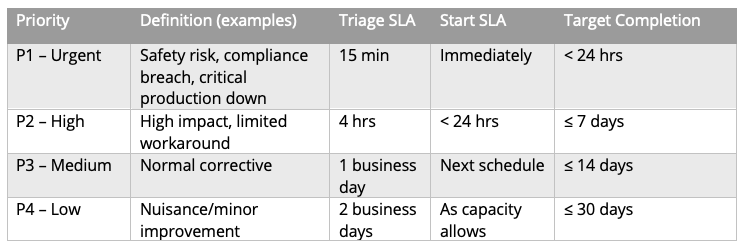
- Priority (P#): Defines urgency and SLA (see §10).
- Kitting: Pre-staging all parts before scheduling.
- Backlog: All approved, not-yet-scheduled WOs.
5. Prerequisites (System & Data)
- Asset registry with a hierarchy (Site > Area > Line > Asset) and asset criticality levels.
- Solid asset naming convention that helps quickly identify assets
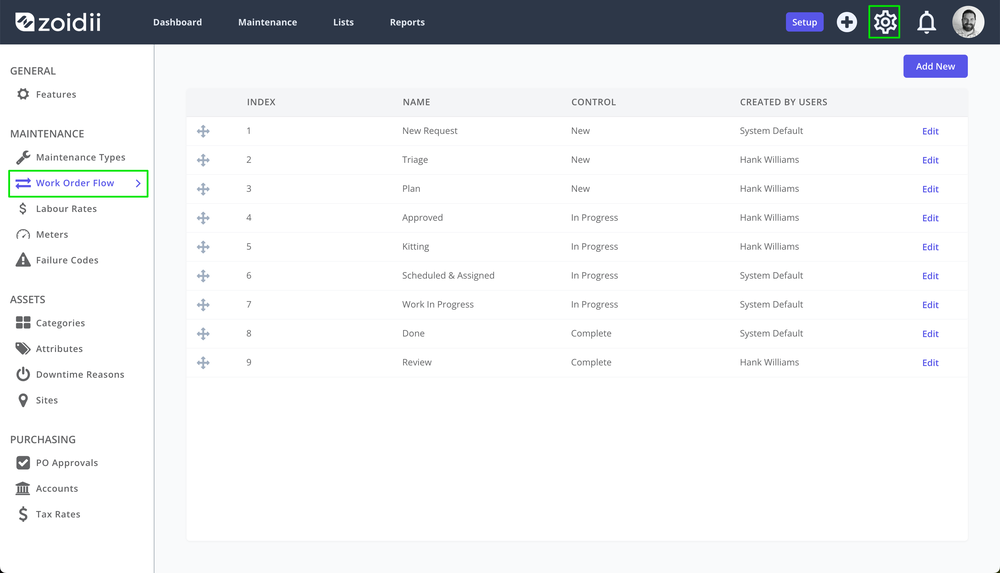
- Standard status model configured in Zoidii (e.g., Requested → Screening → Planning → Waiting Parts → Ready to Schedule → Scheduled → In Progress → Pending → Completed → Closed).
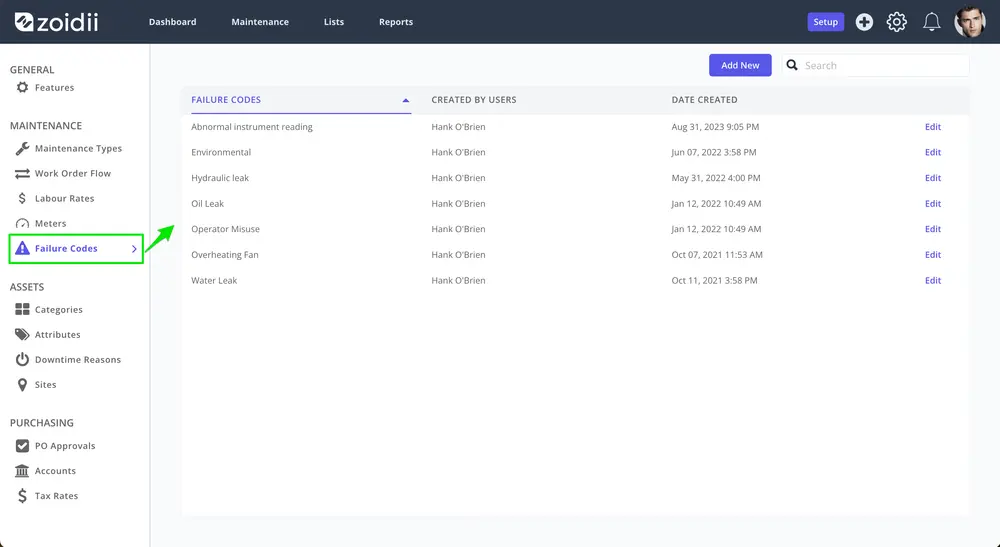
- Standardized defaults: maintenance type, failure codes, downtime reason, teams or shifts.
- Parts catalog with part-asset relationships configured through Attributes; min/max levels.
- User roles/permissions aligned to RACI.
6. End‑to‑End Process Overview
Flow: Request → Triage → Plan → Approve → Kit → Schedule → Execute → Close → Review
6.1 Request (Work Request creation)
Who: Requester (Ops) or Tech via guest request portal
Actions: · Submit request via guest request portal · Validate asset & duplicate check for known issues.
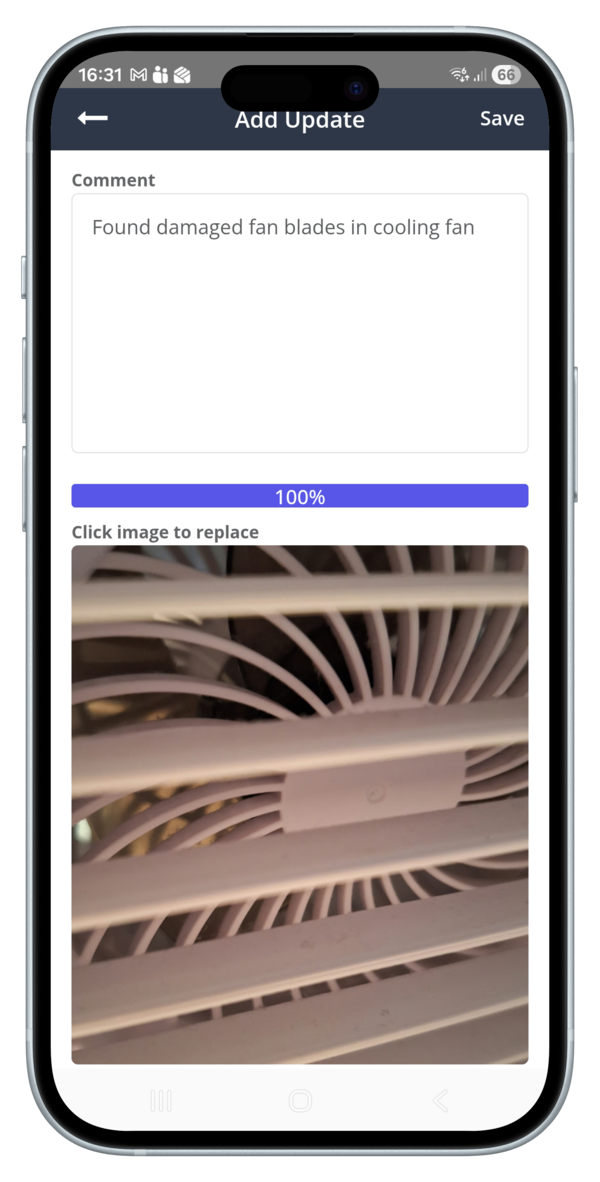
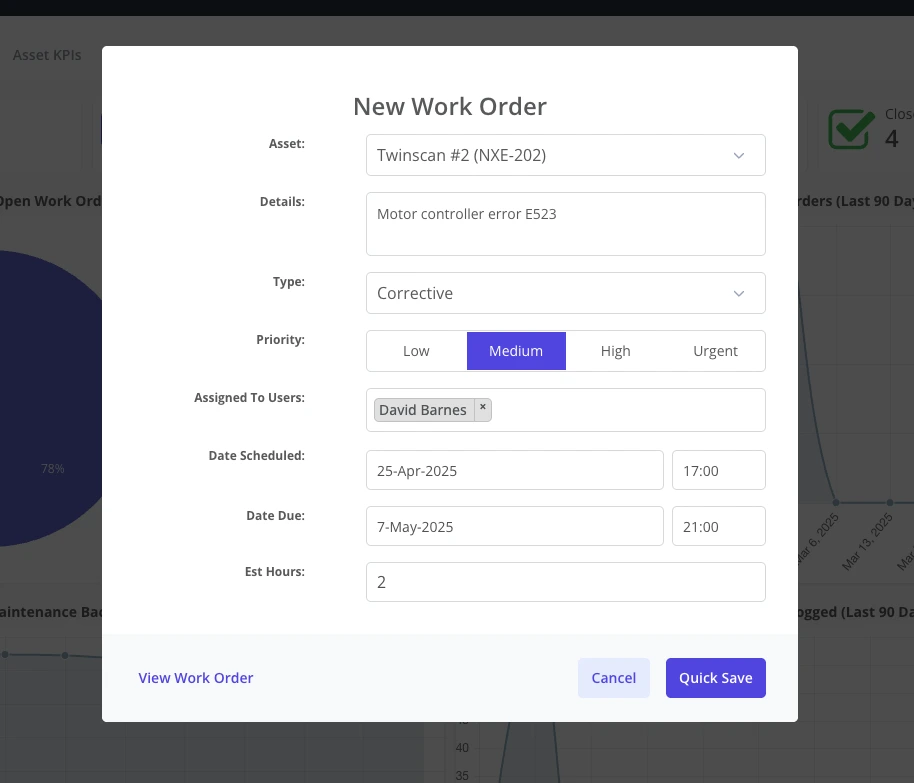
Zoidii fields – required: · Asset/location (use QR codes if possible to eliminate friction) · Details field outlining the problem/symptom (clear, observable) · Assign maintenance Type (Corrective, breakdown, safety, sanitation etc). · Priority level should represent impact on Safety, Quality, Throughput, Cost. · Add “as found” photos on mobile where possible (when helpful)
Best practices: · Install QR codes on all assets to eliminate confusion and remove friction · Guest requestor should always review known issues before submitting to eliminate duplications · Avoid solutions in the request; focus on symptoms (e.g., “Pump P-104 cavitating, loud rattling at 2800 RPM”).
If asset unknown, select nearest location and add “Asset details in description”.
6.2 Triage (convert WR → WO)
Who: Maintenance Planner/Coordinator within SLA (see §10)
Actions: · Validate asset & duplicate check. · Verify/edit maintenance Type (Corrective, breakdown, safety, sanitation etc). · Verify/edit Priority (low - urgent) using impact/urgency matrix. · Decide: emergency dispatch vs. plan & schedule.
Decision gates: o Emergency (Urgent): assign immediately; minimal planning; capture details post‑repair. o Non‑emergency (Low - High): proceed to Planning.
6.3 Work Order Planning
Who: Planner
Actions (enter in Zoidii): · Define Scope: clear objective, acceptance criteria, safety notes, permits, LOTO steps. · Add Task Steps/Checklist with standard job plans where available. · Estimate Labor hours. · Identify Parts and add to work order; initiate purchase if stockout. · Set Target Finish Date (due date in Zoidii) based on priority and asset criticality. · Link to relevant files & Attachments: manuals, drawings, procedures, P&IDs, photos.
Planning Checklist · Safety notes & permits · Scope & acceptance criteria · Steps/checklist added · Parts identified · Labor hours estimated · Drawings/procedures/manuals attached · Target/scheduled date set
Quality bar: a job is “planned” when a qualified tech could execute without stopping to ask basic questions.
6.4 Approval
Who: Supervisor/Manager
Checks: · Safety/permit requirements present · Priority & required date sensible · Compliance tasks (calibration, statutory) flagged · Downtime coordinated with production if needed
Outcomes: Approved → next step; Rejected → requester notified with reason.
6.5 Kitting Parts & Materials
Who: Stores with Planner
Actions: · Reserve and Kit parts; mark WO Waiting Parts if incomplete. · Update part substitutes; trigger Purchase Order if below min/max. · When complete, set Ready to Schedule if using work order scheduler.
6.6 Scheduling
Who: Scheduler with Ops
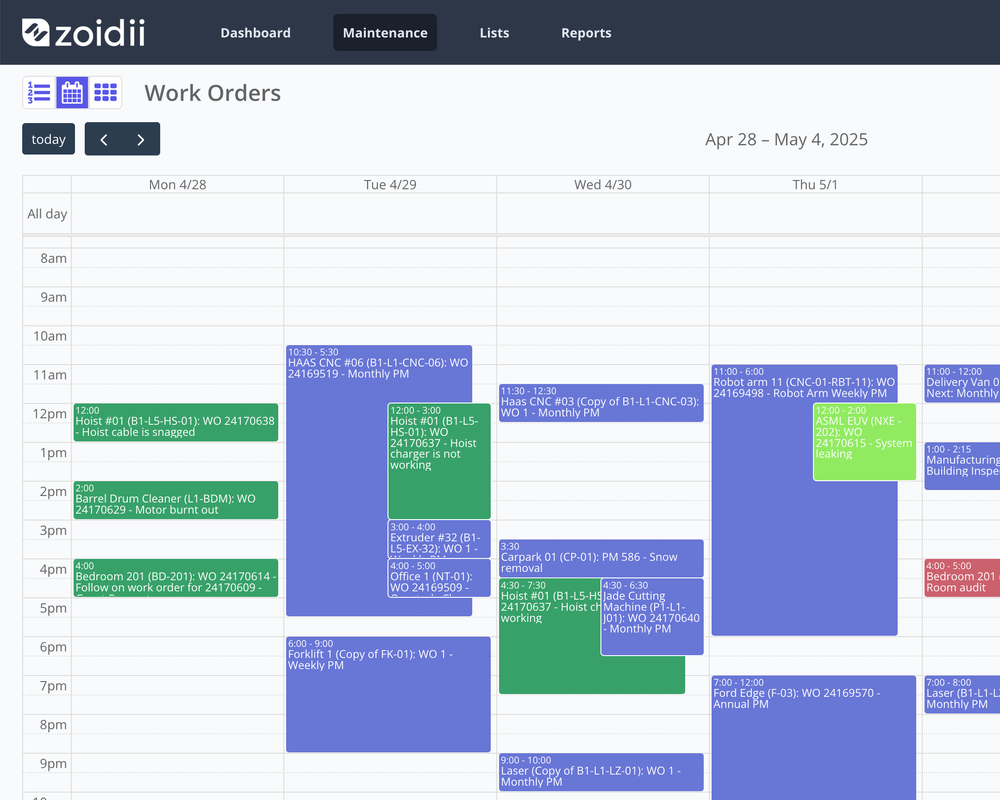
Cadence: weekly frozen schedule; daily dispatch for changes
Actions: · Load the Ready to Schedule backlog, sorted by priority. · Assign technicians; place on calendar. · Communicate locked schedule to Ops.
6.7 Execution
Who: Technicians
Best practices: · Start/stop Downtime Tracking on arrival/exit using asset offline feature. · Follow Checklist and attach photos for as‑found/as‑left. · Add repair commentary to work order updates section. · Record Measurements (e.g., runtime hours, temperatures) where needed in the WO. · If blocked (parts, access), set work order back to waiting scheduling with reason.
6.8 Close‑Out
Who: Technician → Supervisor validates
Required entries: · Add actual Labor hours per resource · Parts consumed (pulled from store) · Downtime start/stop if applicable · Failure Data: assign failure code to work order · Meter readings/measurements · Follow‑up WOs for defects found · Completion “as left” photos; · Acceptance check by requester/production if needed using eSignature
Supervisor review: Verify quality of notes and codes; change status to Completed then Closed.
Close‑Out Checklist · Work completed per scope · Labor hours entered · Parts issued and consumed on Work Order · Downtime recorded · Failure code added · Photos uploaded · Follow‑ups created
6.9 Post‑Review / Reliability
Who: Reliability/Planner weekly
Actions: · Review top repeaters and bad actors; log RCFA candidates. · Refine PMs/condition tasks; create improvement WOs. · Confirm data quality (see §9).
7. Data Standards (what “good” looks like)
- Titles: fill in all fields: [Asset] – [Short Symptom] – [type] – [priority]
- Always choose an asset. If no asset is available, choose the next level in the hierarchy.
- Descriptions: 2–5 bullet points; observable facts first; no speculation.
- Attachments: pre and post-repair images, where possible
- Time entries: rounded to 0.25h (15 minutes)
- Parts: always issue to WO
- Failure coding: mandatory for all reactive work orders
- Checklists: use standard job plans when available; avoid free‑text only.
8. Communication Standards
- Requester gets auto‑notifications when the work order moves through the work order flow from Approval/Rejection, Status change to Scheduled, Completion.
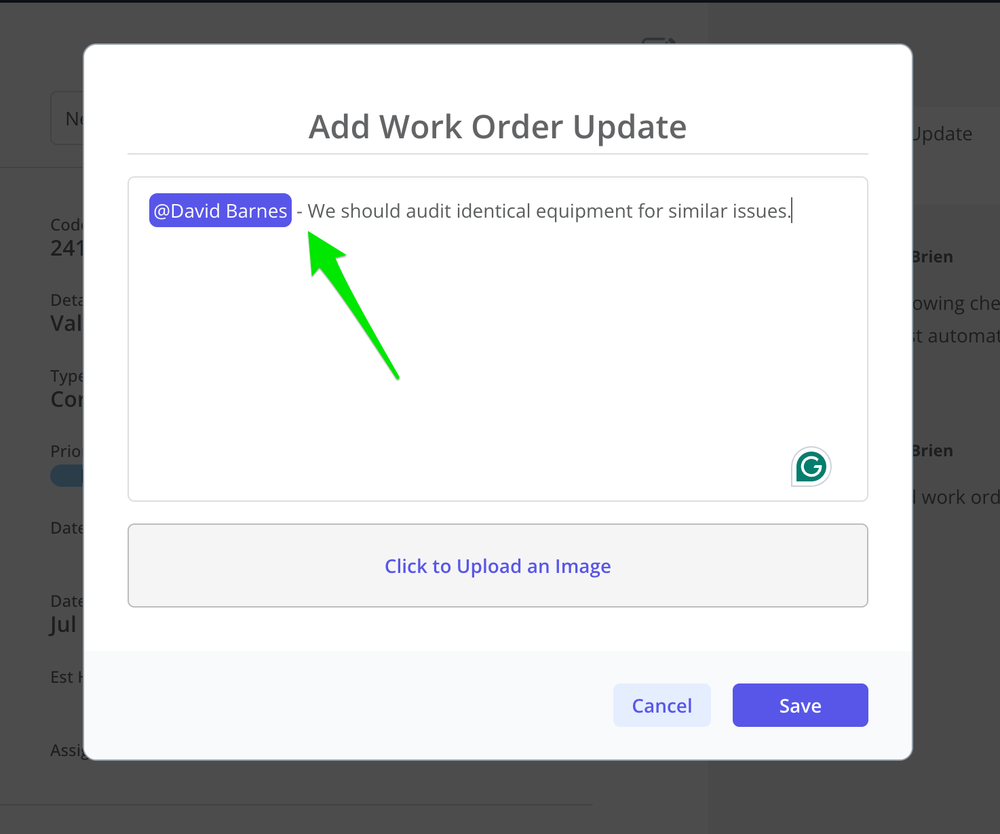
- Comment tagging: @Planner, @Scheduler, @Requester inside WO for decisions & updates.
- Handover notes at shift end for In Progress WOs added to work order activity.
9. Quality Control & Audits
- Weekly audit: random 10 closed WOs → check titles, codes, labor, parts, photos, acceptance.
- Monthly audit: backlog aging by status; P1 post‑mortems; schedule compliance.
- Quarterly: usage review; update checklists, templates and job plans.
10. Priority Matrix & SLAs
11. KPIs & Dashboards
- Planned maintenance % (target 85-90%)
- PM Compliance (Completed as scheduled / Scheduled)
- Wrench Time (% of tech time on active WOs using labour hours reports)
- Backlog Health (weeks of work; aged > 90 days)
- Planning Accuracy (planned vs. actual hours; parts availability at schedule lock using closed work order reports)
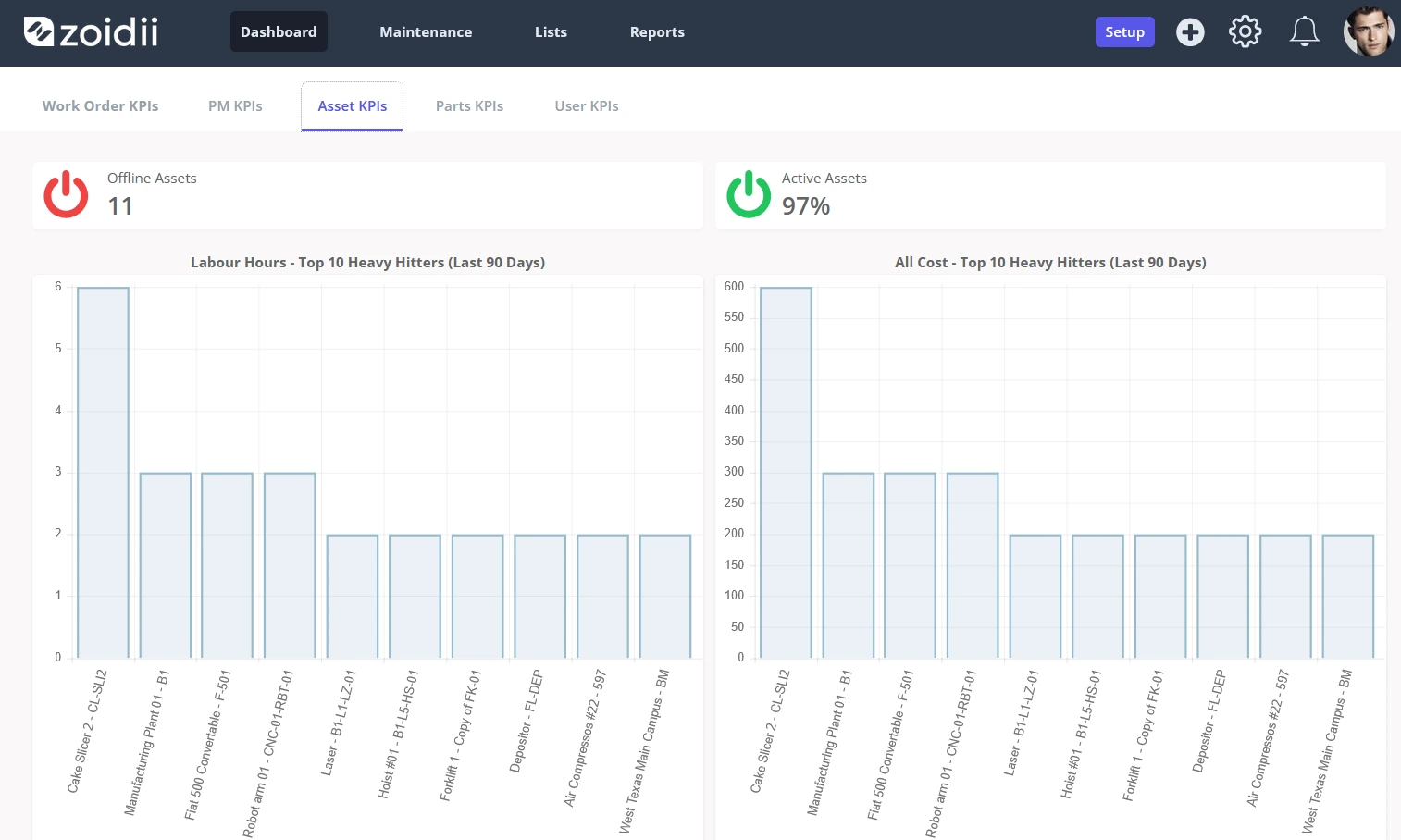
- Asset heavy hitters
12. Safety & Compliance
- All WOs must reflect required permits (LOTO, Hot Work, Confined Space, Electrical).
- Never bypass permit steps due to priority—P1 still requires safety controls.
- Calibration and statutory tasks must reference standards and retain records/attachments.
13. Exceptions & Escalations
- If data is missing at close‑out, the supervisor may return the WO to In Progress with comments.
- If parts are unavailable for > 5 days on P2/P3, escalate to Maintenance Manager and Procurement.
- If repeated failures occur three times within 30 days, escalate to Reliability for RCFA.
14. Mobile Usage Best Practices
- Scan the asset QR code to ensure the correct asset is selected
- Use voice-to-text for notes, but proofread them carefully before submitting.
- Take as‑found and as‑left photos (before and after repair).