

Most manufacturing teams don't lose production time because of catastrophic failures. They lose it in the gaps: a work order that sat in someone's inbox for three hours, a technician who drove to the wrong building because the location field was blank, a spare part that was supposedly "in stock" but wasn't. Manufacturing work order software exists to close those gaps, and the right system can cut unplanned downtime by 30-50%, according to a 2025 report from Plant Engineering.
But picking the wrong one? That's a different kind of expensive. I've seen plants spend $40,000+ on software their maintenance teams refused to use because it was designed for office workers, not people wearing gloves. Here's what actually matters.
Quick Verdict:
- Best overall for small to mid-size manufacturers: Zoidii CMMS - mobile-first, fast to deploy, simple to manage
- Best for enterprise plants with ERP needs: SAP Plant Maintenance or IBM Maximo
- Best free option for very small shops: MaintainX (free tier covers basics)
- What to prioritize: Mobile access, spare parts tracking, and a setup time under 2 weeks
- What to skip: Any system that requires a 6-month implementation or charges per work order
What Manufacturing Work Order Software Actually Does
Strip away the marketing language, and you're looking at a system that handles three things: creating maintenance tasks, assigning them to the right people, and tracking whether the work got done correctly.
The best platforms for manufacturing go further. They tie work orders to specific assets (think: CNC Machine #4 on Line B, not just "the CNC machine"), track labor hours against each job, manage spare parts inventory, and generate reports that help you spot patterns before they become emergencies. A good CMMS (Computerized Maintenance Management System) is the most common form of work order software in manufacturing. It connects your preventive maintenance schedules, your reactive repair requests, and your parts inventory into one system. The difference between a generic task manager and a proper CMMS is like the difference between a sticky note and a flight checklist: both track tasks, but only one keeps the plane in the air.
Comparison Table: Top Work Order Platforms for Manufacturing (2026)
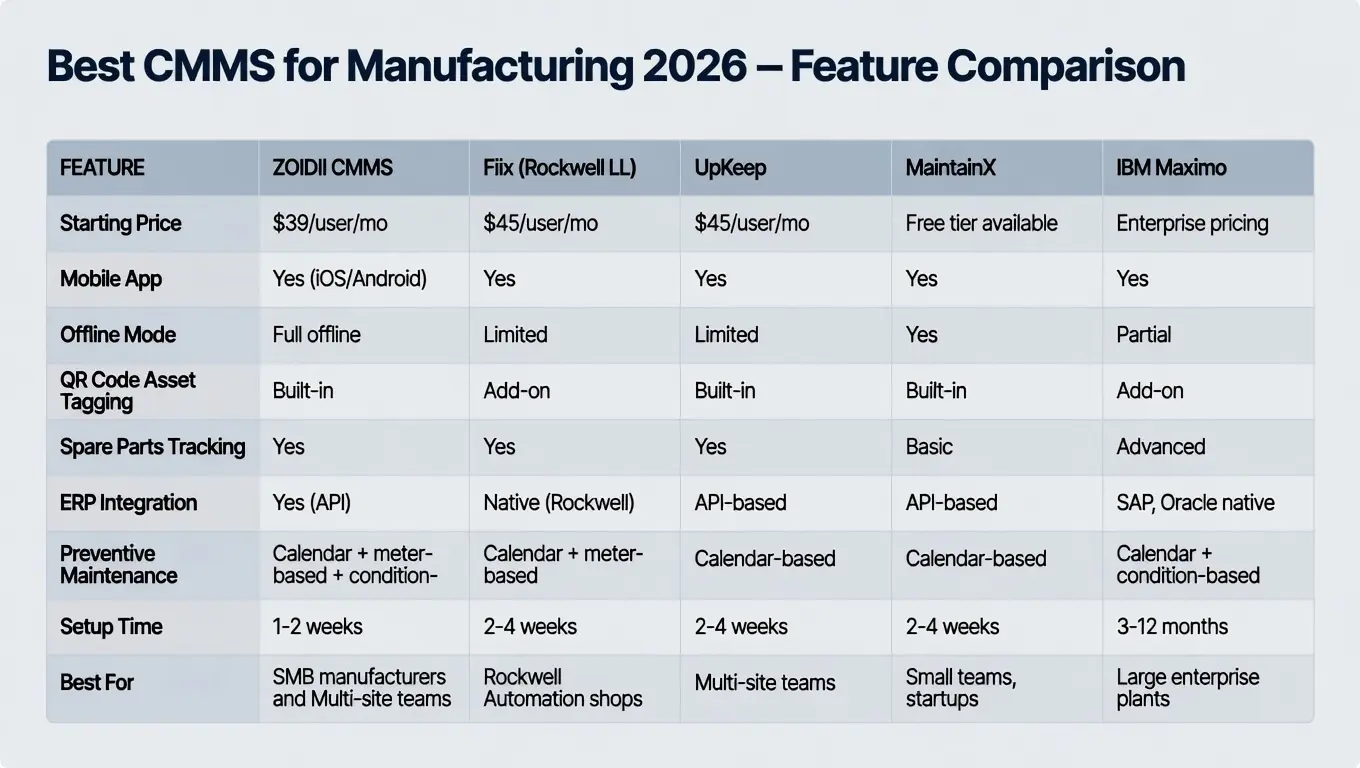
Features That Actually Move the Needle
Work Order Creation with SOPs Attached
Creating a work order should take under 60 seconds. The best systems let you attach standard operating procedures directly to the order, with the best systems allowing you to automatically add SOPs, so a technician replacing a hydraulic seal on a press brake sees the exact torque specs, safety lockout steps, and part numbers without calling anyone. Zoidii and MaintainX both handle this well with photo, video and PDF attachments on mobile.Technician Scheduling and Labor Tracking
A 2025 Deloitte study found that manufacturers waste an average of 26% of maintenance labor hours on non-wrench time: walking to get parts, waiting for instructions, filling out paperwork. Software that allows you to assign work orders based on technician skill, location, and current workload can recover a significant chunk of that lost time. If your team has 10 maintenance techs, that's roughly the equivalent of getting 2.5 extra employees for free.Mobile Access
This is non-negotiable for manufacturing. Your technicians aren't sitting at desks. If the software doesn't work on a phone, it won't get used. Period. Zoidii's full intuitive mobile app stands out here: techs can complete work orders, log parts used, and add photos easily.QR Code Tagging and Digital Forms
Slapping a QR code on every asset sounds simple, but it changes behavior. A technician scans the code on a conveyor motor and instantly sees its maintenance history, open work orders, and linked parts. No more guessing which motor is which. No more handwritten logs that nobody can read. Plants using QR-based asset identification report 15-20% faster work order completion, according to Reliable Plant data from late 2025. Read more about how QR codes work with your CMMS.Inventory and Spare Parts Management
Here's where money gets real. The average manufacturing plant carries $250,000 to $1 million in spare parts inventory. Without software tracking consumption against work orders, you end up with two problems: critical parts that run out (causing extended downtime) and shelves full of parts you'll never use (tying up cash). A connected work order system automatically deducts parts when they're used and triggers reorder alerts at minimum stock levels.Reporting and Analytics
The reports themselves aren't the point. What matters is whether you can answer specific questions: Which asset has the highest repair cost this quarter? What's our average time-to-repair for emergency work orders? Are we completing PMs on schedule or constantly pushing them back? If your software can't answer those in two clicks, you're flying blind.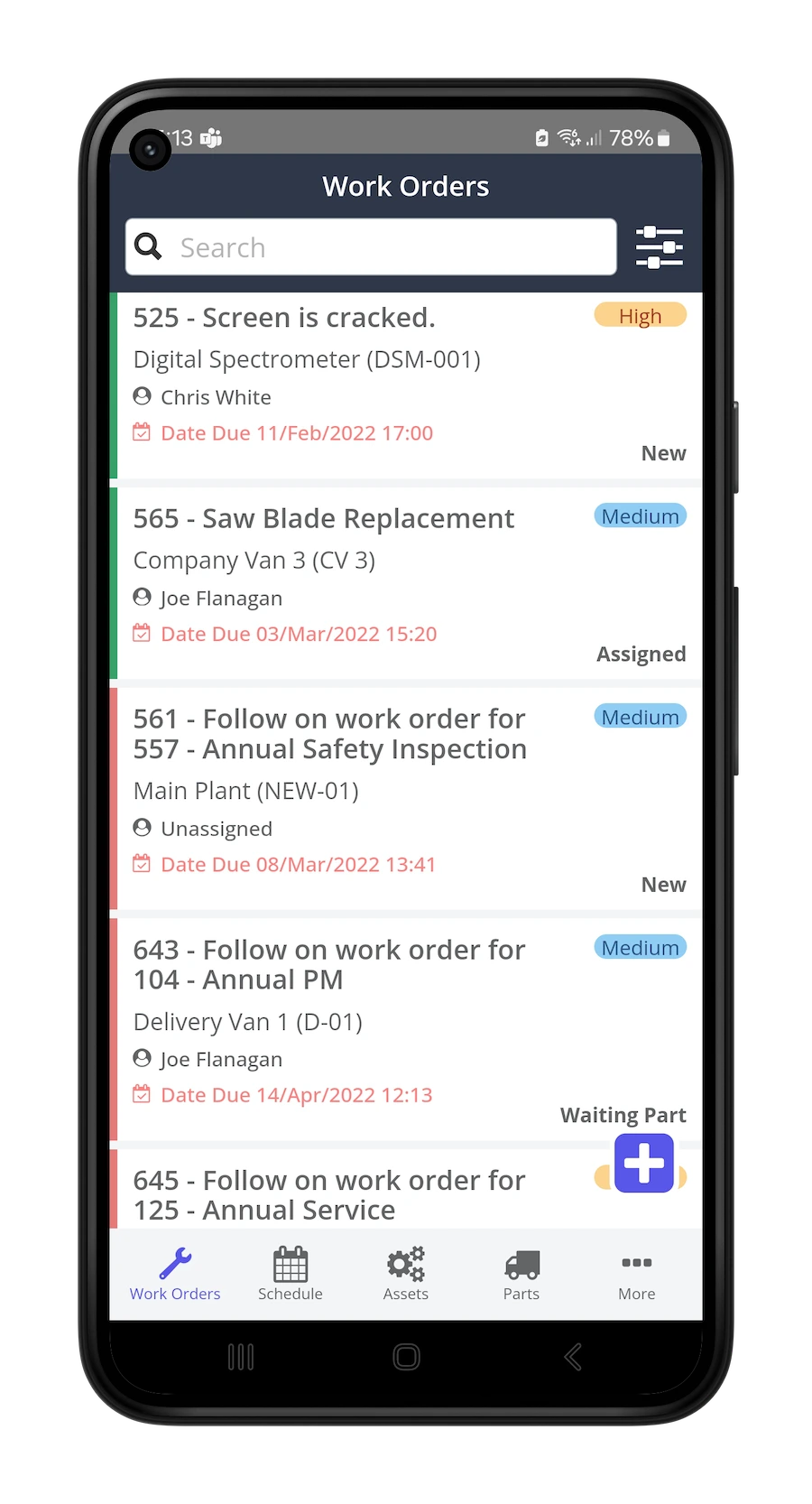
Types of Systems: Which Category Fits Your Plant?
Simple task managers (Trello, Asana) work for tracking office projects but fall apart in manufacturing. They don't support asset hierarchies, parts tracking, or meter-based PM scheduling. Skip them for maintenance.
CMMS platforms are the sweet spot for most manufacturers. They're purpose-built for maintenance work orders, preventive maintenance, and asset management. A mid-size plant with 200-500 assets and 5-15 maintenance staff will get the most value here.
Enterprise asset management (EAM) systems like IBM Maximo or SAP PM are built for organizations managing thousands of assets across multiple sites. They're powerful but expensive, and implementation timelines of 6-12 months are common. A 500-person plant with complex compliance requirements might need this level. A 50-person shop definitely doesn't.
Field service management (FSM) software is designed for companies dispatching technicians to customer locations. If your maintenance team works inside your own facilities, FSM adds complexity you don't need.
What a Good Implementation Looks Like
The biggest predictor of success isn't the software you pick. It's how you roll it out. Here's what works:
- Week 1: Import your asset list and assign QR codes to your top 20% of critical equipment
- Week 2: Set up your most common PM schedules and train your lead technicians
- Week 3: Go live with work orders for one production line or area
- Week 4: Expand to the full facility based on lessons learned
Frequently Asked Questions
How much does manufacturing work order software cost?
Expect $30-75 per user per month for mid-tier CMMS platforms. Enterprise systems like Maximo can run $150-300+ per user monthly with implementation costs of $100,000-500,000. Free tiers exist (MaintainX, Limble) but typically cap features or user counts.Can work order software reduce downtime?
Yes, and the numbers are well-documented. Plants using CMMS-driven preventive maintenance programs report 25-40% reductions in unplanned downtime within the first year, according to the Society for Maintenance and Reliability Professionals (SMRP).How long does implementation take?
Cloud-based CMMS platforms typically take 1-4 weeks for small to mid-size plants. Enterprise EAM systems take 3-12 months. The variable isn't the software: it's how clean your asset data is going in.Do I need a CMMS or is a spreadsheet enough?
If you're managing fewer than 50 assets and have one or two maintenance people, a spreadsheet can work temporarily. Beyond that, you're losing money. A 2025 Fiix benchmark study found that plants switching from spreadsheets to CMMS saved an average of $12,000 per technician annually in reduced downtime and better parts management.What's the ROI timeline?
Most manufacturers see positive ROI within 3-6 months. The biggest early wins come from reduced emergency repairs (which cost 3-5x more than planned maintenance) and fewer stockouts on critical spare parts.Can work order software integrate with our existing ERP?
Most modern platforms offer API connections to major ERP systems. Native integrations (like Fiix with Rockwell or Maximo with SAP) require less configuration. Budget $2,000-10,000 for custom API integration work if your ERP isn't directly supported.Picking the Right System
The best manufacturing work order software is the one your technicians will actually open every morning. Features matter, but adoption matters more. Book a demo with your top two or three choices, put a wrench-turner in the room during the demo, and watch their reaction. That tells you more than any feature checklist ever will.



