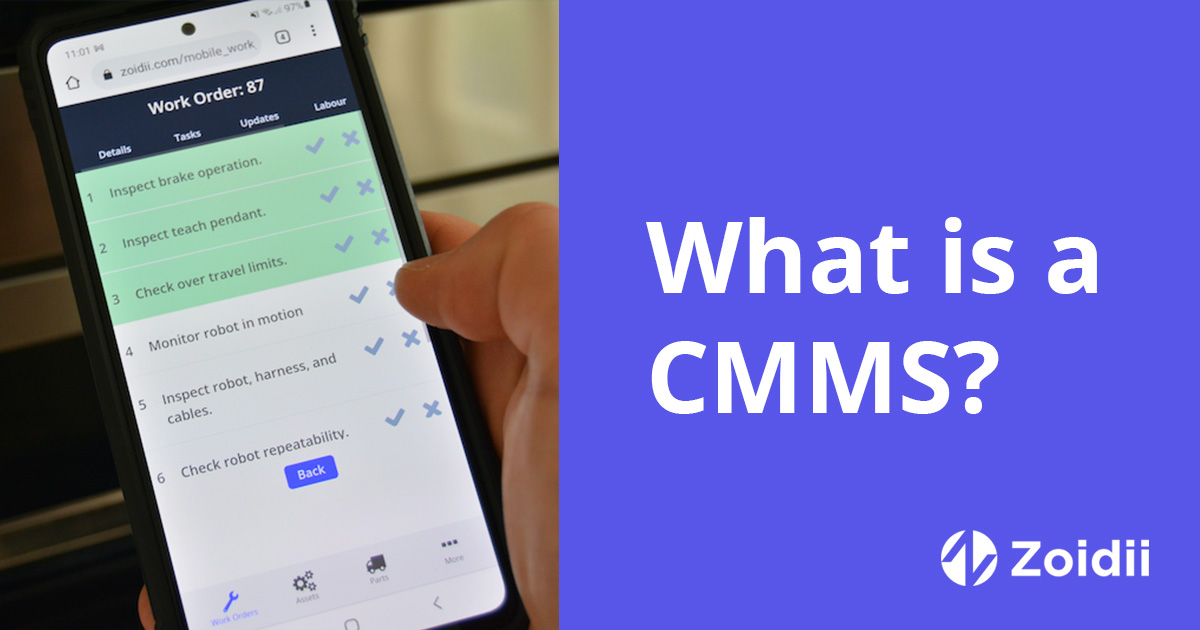
Last Tuesday, your lead technician spent 42 minutes digging through a dusty filing cabinet just to find the service manual for a pump that was already leaking. In a facility with over 250 identical machines, identifying the right asset shouldn't feel like a high-stakes guessing game.
You need a reliable QR code system to bridge the gap between your physical equipment and your digital records. You know that manual data entry is a slow, error-prone process that drags down your team's efficiency every single shift.
We are here to make your asset management stupid simple. This guide shows you how to generate and implement QR codes that put work orders and asset history directly into your technicians' hands.
You'll learn how to eliminate data entry errors and improve overall reliability through better tracking. We will walk through the exact steps to transform your facility into an organized, high-performing operation where every scan delivers the data you need to keep things running.
Key Takeaways
- Bridge the gap between your physical hardware and digital records by using "Quick Response" technology built for industrial environments.
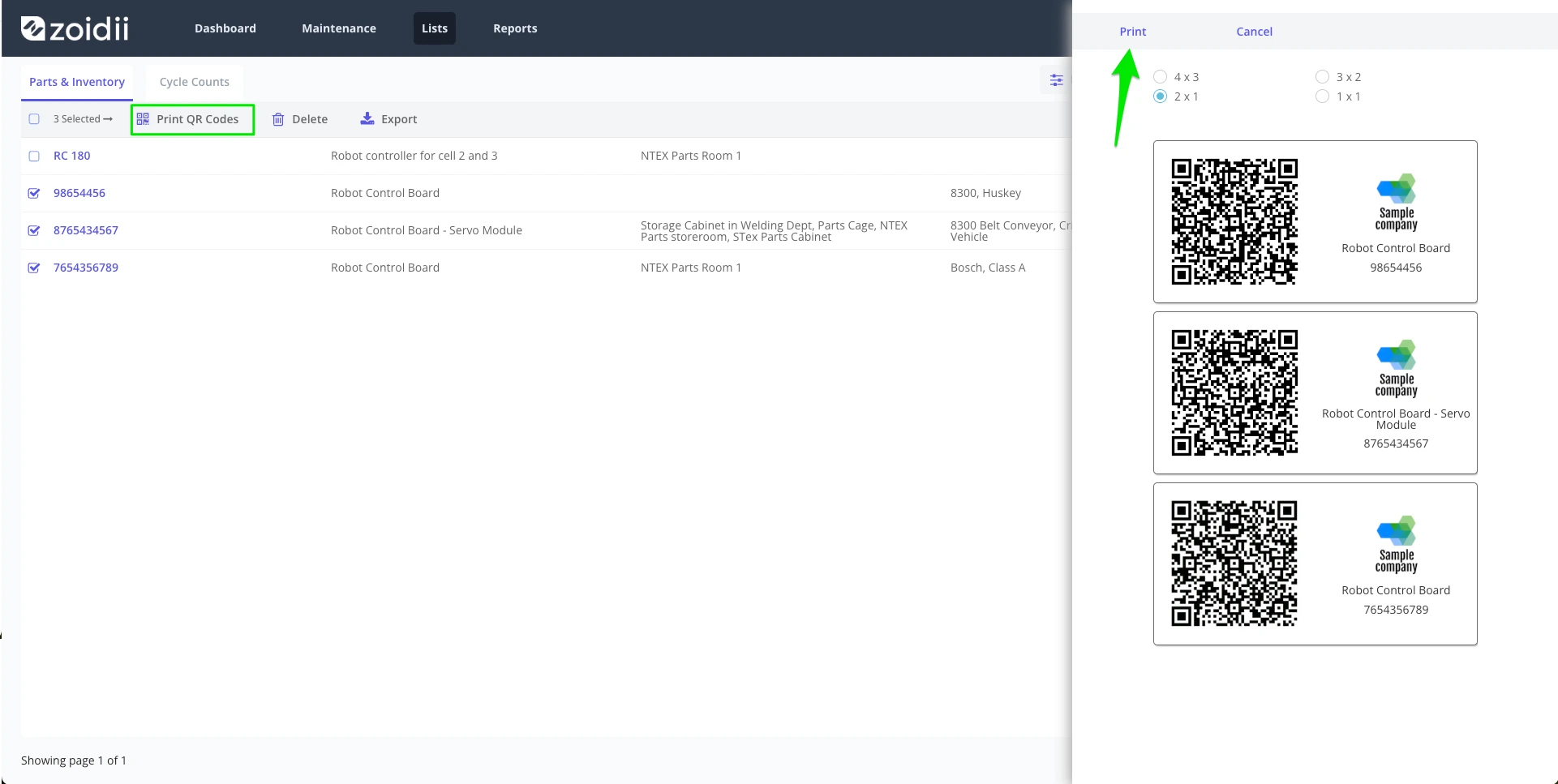
- Learn how to use the QR code generator to create high-resolution asset tags that link directly to your specific maintenance data in five simple steps.
- Identify high-impact areas in your facility where instant access to asset history can slash response times and eliminate manual entry errors.
- Get pragmatic advice on selecting durable label materials that won’t fall off or fade in the heat and grime of a real-world factory.
- Discover how Zoidii keeps it stupid simple by turning a basic QR code into a powerful, scalable tool for your entire maintenance team.
What is a QR Code for Asset Management?
Asset management used to mean clipboards, smudged ink, and squinting at faded serial numbers. A QR code, or Quick Response code, flips that script. It's a two-dimensional matrix barcode that stores data horizontally and vertically.
While a traditional 1D barcode usually holds about 20 to 25 characters, a QR code can hold up to 7,089 numeric characters. In an industrial environment, this extra capacity is the difference between a simple ID number and a direct link to a machine's entire service history.
The QR code is then decoded by the scanner and displayed on the device in milliseconds, making it a convenient and efficient tool for storing and accessing data.
Initially developed in the automotive industry for tracking vehicle parts, these unique codes have evolved into versatile tools utilized by various industries, including consumer goods, banking, maintenance, and asset management.
The evolution of QR codes in asset management and maintenance
QR codes have become increasingly popular in recent years due to their ease of use and ability to store vast amounts of data in a small space.
They are commonly used in advertising and marketing campaigns, allowing businesses to provide customers with quick access to information about their products or services.
For example, customers and prospects can scan QR codes and be directed straight to a website without manually entering a web address.

How are QR codes used with CMMS Software?
Maintenance teams use these codes to bridge the gap between physical equipment and digital records. When a technician stands in front of a centrifugal pump, they don't want to dig through a filing cabinet. They need the specs now.
By using the QR code generator in the CMMS, managers can create durable tags that instantly surface work orders, safety protocols, or spare parts lists on any mobile device. It's about moving from a reactive "search and find" culture to an "identify and fix" workflow.
QR codes can enhance efficiency and usability in a CMMS (Computerized Maintenance Management System) context.
QR codes are typically assigned to an asset or part, allowing users to quickly access the relevant information by scanning the QR code. Using QR codes enhances asset visibility and improves the speed and accuracy of equipment maintenance processes.
QR codes enable users to quickly access the information they need, improving their productivity, accuracy, and efficiency. QR codes are handy for CMMS mobile users, who may find it difficult to type long URLs on a tiny keyboard.
The most common use is to assign QR codes to specific assets or equipment, making it easier for maintenance professionals to access information and log their work. For example, QR codes for tracking equipment allow maintenance teams to quickly scan and retrieve relevant data during inspections.
For QR codes to function optimally within a system, a standardized asset naming convention is essential. This ensures that all asset data is consistent, accurate, and easily retrievable when scanning codes.
Here are some examples of how to use QR codes with your CMMS software:
1. Retrieving asset information
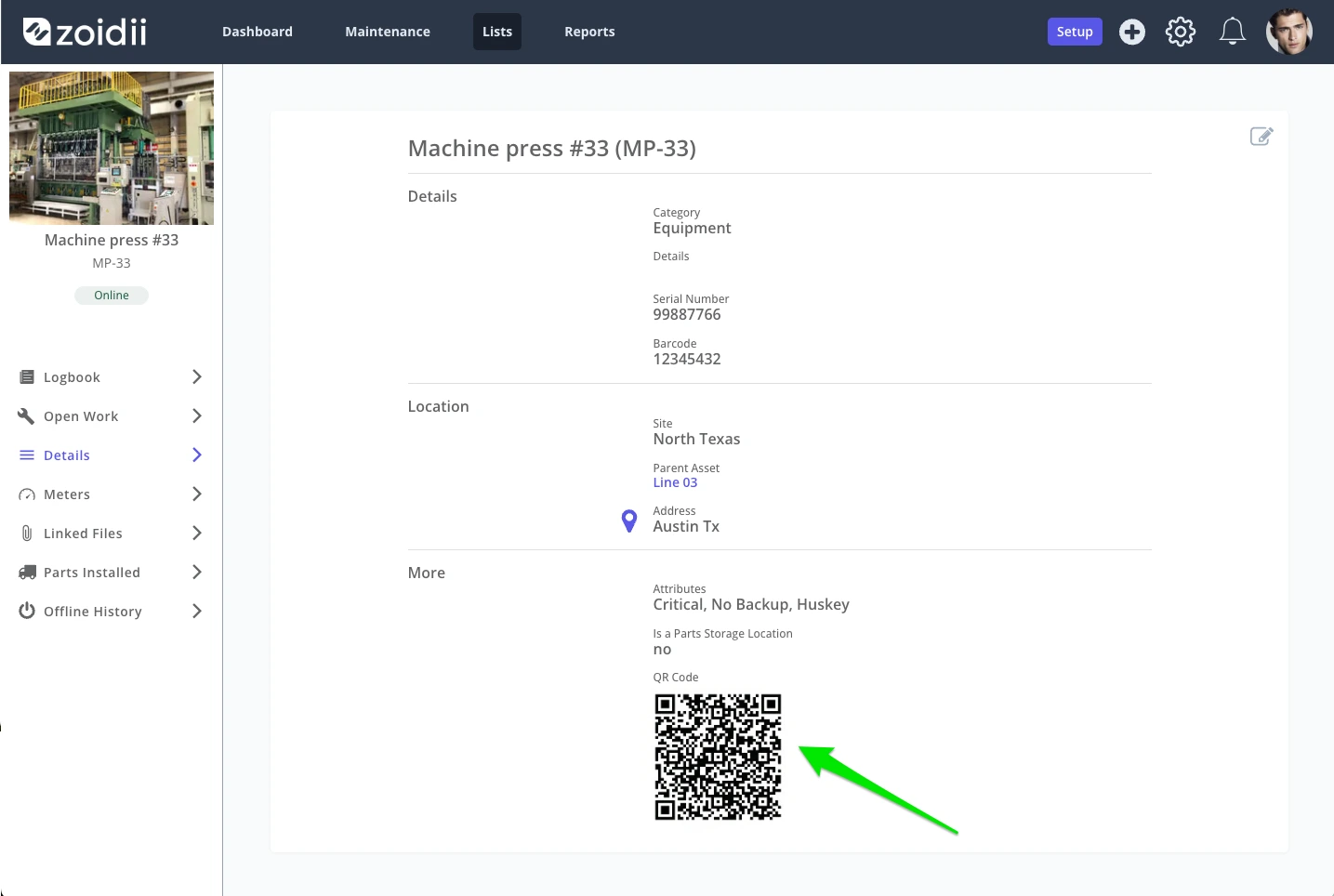
Attaching a QR code to an asset allows technicians to quickly retrieve information about the equipment, such as maintenance history, manuals, warranty details, or installed parts, without manually searching the system.For example, a technician is repairing a piece of equipment they've never worked on before. Without a QR code, they would need to search through the CMMS to find the relevant information.
However, a QR code attached to the equipment allows the technician to scan it and instantly access the necessary information, ensuring accurate maintenance records and quicker repairs.
2. Create work requests
Utilizing the QR code simplifies the work request process and saves valuable time. It also increases the chances the guest logs the work in the CMMS. Consider the scenario where a security guard spots a leaking HVAC system.If there is no system to report the issue, or the reporting system is more hassle than it's worth, the leak may go unreported and unnoticed. If the HVAC system has a QR code, the security guard can quickly scan it with the QR code maintenance app on their mobile device and report the issue quickly.
3. Inventory management
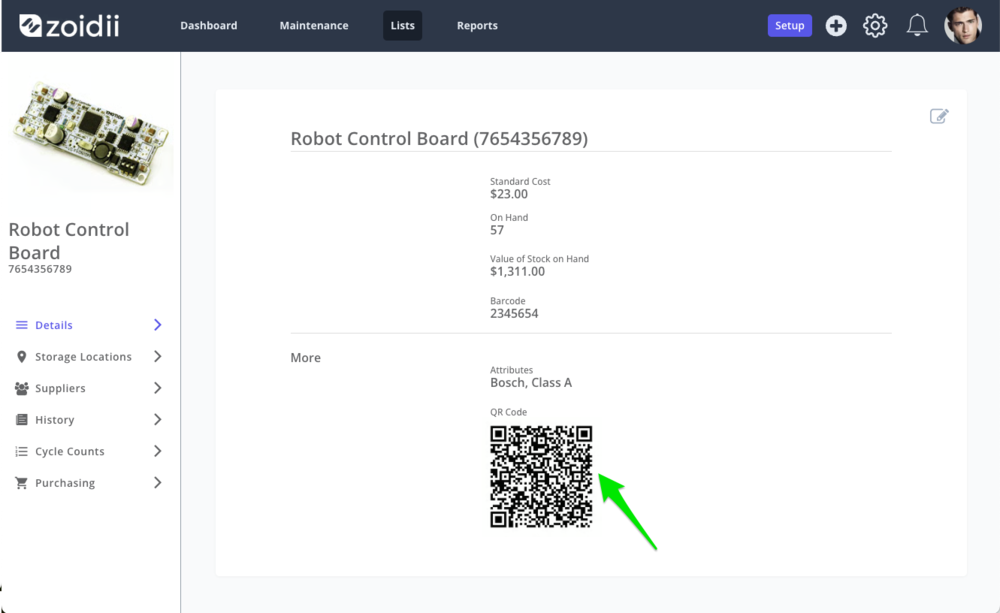
Scanning the QR code on a part can display essential information such as stock levels, reorder points, and order history.During stock counts, inventory personnel can quickly scan the QR code on the part shelf and log the part count with ease by leveraging a QR code management system designed to enhance inventory tracking and accuracy.
Static vs. Dynamic QR Codes: Which Do You Need?
- Static QR codes are permanent. The data is hardcoded into the square pattern itself. Once you print a static tag for a boiler, that link can't change. If the destination URL breaks or the documentation moves to a new server, the physical tag becomes a useless piece of plastic. These are fine for simple, unchanging ID numbers, but they lack flexibility for long-term operations.
- Dynamic codes are the professional standard for maintenance. These codes use a short redirect URL. This means you can update the linked manual, video tutorial, or maintenance log without ever touching the physical tag on the machine. It's a "set it and forget it" approach that saves hundreds of hours in re-tagging labor over a 10-year asset lifecycle. Zoidii utilizes the dynamic QR codes approach.
What are the advantages of using QR codes in your CMMS?
Manual data entry is a reliability killer. Industry data shows that manual entry error rates typically hover between 1% and 4%. In a facility with 500 assets, those small typos lead to wrong parts being ordered and safety checks being missed. Scanning a QR code is "stupid simple" and cuts the error rate to near zero.
Using QR codes in conjunction with CMMS software has several benefits, including enhanced efficiency, reduced human error, and improved data accuracy.
Integrating QR codes with essential CMMS features, such as work order management and inventory control, enables organizations to streamline maintenance processes, reduce downtime, and ensure more accurate record-keeping.
1. Quick retrieval of asset or part information
QR codes enable you to quickly enter data into your maintenance software. Instead of typing in information, you can scan the QR code with your smartphone or tablet. Scanning takes less than one second, compared to 15-30 seconds for manual searching.The CMMS automatically populates the asset information into the appropriate fields on the work order, enhancing equipment visibility and optimizing QR code equipment maintenance.
Ditching paper isn't just about being "green." It's about operational speed. When a line goes down, every second spent hunting for a paper manual adds to the downtime cost. Digital tagging ensures the right information is in the right hands at the exact moment of need.
2. Increased accuracy
Every plant has stories of technicians performing preventive maintenance (PMs) and work orders on the wrong systems. Since QR codes eliminate the need for manual data entry, there is less room for errors.Scanning the QR code on the equipment ensures the technician is working on the correct asset, improves the accuracy of your maintenance records, and reduces the likelihood of mistakes in your equipment maintenance processes.
3. Improved efficiency
As mentioned earlier, QR codes save valuable time by providing instant access to critical information. Technicians can quickly scan QR codes on assets, giving them instant access to the information they need to perform maintenance tasks without wasting time searching for the necessary data.This functionality supports real-time updates on work orders, maintenance activities, service histories, and equipment performance, ensuring smoother and more efficient operations.
4. Reduced human error
Using QR codes minimizes the risk of errors resulting from manual data entry. Automating information retrieval saves less room for mistakes, making the CMMS more accurate and reliable. Barcode scanning also contributes to higher data accuracy by simplifying the capture of information.5. Increased mobility
With QR codes, you can access your CMMS data from anywhere, using your smartphone or tablet. Deploying QR codes can help increase mobility and flexibility, allowing you to manage your maintenance processes from anywhere, at any time.6. Increase the likelihood of receiving guest work requests
When reporting an issue at your facility, if your guest request process is too complex, guest users will often ignore problems and continue moving forward. QR codes make the process easy for folks to report issues to the maintenance team.They scan the QR code, which brings the guest user to the company's guest request portal with the asset prepopulated, streamlining QR code asset management and improving response times.

Industrial Use Cases: Where QR Codes Save Time
Maintenance managers lose hours every week chasing paper records and hunting down manuals. Using QR codes to tag your equipment stops the data hunt before it starts.
These codes bridge the gap between a physical machine and your digital records instantly. It’s about putting the right information in the technician's hand exactly when they're standing in front of the asset. This "on-the-spot" reporting cuts out the middleman and keeps your facility running without the usual administrative friction.
Instant Asset History and Manuals
Technicians often spend 25% of their shift just looking for information. When a critical pump fails, they don't have time to walk back to the office to check a filing cabinet. A QR code fixed to the pump housing allows them to scan and see the last five work orders immediately. You can link these codes directly to digital O&M manuals, eliminating the need for bulky paper binders. Most importantly, scanning a code can display safety protocols or LOTO procedures. This ensures your team follows every safety step before they even crack a wrench, reducing the risk of accidents by providing 100% clarity on-site.MRO Inventory and Spare Parts
Disorganized parts rooms kill productivity and lead to expensive rush orders. Stick QR codes on your bin locations to make the checkout process stupid simple. When a tech grabs a spare bearing, they scan the bin to update the count in your CMMS. You can set the system to trigger "low stock" alerts automatically when levels hit a specific threshold, such as 3 units. During the annual physical inventory count, scanning codes reduces manual entry errors by 40%. It keeps your stock levels accurate and ensures you have the parts you need for your next PM.Guest Work Orders for Facilities
Non-technical staff often ignore issues because reporting them is a hassle. This leads to "drive-by" maintenance requests where someone stops a tech in the hallway to complain about a leaky faucet. You can end this distraction by placing QR codes in common areas like breakrooms or lobbies. A guest or employee scans the code and submits a request in seconds without needing a login.Because the code is tied to a specific location, the system captures the exact room number automatically. This eliminates 15 minutes of back-and-forth communication per request and ensures your team knows exactly where to go. Using QR codes at these request points makes your facility management more responsive and organized.
How to Implement QR Codes in Maintenance Operations
Implementing QR codes in maintenance involves several steps to ensure they are effectively integrated with your Computerized Maintenance Management System (CMMS) and utilized efficiently by your maintenance team. Here's a detailed guide on how to do this:
1. Identify assets
Start by identifying all the assets and equipment that will benefit from QR codes. This includes machinery, tools, vehicles, and inventory items. Group these assets based on their maintenance needs and frequency of use to streamline your QR code equipment tracking and reporting system.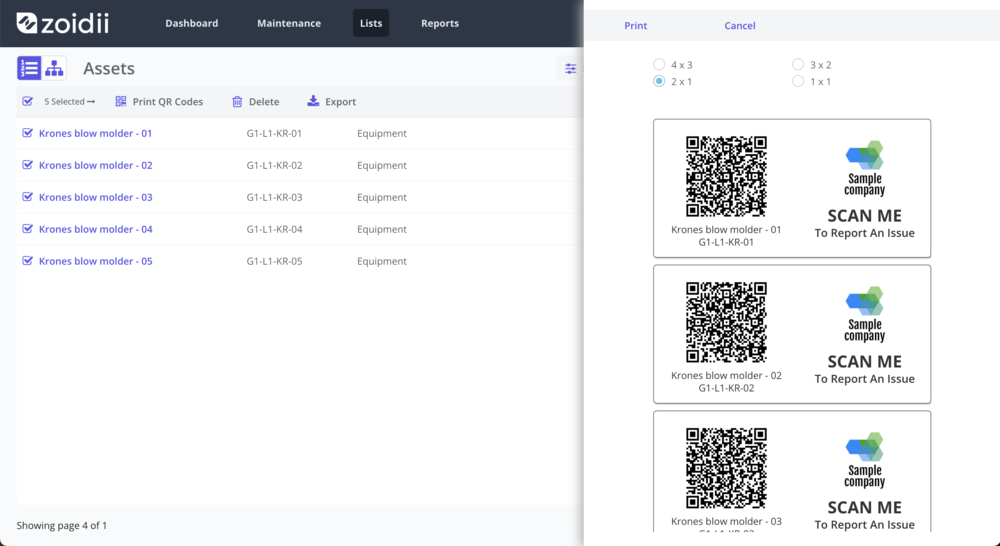
2. Durable printing
Print the QR codes on durable, weather-resistant materials to withstand the conditions in your facility. Consider using laminated labels or metal tags for harsh environments.3. Attach securely
Attach the QR codes securely to the assets in readily accessible and visible locations. Do not place them in areas prone to damage or excessive dirt. Proper placement is crucial for efficient QR code management, as it reduces the need for reprinting codes due to wear and tear.4. Equip your team
Equip your maintenance team with smartphones or tablets that have QR code scanning capabilities. Ensure these devices are compatible with your CMMS software. Install any necessary apps or software on your mobile device to scan QR codes and access the CMMS.5. Conduct training sessions
Please don't assume your team will figure out what QR codes are and how to use them. Provide QR code training for your maintenance team to demonstrate how to use the QR codes effectively. Show them how to scan codes using mobile devices and access asset information in the CMMS.6. Scan and test
Be sure to scan a few QR codes to ensure they are linked to the correct asset. Regular testing and verifying that each code is correctly assigned will help prevent issues and ensure your QR code management software functions smoothly during live operations.Best practices for using QR codes and CMMS Software
As with any new technology, there are potential pitfalls when printing QR codes for a CMMS. The problems do not become evident until after the codes are in place, so it can be an expensive mistake if done incorrectly. To avoid complications and get the most out of your QR code experience, keep an eye out for the following:
- Camera - The QR code works well on one smartphone but not on the next. The reason is the smartphone's camera quality, which can give mixed results. Testing with various devices is essential, especially in environments requiring QR code tracking software.
- Environment - Harsh chemicals can damage the codes, sunlight or UV light can prematurely fade the pattern, dark areas can make the codes challenging to read, and paints or oils can block the pattern. Proper QR code production tracking is vital in industrial settings to ensure readability over time.
- Size - Size directly impacts scannability. Ensure your codes are not too small for your smartphone to read. QR code systems in manufacturing environments must consider both size and durability. No smartphone can pick up the pattern if the lines are too faint or close together.
- Poor-quality printed QR codes may be difficult to read, especially if the lines are blurry.
- Finish - Shiny gloss or matte finishes can also influence the phone's ability to read the code. When choosing QR code software, be mindful of how the finish impacts scanning accuracy.
- Placement - Don't put a tag on a handle, a vibration point, or a high-friction surface. Position the code on a flat, non-moving part of the machine at eye level. We advocate for the "Clean-Scan-Go" rule. In high-dust environments, technicians should give the tag a quick wipe. Modern QR codes have a 30% error correction rate, which means they can still work even if they're partially obscured, but a clean surface is always better.
Common mistakes to avoid when creating QR codes for CMMS systems
Following best practices for optimal results is essential to ensure the success of implementing QR codes in your Computerized Maintenance Management System (CMMS). Here are some recommendations to help you get started:
- Use durable labels: To prevent wear and tear on your QR codes, use durable, weather-resistant labels to protect them from damage and ensure they remain scannable for an extended period.
- Contrast: Print your QR codes with high contrast between the background and the code itself, and make it easier for scanners to read the code effectively.
- Size and resolution: Ensure your QR codes are printed at a size and resolution that devices can easily scan. Proper sizing helps improve asset visibility and ensures consistent performance in QR code management systems.
- Placement: Attach QR codes to assets in a location that is easily accessible and visible. Avoid placing them in areas where they may become dirty, damaged, or obstructed by other objects.
Maximizing the benefits of QR code management in CMMS systems
Zoidii recommends printing a sample of approximately ten QR codes and putting them into the production environment for a beta test. Test the samples to ensure they scan easily with various devices, including smartphones and tablets.
In conclusion, QR codes are a powerful technological tool that can improve the efficiency and effectiveness of your CMMS software.
By assigning unique QR codes to assets, work orders, and inventory items, you can streamline maintenance processes, reduce human error, and ensure that technicians work on the correct equipment.
Scaling Your Maintenance with Zoidii and QR Codes
Stop searching for a generic QR code generator online to patch together a DIY system. Scaling a facility requires a tool built for the grit of the maintenance floor. Zoidii turns a simple sticker into a high-speed portal for asset data, making the integration of hardware and software stupid simple. You don't need a degree in IT to label 500 assets in a single weekend. You just need a system that anticipates your workflow.
Zoidii takes the friction out of asset tagging by unifying the process. Instead of jumping between different apps, you manage everything in one place. It's a no-nonsense approach that moves your team away from clipboards and toward modern efficiency. By using a centralized platform, you ensure that every piece of data collected on the floor is accurate, reachable, and actionable.
The Zoidii Advantage: Built-in QR Support
Zoidii doesn't just store your data; it creates the tools you need to access it. The platform generates asset-specific codes automatically as soon as you add equipment to your inventory. You won't waste time manually linking URLs or managing messy spreadsheets. Everything is synced from the start.Technicians don't have to hunt for manuals or maintenance history anymore. They use the Zoidii mobile app to scan a tag and pull up the asset's full profile instantly.
This includes:
- Active work orders and pending PMs
- Safety checklists and lockout-tagout procedures
- Full repair history and parts used
- Digital manuals and instructional videos
Realizing Your Maintenance Goals
Moving from disorganized chaos to a streamlined digital workflow is the ultimate goal for any manager. QR codes are the bridge that helps you get there. When every pump, motor, and HVAC unit has a unique tag, your data stays clean. This clean data is your best weapon when it's time to prove ROI to the C-suite.Proving the value of your department is easier when you have hard numbers. Facilities that adopt digital tagging often see a 20% increase in technician productivity because they stop wasting time searching for information. You can show leadership exactly how much downtime decreased and how PM compliance hit 95% because the system made it easy for the crew to follow through.
It turns maintenance from a perceived cost center into a profit-protecting department.
Transitioning from reactive "firefighting" to a preventive maintenance schedule is the fastest way to reduce stress and save money. Zoidii provides the framework to make that transition permanent. Book a demo with a Zoidii expert to see QR tagging in action and start organizing your facility today.
Streamlining asset tracking and maintenance workflows with QR codes
Manual asset tracking is a relic of the past. By using Zoidii's QR code generator in app, you can bridge the gap between physical equipment and digital records in seconds. Following these best practices and recommendations will allow you to maximize the benefits of incorporating QR codes into your CMMS system and get the most out of this innovative technology.
Using QR codes with your CMMS software can help improve your maintenance processes, procedures, accuracy, efficiency, and effectiveness while providing better tracking and mobility.
You've learned that choosing the right industrial-grade labels prevents the common 80% failure rate associated with standard paper tags in high-heat environments. You also know that following a 5-step implementation plan turns a chaotic floor into an organized facility. Now it's time to scale. Zoidii is the #1 cloud-based CMMS designed for speed.
It's trusted by maintenance experts worldwide because it works without the fluff. With seamless mobile app integration, your team scans a code and gets to work immediately. No more searching for manuals or lost work orders. It's about getting the job done right the first time without the headaches of over-engineered software.
Stop wasting time on paper; see how Zoidii makes asset tagging stupid simple.
You have the tools and the plan. Now go build a more reliable operation today.