

In the fast-paced world of asset and facility management, Computerized Maintenance Management Systems (CMMS) have emerged as critical tools for organizations seeking to enhance operational efficiency, minimize equipment downtime, and control maintenance costs.
As we step into 2026, the CMMS landscape is being transformed by cutting-edge advancements such as artificial intelligence for predictive analytics, seamless Internet of Things (IoT) integrations for real-time monitoring, intuitive mobile applications for on-the-go technicians, and robust cloud infrastructures that support scalable, multi-location operations.
These innovations are particularly vital in addressing pressing industry challenges, including skilled labor shortages, escalating energy expenses, stringent regulatory requirements, and the need for sustainable practices across sectors like manufacturing, healthcare, hospitality, agriculture, and public facilities.
Implementing an effective CMMS can dramatically improve equipment reliability, achieving up to 95% uptime, while slashing maintenance expenditures by 20-30% through proactive scheduling and data-driven decision-making. Moreover, modern CMMS platforms foster better team collaboration, automate routine tasks like work order generation and inventory replenishment, and provide actionable insights via customizable dashboards and reports.
This comprehensive article ranks and rates the top 15 CMMS solutions for 2026, drawing from aggregated user reviews on platforms like Capterra and GetApp, in-depth feature evaluations, ease of implementation, integration capabilities, and alignment with emerging trends such as AI-enhanced predictive maintenance and zero-touch automation.
Rankings are based on overall user satisfaction scores, review volumes, affordability for small to medium-sized enterprises (SMEs), and adaptability to future-proof maintenance strategies.
Whether you’re a startup optimizing limited resources or a large enterprise managing complex asset portfolios, this guide will help you select a CMMS that drives tangible ROI and operational excellence.
Key Takeaways:
1. Prioritize Essential Features: When selecting a CMMS, focus on must-have elements such as automated work orders, predictive maintenance, mobile accessibility, and analytics, alongside advanced trends like IoT integrations and sustainability tracking to ensure future-proof operations and cost savings of 20-30%.
2. User Feedback Highlights Usability: Across platforms, users consistently praise ease of setup, responsive support, and reduced downtime, while common dislikes include initial configuration efforts and occasional glitches—emphasizing the need for trials to match specific needs.
3. Pricing Flexibility for All Sizes: CMMS options range from free limited plans (e.g., Fiix) to custom enterprise tiers ($79+/user/month), with averages of $30-80/user/month, allowing scalability for SMEs and large organizations alike.
4. 2026 Trends Drive Innovation: AI for predictions, enhanced mobile capabilities, and multi-site management are key evolutions, promising up to 95% uptime and better compliance in industries like manufacturing and healthcare—choose systems aligned with these for maximum ROI.
Essential Features to Look for in a CMMS
Selecting the right Computerized Maintenance Management System (CMMS) in 2026 requires a keen eye on features that align with modern maintenance demands. With the integration of technologies like AI, IoT, and cloud computing, CMMS platforms have evolved from basic tracking tools to sophisticated systems that predict issues, automate workflows, and drive sustainability. Essential features ensure not only day-to-day efficiency but also long-term scalability, compliance, and cost savings. Below, we outline must-have and advanced features, drawing from industry insights and trends. This section provides a detailed checklist to evaluate options, helping you prioritize based on your organization’s size, industry, and goals.
Must-Have Features
These core functionalities form the backbone of any effective CMMS, addressing fundamental needs like organization, automation, and accessibility.
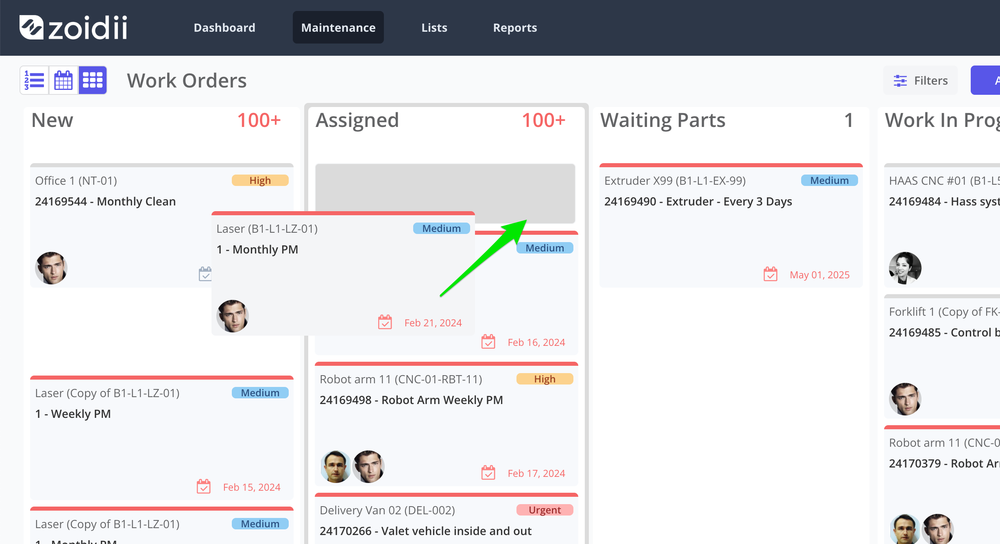
- Work Order Management - By tracking maintenance jobs in a CMMS system, they are less likely to fall through the cracks, get missed, and turn into something more serious. Over time, work order history becomes a valuable repository of information.
- Preventive & Predictive Maintenance Scheduling - Enables scheduling of routine maintenance based on time, usage meters, or condition data from sensors. Essential for shifting from reactive to proactive strategies, it reduces unplanned outages by 50-70%, extends asset lifespan, and controls costs through optimized intervals.
- Asset Tracking & Management - Centralizes asset information, including history, warranties, manuals, and location via QR codes or barcodes. This is crucial for quick lookups, audit trails, and lifecycle management, preventing unreported damages and aiding compliance with standards like ISO or OSHA.
- Mobile Accessibility & Management - A robust mobile app allows technicians to access work orders, update statuses, and capture photos/signatures. Push notifications and in-app communication enhance real-time collaboration. Indispensable in 2026 for field-based operations, it boosts productivity by 20-40%, reduces paperwork, and ensures data accuracy on the go.
- Maintenance Reporting & Analytics - Offers dashboards for real-time KPIs like PMP (Planned Maintenance Precentage), PMC (Preventive Maintenance Compliance), downtime, and costs. Advanced analytics provide insights for performance tracking and decision-making. Vital for visibility into operations, justifying budgets, and identifying trends to optimize processes.
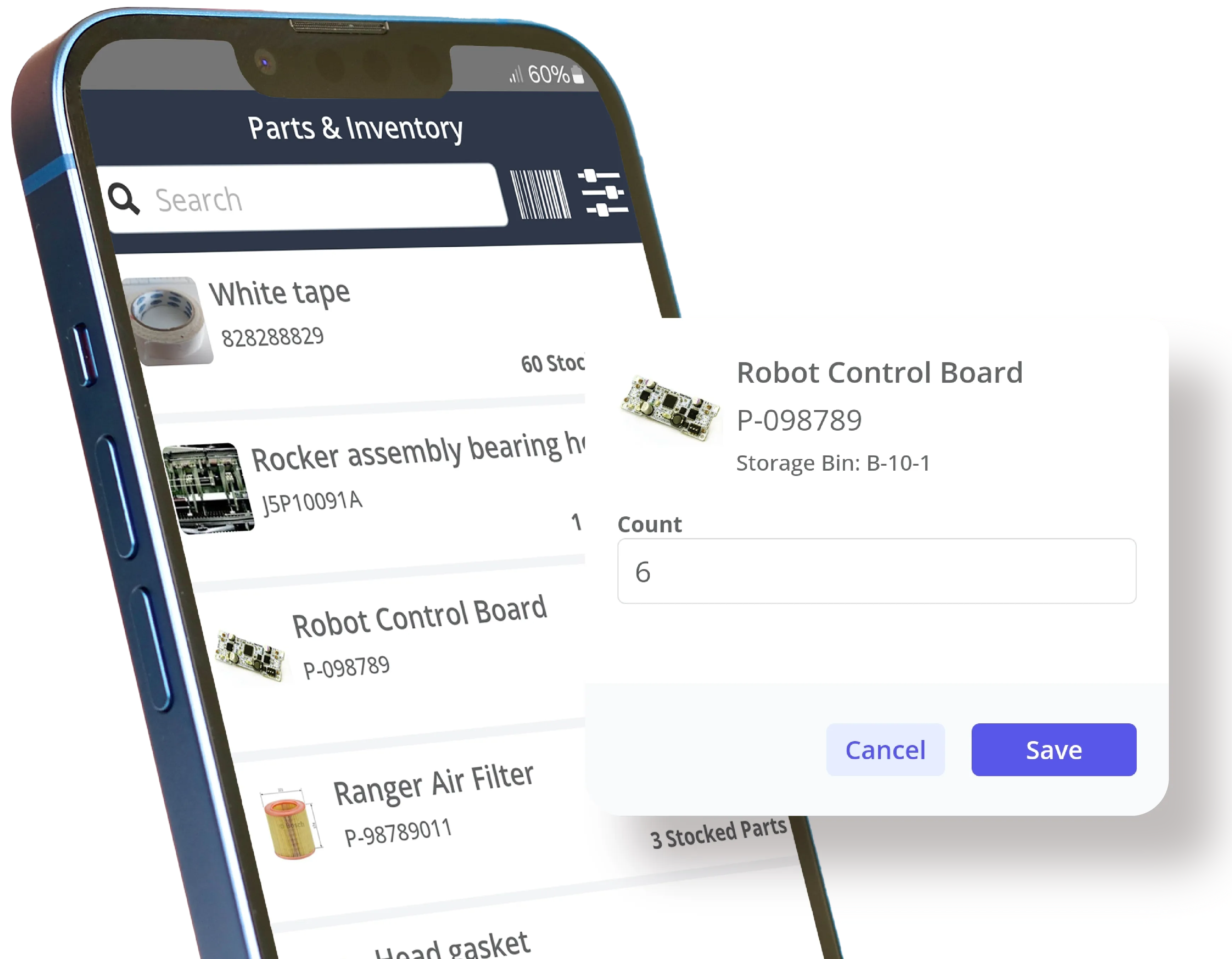
- Inventory & Spare Parts Management - Tracks stock levels, usage, and locations with auto-replenishment alerts and reorder triggers. Supports vendor integration for seamless purchasing. Essential to avoid stockouts or overstocking, reducing delays and costs by 15-25% while maintaining operational continuity.
- Compliance & Audit Trail Automation - Automatically logs all actions with timestamps, e-signatures, and digital records for regulatory adherence (e.g., FDA, OSHA). Simplifies audits and proves compliance. Critical in regulated industries to mitigate risks, reduce audit times, and ensure traceability.
Nice-to-Have & Advanced Features
These enhance scalability and future-proofing, especially for growing or tech-forward organizations.
- Customizable Inspection Checklists & Forms - Allows creation of tailored digital checklists attachable to assets or work orders, with scheduling for recurring inspections. Improves consistency, supports audits, and reduces compliance risks. Bonus points if these digital checklists can be automated based on the type of maintenance or asset, similar to Zoidii’s automated checklists.
- Vendor & Contract Management - Centralizes vendor data, contracts, SLAs, and performance tracking with renewal reminders. Facilitates assignment and communication, optimizing external partnerships and reducing admin burdens.
- Real-Time Technician Tracking & Assignment - Uses GPS to locate techs and assign jobs based on proximity, skills, and availability. Cuts response times and optimizes workforce utilization.
- Seamless Integrations (IoT, ERP, BMS) - Connects with external systems for data sync, automated alerts, and enhanced automation. Future-proofs the CMMS by eliminating silos and enabling advanced functionalities like condition-based maintenance.
- Incident & Safety Event Reporting - Enables reporting of hazards or incidents with alerts and tracking, improving EHS compliance and proactive safety measures.
- Energy & Sustainability Analytics - Monitors usage, emissions, and ESG metrics to identify waste and support green initiatives. Increasingly important for cost reduction and regulatory alignment in 2026.
- AI-Driven Predictive Tools - Integrates machine learning for failure predictions, inventory optimization, and actionable insights. A key trend is reducing manual tasks and enhancing accuracy.
Trends for 2026
In 2026, look for CMMS with cloud-based scalability for real-time collaboration, mobile-first designs for field efficiency, and advanced analytics for predictive shifts. AI automates work orders and provides trend analysis, while IoT enables continuous monitoring. Benefits include 20-30% cost savings, extended asset life, and data-driven decisions.
Prioritize user-friendly interfaces with strong support for quick adoption. Evaluate via trials to ensure fit.
1. Zoidii CMMS
Top Features
Zoidii CMMS is a cloud-based platform renowned for its simplicity and comprehensive functionality, making it ideal for organizations transitioning from manual processes to digital maintenance management. Key features include intuitive work order management for creation, assignment, tracking, and completion with attachments like photos and documents; automated preventive maintenance scheduling with customizable triggers based on time, meter readings, or conditions; advanced asset tracking that covers lifecycle management, history logs, and QR code scanning for quick access; robust inventory management with real-time tracking, auditing, reorder alerts, and vendor integration; a user-friendly mobile app for iOS and Android that supports push notifications, and on-the-go updates; powerful reporting and analytics dashboards offering KPI visualizations, downtime analysis, and compliance reports; calibration management tools to ensure equipment accuracy and regulatory adherence. Additionally, Zoidii offers custom work order statuses, role-based access controls, and AI-driven insights. Its multi-site setup enables centralized oversight for distributed operations. This makes Zoidii particularly suitable for industries like manufacturing, food production, and facilities management, where ease of use and quick ROI are paramount.
What Do Users Like About the CMMS
From Software Advice reviews:
“Excellent value, easy to use, very responsive support team.” (Anthony, Farming, 201-500 employees, Reviewed July 2024, Rating: 5/5)
“Team listened to needs, tailored software, turned work life around.” (Eddie, Semiconductors, 1001-5000 employees, Reviewed April 2024, Rating: 5/5)
“Customer support, ease of use, reports.” (Darren, Food Production, 51-200 employees, Reviewed April 2024, Rating: 5/5)
From GetApp reviews:
“Configuring PMs is super easy using the step by step process. The asset logbook is great for getting a single view of asset history without having to toggle through different work order screens.” (Mauro D., Co-Founder, Reviewed Date not specified, Rating: 5/5)
“It was straightforward to implement and is pretty easy to use. In particular, I like the ability to bookmark and follow critical work orders.” (Sami A., CEO, Reviewed Date not specified, Rating: 5/5)
“The mobile app is just as user-friendly. Customer support has been excellent throughout.” (Susie O., Production Improvement Intern, Reviewed Date not specified, Rating: 5/5)
What Do Users Dislike About the CMMS
From Software Advice reviews:
“Mobile version lacks access to KPIs and dashboard while on the go.” (Darren, Food Production, 51-200 employees, Reviewed April 2024, Rating: 5/5)
“There is nothing at this time, generally when we have found and issue it was generally something we did not set up correctly that was causing an issue also there are always new features and improvements that zoidii releases..” (Anthony, Farming, 201-500 employees, Reviewed July 2024, Rating: 5/5)
“As with any new system implementation, it is tedious to set up all of the assets and the work orders, but once they are in the system, it makes life a little easier.” (Bryce, Warehousing, 201-500 employees, Reviewed May 2024, Rating: 5/5)
Pricing
Zoidii offers flexible pricing with no setup fees or contracts. The Basic plan starts at $39/user/month for core features like work orders and PMs. Professional: $55/user/month, adding inventory and reporting. Enterprise: $55/user/month. Free trial available with unlimited users in higher tiers.
2. Limble CMMS
Top Features
Limble CMMS is designed for ease of use and scalability, catering to teams of all sizes with its unlimited assets, work orders, preventive maintenance tasks, and custom dashboards. Standout features encompass automated work order generation and assignment, predictive maintenance via IoT sensor integrations and meter-based triggers, comprehensive asset management with downtime tracking and history logs, inventory control including cycle counts and vendor management, a mobile app with offline capabilities in premium plans, REST API for custom integrations with ERP and other systems, multi-location support for enterprise users, 21 CFR compliance for regulated industries, single sign-on (SSO), and advanced analytics for KPI monitoring. Limble’s no-code customization allows for tailored fields, workflows, and reports, while its AI tools provide insights into maintenance trends and optimization opportunities. The platform emphasizes proactive support with dedicated managers in higher tiers, making it suitable for manufacturing, wholesale, and aviation sectors where real-time visibility and minimal training are essential.
What Do Users Like About the CMMS
From GetApp reviews:
“After research, focused on Limble and was immediately impressed. We watched their series of videos and within a week, had created the assets and PM schedules and were up and running.” (Rating: Not specified, Date: Not provided)
“For me the ease in which we could set this up was great. I’m old school and like paper, so this was new your me to have and it was so ease to use that I can’t believe it took me so long to get it.” (Rating: Not specified, Date: Not provided)
““I especially love the accessibility of having it on my phone. As a manager always on the go, it is so easy to communicate with my crew when there is a work order that needs taken care of immediately.” (Rating: Not specified, Date: Not provided)
What Do Users Dislike About the CMMS
From GetApp reviews:
“There is no offline version, for it to work you have to be online - something i am sure they are working to do though.” (Rating: Not specified, Date: Not provided)
“I was involved with the meetings set up to help choose a CMMs system, as i was one of 3 people with any real experience with another CMMS system. We had it narrowed down to 3 systems, why they chose this one over the other 3 is way beyond my comprehension. A very big blunder is when a maintenance worker closes a work order, it shouldn’t actually close it. Instead, it should go to a pool for someone to review and then do the final closing. To the maintenance worker it appears closed, but it is not until the person(s) in charge of reviewing them signs off. The inventory side of things is another problem all on its own. Also, we should be able to have more than one window open at a time. I have used Infor EAM (HxGNn) before Limble. This CMMS system seems like one that was created in a basement and introduced with limited talent to back it up. This system is poorly set up. It might work for a startup company that doesn’t know what it needs or understand how these systems should function.” (Rating: 1/5, Reviewed February 2025).
From Software Advice reviews:
“Not designed for a Manufacturing Company. I initially evaluated 4 different systems and was excited that Limble had good reviews and looked like a nice application. A few months in i discovered it was not designed for manufacturing. The Asset was not the driver of all information. The expect me to have a separate PM for every asset and i have hundreds of similar assets. Limble keeps changing features and then asking foe more money if i want those features back.” (Rating: 2/5, Reviewed July 2023).
Pricing
Standard: $28/user/month (annual) or $33 monthly. Premium+: $69/user/month (annual) or $79 monthly. Enterprise: Custom. Free trial.
3. MaintainX
Top Features
MaintainX is a mobile-first CMMS focused on frontline teams, offering unlimited work orders with images, procedures, and real-time updates; preventive maintenance scheduling with recurring tasks and meter triggers; asset tracking via barcodes and QR codes; parts inventory management with reorder alerts and purchase order integration; time and cost tracking for labor efficiency; REST API for custom connections; advanced analytics dashboards with AI CoPilot for insights; IoT integrations for predictive alerts; offline mode across iOS, Android, and web; and unlimited requester accounts for external users. Its cross-platform usability and multi-site tools make it versatile for plant operations, retail, and hospitality.
What Do Users Like About the CMMS
From GetApp reviews:
“Very easy to create/edit procedures and implement. Support responds quickly even if it is something that they can’t fix.” (Rating: 4/5, Reviewed July 2025)
“Easy to use software for both administrators and technicians. Assets and work orders are clearly laid out and easy to trace to find the information you are looking for.” (Rating: 5/5, Date: Not provided)
“I will keep using it and recommend it to anyone who is looking for a maintenance software... it works well and has excellent support when you run into a jam and need help.” (Rating: 4.8/5, Date: Not provided)
“It was a mess without a method to keep communication organized. The previous person in my position would just scribble a jumble of notes to try and remember everything.” (Rating: 4.8/5, Date: Not provided)
What Do Users Dislike About the CMMS
From GetApp reviews:
“The one thing I dislike about the app is that when work orders are closed they still appear in closed orders for my team. I would love to see the option to archive these while still be searchable.” (Rating: 4.8/5, Date: Not provided)
“Scheduling is a pain as you can’t reorder the jobs on a calendar. Can’t easily see who is assigned to a job in calendar view.” (Rating: 4.8/5, Date: Not provided)
From Software Advice reviews:
“I’ve been quite disappointed with my experience at MaintainX. First and foremost, their service has been extremely slow. Scheduling Zoom meetings takes an unreasonably long time, which has hindered our progress significantly. Additionally, I was promised regular PM reports, which were touted as a straightforward feature. However, we’ve encountered constant delays and a lack of follow-through on this promise. It’s frustrating when expectations are set and then not met. Overall, I expected a more efficient and responsive service. Unfortunately, this has not been the case.” (Rating: 4/5, Reviewed July 2025)
Pricing
Basic: Free (limited). Essential: $16/user/month (annual). Premium: $49/user/month (annual). Enterprise: Custom. Free trial.
4. Fiix
Top Features
Fiix, backed by Rockwell Automation, provides work order creation and scheduling, preventive maintenance automation, inventory management with stock alerts, asset tracking with failure codes and audit trails, downtime analysis, mobile app for alerts and e-signatures, calendar views, AI insights for optimization, over 1000 integrations including ERP and IoT, customizable workflows, and compliance tools. Free plan for basics, scalable to enterprise with SSO.
What Do Users Like About the CMMS
From GetApp reviews:
“The best feature about fiix for me is the organisation of assets and their logical accessibility. Ease of use was another plus as it did not take long for me to pick up the software.” (Rating: Not available, Date: Not available)
“Fiix is an amazing Software, very easy to use, a lot of useful features and data import/export capability which allows you to perform different analysis. Customer service is excellent.” (Rating: Not available, Date: Not available).
What Do Users Dislike About the CMMS
From GetApp reviews:
“Initially difficult to set up and adding features is also time consuming. The reports are missing stages of completion, completed works with dates.” (Rating: Not available, Date: Not available)
“In a year where every business has to adapt and make compromise in regards to what they offer and how it is paid for , Fiix have been extremely unhelpful - and actually quite rude.” (Rating: Not available, Date: Not available)
Pricing
Free: $0 (limited). Basic: $45/user/month. Professional: $75/user/month. Enterprise: Custom. Free trial.
5. UpKeep
Top Features
UpKeep offers unlimited work orders, asset management with QR codes, preventive optimization, custom checklists, inventory costing, staffing tracking, analytics, workflow automation, PO management, multi-site support, API, SSO, and an AI intelligence suite for insights.
What Do Users Like About the CMMS
From GetApp reviews:
“Upkeep is great at helping us compile our facility management information in one central location that is easily accessible to different users in ways that are suitable for them.” (Rating: Not provided, Date: Not provided)
“The tracking for the work orders is super convenient and thorough and allows for reporting to be super easy and helps track problem areas or where money should be spent.” (Rating: Not provided, Date: Not provided)
From Software Advice:
“UpKeep has been very helpful in guiding us through adoption of the platform and providing us the tools needed to expand our capabilities and record keeping. This is an excellent platform that has helped us build our service delivery platform.” (Rating: 5/5, Date: February 2024).
What Do Users Dislike About the CMMS
From GetApp reviews:
“In some areas there are connection issues with no or limited internet/phone signals. This is an issue when uploading and even some data as been lost.” (Rating: Not provided, Date: Not provided)
“It has been difficult to learn the use of upkeep. I believe that a mandatory intro training should be required when a new user is to use upkeep.” (Rating: Not provided, Date: Not provided)
From Software Advice:
“We began using Upkeep in 2021 at the start up of our new company. Our asset list includes over 300 units, 165 of them needing regular preventative maintenance. From the beginning, the approximate monthly user license fee near $100 seemed high, but not for a system that was sold to us as an all-encompassing platform. As it turns out, Upkeep fell far short of that level. We began using Upkeep prior to the preventative maintenance module roll out they use now, and right away we found that recurring work orders were not populating correctly, most notably re-using work order numbers (which should be unique), and not populating at the correct time. This was mostly solved when the PM roll out took place in 2022, but the amount of labor time on our end to correct this recurring work order problem was excessive to say the least. Tech support was very limited, in that they were only able to train in how to use the new module. It didn’t help that when they migrated away from recurring work orders to PM, the functionality ceased on all our existing work orders. Many of our assets had several months of missed maintenance due to this as we frantically tried to catch up. The PM module still took over a year to establish a working capability, with many bugs found and long delays for fixes. The work order function still worked very well, especially for the technicians using the mobile app. Aside from always requiring an internet connection. It took some time, but we were able to manipulate the software to sort work orders correctly. Purchase orders and parts brought around a host of new problems. The first, and most noteworthy, is that our accounting department, who only required viewing of PO’s that are in the system, required an administrator’s license. This took one of the very expensive licenses away from a technician for a user that didn’t need full unfettered access. In addition, there were no custom security variations that wouldn’t require a full license to simply view purchase order data. Regarding purchasing, inventory control and cost appropriations, it is important to note that to change the pricing of an individual item in Upkeep, one must update the part in their parts/inventory module. There is no function in a working PO that allows for updating of current price. This has two problems. First, as prices fluctuate from vendor to vendor and day to day, an updated last cost is very important. Second, when updating the price in Upkeep’s Parts module, the cost would update all work and purchase orders from the past, thereby adjusting overall costs of every PO, some of which were not due, and making them no longer match invoices to be paid. This also brings up a purchasing question that if costs are not available to be averaged, then a buyer cannot accurately predict and anticipate cost increases and make bottom line dollar saving decisions. Among these issues with parts and POs was the fact that vendor assignments are a secondary thought, taking a distant 6th position to “PO Title”, “Description”, and “Category” among other less important references. These problems truly spoke of a company and designers that had never used a proper purchase order or items/parts inventory control system. These concerns were not rectified by the time we changed software in August 2023. I don’t want to sound completely disparaged by Upkeep. Like I said before, the work order mobile app is very easy to use, and the learning curve is very shallow. Tech support always left something to be desired as well as we were presented with “workarounds” rather than solutions on a regular basis. Our annual “check-in” was with our original salesman, who was more interested in the analytics of how we paid our bill than how the software worked. When said salesman left the company, it took nearly three months to get a new account representative. When we upgraded this year to another company (which will not be named) we got all the features of Upkeep and so much more, for half the price. I wish all the best to Upkeep and all their employees, but I would not recommend this software.” (Rating: 2/5, Date: February 2023).
Pricing
Essential: $20/user/month. Premium: $45/user/month. Professional/Enterprise: Custom. Free trial.
6. eMaint CMMS
Top Features
eMaint includes work/asset tracking, preventive and predictive maintenance, mobile access, inventory, document management, real-time data, reporting, QR scanning, multi-site support, and custom templates.
What Do Users Like About the CMMS
From Software Advice reviews:
“eMaint CMMS is very clean and intuitive Software and it’s a great choice for companies who need to improve work quality of their maintenance teams. It also performs very well on mobile so we can easily access the software from anywhere, at any time from the mobile device which saves my lots of time and effort.” (Rating: 5/5, Date: March 2023).
From GetApp reviews:
“Customer Support is Outstanding. They truly work to satisfy the customer to the best of their abilities and recommend work around where needed.” (Rating: Not provided, Date: Not provided)
What Do Users Dislike About the CMMS
From Software Advice reviews:
“After 17 years working as a maintenance engineer, I was excited to get a CMMS system that could be tailored to our needs. That would give us the opportunity to do budget control, depreciation management, etc. It was all a fairy tale during a sales call. Fluke personnel is not connected between departments. We wasted almost nine months in implementation, that they will charge you even if you are not satisfied.” (Rating: 2/5, Date: July 2023).
From GetApp reviews:
“What I’ve noticed, you keep on calling the IT people to help you do this do that and so on. It’s not really a friendly user, You need to call IT to help you fix something that is too small and supposedly easy. It seems that they controlled everything. which is not good.” (Rating: 3/5, Date: July 2021).
Pricing
Team: $69/user/month. Professional: $85/user/month. Enterprise: $120/user/month. Free trial.
7. FMX
Top Features
FMX features preventive work orders, calendar integration, asset tracking, floor plans, dashboards, mobile requests, and reporting.
What Do Users Like About the CMMS
From Software Advice reviews:
“Our overall experience with FMX has been great! It’s user-friendly, flexible, and makes data tasks easy. Import/export tools and reporting features help us work efficiently and stay organized daily.” (Rating: 5/5, Date: May 2025).
From GetApp reviews:
“My experience with FMX has been fantastic, the team has been really helpful and patient while we modify this software for our needs.” (Rating: Not provided, Date: Not provided)
What Do Users Dislike About the CMMS
From GetApp reviews:
“Some of our operators have expressed how difficult it is to recall past comments in the “Log” section.” (Rating: Not provided, Date: Not provided) “If you are looking for something beyond an tool for running operationally, this may struggle.” (Rating: Not provided, Date: Not provided)
Pricing
Custom quote based on users and features.
8. Brightly Asset Essentials
Top Features
Brightly offers preventive work orders, asset management, inventory vendors, mobile access, and compliance tools.
What Do Users Like About the CMMS
From Software Advice reviews:
“Very positive---works very well! Easy to navigate.” (Rating: 5/5, Date: May 2025).
From GetApp reviews:
“The reporting is great, it’s easy for me to make the detailed reports I need and see how we’re doing. On top of all this, the support staff is so nice and very responsive to any questions I have.” (Rating: Not provided, Date: Not provided)
What Do Users Dislike About the CMMS
From Software Advice reviews:
“Customer service. I have waited weeks on support tickets they hang up when I have called support and do not return calls.” (Rating: 2/5, Date: May 2022).
From GetApp reviews:
“These problems that belong to SchoolDude are truly having a negative impact here.” (Rating: Not provided, Date: Not provided)
Pricing
Custom quote.
9. Fracttal One
Top Features
Fracttal provides asset work orders, preventive with IoT, inventory SLA, integrations, mobile app, and AI insights.
What Do Users Like About the CMMS
From Software Advice reviews:
“Excelent, easy to find the things and there are alot of functions, all to manage the department of maintenance.” (Rating: 5/5, Date: November 2024).
From GetApp reviews:
“The fracttal software is very friendly when uploading equipment, areas, and assigning them. Another aspect that I highlight is its ease when assigning human resources to tasks.” (Rating: Not provided, Date: Not provided).
What Do Users Dislike About the CMMS
From Software Advice reviews:
“purchase order vs request cannot make as take same number sequence.” (Rating: 2/5, Date: July 2020).
From GetApp reviews:
“It does not handle the volumes of information well, the API available does not completely solve the problem. New versions sometimes contain errors that are difficult to reverse.” (Rating: Not provided, Date: Not provided)
Pricing
Custom quote.
10. Maintenance Care
Top Features
Maintenance Care includes work orders preventive, parts tracking, reporting, task scheduling, mobile access, and vendor management.
What Do Users Like About the CMMS
From Software Advice reviews:
“Maintenance Care was easy to implement and really easy from both the user and administrative end. Our organization was using a manual system and this has been a huge blessing to us!” (Rating: 5/5, Date: July 2024).
From GetApp reviews:
“I love the ease of use and how it keeps me up to date with maintenance needs. I like the fact the the staff are able to put in request and then the request come straight to my mobile device.” (Rating: Not provided, Date: Not provided)
What Do Users Dislike About the CMMS
From Software Advice reviews:
“The two most impacful features missing are1) You can print all the columns you display. I always want to see who the vendor is and I have to specifically open and display the vendor in the columns, but when I want to print the screen display I have, there is a predetermined template that prints without the information I need2) Pictures taken and uploaded through the app with iphones are not available for everyone to view or print. Someone has to manually send them through email and we have to manually upload them to the work order.” (Rating: 3/5, Date: January 2023).
From GetApp reviews:
“No way to do a search for individual units, only by building.” (Rating: Not provided, Date: Not provided)
Pricing
Free Forever: $0 (limited). Unlimited Users: $225/month. Enterprise: $500/month.
11. Hippo CMMS (Now Eptura Asset)
Top Features
Hippo offers preventive work orders, inventory management, vendors, asset inspections, mobile CMMS, reporting, and floor integration.
What Do Users Like About the CMMS
From Software Advice reviews:
“Easy to navigate through and user friendly. All of my work is done on Eptura Asset and I enjoy all of the features of the program.” (Rating: 5/5, Date: March 2025).
From GetApp reviews:
“It is good for keeping up with work and when all the change-over bugs are worked out - it will be good.” (Rating: Not provided, Date: Not provided
What Do Users Dislike About the CMMS
From Software Advice reviews:
“Eptura seems to have gone downhill. It was a much better program when it was iOffice. The reliability to access the program, the integration with Outlook (Hummingbird) is double-booking our rooms, the insights module is very difficult to use and has never been able to provide the reports we need. I hate that we can no longer bring back a person that leaves without requesting extra help from Eptura to reactivate the profile. Because of the continued issues without result, I am VERY strongly considering looking for a new system when my contract expires.” (Rating: 1/5, Date: January 2025).
From GetApp reviews:
“To say that customer service was bad is not accurate because it would imply that customer service actually exists.” (Rating: Not provided, Date: Not provided)
Pricing
Custom quote.
12. Click Maint CMMS
Top Features
Click Maint provides work order management, preventive maintenance, asset inventory, mobile dashboards, multi-site, reporting, and parts management.
What Do Users Like About the CMMS
From Software Advice reviews:
“Overall, it’s a very positive experience. We’re still in the setup phase, Click Maint team has been helpful and available whenever needed.” (Rating: 5/5, Date: June 2025).
From GetApp reviews:
“So far so good, is easy to use and is easy to create preventive maintenance program and i can show the department progress.” (Rating: Not provided, Date: Not provided)
What Do Users Dislike About the CMMS
From Software Advice reviews:
“I wish the app worked as good as the website. It logs me out often and doesn’t allow me to upload pictures directly from my phone to the app. If I take pictures, I need to email them to myself and then use the web browser.” (Rating: 5/5, Date: June 2025).
From GetApp reviews:
“Printing work order does need some attention. I am in a rural area and cell service is horrible.” (Rating: Not provided, Date: Not provided)
Pricing
Professional: $35/user/month (annual).
13. eWorkOrders CMMS
Top Features
eWorkOrders includes work order management, preventive maintenance, asset tracking, inventory reporting, mobile app, and custom integrations.
What Do Users Like About the CMMS
From Software Advice reviews:
“eWorkOrders CMMS provides a complete set of features for cloud based maintenance.” (Rating: 5/5, Date: January 2025).
From GetApp reviews:
“The software facilitates a great way of communicating in a decentralized organization to ensure items are completed in a timely fashion ensuring a quality product for our customers.” (Rating: Not provided, Date: Not provided)
What Do Users Dislike About the CMMS
From Software Advice reviews:
“Sometimes finding a specific work order it difficult because the type filters that are offered.” (Rating: 4/5, Date: March 2019).
From GetApp reviews:
“The flexibility can sometimes be a double edge sword. If your users find things can be manipulated they will request you cater to them in that aspect.” (Rating: Not provided, Date: Not provided)
Pricing
Custom starts around $35/user/month.
14. Asset Panda
Top Features
Asset Panda offers asset management, preventive maintenance, inventory management, custom fields, reporting, mobile QR, integrations, and compliance.
What Do Users Like About the CMMS
From Software Advice reviews:
“easy to use/navigate. has everything that I need. Tool tracking and being able to put all of our current jobsites on there. Perfect for me!” (Rating: 5/5, Date: June 2025).
From GetApp reviews:
“Overall, it does the job of tracking all your devices and if you print barcodes for your devices then you can look up your devices faster with barcode scanning which is pretty convenient.” (Rating: 5/5, Date: May 2025).
What Do Users Dislike About the CMMS
From Software Advice reviews:
“Great in theory, difficult to deploy and use. The staff was friendly and mostly helpful. The product was just not well executed, slow to use, and clunky.” (Rating: 4/5, Date: August 2020).
From GetApp reviews:
“User experience was terrible. We spent two months getting it set up and then abandoned it as it would require hiring a dedicated person to maintain the system. Not user friendly and overly complicated. (Rating: Not provided, Date: Not provided)
Pricing
Custom quote.
15. Cryotos
Top Features
Cryotos provides work order automation, preventive maintenance, asset management, inventory management, checklists, IoT, mobile app, and reporting.
What Do Users Like About the CMMS
From Software Advice reviews:
“Accessibility is easy. Data accountability is good.” (Rating: 5/5, Date: February 2024).
From GetApp reviews:
“It is very important for me as a maintenance planner. Cryotos is so intuitive and easy to use while providing the functionality needed to run daily equipment and facility operations.” (Rating: Not provided, Date: Not provided)
What Do Users Dislike About the CMMS
From Software Advice reviews:
“Some features like mass download of service reports (pdf reports) not available. More customization features like inserting tables etc into forms needed.” (Rating: 3/5, Date: October 2021).
From GetApp reviews:
“Mobile app is difficult to use in everyday task with the product.” (Rating: Not provided, Date: Not provided)
Pricing
Basic: $29/user/month. Starter: $39/user/month. Professional: $69/user/month. Enterprise: Custom.
Computerized Maintenance Management Systems (CMMS) FAQs
What is a CMMS?
A Computerized Maintenance Management System (CMMS) is software that helps organizations manage maintenance operations by tracking assets, scheduling work orders, managing inventory, and providing analytics to reduce downtime and costs.How do I choose the best CMMS for my business in 2026?
Evaluate based on your team size, industry (e.g., mobile needs for field service), integrations (IoT, ERP), budget, user-friendliness, and future features like AI predictions. Test trials and read reviews for real-world fit.What are the benefits of using a CMMS?
Benefits include up to 95% reduced downtime, 20-30% cost savings, improved regulatory compliance, extended asset life, enhanced team productivity, and data insights for strategic decisions.Is there a free CMMS option?
Yes, options like Fiix’s free plan (limited PMs), MaintainX Basic, or Maintenance Care Free Forever exist, but full features require upgrades. Most offer free trials.How much does a CMMS typically cost?
Pricing ranges from $0 (limited free) to $120/user/month for enterprise, averaging $30-80/user/month. Factors include users, features, and customizations; annual billing often saves 10-20%.Can CMMS integrate with other systems?
Most modern CMMS support integrations with ERP, IoT devices, calendars, and APIs for seamless data exchange, enhancing automation.What’s new in CMMS for 2026?
Advancements include AI for predictive maintenance, enhanced mobile/offline capabilities, sustainability metrics for energy tracking, and improved multi-site dashboards for global operations.How long does it take to implement a CMMS?
Implementation varies from days for simple systems like Zoidii or MaintainX to months for complex enterprises, depending on data migration and training.Is CMMS suitable for small businesses?
Absolutely; many like MaintainX or Click Maint offer affordable, scalable plans with minimal setup, ideal for SMEs.What industries benefit most from CMMS?
Manufacturing, healthcare, facilities, food production, aviation, and hospitality see the greatest gains in efficiency and compliance.How does CMMS improve compliance?
By automating audits, tracking calibrations, generating reports, and ensuring PM adherence to standards like 21 CFR or ISO.Can CMMS help with predictive maintenance?
Yes, via IoT integrations and AI in platforms like Limble or Fiix, predicting failures based on data trends.What if my team isn’t tech-savvy?
Choose user-friendly options like Zoidii or MaintainX with intuitive interfaces and mobile apps; most provide training and support. Does CMMS support mobile access?
Nearly all do, with apps for work orders, scanning, and updates; offline mode in premium plans like Limble.How secure is CMMS data?
Cloud-based systems use encryption, SSO, and role-based access; check for compliance like GDPR or HIPAA.Can CMMS track inventory?
Yes, features include stock levels, reorders, vendor management, and auditing to prevent shortages.What’s the ROI of CMMS?
Typically, 3-6 months payback through reduced repairs, labor efficiency, and downtime savings.Conclusion
In conclusion, as we navigate the demands of 2026, selecting the right CMMS is pivotal for achieving operational excellence and sustainable growth. From Zoidii’s top-ranked user-friendliness to the innovative features across all platforms, these systems empower businesses to shift from reactive fixes to proactive, data-driven maintenance. By prioritizing essential capabilities like AI predictions, mobile access, and seamless integrations, organizations can significantly reduce downtime, cut costs, and enhance compliance. We recommend evaluating your needs against this guide, starting with free trials of leading options like Zoidii or Limble. Investing in a robust CMMS today will future-proof your assets and drive long-term success in an increasingly competitive landscape.



