

Keeping physical assets running smoothly has never been more crucial: supply chains are lean, equipment is expensive, and customers expect zero downtime.
That’s why computerized maintenance management systems (CMMS)—and their bigger cousins, enterprise asset management (EAM) platforms—have become essential for teams that need to plan preventive work, streamline work orders, control spare parts, and prove compliance.
This guide breaks down what “best” really means (spoiler: it depends on your footprint, budget, and data maturity) and highlights leading platforms worth shortlisting in 2026. I’ll also show you how to evaluate tools against your use cases so you don’t overspend—or underbuy.
CMMS vs. EAM (and why the difference matters)
Before shopping, clarify whether you need a CMMS or a full EAM:
- CMMS focuses on day-to-day maintenance: work orders, preventive schedules, technician mobility, parts, and reporting. It’s typically faster to deploy and ideal for small to mid-sized teams or single-site operations.
- EAM covers the entire asset lifecycle (planning, acquisition, operations, maintenance, and disposal) and usually integrates more deeply with ERP, finance, and supply chain systems across multi-site enterprises. It’s a strategic system of record for asset-intensive industries like utilities, aerospace, and transportation.
How to evaluate “best” for your context
When you demo platforms, stack them against these criteria:
1. Mobile-first execution Your technicians live on phones and tablets. QR code scanning, photo/video capture, voice-to-text, and guided checklists are must-haves.
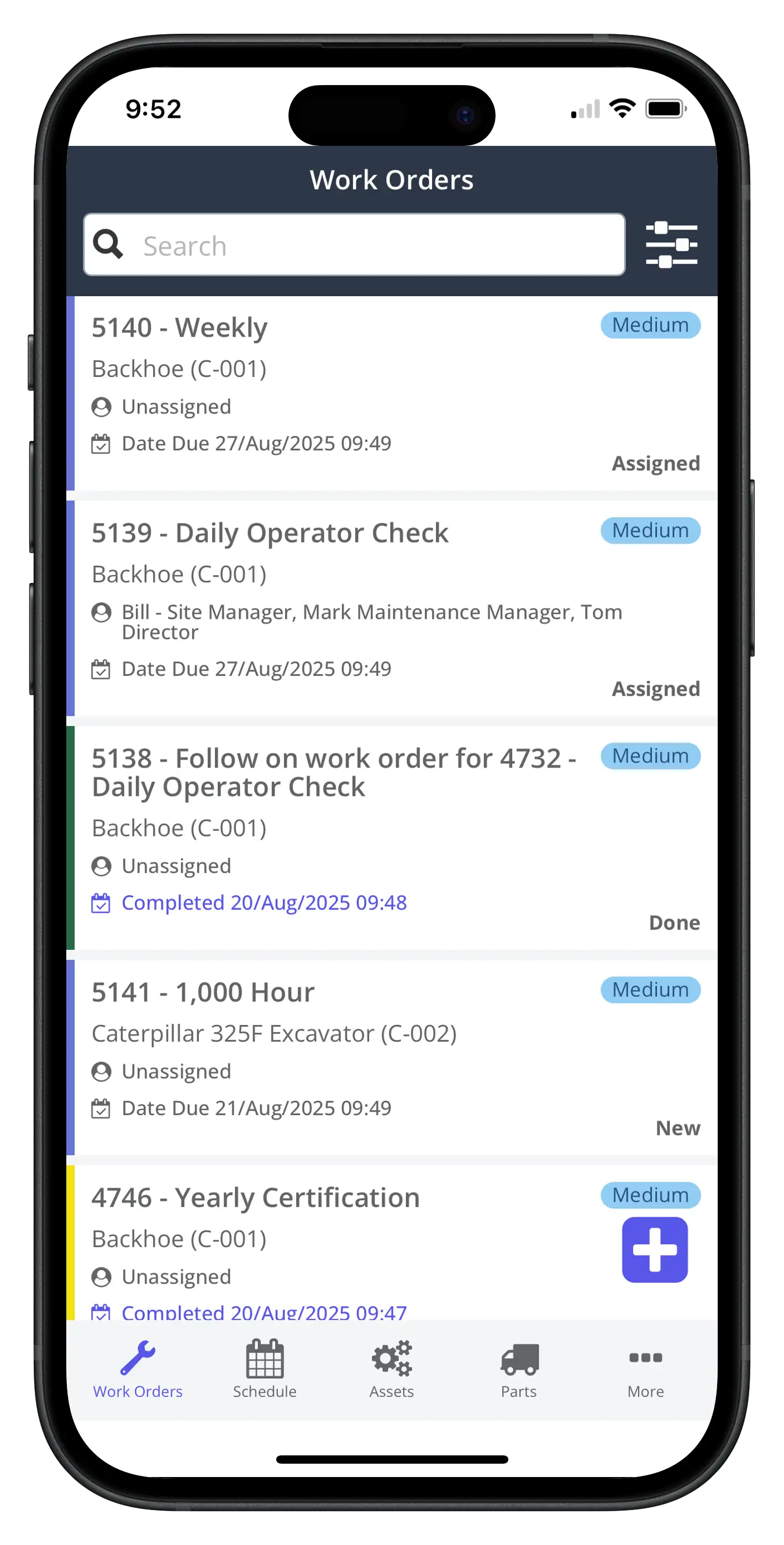
2. Preventive and predictive Look for calendar and meter-based PMs at minimum; more mature teams may benefit from sensor/IoT ingestion and condition monitoring as they move toward predictive maintenance.
3. Parts and purchasing Real savings hide in the storeroom. Ensure the system tracks min/max levels, vendor lead times, and can route purchase requests (bonus if the system has approval levels).
4. Asset hierarchy and history Parent/child relationships, location trees, asset attributes, and a clean as-maintained history drive reliable decision-making.
5. Reporting you’ll actually use Out-of-the-box dashboards for labor hours, backlog, MTTR/MTBF, and PM compliance should be simple to tweak without a data engineer.
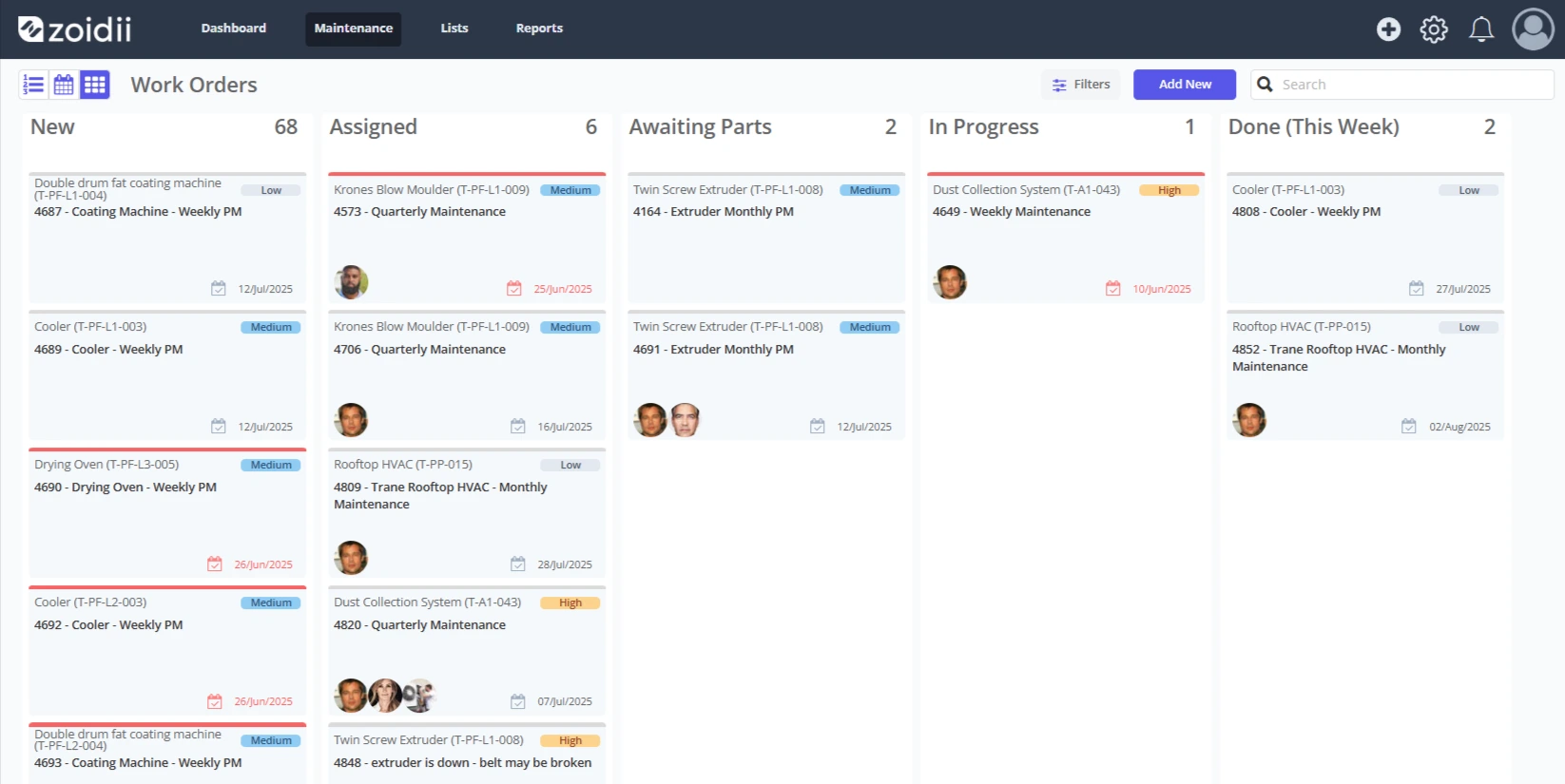
6. Work order management Ensure that the system has an easy way to create and assign work orders. It’s helpful if managers can drag and drop work orders across a work order planning board to assign, process, or close out work orders quickly. 7. Time-to-value and adoption A feature-rich CMMS means nothing if technicians won’t use it. Prioritize tools with plain-language forms, clear navigation, and fast onboarding.
The 2025 shortlist: top CMMS and EAM platforms to consider
There’s no single winner across all industries and team sizes. These platforms consistently appear in independent roundups and user-review leaders in 2025; use them as a high-quality starting shortlist.
Best all-around CMMS options for most teams
#1 - Zoidii – A long-standing mobile-first CMMS loved for quick work order capture, asset histories, and easy PM scheduling. Strong choice when speed and usability matter most. Top picks in multiple 2025 roundups and user-review leaders.
#2 - Limble CMMS – Known for its intuitive UI, robust checklists, and flexible automations, offering a good balance of features for SMB to mid-market. It is often praised for its in-app guidance and template libraries.
#3 - Fiix (by Rockwell Automation) – Cloud CMMS with strong maintenance workflows and growing analytics; integrates into Rockwell’s ecosystem for manufacturers. Repeatedly recommended in 2025 buyer guides and category lists.
#4 - MaintainX – Excellent for digital procedures, inspections, and frontline communication; lightweight and fast to deploy with strong mobile capabilities. Popular in user communities for usability.
#5 - eMaint (by Fluke) – A mature CMMS with breadth across PMs, work orders, and inventory; suited to teams that want depth without going full EAM. Frequently listed among top CMMS picks.
Best for public sector and utilities
- Brightly Asset Essentials (formerly Dude Solutions) – Strong GIS integration (Esri) and workflows for public works, parks, water/wastewater, and education; pairs work orders with maps and outage management.
When you likely need an EAM
If you manage multiple plants, complex compliance, or want one asset backbone that ties into ERP/finance:
- IBM Maximo / IFS / SAP EAM – These vendors dominate EAM discussions and peer-review shortlists for heavy industry and multi-site operations; evaluate based on your existing ERP/IT stack and governance needs.

Matching tools to scenarios
You’re a single-site manufacturer modernizing from paper. Shortlist: Zodiii, Limble, Fiix, MaintainX. Prioritize mobile forms, fast PM setup, and basic inventory control. Aim for 90-day adoption: backlog to zero, PM compliance above 85%.
You’re a school district or small municipality. Shortlist: Brightly Asset Essentials or eMaint. Look for service request portals, GIS, and simple approval flows.
You’re multi-plant, regulated, and finance-driven. Shortlist: IBM Maximo, IFS, SAP EAM. Evaluate asset lifecycle governance, integration depth with ERP, and multi-site master data.
You need robust inspections and SOP compliance. Shortlist: Zoidii, Limble, Fiix. Seek structured procedures, media capture, and revision control.
Frequently asked questions
How much should we budget? CMMS is often subscription-based per user (and/or per site), with tiers by features and storage. EAM pricing varies widely and usually correlates with integration scope and sites. Instead of chasing list prices, estimate ROI by considering avoided downtime, parts optimization, technician productivity, and regulatory risk reduction. Using an ROI calculator can help build justification for the spend.
What about predictive maintenance and IoT—do we need that now? Not on day one. Start with disciplined preventive maintenance and good data capture; grow toward sensors, vibration, and oil analysis as you identify high-value opportunities. Industry trend analyses show organizations gradually adopting IoT and predictive analytics as processes mature.
We already have an ERP—should maintenance live there? Large enterprises often keep EAM tightly tied to ERP for capitalization, depreciation, procurement, and multi-site master data. Smaller teams typically get faster time-to-value from a focused CMMS and integrate only key flows (e.g., single sign-on).
The bottom line
There’s no universal “best” maintenance platform—only the best platform for your mix of assets, people, and maturity. If you’re a small to mid-sized operation prioritizing speed and adoption, start with Zoidii, Limble, Fiix, MaintainX, or eMaint.
Public sector and utilities should consider Brightly Asset Essentials, particularly for GIS-driven dispatch. Asset-intensive, multi-site enterprises may be better served by EAM suites like IBM Maximo, IFS, or SAP EAM—with the understanding that implementation discipline is just as important as the software itself.
Wherever you land, keep the evaluation anchored to real outcomes (downtime, compliance, throughput). Run a pilot with your toughest workflows, and make technicians heroes with a mobile experience they actually enjoy. Do that, and the software you choose will be the best maintenance management software—for you.



