

If you've already rolled out Zoidii, you've done the hard part: you've moved away from spreadsheets, paper, and "who has that notebook?" moments.
But like any CMMS, the real value doesn't come from just having the software. It comes from the habits, standards, and little workflow tweaks you build around it.
Here are eight practical, boots-on-the-ground tips to squeeze more value from Zoidii and make life easier for both your maintenance team and your wider organisation.
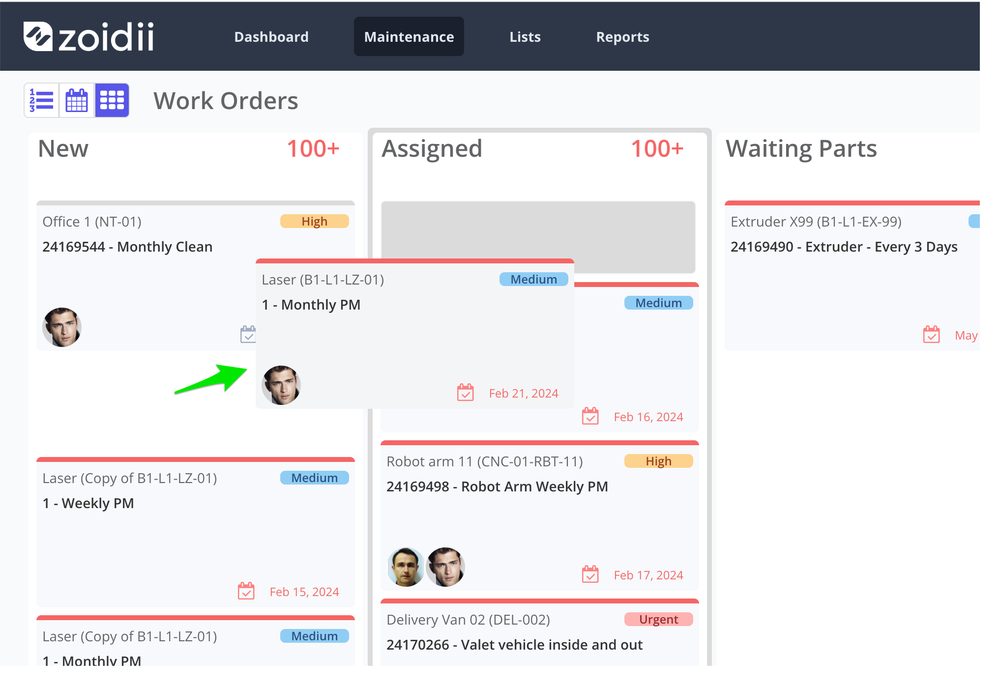
1. Add profile images to help speed up processing
About 90% of the information transmitted to the brain is visual. Humans recognise faces and pictures 60,000+ times faster than names and codes.
That's why adding images to user profiles, assets, and parts is a small change that pays off every single day.
It's such a simple change but highly effective: open the user profile and click to add a profile image or avatar. For Assets and parts, you can add photos directly from the mobile app.
Why it helps:
- Supervisors can quickly match the right technician to the right jobs
- Maintenance managers can quickly scan the work order kanban view to see who is assigned to what work.
- They can make sure the work is evenly spread across the team
- Techs can confirm they've got the correct asset in the field by matching the equipment to a photo.
- Make "add a photo" part of your asset onboarding checklist—no asset is "live" in Zoidii without a clear picture.
- During user setup, ask each technician for a headshot (or take one onsite) and upload it to their profile.
- For tricky areas (similar pumps, lines, or rooms), use wide shots that show context rather than just a nameplate.
- For parts and inventory, place the part on a clean table and snap a photo with the mobile app.
2. Insist non-maintenance staff use the guest request portal
If your team still gets work requests via WhatsApp, text, phone, sticky notes, and "drive-by conversations," your facility won't look as busy as it should. It's difficult to justify maintenance resources when nothing is recorded in a system.
The guest request portal is designed to eliminate confusion and chaos by giving non-maintenance staff a simple, branded page to submit issues to one central system.
The keyword is insist.
Make the portal the only door:
- Share the unique guest URL widely (posters, intranet, QR codes at entry points, printed on operator consoles).
- Clearly communicate: "If it's not in Zoidii, it doesn't officially exist."
- Show requesters how they can log back in to check the status of their requests, so they don't need to chase the maintenance team for updates.
- Nothing falls through the cracks. Every request is tracked, prioritised, and assigned.
- Less noise. Fewer ad-hoc calls and walk-ups because people can see progress themselves.
- Better data. You can report on volume, response times, and the source of requests.
- Justify resources. You can pull up the closed work order reports to show exactly how many issues the team addresses each period.
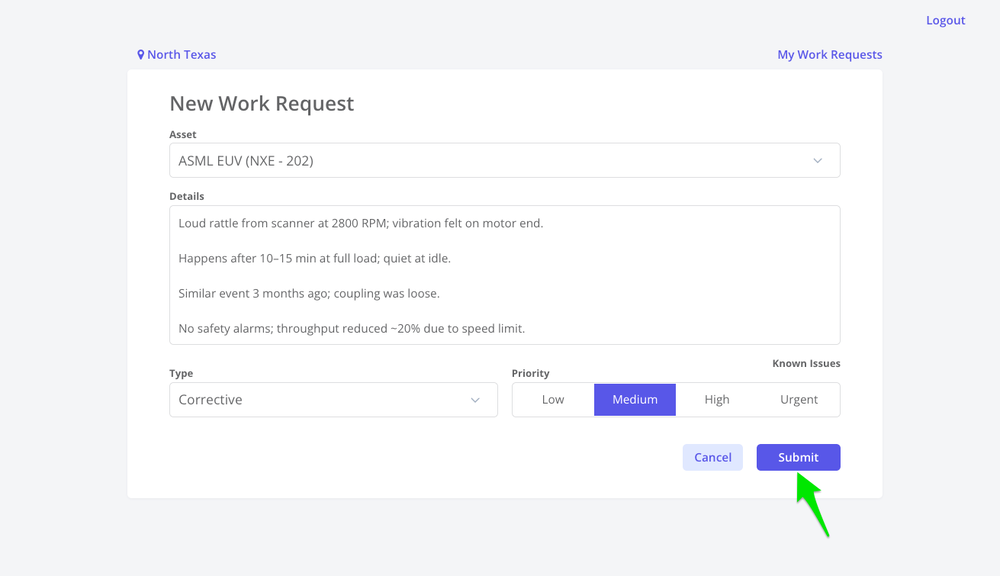
3. Distribute best-practice work request guidelines so people describe problems properly
Zoidii's work request portal is designed to give people outside the maintenance team a simple way to report issues into one central queue. But a simple portal doesn't automatically mean high-quality requests.
That depends on what people type into the form.
If the average request is "it's broken" or "machine down," your technicians spend time chasing details instead of fixing things.
Fix this by standardising what "a good request" looks like. Create a simple one-page "How to log a good work request" guide and push it out wherever people interact with Zoidii:
- On the guest request portal (link it or print it next to shared kiosks).
- In onboarding packs for operators and facilities staff.
- As a short toolbox talk for supervisors.
Encourage requesters always to include:
- Where: exact asset and location.
- What: clear description of the issue, not just "not working."
- When: when it started and whether it's getting worse.
- Impact: safety risk, quality risk, downtime, or annoyance.
- Evidence: snap a photo where possible, using a mobile device
4. Make it standard to log every part used on a work order
If parts aren't logged on work orders, you lose three big things: true maintenance cost by asset, accurate stock levels, and the ability to plan smarter purchasing.
Zoidii already gives you a parts module where you can store part numbers, locations, standard costs, and usage history, and link those parts to work orders.
The trick is turning that capability into a non-negotiable habit.
Make it "the way we work":
- Every time a technician uses a part, they add it to the work order before closing the job.
- Every work order is checked for parts usage during review (especially breakdowns and repeat failures).
- Supervisors and planners use these records to justify budgets and optimise min/max levels.
- Which assets are "parts-hungry"
- Which spare parts are draining the budget?
- Where you can stock less because the real usage is lower than you thought.
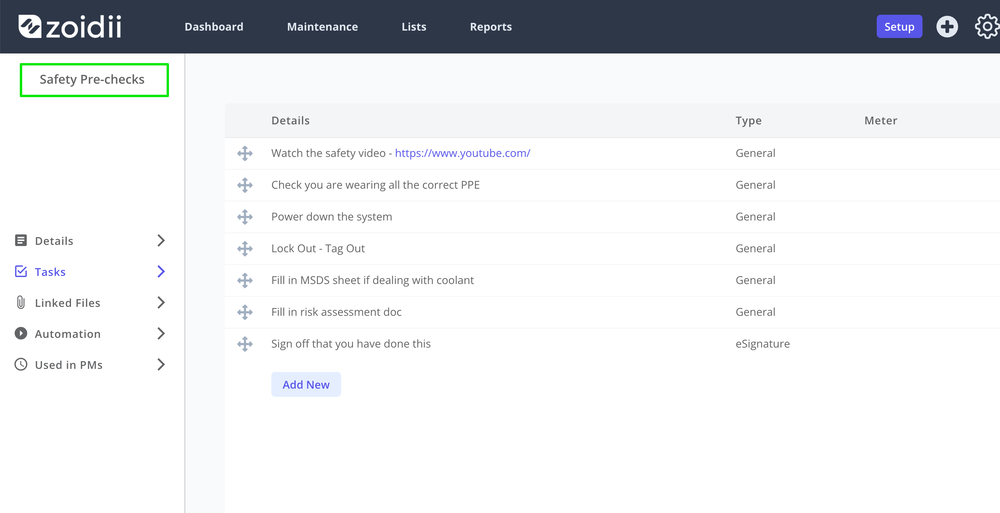
5. Build standard job plans for repeat work
There are tasks you do again and again: production line turnovers, repeat part replacements, filter changes, seasonal shut-downs. If every technician is recreating those jobs from scratch, you're wasting both time and consistency.
Zoidii lets you create standardised checklists, including steps, readings, and associated parts, then attach them to PMs and work orders.
Checklists aren't necessarily just for PM maintenance. They can be used for reactive tasks that occur frequently. That's essentially a "job plan library" waiting to be used.
Start with your top 10 repeat jobs:
For each one, define:
- Scope – what's included and what's not.
- Steps – clear, ordered checklist items.
- Labor – typical duration in the estimate hours field
- Tools & PPE – what's required to do it safely.
- Parts – standard spares to have on hand.
- Build these job plans into Zoidii in the checklist section. You can use the AI checklist generator as a starting point.
- Train technicians to pull the job from the library and follow it, instead of "doing it from experience."
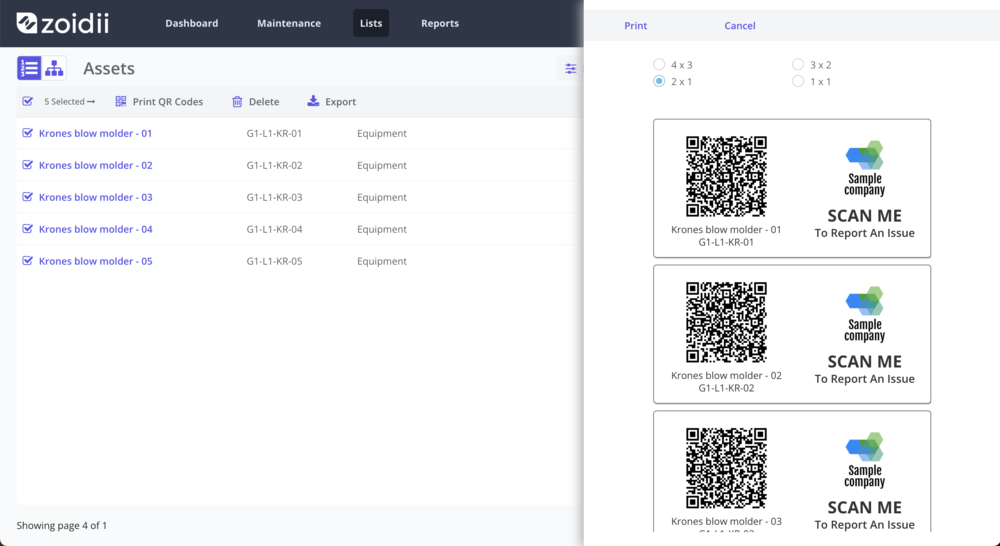
6. Install QR codes on assets and parts to speed up the work request and work order process
Typing asset names on a phone, especially in a noisy plant or dim corridor, is a pain. QR codes cut that friction down to a quick scan.
Zoidii lets you generate and print QR codes for assets and parts, so users can scan them with the mobile app to instantly pull up the relevant record.
QR codes also let non-maintenance staff scan an asset and submit a request straight away through the guest request portal. This significantly reduces friction and increases the likelihood that the issue will be reported.
Practical uses:
- Technicians: scan an asset to open its record, view history, and create or update a work order.
- Guest users: scan to submit a work request without hunting for asset names or codes down a list.
- Stockrooms: scan parts to add them to work orders or check stock.
- Prioritise printing QR codes for critical assets and those with frequent failures.
- Use durable labels that can survive your environment (oil, heat, washdowns).
- Include a tiny "If there's a problem, scan this" message next to the QR code to encourage use.
For more information, see our QR codes knowledge article.
7. Review repeat failures using failure codes, dashboards, and reports
Logging work is good. Learning from it is better.
Zoidii includes dashboards and reports that let you slice your data by work order type, asset, and more, so you can spot trends and problem areas. When you consistently capture failure codes on your work orders, these tools become even more powerful.
Here's a simple approach:
- Standardise your failure codes. Keep the list short and meaningful (e.g., "bearing failure," "electrical–sensor," "contamination," "operator damage") and set them up in system settings.
- Make failure code entry mandatory for breakdown or corrective work when technicians close a job.
- Monthly, run reports to answer questions like:
- Which assets are generating the most repeat failures?
- Which failure modes are most common?
- Are particular shifts, locations, or lines over-represented?
From there, it's about action: root cause analysis, improved PM tasks, better training, or maybe a capital replacement case backed by actual data rather than gut feel.
8. Schedule regular CMMS housekeeping
Even simple systems get messy over time. Assets get duplicated, work orders linger open, and old request types or dropdown values stop making sense. A bit of digital housekeeping keeps Zoidii fast, clean, and trusted.
Zoidii already gives you structured lists for assets, parts, and users, plus dashboards and reports that highlight what's happening in your maintenance operation. Use that visibility to drive a regular clean-up rhythm.
Every month or quarter, block out time to:
- Close or cancel stale work orders that everyone agrees are no longer relevant.
- Review asset hierarchies and tidy up naming so search results are clear and consistent.
- Review dropdowns and codes (locations, request types, failure codes) and remove unused values.
- Archive old parts that you no longer stock, to keep inventory screens lean.
- Check inactive users and disable logins for people who have left the business.
Bringing it all together
None of these tips requires you to buy new modules, hire consultants, or rebuild your entire maintenance strategy. They're small, practical changes that build on what Zoidii already does well: providing a simple, centralised system for work orders, PMs, assets, and parts for teams moving off pen, paper, and Excel.
If you'd like, tell me a bit about your industry and team size, and I can help you turn these ideas into a concrete Zoidii rollout or optimisation checklist.
Email: jeff@zoidii.com Phone: +1 647 846 4244 (N. America) or +353 1 211 8944 (Europe)



