

Keeping a distribution center (DC) humming is a perpetual race against the clock: conveyors and sorters can’t stall, dock doors have to cycle on time, forklifts must be safe and available, and cold-chain assets need to hold temp. A well-chosen CMMS (computerized maintenance management system) turns that chaos into cadence—standardizing work orders, preventing breakdowns, and giving you clean data to improve throughput. At scale, the “best” CMMS isn’t a universal crown; it’s the platform that fits your workflow, footprint, and integration needs.
This guide explains what to look for in a DC-focused CMMS and highlights top options for different sizes and sophistication levels.
Key Takeaways
Here are 4-5 key takeaways from this 2026 ranking of the best CMMS for distribution centers:
- Zoidii Leads for Simplicity and ROI: As the top-ranked CMMS, Zoidii excels in quick deployment, intuitive mobile interfaces, and superior inventory management, making it ideal for DCs transitioning from manual systems to achieve rapid downtime reductions of 25-50%.
- AI and IoT Drive Predictive Maintenance: Platforms like Limble, MaintainX, and Fiix highlight the growing importance of AI/ML and IoT integrations for forecasting failures in high-wear assets like conveyors and forklifts, potentially cutting reactive work by 30-60%.
- Mobile-First Design Boosts Adoption: High-rated solutions such as UpKeep and Coast emphasize offline-capable mobile apps with QR scanning and voice input, enabling 90%+ technician adoption and floor-level efficiency in vast, Wi-Fi-challenged warehouses.
- Scalability for Multi-Site Networks: For large operations, enterprise options like IBM Maximo and TMA Systems provide centralized dashboards and global compliance tools, essential for unifying maintenance across 10-50+ DC sites without losing oversight.
- Inventory Optimization Prevents Disruptions: Across rankings, strong parts tracking (e.g., auto-reorders in Zoidii and predictions in Limble) is critical for avoiding stockouts that could cost $50k+ per hour, with users reporting 20-35% savings in holding costs.
What distribution centers need from a CMMS (beyond the basics)
Most modern CMMS platforms check the core boxes—work orders, preventive maintenance (PM), assets, parts, and reporting. For a distribution center cmms, prioritize these additional capabilities:
- Mobile-first UX. Maintenance occurs in all areas of the DC - on the floor, in mezzanines, and on the docks. Look for mobile apps that allow technicians to access work orders, standard operating procedures (SOPs), and asset histories from anywhere.
- Fast work creation with barcodes/QR codes. Scanning an asset tag at a conveyor station to retrieve history or initiate a work order saves minutes on every job and keeps data clean. Many vendors support barcode scanning in their mobile apps. See how in our How do QR codes work with your CMMS software article.
- Parts and inventory management tuned for MRO. You want minimum/maximum thresholds, consumption tracking, and reorder workflows so a $20 sensor doesn’t strand a $2M sorter. (Zoidii and other CMMS emphasize built-in parts and inventory modules.)
- Flexible PM triggers. Time-based, meter-based, and condition/event triggers (from PLC alarms, counters, or sensors) align with DC realities, where run-hours and cycles take precedence over calendar dates.
- Scalable multi-site management. If you run regional DCs, you’ll want shared templates, cross-site reporting, and role-based access to compare MTTR/MTBF and standardize PMs. The best way to manage multiple sites is with a multi-site CMMS.
- Full Reporting. Having the information that you need to make informed business decisions is key to any great CMMS.
The short list: best CMMS for distribution centers
Below are strong choices for DCs, with notes on where each shines.
#1: Zoidii CMMS – Best Overall for Distribution Centers
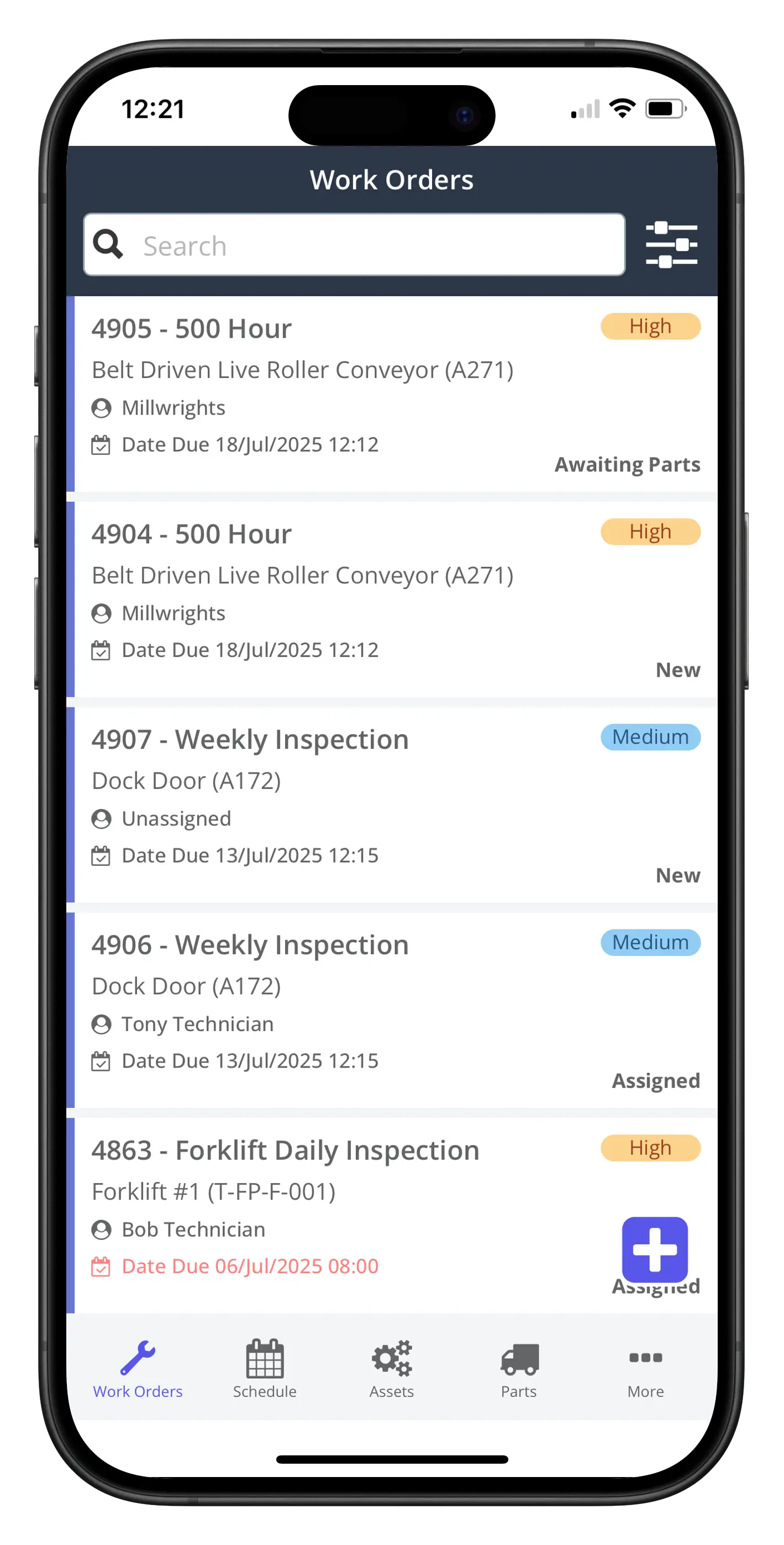
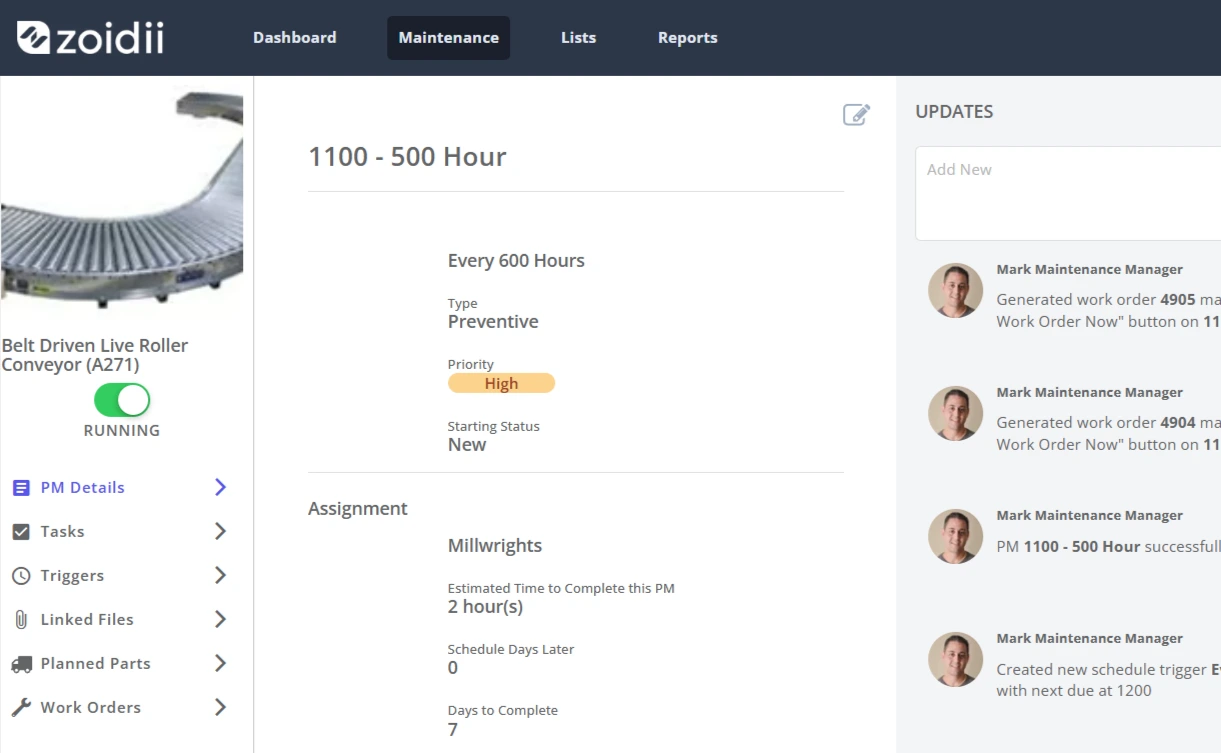
Rating: 4.9/5 | Best for: Quick implementations in multi-site DCs upgrading from spreadsheets, with top-tier inventory management and PM nesting. Zoidii CMMS tops the charts for DCs in 2026, thanks to its founder-driven emphasis on resolving core challenges—gathering input from 700+ managers to build a lean system deployable in weeks. Work orders include media attachments for rapid troubleshooting, and nested PMs support sequenced protocols (e.g., forklift check + tire rotation). Techs scan QR codes on assets for instant access, slashing lookup time by 60% in large layouts.
Top Features
- Work Orders: Create, track, and manage work orders and work requests in one centralized location with one-click creation, photos, checklists, assignments, and real-time status updates that sync across sites.
- Preventive Maintenance: Time-, meter- (e.g., forklift hours), or condition-based scheduling; nested tasks (e.g., battery check + full service) available on top-tier plans to reduce reactive work by 30-50% per user reports.
- Asset Management: Hierarchies for DC layouts (zone-based conveyors, dock doors); QR/barcode scanning for quick lookups and asset tracking.
- Inventory Management: Track spares by bin/location; reorder automation to prevent stockouts that halt fulfillment lines.
- Mobile CMMS: Full functionality on phones/tablets; intuitive UI with in-app tutorials/videos.
- Guest Work Requests: Operations teams can flag issues without login, streamlining communication.
- Reporting: Compliance-ready logs for OSHA/FDA audits; downtime/cost tracking; exportable dashboards for data-driven decisions.
- Purchase Orders: Create, track, and manage POs directly in the CMMS for simplified purchasing.
- Maintenance Checklists: Standardized checklists to ensure task clarity and accountability.
What Do Users Like About the CMMS
From Software Advice reviews:
“Excellent value, easy to use, very responsive support team.” (Anthony, Farming, 201-500 employees, Reviewed July 2024, Rating: 5/5)
“Team listened to needs, tailored software, turned work life around.” (Eddie, Semiconductors, 1001-5000 employees, Reviewed April 2024, Rating: 5/5)
“Customer support, ease of use, reports.” (Darren, Food Production, 51-200 employees, Reviewed April 2024, Rating: 5/5)
From GetApp reviews:
“Configuring PMs is super easy using the step by step process. The asset logbook is great for getting a single view of asset history without having to toggle through different work order screens.” (Mauro D., Co-Founder, Reviewed Date not specified, Rating: 5/5)
“It was straightforward to implement and is pretty easy to use. In particular, I like the ability to bookmark and follow critical work orders.” (Sami A., CEO, Reviewed Date not specified, Rating: 5/5)
“The mobile app is just as user-friendly. Customer support has been excellent throughout.” (Susie O., Production Improvement Intern, Reviewed Date not specified, Rating: 5/5)
What Do Users Dislike About the CMMS
From Software Advice reviews:
“Mobile version lacks access to KPIs and dashboard while on the go.” (Darren, Food Production, 51-200 employees, Reviewed April 2024, Rating: 5/5)
“There is nothing at this time, generally when we have found and issue it was generally something we did not set up correctly that was causing an issue also there are always new features and improvements that zoidii releases..” (Anthony, Farming, 201-500 employees, Reviewed July 2024, Rating: 5/5)
“As with any new system implementation, it is tedious to set up all of the assets and the work orders, but once they are in the system, it makes life a little easier.” (Bryce, Warehousing, 201-500 employees, Reviewed May 2024, Rating: 5/5)
Pricing
Starts free; Basic $39/user/month, Professional $55, Enterprise $75 (annual billing; discounts for volume/multi-site). No per-asset fees; quick setup.
DC Fit & ROI: Zoidii shines in mid-large DCs (e.g., retail, pharma) by promoting tech autonomy—resolving 50% more issues via mobile. Example: A beverage DC dropped refrigeration breakdowns 50% with condition PMs. Anticipate 30-55% downtime cuts, 25% inventory savings. “Zoidii was quick and simple to implement... app is super simple for techs.” – Supervisor (Capterra). Suited for efficiency-focused teams over heavy customization.
#2: Limble CMMS – Best for Automation-Driven Multi-Site & Predictive Insights
Rating: 4.8/5 | Best for: Expansive DC networks requiring AI, IoT, and large-scale growth. Limble’s AI-infused, mobile-priority system unifies maintenance in distributed DCs. AI auto-generates orders, refines PMs from usage (e.g., high-volume conveyor runtime), and converts incidents to preventives. Offline mobile excels in signal-poor zones.
Top Features
- Work Order Management: Organize work orders, PMs, and tasks for the entire team with streamlined creation, assignment, and completion tracking for real-time visibility.
- Preventive Maintenance: Automate scheduling, build checklists, and analyze performance; supports condition-based and predictive maintenance to cut downtime.
- Asset Management: Track assets from installation to retirement with health scoring, history, and lifecycle costs for complete oversight.
- Inventory Management: Real-time parts tracking with min/max thresholds, auto-reorders, and usage-based predictions to minimize costs and prevent delays.
- Mobile App: Full mobile access for technicians, including offline mode, to improve productivity and data quality on the floor.
- Integrations: Endless API and standard integrations, including IoT sensors and ERP systems for seamless connectivity.
- Reporting/Analytics: Customizable dashboards and AI-powered insights for actionable data on maintenance costs and efficiency.
- Vendor Management: Track vendors and purchase orders to streamline external repairs and procurement.
What Do Users Like About the CMMS
From GetApp reviews:
“After research, focused on Limble and was immediately impressed. We watched their series of videos and within a week, had created the assets and PM schedules and were up and running.” (Rating: Not specified, Date: Not provided)
“For me the ease in which we could set this up was great. I’m old school and like paper, so this was new your me to have and it was so ease to use that I can’t believe it took me so long to get it.” (Rating: Not specified, Date: Not provided)
““I especially love the accessibility of having it on my phone. As a manager always on the go, it is so easy to communicate with my crew when there is a work order that needs taken care of immediately.” (Rating: Not specified, Date: Not provided)
What Do Users Dislike About the CMMS
From GetApp reviews:
“There is no offline version, for it to work you have to be online - something i am sure they are working to do though.” (Rating: Not specified, Date: Not provided)
“I was involved with the meetings set up to help choose a CMMs system, as i was one of 3 people with any real experience with another CMMS system. We had it narrowed down to 3 systems, why they chose this one over the other 3 is way beyond my comprehension. A very big blunder is when a maintenance worker closes a work order, it shouldn’t actually close it. Instead, it should go to a pool for someone to review and then do the final closing. To the maintenance worker it appears closed, but it is not until the person(s) in charge of reviewing them signs off. The inventory side of things is another problem all on its own. Also, we should be able to have more than one window open at a time. I have used Infor EAM (HxGNn) before Limble. This CMMS system seems like one that was created in a basement and introduced with limited talent to back it up. This system is poorly set up. It might work for a startup company that doesn’t know what it needs or understand how these systems should function.” (Rating: 1/5, Reviewed February 2025).
From Software Advice reviews:
“Not designed for a Manufacturing Company. I initially evaluated 4 different systems and was excited that Limble had good reviews and looked like a nice application. A few months in i discovered it was not designed for manufacturing. The Asset was not the driver of all information. The expect me to have a separate PM for every asset and i have hundreds of similar assets. Limble keeps changing features and then asking foe more money if i want those features back.” (Rating: 2/5, Reviewed July 2023).
Pricing
Essential $20/user/mo, Premium $55, Professional/Enterprise custom (free trial).
DC Fit: Ideal for national networks aligning upkeep with WMS metrics; 50% efficiency gains in studies. Scenario: Black Friday conveyor uptime at 99% via AI alerts.

#3: MaintainX – Best for Compliance-Focused Frontline Operations
Rating: 4.7/5 | Best for: Regulated DCs (food/pharma) prioritizing safety SOPs and AI optimizations. MaintainX converts paper SOPs to digital checklists (e.g., forklift certs), with AI refining schedules and inventory forecasts. Mobile-first for floor teams.
Top Features
- Work Orders: Create, assign, and track work orders across all sites, with AI-powered suggestions and insights to guide frontline teams.
- Preventive Maintenance: Automated preventive and predictive maintenance with AI, including scheduling PMs, triggering condition-based work, and identifying data anomalies.
- Asset Management: Increase asset availability with equipment health and reliability insights, root cause identification, extended asset life, and AI-powered data-driven decisions.
- Inventory Management: Monitor parts inventory, receive low stock alerts, automate reorders, and use AI to predict upcoming parts needs.
- Mobile App: Technician-loved usability with mobile access for frontline operations.
- Integrations: Connect to any system with available integrations, including custom builds upon request.
- Reporting/Analytics: Customizable dashboards, out-of-the-box reports, and AI-powered reporting that generates charts and insights using natural language.
- Compliance Tools: Digitize operations to enforce safety guidelines and compliance standards across sites, reducing risk of fines and shutdowns.
- Multi-Site Support: Multi-site management and reporting to centralize data, with support for global operations and enterprise-grade scalability.
What Do Users Like About the CMMS
From GetApp reviews:
“Very easy to create/edit procedures and implement. Support responds quickly even if it is something that they can’t fix.” (Rating: 4/5, Reviewed July 2025)
“Easy to use software for both administrators and technicians. Assets and work orders are clearly laid out and easy to trace to find the information you are looking for.” (Rating: 5/5, Date: Not provided)
“I will keep using it and recommend it to anyone who is looking for a maintenance software... it works well and has excellent support when you run into a jam and need help.” (Rating: 4.8/5, Date: Not provided)
“It was a mess without a method to keep communication organized. The previous person in my position would just scribble a jumble of notes to try and remember everything.” (Rating: 4.8/5, Date: Not provided)
What Do Users Dislike About the CMMS
From GetApp reviews:
“The one thing I dislike about the app is that when work orders are closed they still appear in closed orders for my team. I would love to see the option to archive these while still be searchable.” (Rating: 4.8/5, Date: Not provided)
“Scheduling is a pain as you can’t reorder the jobs on a calendar. Can’t easily see who is assigned to a job in calendar view.” (Rating: 4.8/5, Date: Not provided)
From Software Advice reviews:
“I’ve been quite disappointed with my experience at MaintainX. First and foremost, their service has been extremely slow. Scheduling Zoom meetings takes an unreasonably long time, which has hindered our progress significantly. Additionally, I was promised regular PM reports, which were touted as a straightforward feature. However, we’ve encountered constant delays and a lack of follow-through on this promise. It’s frustrating when expectations are set and then not met. Overall, I expected a more efficient and responsive service. Unfortunately, this has not been the case.” (Rating: 4/5, Reviewed July 2025)
Pricing
~ $20/user/mo starter; free plan.
DC Fit: Enforces FDA audits in cold DCs; 35% MTTR reductions.
#4: Fiix CMMS – Best for Industrial Automation Integration
Rating: 4.6/5 | Best for: DCs with Rockwell hardware in AS/RS and conveyors. Fiix uses AI/IIoT for predictive upkeep, syncing with industrial controls.
Top Features
- Work Orders: Manage thousands of work orders in a few clicks to keep equipment running at its best.
- Preventive Maintenance: Set up predictive maintenance in as little as two weeks to cut downtime and skip unnecessary inspections.
- Asset Management: Track and manage assets, including sending readings from 30 assets for better visibility.
- Inventory Management: Handle parts and inventory as part of managing assets and work orders.
- Mobile App: Mobile-friendly features for technicians on the floor.
- Integrations: Endless integration capabilities to get data from any system, including Rockwell hardware.
- Reporting/Analytics: AI-powered reporting to see the future of your facility and reduce guesswork.
- AI Capabilities: Includes Fiix Asset Risk Predictor to predict and prevent asset failure before it happens.
- Compliance Tools: Track compliance tasks to pass audits without spending hours at the computer.
- Multi-Site Support: Supports maintenance teams managing multiple assets and facilities.
What Do Users Like About the CMMS
From GetApp reviews:
“The best feature about fiix for me is the organisation of assets and their logical accessibility. Ease of use was another plus as it did not take long for me to pick up the software.” (Rating: Not available, Date: Not available)
“Fiix is an amazing Software, very easy to use, a lot of useful features and data import/export capability which allows you to perform different analysis. Customer service is excellent.” (Rating: Not available, Date: Not available).
What Do Users Dislike About the CMMS
From GetApp reviews:
“Initially difficult to set up and adding features is also time consuming. The reports are missing stages of completion, completed works with dates.” (Rating: Not available, Date: Not available)
“In a year where every business has to adapt and make compromise in regards to what they offer and how it is paid for , Fiix have been extremely unhelpful - and actually quite rude.” (Rating: Not available, Date: Not available)
Pricing
Free: $0 (limited). Basic: $45/user/month. Professional: $75/user/month. Enterprise: Custom. Free trial.
#5: UpKeep – Best for Mobile-First Multi-Site Networks
Rating: 4.6/5 (1,300+ reviews) | Best for: Distributed DCs with emphasis on EHS compliance and IoT-driven predictive maintenance. UpKeep’s cloud-based, mobile-centric CMMS unifies maintenance across sprawling DC networks, leveraging AI to auto-create work orders, optimize PM schedules from asset data (e.g., conveyor runtime), and integrate IoT for real-time alerts on equipment health. In warehouses where downtime from forklift failures or sorter jams can disrupt thousands of orders, UpKeep’s offline mobile app enables techs to log issues with photos, scan barcodes for parts, and collaborate via chat—reducing MTTR by up to 50% in case studies.
Top Features
- Inventory management: Track parts with low-stock alerts and reorders.
- Inventory control: Multi-site visibility for spares optimization.
- Real-time scheduling: Assign tasks dynamically across shifts.
- Third-Party integrations: Connect to WMS/ERP for auto-triggers.
- Work order creation: Quick setup with checklists and attachments.
- Maintenance scheduling: Meter-based PMs for MHE like AGVs.
What Do Users Like About the CMMS
From GetApp reviews:
“Upkeep is great at helping us compile our facility management information in one central location that is easily accessible to different users in ways that are suitable for them.” (Rating: Not provided, Date: Not provided)
“The tracking for the work orders is super convenient and thorough and allows for reporting to be super easy and helps track problem areas or where money should be spent.” (Rating: Not provided, Date: Not provided)
From Software Advice:
“UpKeep has been very helpful in guiding us through adoption of the platform and providing us the tools needed to expand our capabilities and record keeping. This is an excellent platform that has helped us build our service delivery platform.” (Rating: 5/5, Date: February 2024).
What Do Users Dislike About the CMMS
From GetApp reviews:
“In some areas there are connection issues with no or limited internet/phone signals. This is an issue when uploading and even some data as been lost.” (Rating: Not provided, Date: Not provided)
“It has been difficult to learn the use of upkeep. I believe that a mandatory intro training should be required when a new user is to use upkeep.” (Rating: Not provided, Date: Not provided)
Pricing
Essential: $20/user/month. Premium: $45/user/month. Professional/Enterprise: Custom. Free trial.
#6: IBM Maximo – Best for Enterprise Asset Lifecycle
Rating: 4.2/5 (82 reviews) | Best for: Massive, regulated DC networks with complex integrations and AI analytics. IBM Maximo’s enterprise-grade suite excels in comprehensive asset management for large DCs, using AI for predictive insights (e.g., forecasting refrigeration failures from sensor data) and GIS for multi-site tracking. In high-volume warehouses, it automates workflows from work orders to procurement, ensuring compliance and minimizing disruptions in global supply chains.
Top Features
- Work Order Management: Create, assign, track tasks.
- Inventory Management: Track supplies for optimal stock.
- Activity Tracking: Document system activities.
- Maintenance Management: Track asset performance.
- Barcoding/RFID: Track items via tags.
- Location Tracking: Monitor physical locations.
What Do Users Like About the CMMS
Versatility and config:
- “It is powerful and versatile, and it’s easy to use. It’s by far the only end-to-end asset management software on the market.” – Omar S. (Capterra)
- “Among reviewers who comment on IBM Maximo Application Suite’s flexibility, 93% feel positive.” – Aggregated (GetApp)
- “User Friendly, Highly Configurable, Maximo Mobile, Feature rich in terms of Enterprise Asset Management.” – Partheeban B. (GetApp)
- “Projetech is a fantastic company.” – Verified Reviewer (GetApp)
- “Great Experience with Maximo application suite.” – Verified User (Capterra)
What Do Users Dislike About the CMMS
Learning and cost:
- “Large learning curve to use it, not intuitive.” – Amanda C. (Capterra)
- “Difficult to track time charging and part costs. Like most IBM products, it is bit expensive.” – Verified User (Capterra)
- “Not user friendly.” – Selva N. (GetApp)
- “Its user interface does not look very modern.” – Miley M. (Capterra)
- “Even filling a work order is too complicated.” – Don C. (GetApp)
Pricing
Quote-based, starting high for enterprise. Free trial.
DC Fit: Ideal for global e-commerce DCs with deep ERP ties; reduces failures in AS/RS systems via AI, per automotive/ logistics users.
#7: Hippo CMMS (Eptura) – Best for Visual Mapping & Facilities
Rating: 4.8/5 (85 reviews) | Best for: DCs with space planning needs, using interactive maps for asset navigation. Hippo CMMS (now under Eptura as Click Maint) provides visual tools for DC layouts, enabling techs to drill into floor plans for quick asset access and QR scanning. For warehouses managing racking and dock equipment, it streamlines PMs and requests, improving response times in tight spaces.
Top Features
- Work Order Management: Create, track tasks.
- Preventive Maintenance: Schedule inspections.
- Workflow Management: Automate repetitive tasks.
- Inspection Management: Track compliance.
- Mobile Access: Remote device use.
- Maintenance Scheduling: Plan services.
What Do Users Like About the CMMS
From Software Advice reviews:
“Easy to navigate through and user friendly. All of my work is done on Eptura Asset and I enjoy all of the features of the program.” (Rating: 5/5, Date: March 2025).
From GetApp reviews:
“It is good for keeping up with work and when all the change-over bugs are worked out - it will be good.” (Rating: Not provided, Date: Not provided
What Do Users Dislike About the CMMS
From Software Advice reviews:
“Eptura seems to have gone downhill. It was a much better program when it was iOffice. The reliability to access the program, the integration with Outlook (Hummingbird) is double-booking our rooms, the insights module is very difficult to use and has never been able to provide the reports we need. I hate that we can no longer bring back a person that leaves without requesting extra help from Eptura to reactivate the profile. Because of the continued issues without result, I am VERY strongly considering looking for a new system when my contract expires.” (Rating: 1/5, Date: January 2025).
From GetApp reviews:
“To say that customer service was bad is not accurate because it would imply that customer service actually exists.” (Rating: Not provided, Date: Not provided)
Pricing
Custom quote.
DC Fit: Optimizes racking maintenance with maps; users praise QR for fast requests in industrial settings.
#8: eMaint – Best for Customizable Compliance
Rating: 4.4/5 (329 reviews) | Best for: Food/pharma DCs requiring audit-ready logs and flexible workflows. eMaint’s customizable platform supports multi-site DCs with condition-based PMs and interactive mapping, ideal for tracking cold chain assets and ensuring FDA compliance through detailed histories.
Top Features
- Work order management: Plan, schedule, track with mobile access.
- Work order creation: Custom templates, automation.
- Asset tracking: Monitor status, history, costs.
- Preventive maintenance: Schedule via calendar/meter, reminders.
- Mobile access: Remote use.
- Inventory management: Track supplies.
- Maintenance scheduling: Ad hoc/planned.
- Reporting & analytics: Metrics tracking.
What Do Users Like About the CMMS
From Software Advice reviews:
“eMaint CMMS is very clean and intuitive Software and it’s a great choice for companies who need to improve work quality of their maintenance teams. It also performs very well on mobile so we can easily access the software from anywhere, at any time from the mobile device which saves my lots of time and effort.” (Rating: 5/5, Date: March 2023).
From GetApp reviews:
“Customer Support is Outstanding. They truly work to satisfy the customer to the best of their abilities and recommend work around where needed.” (Rating: Not provided, Date: Not provided)
What Do Users Dislike About the CMMS
From Software Advice reviews:
“After 17 years working as a maintenance engineer, I was excited to get a CMMS system that could be tailored to our needs. That would give us the opportunity to do budget control, depreciation management, etc. It was all a fairy tale during a sales call. Fluke personnel is not connected between departments. We wasted almost nine months in implementation, that they will charge you even if you are not satisfied.” (Rating: 2/5, Date: July 2023).
From GetApp reviews:
“What I’ve noticed, you keep on calling the IT people to help you do this do that and so on. It’s not really a friendly user, You need to call IT to help you fix something that is too small and supposedly easy. It seems that they controlled everything. which is not good.” (Rating: 3/5, Date: July 2021).
Pricing
Team: $69/user/month. Professional: $85/user/month. Enterprise: $120/user/month. Free trial.
DC Fit: Enforces cold chain tracking; users note QR for inventory in large facilities.
#9: Fracttal One – Best for Custom Filters & Mobility
Rating: 4.6/5 (1,700 reviews) | Best for: Dynamic DC teams needing AI and IoT for proactive upkeep. Fracttal One combines AI and IoT for smart maintenance in DCs, optimizing processes from PMs to inventory with real-time data.
Top Features
- Preventive maintenance
- Reporting & statistics
- Maintenance scheduling
- Work order creation
- Equipment tracking
- Real-Time notifications
What Do Users Like About the CMMS
From Software Advice reviews:
“Excelent, easy to find the things and there are alot of functions, all to manage the department of maintenance.” (Rating: 5/5, Date: November 2024).
From GetApp reviews:
“The fracttal software is very friendly when uploading equipment, areas, and assigning them. Another aspect that I highlight is its ease when assigning human resources to tasks.” (Rating: Not provided, Date: Not provided).
What Do Users Dislike About the CMMS
From Software Advice reviews:
“purchase order vs request cannot make as take same number sequence.” (Rating: 2/5, Date: July 2020).
From GetApp reviews:
“It does not handle the volumes of information well, the API available does not completely solve the problem. New versions sometimes contain errors that are difficult to reverse.” (Rating: Not provided, Date: Not provided)
Pricing
Custom quote.
DC Fit: Enhances logistics with AI; users note better machinery control.
#10: MPulse CMMS – Best for Flexible Enterprise
Rating: 4.5/5 (169 reviews) | Best for: Proactive strategies in scalable DC ops. MPulse supports condition-based maintenance for DC fleets, with strong reporting for asset utilization.
Top Features
- Preventative maintenance: Schedule tasks.
- Work order management: Track requests.
- Asset Tracking: Lifecycle monitoring.
- Maintenance Scheduling: Slot tasks.
- Scheduling: Resource planning.
- Service History: Past records.
What Do Users Like About the CMMS
Balance and support:
- “MPulse is the software that we chose to help get our house in order and it has proven to be a very good decision. This software offers the best balance of features.” – Verified User (Capterra)
- “The reporting is great, it’s easy for me to make the detailed reports I need.” – Sharon D. (GetApp)
- “I cannot say enough positive about Mpulse to reflect my appreciation of their commitment to their product quality and support of their customers.” – Verified Reviewer (GetApp)
- “Their Customer Service is always very helpful and does the best they can to resolve your issues.” – Verified User (GetApp)
What Do Users Dislike About the CMMS
Difficulty and cost:
- “Pros: MPulse has a simplified list of features and applications and does not overly complicate the software with unnecessary items. Cons: Extremely difficult ...” – Verified User (Capterra)
- “So far I have found it to be complex in setup and configuration. A little pricey lately.” – Verified User (Capterra)
- “Mpulse is a good tool for my maintenance technicians. When a machine breaks it is very easy to track down what...” but “the conversion between...” – Verified User (GetApp)
Pricing
$49/concurrent user/mo, annual. Free trial.
DC Fit: Tracks devices in IT-heavy warehouses; reduces spreadsheet reliance.
#11: Brightly Asset Essentials – Best for Citizen/Guest Requests
Rating: 4.4/5 (272 reviews) | Best for: Hybrid DC-facilities with external portals. Brightly streamlines work orders and PMs for education/engineering DCs, with portals for ops input.
Top Features
- Maintenance scheduling: Prioritize tasks.
- Work order management: Track updates.
- Preventive maintenance: Extend life.
- Work order creation: Detailed entry.
- Asset tracking: History planning.
What Do Users Like About the CMMS
From Software Advice reviews:
“Very positive---works very well! Easy to navigate.” (Rating: 5/5, Date: May 2025).
From GetApp reviews:
“The reporting is great, it’s easy for me to make the detailed reports I need and see how we’re doing. On top of all this, the support staff is so nice and very responsive to any questions I have.” (Rating: Not provided, Date: Not provided)
What Do Users Dislike About the CMMS
From Software Advice reviews:
“Customer service. I have waited weeks on support tickets they hang up when I have called support and do not return calls.” (Rating: 2/5, Date: May 2022).
From GetApp reviews:
- “These problems that belong to SchoolDude are truly having a negative impact here.” (Rating: Not provided, Date: Not provided)
Pricing
Contact for custom quote; ~$50-100/user/mo.
DC Fit: Good for fleet maintenance in government warehouses.
#12: Facilio – Best for Connected Operations
Rating: 4.0/5 (25 reviews) | Best for: Portfolio DCs with vendor and real-time monitoring. Facilio unifies FM for DCs, with preventive tools and vendor tracking for efficient operations.
Top Features
- Preventive Maintenance: Scheduled repairs.
- Work Order Management: Task tracking.
- Maintenance Management: Asset performance.
- Maintenance Scheduling: Ad hoc planning.
- Mobile Access: Remote.
- Asset Tracking: Usage monitoring.
What Do Users Like About the CMMS
Support and features:
- “People’s in Facilio are very friendly, cooperative, intend to complete scope, make happy of the client. Product has lot of features.” – Fernando M. (Capterra)
- “The team have been graceful but firm in the way they’ve managed everything. And mostly the level of patience the project team have shown us whilst working.” – Md S. (GetApp)
- “Facilio’s CMMS software helps property owners/operators manage, control, and optimize their end-to-end portfolio O&M in one place.” – Verified Reviewer (GetApp)
What Do Users Dislike About the CMMS
Complexity and enhancements:
- “Product has lot of features and just need to enhance how to configure.” – Fernando M. (Capterra)
Pricing
$10,000/year Basic. Free trial.
DC Fit: Suits logistics with FM focus; users recommend for supply chain.
Implementation tips specific to distribution centers
- Start with high-velocity equipment. Bring the first lines into the CMMS where a minute of downtime hurts most (inbound receiving conveyors or the main sorter). Build PM templates there, then propagate.
- Use QR codes everywhere. Put scannable tags on motors, gearboxes, and dock mechanisms. Technicians should open the right asset record in two taps from the floor.
- Make parts data actionable. Enter supplier, lead time, and min/max on critical spares so re-orders trigger before peak season.
- Train operators to log anomalies. Provide pickers and dock associates with a simple mobile form to report belt mistracks, unusual noise, or slow doors, thereby feeding proactive work orders. MaintainX and similar systems are strong at these frontline workflows.
- Instrument where it pays. If you already collect cycles or alarms from PLCs/SCADA, use them to trigger event-based PMs in your CMMS so maintenance keeps pace with reality.
Frequently Asked Questions (FAQs)
1. How long does it typically take to implement a CMMS in a mid-to-large distribution center? Implementation time varies significantly depending on the platform and company size:
- Lightweight, mobile-first solutions like Zoidii, MaintainX, and UpKeep often go live in 2–6 weeks for a single site and 2–4 months for multi-site rollouts (including data import, training, and pilot testing).
- More enterprise-grade platforms like IBM Maximo, Fiix, or eMaint usually require 3–12 months due to deeper custom integrations, data migration from legacy systems, and extensive user training. Most vendors offer guided onboarding, and starting with a single DC as a pilot significantly accelerates the timeline and reduces risk.
- Robust mobile app with offline capability – Technicians must be able to create/update work orders, scan QR codes, attach photos, and view asset history while on the floor without reliable Wi-Fi.
- Strong parts/inventory management – Including bin-level tracking, kitting, low-stock alerts, auto-reorders, and vendor PO integration to prevent stockouts that can idle entire zones ($50k+/hour impact).
- Meter- and condition-based preventive maintenance – Scheduling based on runtime hours, cycles, or IoT sensor data (vibration, temperature) rather than just calendar days, which is essential for high-utilization MHE like conveyors, sorters, and forklifts. Platforms like Zoidii and Limble consistently rank highest when these three priorities are weighted heavily.
- Downtime reduction: 25–55% (most common range 30–45%)
- Reactive / emergency work drop: 30–60%
- Spare parts inventory holding cost savings: 15–35% (through better visibility and reorder automation)
- Overall maintenance labor & material cost reduction: 20–40%. The fastest and largest gains usually come from organizations moving from spreadsheets/paper to a modern mobile CMMS (e.g., Zoidii, MaintainX). At the same time, already-digitized sites see more incremental but still significant improvements from AI/IoT features.
- Start with strong basics: mobile access, offline support, good inventory, and meter-based PMs (Zoidii, MaintainX, UpKeep excel here).
- Add predictive AI and IoT later (Limble, Fiix, IBM Maximo) once you have clean historical data and 80–90% technician adoption. Many mid-sized DCs report 30–50% downtime reduction in the first year using only core features before layering on advanced analytics.
Bottom line
In 2026, the best CMMS for distribution centers transforms maintenance from cost center to competitive advantage, directly boosting order fulfillment rates and margins. Zoidii CMMS tops the list for delivering enterprise power in an accessible package—ideal for DCs prioritizing speed, simplicity, and parts reliability amid relentless operational pressure. Whichever you choose, prioritize mobile adoption and data integration to maximize value. Start with a free trial of Zoidii today and future-proof your DC operations.



