

If you’re running a small business with equipment, vehicles, or facilities to look after, you’ve probably lived through at least one “spreadsheet maintenance” disaster:
- The one critical asset nobody serviced on time.
- The sticky note that went missing.
- The urgent job is buried in someone’s inbox.
In 2026, the good news is that CMMS tools are now more affordable, mobile-enabled, and small-business-friendly. The challenge is choosing one that your team will actually use.
Below, we’ll look at what small businesses should expect from a CMMS in 2026, then walk through the top options.
What small businesses need from a CMMS in 2026
Large enterprise systems are overkill for most smaller teams. When you evaluate CMMS options, focus on a few fundamentals.
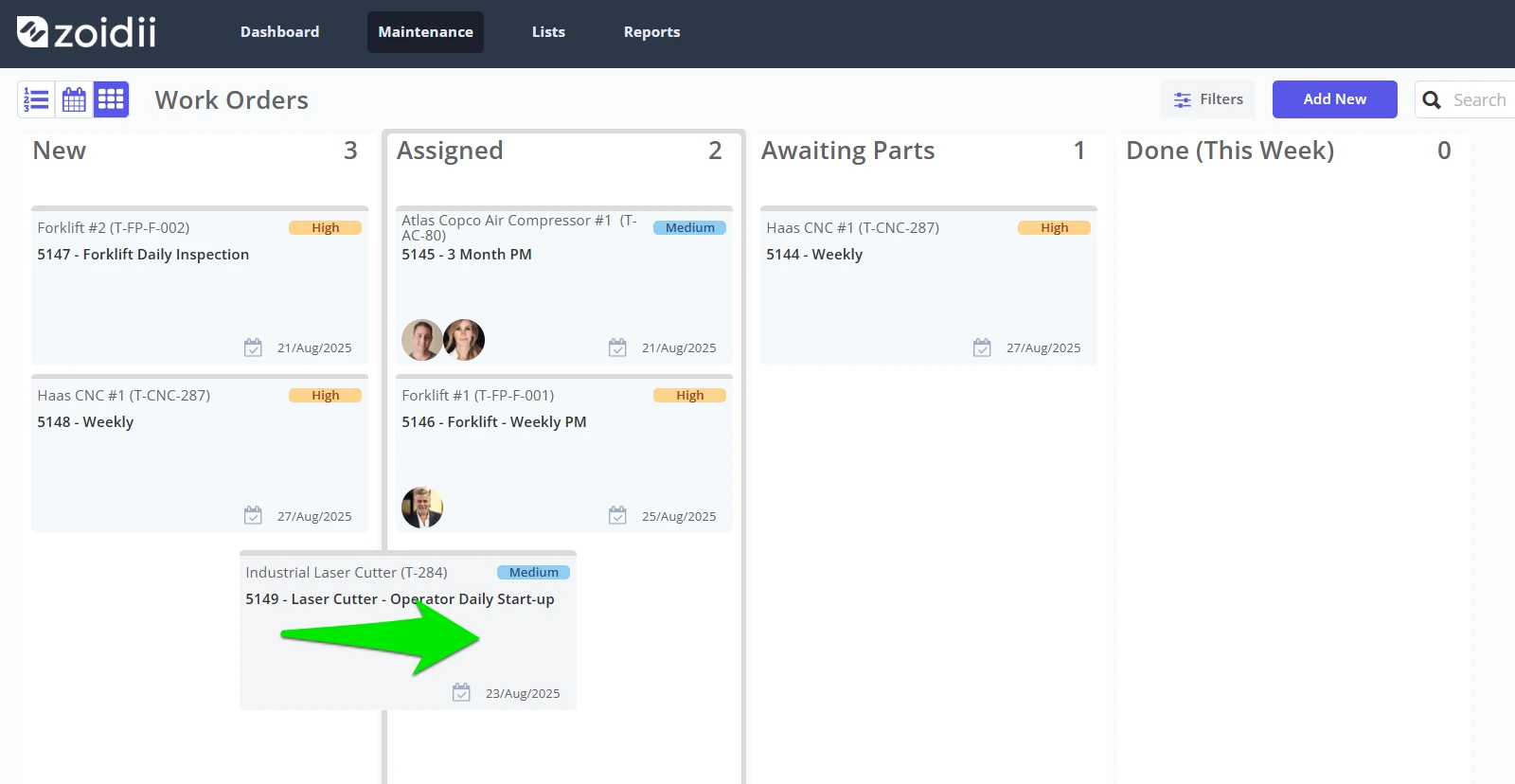
1. Simple, fast work order management
The core job: get work out of inboxes and into a structured, trackable workflow.
A good CMMS for small businesses should give you:
- A clean request form that anyone can use
- A central board or list showing all open work orders
- Easy assignment and status updates for techs or outside vendors
2. Preventive maintenance that doesn’t require a PhD
For small organizations, the biggest win is doing preventive maintenance on time. Look for:
- Recurring PMs based on time or usage
- Checklists for repeat jobs
- Automatic work order generation and reminders
3. All-in-one asset and parts tracking
You don’t want five different systems. A small-business CMMS should comfortably handle:
- Asset information (locations, serials, manuals, history)
- Spare parts with storage locations, min/max levels, and costs
- Maintenance cost rollups by asset or location
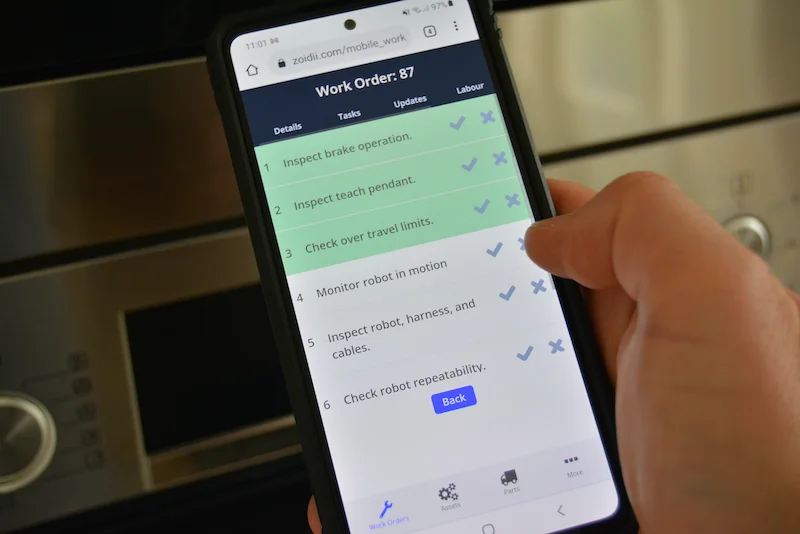
4. Mobile-first experience
Your people are not sitting at desks all day. They’re on roofs, shop floors, in vehicles, or across campus.
Modern top-ranked CMMS tools like Zoidii, MaintainX, Limble, and UpKeep are consistently praised for their user-friendly mobile apps that help frontline teams know what to do and how to do it. If a tech can’t comfortably use the app on their phone, adoption will stall — no matter how impressive the feature list.
5. Pricing that makes sense for a small business
Cloud CMMS pricing has become very competitive. Many tools now start at $20–$40 per user per month for basic tiers, with more advanced plans layered on top. For a small business, that kind of transparent, per-user pricing makes budgeting far easier.
#1 – Zoidii: Best CMMS for Small Businesses in 2026
Zoidii is a cloud-based CMMS built specifically for organizations moving from pen and paper and Excel to digital maintenance management for the first time.
That focus on “first-time CMMS” buyers, plus its full feature set and approachable pricing, is why it deserves the #1 spot for small businesses in 2026.
Built for teams escaping spreadsheet chaos
Zoidii is repeatedly described as being purpose-built for maintenance organizations dealing with:
- Constant emergency breakdowns
- PMs “out of control.”
- Little communication or shared knowledge
- No real tracking or planning
The features small businesses actually use
Zoidii covers all the core CMMS building blocks without drowning you in enterprise complexity:
- Work orders & requests
- A request portal where anyone can submit issues
- A central list/board to prioritize and assign work
- Status tracking from new → in progress → complete
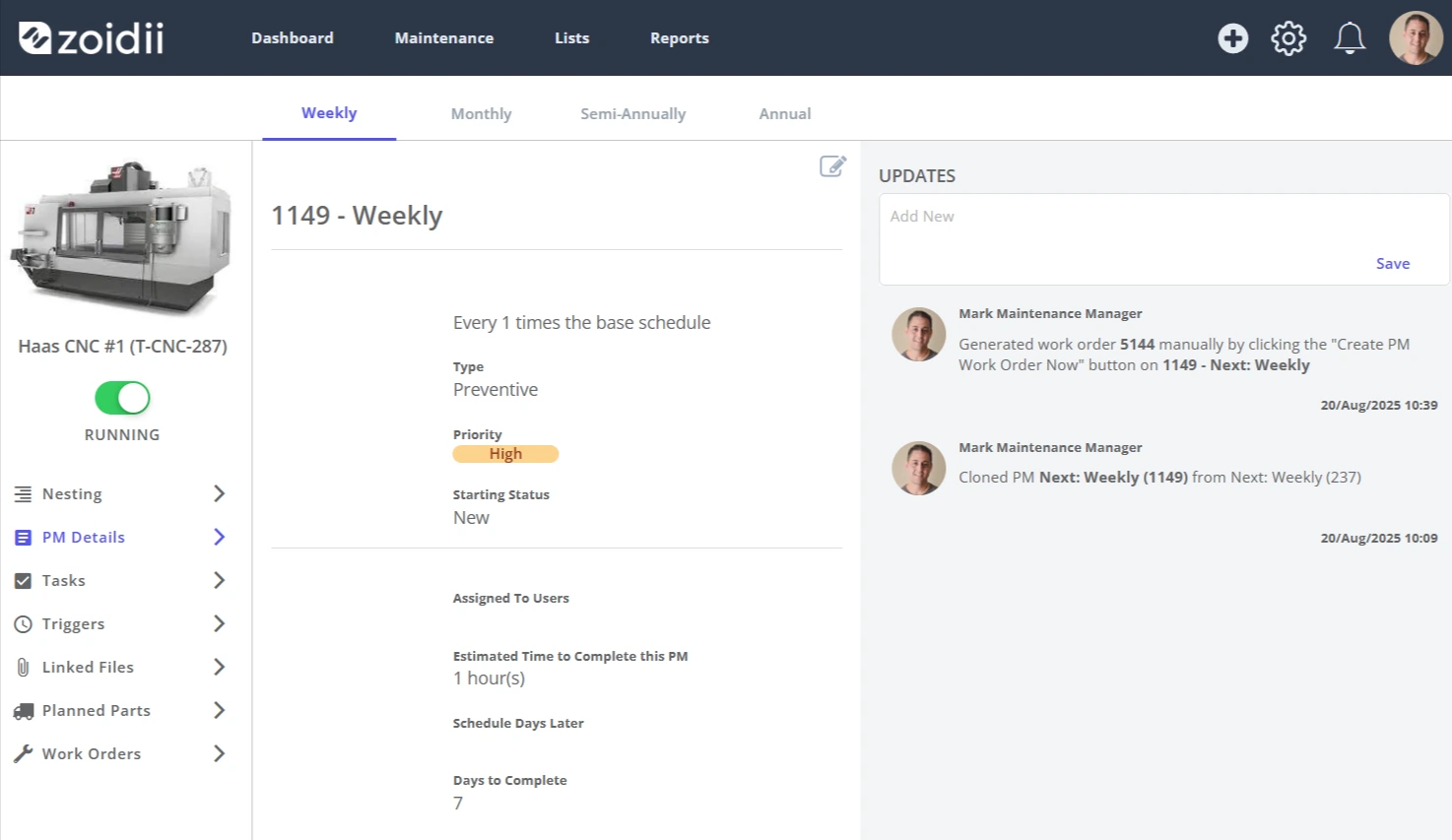
- Preventive maintenance
- Recurring PM schedules based on time or meter readings
- Checklists and procedures are attached to each PM.
- Automatic generation of PM work orders so nothing gets quietly missed.
- Asset management
- Centralized asset registry with locations and details
- Full maintenance history to support decisions on repair or replace
- Parts and inventory
- Part numbers, locations, min/max levels, and standard costs are all tracked in one place.
- Dashboards and reporting
- KPI dashboards for work orders, PMs, assets, and parts, so you can see what’s overdue, what’s failing, and where spend is going — all from a single screen.
Simple, modern pricing
Zoidii’s pricing is clearly laid out:
- Basic – $39/user/month
- Professional – $55/user/month
- Enterprise – $75/user/month
Best for: Small and mid-sized businesses in maintenance-heavy sectors (manufacturing, facilities, hospitality, education, food & beverage, etc.) that are still on paper or spreadsheets and want a modern CMMS that’s powerful but not overwhelming.
Other top CMMS options for small businesses in 2026
Zoidii may be #1 in this list, but it’s not the only strong option. Depending on your priorities, these are worth a look as well.
MaintainX – Best for frontline collaboration
MaintainX is often ranked among the top overall CMMS’, praised for its mobile-first design, ease of use, and strong procedure digitization.
Why it’s great for small businesses:
- Very intuitive mobile apps for frontline teams
- Built-in messaging and collaboration inside work orders
- Strong support for digital SOPs, safety checklists, and inspections
Limble – Best for growing teams that want depth
Limble is a user-friendly CMMS known for its robust work order management, customizable dashboards, and strong reporting.
Why it works for small businesses:
- Powerful yet approachable interface
- Excellent analytics and reporting for ROI and KPI tracking
- Scales well as you add more sites, users, and assets
UpKeep – Best mobile-first option for field-heavy teams
UpKeep is frequently highlighted as one of the leading mobile CMMS tools, with a strong presence among small and mid-sized businesses.
Why small businesses like it:
- Mobile apps are central to the experience
- Easy to create and complete work orders on the go
- Built to support teams that spend most of their day away from desks
Coast – Best for small teams wanting a low-cost start
Coast is a flexible, mobile-first CMMS that gets high marks in reviews of free and low-cost CMMS tools, with a strong focus on adaptable workflows and real-time messaging.
Why it stands out:
- Free tier for very small teams getting started
- Strong real-time chat alongside work orders
- Good value compared with many legacy CMMS tools

How to choose the right CMMS for your small business
Even with rankings, the “best” CMMS is the one that fits your reality. Here’s a simple selection path:
- Write down your top three headaches
- Missed PMs? Frequent breakdowns? No visibility? Audit pressure?
- These will become your must-have requirements.
- Shortlist 3–4 tools
- Put Zoidii on the list if you’re moving off paper/Excel and want something built for that transition.
- Add one mobile-heavy option (MaintainX or UpKeep).
- Add one analytics-heavy platform (Limble, maybe Fiix) if you care a lot about data and dashboards.
- Run a small pilot
- Import a subset of assets.
- Route all work requests through the CMMS for 30–60 days.
- Watch: Do techs actually use it? Is it easier to see what’s going on? Are PMs finally happening on time?
- Standardize and commit
- Whichever tool you pick, make it the single source of truth: no work without a work order.
Final thoughts on CMMS for Small Business
In 2026, small businesses no longer have to choose between clunky enterprise systems and chaotic spreadsheets. The CMMS market has matured: you can get simple, affordable, mobile-ready tools that genuinely fit small teams.
Among them, Zoidii stands out as the best CMMS for small businesses: built for first-time CMMS adopters, priced for small budgets, and packed with the core features — work orders, PMs, assets, parts, and dashboards — that transform maintenance from a daily scramble into a controlled, data-driven process.
Pick the right system, and maintenance stops being a constant fire drill and starts becoming one of the quiet strengths of your business.



