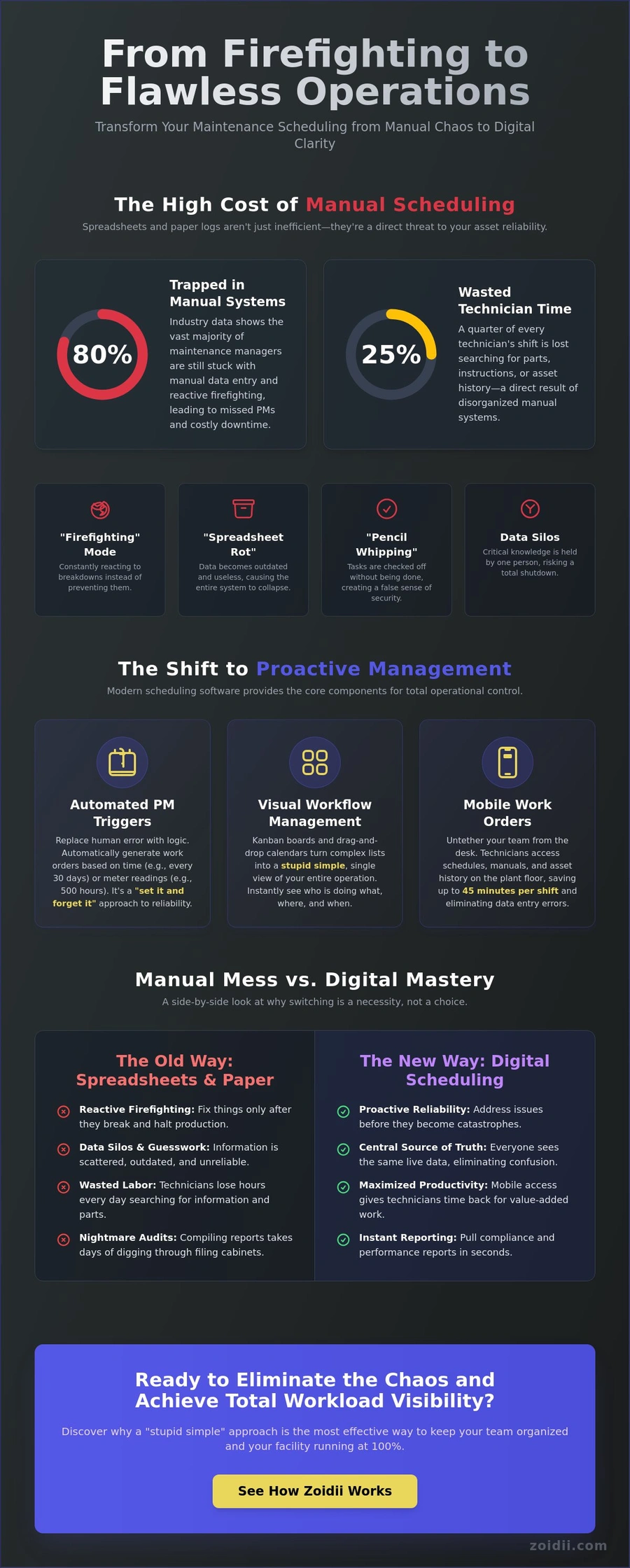
Your spreadsheet isn't a management tool; it's a graveyard for tasks your team forgot to do three weeks ago. Industry data from 2023 shows that 80% of maintenance managers are still trapped in a cycle of manual data entry and reactive firefighting. You've likely felt that frustration when a critical asset goes down because a preventive task slipped through the cracks of a clunky Excel file.
It’s a mess, and it’s costing you hours of operational sanity every single week. Using the right maintenance scheduling software shouldn't feel like learning rocket science; it should just work.
We agree that your team's time is too valuable to waste on complex tech they'll never touch. This guide will show you how to eliminate the chaos and transition to a streamlined, digital schedule that your technicians will actually use. We'll break down how to automate your PM schedules and provide mobile access to ensure you realize your goal of zero unplanned downtime and total workload visibility.
Key Takeaways
- Stop the "firefighting" cycle by learning how to shift from reactive manual systems to a proactive digital rhythm.
- Identify the core components of maintenance scheduling software that drive asset reliability without adding unnecessary complexity.
- Avoid the "Complexity Trap" by learning how to distinguish between essential tools and the over-engineered fluff that kills team adoption.
- Follow a realistic five-step roadmap to transition from Excel to digital, starting with the critical process of cleaning your data.
- Discover why a "stupid simple" approach to software is the most effective way to realize your operational goals and keep your team organized.
The High Cost of Manual Maintenance Scheduling
Maintenance scheduling software isn't just a tool for your back office; it's the digital backbone of your asset reliability. If you rely on whiteboards or paper logs, you're stuck in "Firefighting Mode." This reactive state means you only fix things after they've already stopped your production line. Switching to a digital "Proactive Mode" allows you to address issues before they become catastrophes. A modern Computerized Maintenance Management System (CMMS) organizes your resources so you stop guessing and start planning.
Manual systems carry high hidden costs that drain your budget. A 2021 industry report found that technicians spend 25% of their shift just looking for parts or instructions. This inefficiency leads to "spreadsheet rot." This occurs when your data becomes so messy and outdated that the entire maintenance program collapses under its own weight. When parts are missing and schedules are unclear, technician burnout spikes. Your best people don't want to spend every day in a state of emergency. They want a system that works.
Why Spreadsheets and Paper are Killing Your Efficiency
Paper logs don't provide real-time updates. This lack of visibility leads to "pencil whipping," where technicians check off PM tasks without actually performing the work just to clear the paperwork. You also face the danger of data silos. If only one person knows the schedule, your facility is one retirement or sick day away from a total shutdown.Physical files make audits a nightmare. Compiling a compliance report from filing cabinets takes 10 times longer than pulling a digital record. Keep your system stupid simple, so your team actually uses it.
The Shift to Proactive Asset Management
Moving from "fix when broken" to "planned reliability" is the only way to realize your operational goals. Maintenance scheduling software acts as the central source of truth for your entire team. It ensures that the right technician has the right tools at the right time. When everyone sees the same live data, confusion disappears.Maintenance scheduling is the strategic allocation of resources to prevent asset failure. By digitizing this process, you gain the clarity needed to keep your facility running at 100% capacity without the usual stress.
Core Components of Modern Scheduling Software
Effective maintenance scheduling software isn't just a digital version of a wall calendar. It's the bridge between your asset registry and your daily operations. A spreadsheet tells you what you own, but it doesn't tell you how to keep it running.
Modern tools link every asset directly to a master schedule, ensuring that your team spends time on the right machines at the right intervals. This connection eliminates the guesswork that leads to unexpected downtime and keeps your facility organized.
Automated Preventive Maintenance (PM) Triggers
Manual reminders are a recipe for disaster. If a manager forgets to check a logbook, a critical safety inspection gets missed. Automation replaces human error with logic-based triggers. You can set work orders to generate based on time intervals, such as every 30 days, or meter readings, like every 500 hours of runtime.This "set it and forget it" approach allows you to quickly realize your long-term planning goals. It ensures that 100% of your safety-critical tasks are scheduled without a single manual email or sticky note.
Visual Workflow Management: Kanban and Calendars
Complex lists are hard to read. Visual tools like Kanban boards make status tracking stupid simple. You can see exactly which jobs are "To Do," "In Progress," or "Pending Parts" in a single view. If a technician finishes a job early, a manager can use drag-and-drop scheduling to rebalance the workload instantly.This real-time visibility means you don't have to go looking for your team. You already know who is doing what and where they are. It turns a chaotic morning into an efficient, predictable workflow.
Mobile Work Orders and Real-Time Data
The frontline workforce shouldn't be tethered to a desk. Paperwork orders lead to data entry errors and lost time. High-performing teams use maintenance scheduling software with mobile apps to access their schedule directly from the plant floor. By scanning a QR code on a pump or a conveyor, a technician can instantly pull up the asset history, safety manuals, and the current work order. Attaching photos of a worn bearing directly to the digital record provides a level of clarity that handwritten notes can't match.This shift to mobile can save each technician up to 45 minutes of travel time per shift, allowing them to focus on actual repairs. If you are ready to stop the paper chase, you can chat with a product expert to see how these tools fit your specific needs.
Evaluating Maintenance Scheduling Software: Features vs. Fluff
Stop falling for the "more is better" lie. Most maintenance scheduling software is bloated with features your team will never touch. This is the Complexity Trap. When a system is over-engineered, it creates friction instead of flow. You don't need a 200-page manual or a six-month implementation cycle. You need a tool that solves problems on day one. For larger organizations, the only "complex" parts should be behind the scenes, like SSO (Single Sign-On) for security or ERP integrations to sync parts inventory. Everything else should stay out of the way.
The only metric that actually matters in the first 90 days is the User Adoption Rate. If 85% of your team isn't using the software daily by month three, the project has failed. It doesn't matter how powerful the reporting is if the data going in is incomplete or nonexistent. High adoption happens when the software feels like a help, not a chore.
The "Stupid Simple" Test for Software Selection
Before you sign a contract, run the "Stupid Simple" test. Hand a mobile device to your least tech-savvy technician. If they can't open a work order, attach a photo, and clock their time without a training manual, walk away.A clean UI is a requirement, not a luxury. Cluttered, enterprise-style dashboards might look impressive in a sales demo, but they kill productivity in the field. Prioritize speed. A system you can set up in 48 hours is infinitely more valuable than a "robust" platform that takes six months to configure.
Reporting and Analytics That Actually Matter
Don't get distracted by vanity metrics. Effective maintenance scheduling software should prioritize data that drives decisions. Focus on these three areas:- PM Compliance: Are you actually doing the preventive work you planned? This is the best predictor of equipment lifespan.
- Mean Time to Repair (MTTR): Tracking how long assets stay down helps you identify training gaps or aging machinery.
- Labor Tracking: Use this to prove maintenance ROI to the C-suite. When you can show exactly where 1,200 man-hours went last month, budget approvals get much easier.
Implementation Roadmap: Moving from Excel to Digital
Ditching your spreadsheets for professional maintenance scheduling software isn't a weekend project. It's a strategic shift that requires a "stupid simple" approach to avoid common pitfalls. Most maintenance managers fail because they try to digitize 500 assets in one afternoon. This leads to messy data and a team that hates the new system before it even launches. You need a lean, five-step process to move from chaos to operational sanity.
Step 1: Audit Your Assets and Clean Your Data
Don't import your entire Excel disaster into a new system. Follow the 80/20 rule: identify the 20% of assets that cause 80% of your downtime. Start with these critical machines first. You must standardize your naming conventions now. If one tech calls a machine "Line 1 Pump" and another calls it "P-01," your reporting will be useless. Use Zoidii’s asset management tools to organize this data properly before you hit the upload button. Clean data is the foundation of every successful implementation.Step 2: Define Your PM Workflows
Manufacturer manuals are often 200 pages of fluff. You need to translate those recommendations into digital checklists that a technician can actually follow on a rainy Tuesday. Set up your first 5 to 10 critical PMs to see immediate value. This builds momentum without overwhelming the staff. A digital schedule is only as good as the instructions within it. If your tasks are vague, your results will be inconsistent. Be specific with your steps, measurements, and required tools.Step 3: Train the Team and Launch
Skip the long boardroom presentations. Focus on hands-on training with the mobile app right on the factory floor. This is where the work happens, so that's where the training should stay. Identify a "Super User" within your crew. This is usually the most tech-savvy tech who can help their peers adopt the system.They act as your first line of support, which reduces friction during the "change management" phase. Encourage feedback loops during the first 30 days. If a workflow doesn't work in the real world, change it immediately to maintain team buy-in.
Stop fighting with spreadsheets and start organizing your floor with a tool built for reliability. Book a demo with a Zoidii product expert today
Why Zoidii is the Smart Choice for Maintenance Teams
Most maintenance scheduling software feels like it was designed by people who've never stepped foot on a shop floor. It's bloated, confusing, and often requires a week of training just to log a basic grease job. Zoidii is the antidote to that over-engineered mess. We built this platform on a "Keep It Stupid Simple" (KISS) philosophy because we know that if a tool is too hard to use, your team simply won't use it. It shouldn't take 15 minutes to document a 5-minute repair.
Zoidii is a 100% cloud-based system. You don't have to worry about expensive on-premise servers, manual updates, or begging the IT department for help every time there's a glitch. You get a reliable, modern solution that works from any browser or mobile device. This approach strips away the software stress, allowing you to focus on keeping your assets running instead of troubleshooting your database. It's about providing a clear, calm path toward operational order.
Built for Technicians, Not Just Managers
Managers love reports, but technicians need to get work done. Zoidii uses an intuitive Kanban board that lets your crew see exactly what's on their plate with a single glance. Drag, drop, and done. Our mobile-first design means they can update work orders right at the machine, capturing data while it's fresh.Features like guest work orders allow anyone in the building to report an issue without needing a full license. Single Sign-On (SSO) makes access seamless across the whole organization. This accessibility is why Zoidii is a top-rated partner for maintenance pros who value their time. When the whole organization can submit a request in seconds, nothing falls through the cracks.
Realize Your Goals with Expert Support
Traditional enterprise software often takes 6 to 12 months to fully implement. Zoidii is built for rapid time-to-value. Most of our users are up and running within days, not months. You won't be handed off to a pushy sales representative who doesn't understand your industry.When you talk to us, you're talking to product experts who understand the nuances of PMs and asset lifecycles. We're here to help you reach your goals without the typical corporate friction.
Stop fighting with your tools and start mastering your schedule. Book a demo with a Zoidii product expert today and see how easy maintenance management can be.
Take Control of Your Operational Sanity
Manual scheduling is a drain on your team's energy and your facility's budget. Transitioning from messy spreadsheets to a digital roadmap isn't just a tech upgrade; it's a necessity for hitting uptime targets. You need maintenance scheduling software that prioritizes clarity over complexity, ensuring every work order is visible and every asset is tracked.
By focusing on technician-first tools and a structured implementation plan, you can finally move from reactive chaos to a predictable, organized rhythm.
Zoidii is the #1 rated cloud CMMS for ease of use because we keep things stupid simple. We're trusted by maintenance teams worldwide to eliminate the fluff and deliver results that actually matter on the shop floor. Our technician-first mobile app design ensures your crew spends more time on the tools and less time fighting with software. Don't let disorganized PMs and lost work orders slow you down for another shift. Ready to simplify your schedule? Book a Zoidii demo today.
You've got the expertise to lead your team to success. We've got the tool to make it happen. Let's get to work.