

Government facilities keep the lights on—literally. From courthouses and transit depots to water treatment plants, parks, and public housing, the public sector oversees an enormous and aging asset base.
Keeping those assets safe, compliant, and cost-effective is a high-stakes logistics challenge. That’s where a computerized maintenance management system (CMMS) proves its value.
A modern CMMS centralizes maintenance data, orchestrates work, and turns reactive firefighting into disciplined asset management. Here’s how government agencies put CMMS software to work—and what it takes to do it well.
Key Takeaways:
- CMMS centralizes maintenance data—assets, work history, parts, and costs—so agencies standardize processes, improve accountability, and pass audits with confidence.
- Preventive and predictive maintenance reduces downtime by automating PM schedules, triggering condition-based work, and documenting completions for compliance.
- Work order orchestration + mobile tools streamline intake, routing, and field execution, boosting wrench time, first-time fix rate, and citizen satisfaction.
- Measure what matters—PM compliance, MTTR, backlog, availability, MCRV, and safety findings—to guide staffing, prioritize assets, and justify budgets.
Why CMMS’ Matter in the Public Sector
Public organizations face unique pressures, including strict regulatory oversight, constrained budgets, union rules, and a mandate to deliver reliable services. A CMMS addresses these realities by:
- Creating a single source of truth for assets, locations, warranties, and work history.
- Standardizing processes across departments and districts, so “how we do maintenance” is consistent.
- Improving accountability with timestamps, digital approvals, and audit trails.
- Supporting transparency via reporting that maintenance leaders can share with executives, boards, and the public.
- Extending asset life through preventive and predictive strategies—critical when replacement cycles are long.
Core Use Cases Across Agencies
1) Asset and Inventory Management
Government portfolios can encompass a diverse range of assets, including HVAC systems, pumps, bridges, vehicles, playground equipment, and more. A CMMS catalogs each asset with metadata (manufacturer, serial number, install date, criticality), then ties that record to all related work and costs.
When paired with inventory control, it tracks spare parts, re-order points, and vendor lead times, preventing both stockouts and over-stocking. For agencies with remote facilities, barcode or QR code scanning speeds up audits and reduces data entry errors.
2) Preventive and Predictive Maintenance
Preventive maintenance (PM) schedules—based on time or usage—are the bedrock of public-sector reliability. A CMMS automates PM generation, assigns tasks to the right technicians, and ensures the work is documented for future audits.
As agencies add condition monitoring (e.g., vibration or temperature sensors on pumps), those signals can feed the CMMS to trigger predictive work orders before a failure occurs, minimizing service disruption.
3) Work Order Orchestration
From citizen-reported issues to internally reported issues, work requests flow in constantly. A CMMS provides an intake portal with prioritization rules, SLA targets, labor estimates, and routing by skill or region.
Supervisors gain visibility into backlog, aging, and technician utilization. Mobile apps enable crews to clock labor, capture photos, and close work orders in the field, ensuring complete records without a paper chase.
4) Compliance and Safety
Whether it’s OSHA, environmental health, NFPA, transit authority standards, or municipal codes, public agencies must prove they did the right work at the right time.
CMMS checklists, digital signatures, and automatic audit reports reduce risk. Inspection templates (elevator, boiler, playground, fire suppression) standardize evidence collection, while automated escalations ensure critical deficiencies don’t languish.
5) Budgeting and Capital Planning
Accurate life-cycle cost data turns maintenance from a sunk cost into a strategic input. CMMS data—failure rates, downtime, repair vs. replace analysis—helps justify capital projects and prioritize limited funds.
By rolling up costs to asset classes or locations, finance teams can forecast next year’s O&M spend and model savings from energy retrofits or replacements. Read more about how a CMMS can help to decide whether to repair or replace equipment.
6) Fleet and Transit Operations
CMMS isn’t just for buildings. Transit agencies and public works departments use it to schedule preventive service on vehicles, align with DOT inspections, and integrate with onboard telematics for meter-based PMs.
For snowplows or sanitation trucks, mobile work orders and parts staging can make the difference between timely service and customer complaints.
7) Citizen Experience
Some agencies provide a simplified request portal for residents to report issues such as broken lights, playground hazards, or water leaks. The CMMS auto-creates a work order, sends updates, and, when appropriate, publishes resolution metrics. That feedback loop builds trust and reduces duplicate tickets.

Implementation Playbook: What Good Looks Like
1. Start with a clean asset registry. Inventory is destiny. Conduct a layered audit: import any existing spreadsheets, walk critical sites, and tag assets with barcodes or QR codes. Don’t boil the ocean—begin with high-criticality systems and expand in waves.
2. Standardize data and workflows. Define naming conventions, asset hierarchies (site → building → system → component), failure codes, and priority levels. Agree on what “done” means for each work type. Consistency today prevents reporting headaches tomorrow.
3. Design roles and permissions. Public agencies often require granular access rules, such as limiting contractors to assigned work, supervisors to assign work, and inspectors to their own tasks. Configure roles upfront to avoid audit surprises.
4. Mobilize the field. Technicians require mobile access, straightforward checklists, and the ability to capture photos. Pilot with a few crews to refine forms and streamline the process. The best adoption booster? Remove paper forms and eliminate duplicates the same day the mobile goes live.
5. Train, then retrain. Budget time for train-the-trainer, quick-hit videos, and “floor walks” the first month after launch. Capture feedback, simplify screens, and celebrate early wins—such as reduced backlogs or faster inspections.
6. Governance and data quality. Appoint an owner for master data, establish periodic audits (e.g., “no asset without a location,” “no work order closed without labor hours”), and enforce these audits. Data you trust is what fuels useful dashboards.
Measuring Success: KPIs That Matter
- PM compliance rate: % of PMs completed on time. Target >90% on critical assets.
- Mean time to repair (MTTR): Lower is better; use it to validate staffing and training.
- Backlog (weeks): A healthy preventive backlog is typically 2–4 weeks; a backlog of more than 6 weeks indicates resourcing issues.
- Wrench time: % of shift spent on actual maintenance vs. travel/admin. Mobile workflows should push this up.
- Asset availability/downtime is especially vital for water, power, and transit operations.
- First-time fix rate: Signal of parts availability, diagnostics quality, and technician skills.
- Maintenance cost as % of replacement value (MCRV): Helps identify money pits and inform timely retirement or replacement decisions.
- Compliance findings: Number and severity of deficiencies, plus time to remediation.
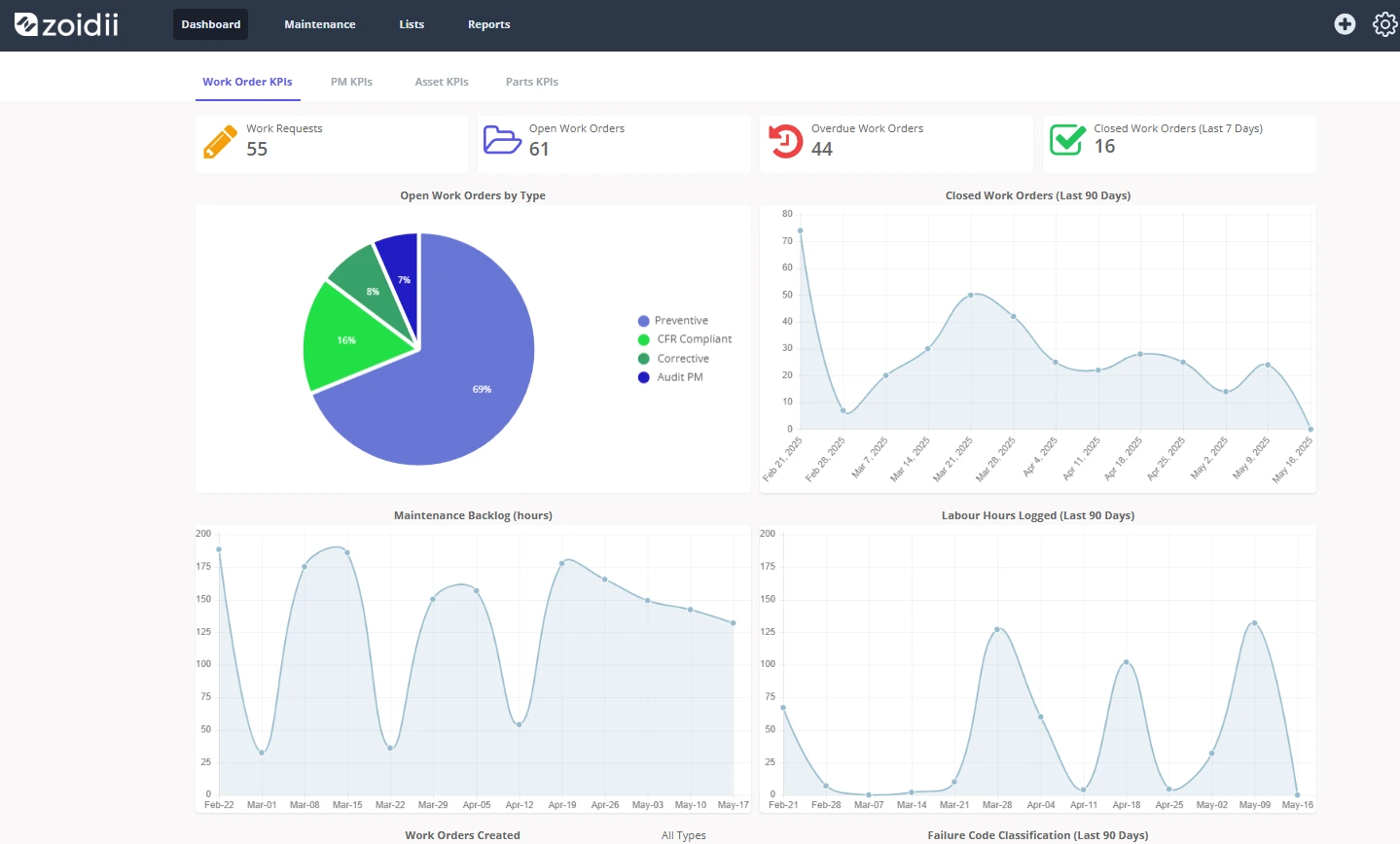
Common Challenges—and How Agencies Overcome Them
- Aging assets with incomplete history. Solution: Start logging from day one, attach photos, and document as-found conditions. Use condition-based scoring to prioritize replacements.
- Change management resistance. Emphasize technician benefits (less paperwork, clearer instructions), involve union reps early, and eliminate duplicative tools quickly so the CMMS becomes the obvious path. Read about the 9 ways CMMS software benefits the end user.
- Data sprawl. Limit free-text fields, require codes and dropdowns, and conduct regular audits. A well-designed CMMS encourages users to maintain clean data.
- Cybersecurity. Work with IT on MFA, role-based access, audit logging, and vendor risk reviews. For critical infrastructure, segment networks and limit outbound connections from SCADA/BMS integrations.
A Quick Scenario: City Parks & Facilities
Consider a mid-sized city managing 120 buildings, 75 parks, and a fleet of 200 vehicles. Before the CMMS was introduced, the operations team managed work orders via phone and sticky notes; parts were stored in unlocked rooms; and annual audits were stressful. After implementation:
- Park rangers submit playground inspection checklists in the field, and hazards create urgent work orders with photos.
- The water department’s sensors push pump run-hours nightly; the CMMS generates usage-based PMs.
- Finance sees monthly rollups of labor and parts by site, aligned to GL codes—no spreadsheet gymnastics.
- Backlog stabilizes at four weeks; PM compliance on critical HVAC rises from 62% to 94%; OSHA findings drop year-over-year.
- Citizens receive status updates for reported issues, which boosts satisfaction scores and reduces duplicate calls.
Final Thoughts
For government agencies, the value of a CMMS is evident in fewer surprises, safer operations, cleaner audits, and more efficient use of every maintenance dollar.
Success isn’t about buying software—it’s about building reliable processes, clean data, and a culture that values preventive work as much as emergency response.
Start with critical assets, standardize the basics, integrate where it counts, and measure what matters. Do that, and your CMMS becomes more than a system—it becomes the backbone of public service reliability.



