

If you make food for a living, you already know your maintenance program isn’t just about uptime—it’s about food safety, audit readiness, and protecting your brand when the unexpected hits.
A great CMMS (Computerized Maintenance Management System) can be the difference between a smooth BRCGS/SQF audit and a scramble for paper binders, between a planned sanitation changeover and a costly allergen cross-contact incident.
This guide cuts through the noise and shows you what “best” really means for food and beverage plants, plus a short list of CMMS options worth a look.

Why is a CMMS critical in food & beverage?
Most CMMS platforms can create work orders and track assets. The best CMMS software for food & beverage have features that enable:
- Auditability on demand: Instant, gap-free records for FDA/CFIA inspections and GFSI schemes (SQF, BRCGS, FSSC 22000). You need time-stamped maintenance, sanitation, and calibration logs that stand up to auditors.
- Sanitation & allergen control: Seamless handling of sanitation standard operating procedures (SSOPs), pre-op checks, and verification tasks tied to specific lines.
- Cold chain & environmental monitoring: Temperature, humidity, and pressure readings—inspection rounds that trigger work orders automatically when limits drift.
- Traceability links: The ability to relate maintenance and sanitation events to batches, lots, and hold/release decisions.
- High-mix operations: Frequent product changeovers, contractors on site, rotating shifts, and multi-site coordination.
The features that actually matter
Here’s the shortlist of capabilities that separate a “works on paper” CMMS from one that fits a modern food plant.
1) Compliance, food safety & audit tools
- SSOP workflow: The ability to create templates for sanitation tasks, verification/validation steps, and digital sign-offs.
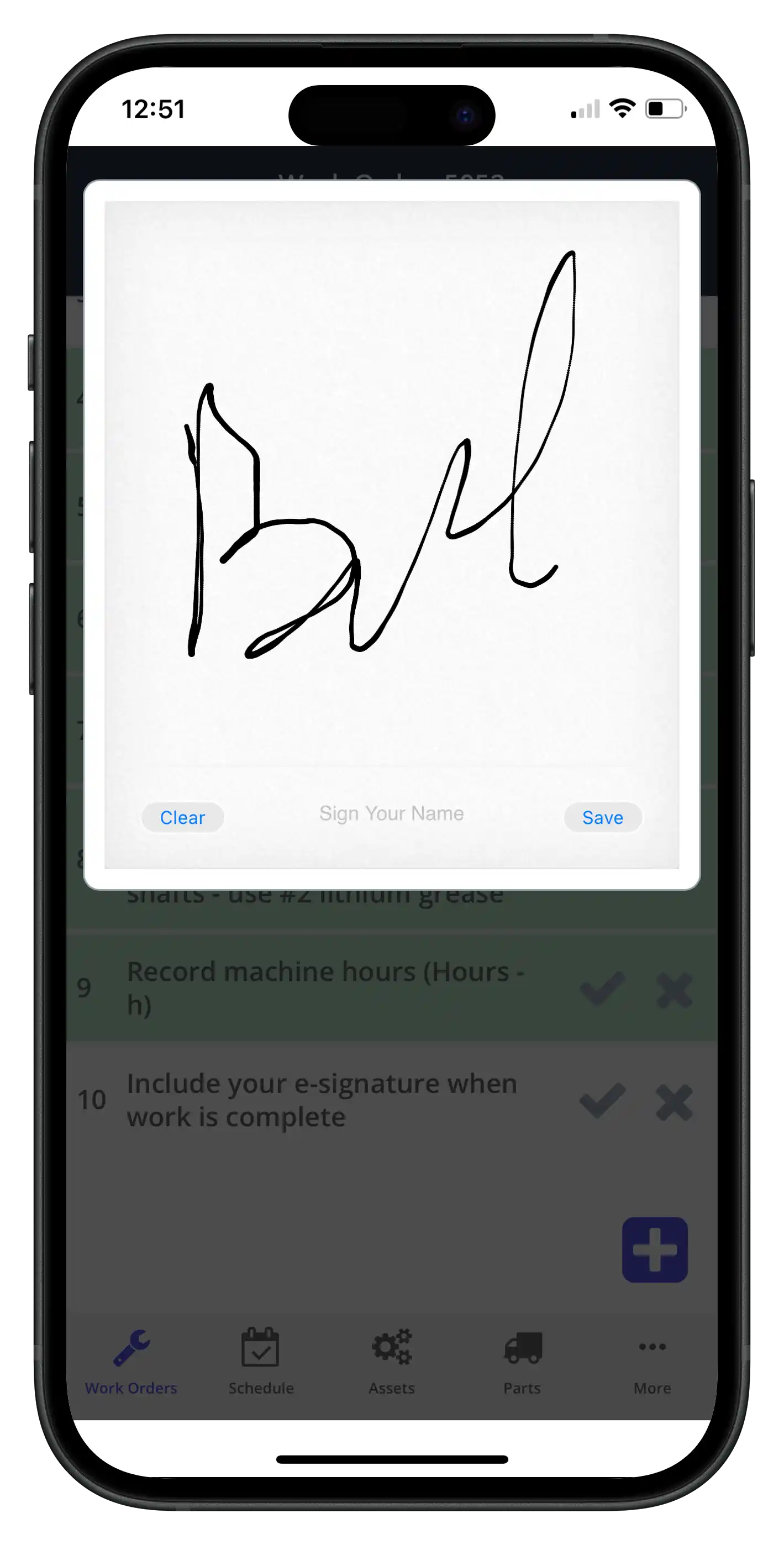
- Pre-op inspections: Mobile checklists with pass/fail, photo evidence, and digital e-signatures upon completion.
- Calibration management: Schedules, creates out-of-tolerance alerts, and linkage to affected CCP/monitoring devices (scales, thermometers, metal detectors, X-ray).
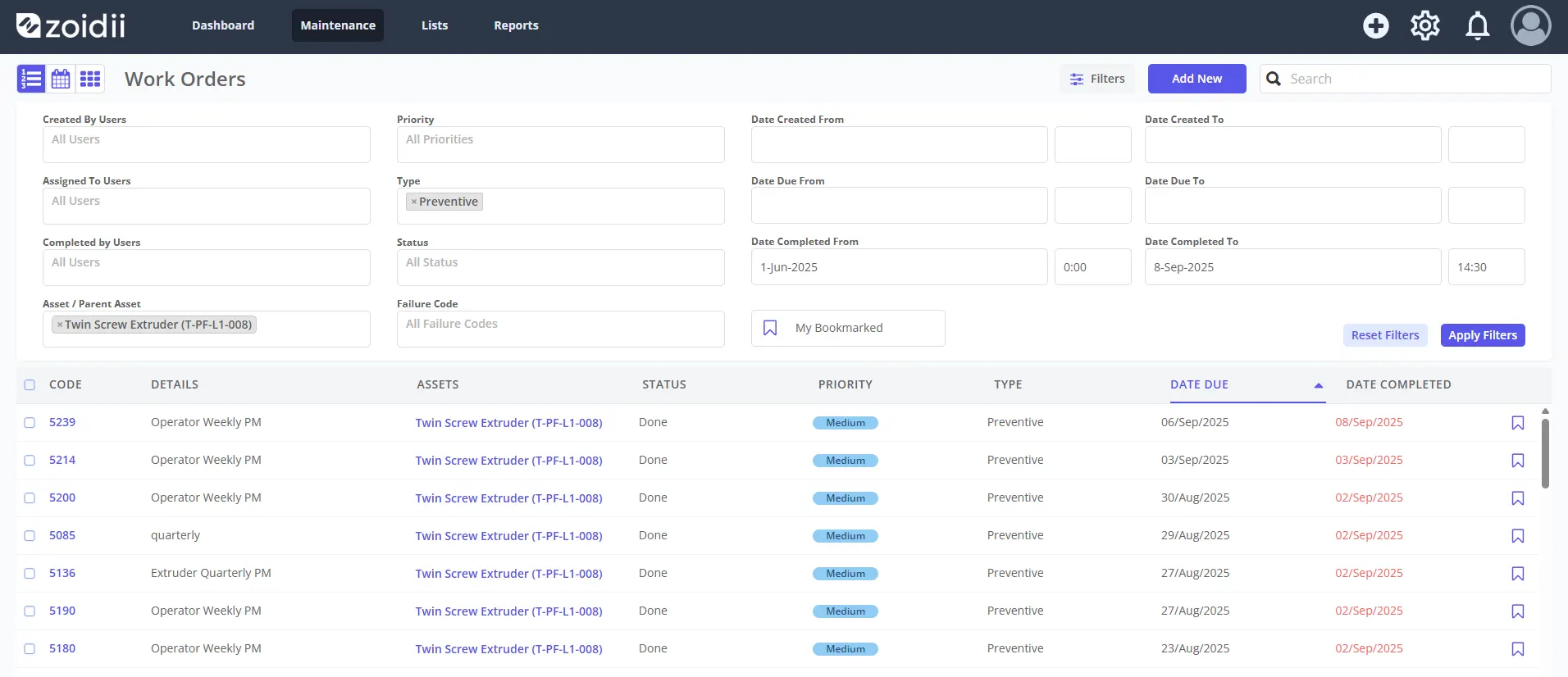
- Electronic signatures & audit trails: Who did what, when, and why—immutable and exportable by date range, asset, or line. With an audit-friendly CMMS, information should be available in a couple of clicks (as proven here).
2) Asset, PM, and reliability functions
- Asset Hierarchy: Plant → line → machine → component, with criticality scoring so you prioritize what matters.
- PM optimization: Usage-based and calendar-based PMs with automatic generation; feedback loops to eliminate non-value PMs.
- Condition monitoring & PdM: Integrations for vibration, temperature, amperage, oil analysis; rules that trigger corrective work only when needed.
- Downtime tracking Includes Offline/Online reason tracking, and MTBF/MTTR.
3) Sanitation & changeover excellence
- Recipe-aware tasks: Allergen-specific steps embedded into work instructions for changeovers.
4) Inventory & procurement that won’t slow you down
- Parts master with alternates: Approved supplier linkage, minimum/maximum levels, and reorder quantities.
- Cost visibility: Part spend by asset/line; aging and obsolescence reports to clean up your storeroom.
5) Mobile-first for the plant floor
- Mobile-first design: Technicians can work in freezers, production areas, or any other areas and update work order information wherever they are.
- Fast work order closure: Scan a QR on the asset, easily update work orders, attach photos, and take voice-to-text notes.
6) Security & deployment
- Cloud, SSO, roles: SAML/SSO, and user roles that give the right access to the right individuals.
- Multi-site governance: Global templates, site-level autonomy, centralized reporting. Here are the top 10 advantages of a multi-site CMMS.
The “best” CMMS for food production by scenario
No single platform wins everywhere. Match the tool to your environment, team size, and needs. The entries below are representative positions to help you shortlist; always validate with a hands-on trial and live data.
Zoidii— Best for mobile-heavy teams and fast rollouts
- Clean UX, strong mobile app, QR codes, and straightforward PMs make it easy for technicians to adopt. Ideal for companies of all sizes, especially first-time CMMS buyers seeking immediate value.
- Solid asset/PM core with strong APIs and marketplace connectors. Backed by Rockwell’s industrial ecosystem, it enables plants to plan deeper MES/SCADA and PdM tie-ins.
- Excellent work instructions, checklists, and form building make it strong for daily operator checks, sanitation pre-ops, and layered process audits alongside maintenance.
- Quick to stand up, highly configurable workflows, and helpful onboarding. A good fit when you need to tailor processes without a heavy IT lift.
- Deep functionality, reliability analytics, and strong multi-site controls. A good match for larger organizations that want rich reporting and governance.
How to choose: a 10-point checklist
1. Audit readiness out of the box Can you export a clean, time-boxed audit packet (work orders, SSOPs, calibrations, deviations) in minutes?
2. Sanitation & allergen support Does it natively handle SSOPs, pre-ops, and verification data with mandatory sign-offs?
3. Mobile-ready Can technicians scan a QR code to bring up all asset and work order information? Can they easily update and complete work orders within seconds?
4. Asset criticality & PM optimization Can you rank assets, set PM priority and due dates based on risk, and prune PMs that don’t reduce failures?
5. Condition-based & predictive Are IIoT signals easy to connect? Can you trigger work orders from measurement inputs (temperature, pressure, etc.) instead of time?
6. Parts management and spend visibility Will it help you prevent stockouts on belts, bearings, gaskets—and show true maintenance cost by line?
7. Reports that you’ll actually use Does it provide the necessary reports to inform your business decisions, such as whether to repair or replace assets?
8. Security & access control SSO, audit trails, and user roles that give the right access to the right individuals.
9. Multi-site templates and governance Can corporate push global PM checklists while sites fine-tune? Is the reporting roll-up simple?
10. Time-to-value and admin load How many weeks to go live with your top 50 assets and PMs? How much ongoing work does the system need?
Implementation game plan (that actually works)
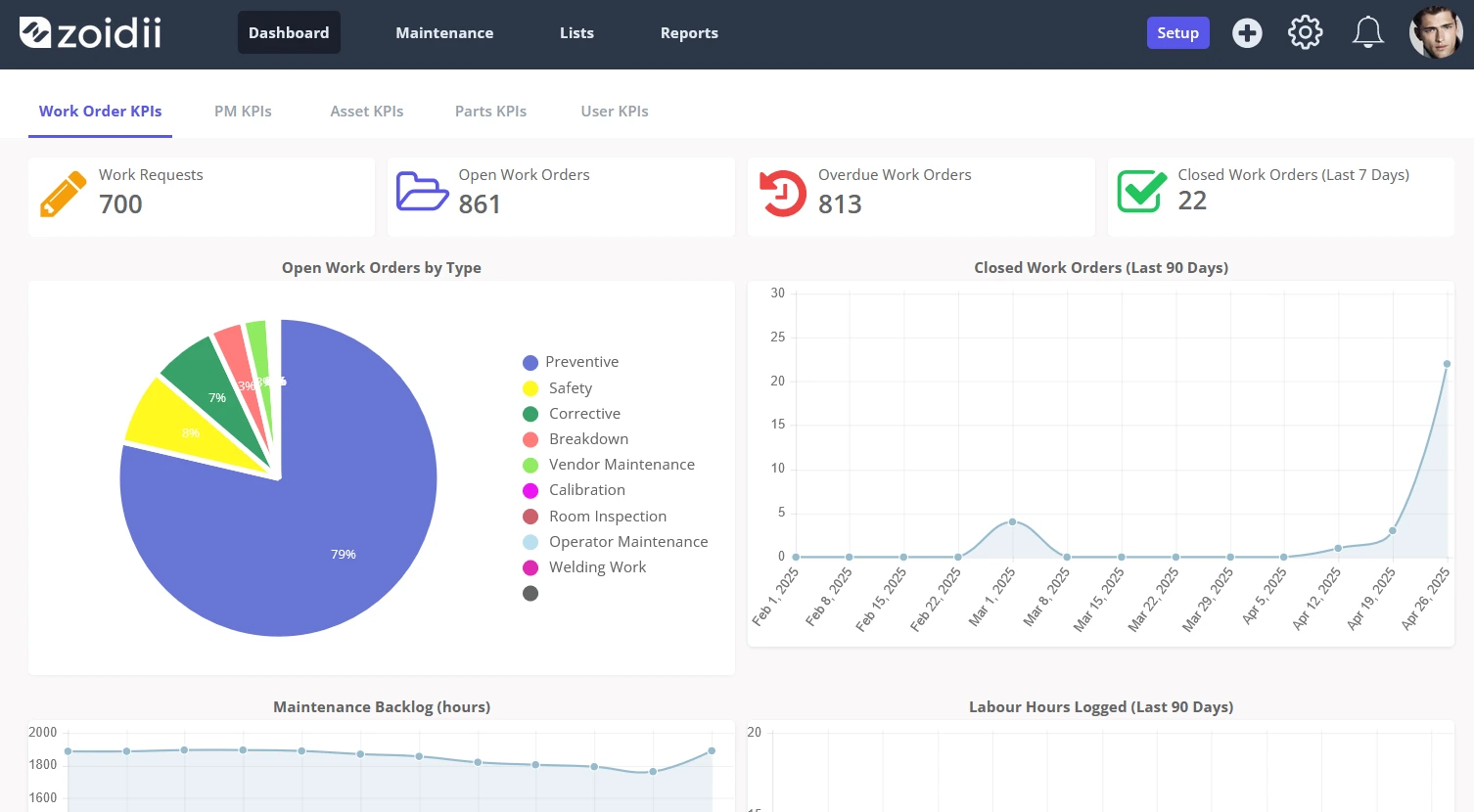
Phase 0: Define outcomes. Select three key metrics that directly impact business outcomes (e.g., a ↓ 20% reduction in unplanned downtime, a 50% decrease in reactive maintenance, and zero audit nonconformances). Decide how you’ll measure them before you start.
Phase 1: Foundation (weeks 1–4)
- Import the asset hierarchy and tag critical equipment (CCPs, refrigeration, packaging automation).
- Stand up core PMs for top-20 critical assets and SSOP/pre-op templates for your pilot line.
- Set up mobile + QR codes and train one shift. Keep the scope small but complete.
- Connect inventory basics: min/max for the top 100 parts; supplier list.
- Roll across lines; add calibration schedules.
- Include PMs for all other assets requiring maintenance
- Begin downtime coding with a limited set of failure codes to maintain data cleanliness.
- Use failure data to prune PMs and add condition-based tasks.
- Launch operator care (autonomous maintenance) checklists in the same system. We cover how operators can become the foundation of a great TPM strategy here.
- Build audit packets and practice a mock inspection pull.
Measuring ROI in food production
A food-focused CMMS should pay for itself in three visible ways:
1. Less unplanned downtime By moving from calendar PMs to targeted, condition-based work, you eliminate both over-maintenance and surprise failures.
2. Audit confidence Every sanitation, calibration, and maintenance task has a digital record with photos and signatures. You spend minutes—not days—preparing for audits. Audit prep should be this easy.
3. Lower recall and scrap risk Faster detection/response to out-of-spec conditions, cleaner changeovers, and better traceability reduce the chance and scope of quality incidents.
Bonus: Expect secondary benefits, including safer work practices (automated lockout/tagout checklists in the work order), reduced overtime, and improved spare-parts turns.
Common pitfalls (and how to avoid them)
- Trying to boil the ocean. Don’t import every bolt on day one. Nail one line, one shift, one SSOP set—then scale.
- Bloated PM libraries. If a task doesn’t reduce failure or risk, kill it. PM compliance looks great until you realize you’re doing busywork.
- Messy failure codes. Keep downtime codes concise and ensure everyone is trained. Garbage in = garbage analytics.
- Ignoring sanitation and QA. The best rollouts include sanitation and QA from the start; your CMMS isn’t “maintenance only.”
Final Take
The best CMMS for food production is the one your technicians, sanitation team, and QA actually use—and the one that can prove compliance at the click of a button.
Shortlist two or three vendors that meet the food-specific needs above, run a 30-day pilot on your most problematic line, and measure results against your top three outcomes.
If the platform helps you pass pre-ops faster, cuts reactive calls, and makes audit pulls painless, you’ve found your winner.



