

What Is CMMS Software?
A computerized maintenance management system, or CMMS, is software designed to centralize maintenance information and streamline operations for teams responsible for keeping equipment and facilities running. Think of it as the command center where work orders get created, preventive maintenance schedules live, spare parts inventory gets tracked, and maintenance history accumulates over time.
The concept emerged in the 1960s when large manufacturing plants started using mainframe computers to schedule preventive maintenance. Back then, only major corporations could afford such systems. Fast forward to today, and cloud-based options have made CMMS software accessible to organizations of virtually any size, from a single-building operation to a multinational enterprise with thousands of assets.
What separates a CMMS from a spreadsheet or paper-based system isn't just digitization. The real value lies in connecting maintenance activities to measurable outcomes. When a technician closes a work order, that data feeds into reports showing equipment reliability, labor costs, parts consumption, and dozens of other metrics. Over months and years, this information reveals patterns that help maintenance teams shift from reactive firefighting to proactive asset management.
A well-implemented CMMS becomes the single source of truth for everything maintenance-related. No more hunting through filing cabinets for equipment manuals, guessing when a machine was last serviced, or wondering which technician has the skills for a specific repair.
What a CMMS Does (and What It Doesn't)
A CMMS excels at organizing maintenance workflows. It automates work order generation based on time intervals or meter readings. It tracks who did what, when, and how long it took. It maintains a running history of every asset, creating an institutional memory that survives employee turnover. It manages spare parts inventory, often triggering reorder alerts when stock drops below defined thresholds.
The software also generates reports that transform raw data into actionable intelligence. You can see which assets consume the most maintenance hours, identify recurring failure modes, compare planned versus actual maintenance costs, and track key performance indicators like mean time between failures or wrench time percentages.
Here's what a CMMS won't do: it won't fix your broken processes. If your team lacks discipline around closing work orders or recording accurate information, the system will reflect that chaos in digital form. A CMMS is a tool, not a magic wand. It amplifies whatever maintenance practices you feed into it.
It also won't replace human judgment. The software can flag that a pump has failed three times this quarter, but deciding whether to repair, rebuild, or replace requires expertise the system doesn't possess. Similarly, a CMMS won't automatically know your business priorities or understand that certain equipment supports revenue-critical operations while other assets can tolerate more downtime.
Core CMMS Modules Explained CMMS vs. EAM vs. ERP: What's the Difference?
Most CMMS platforms share a common architecture built around several core modules. The work order module serves as the operational heart, handling everything from request submission to completion and closure. Asset management stores equipment details, location hierarchies, and maintenance histories. Preventive maintenance scheduling automates recurring tasks based on calendar intervals or usage meters. Inventory management tracks spare parts, manages reorder points, and associates parts with specific assets.
Beyond these fundamentals, you'll find modules for labor management, vendor coordination, purchasing, and reporting. Mobile functionality has become standard, allowing technicians to receive assignments, record work, and access documentation from smartphones or tablets.
The terminology in this space causes genuine confusion. CMMS focuses primarily on maintenance execution: work orders, PM schedules, and parts tracking. Enterprise Asset Management, or EAM, takes a broader view, incorporating asset lifecycle considerations like capital planning, depreciation tracking, and end-of-life decisions. EAM systems often include more sophisticated analytics and may integrate condition monitoring data from sensors.
Enterprise Resource Planning, or ERP, systems like SAP or Oracle operate at an even higher level, connecting finance, human resources, supply chain, and operations across an entire organization. Many ERP platforms include maintenance modules, but these often lack the depth and usability of dedicated CMMS solutions. Organizations frequently run a specialized CMMS alongside their ERP, with integrations passing data between systems.
CMMS Features Checklist: Must-Haves vs Nice-to-Haves
Not every feature matters equally. When evaluating CMMS options, separate the essentials from the extras based on your actual needs.
Must-have features:
- Work order creation, assignment, and tracking with customizable fields
- Preventive maintenance scheduling by date, meter reading, or condition
- Asset registry with hierarchy support and maintenance history
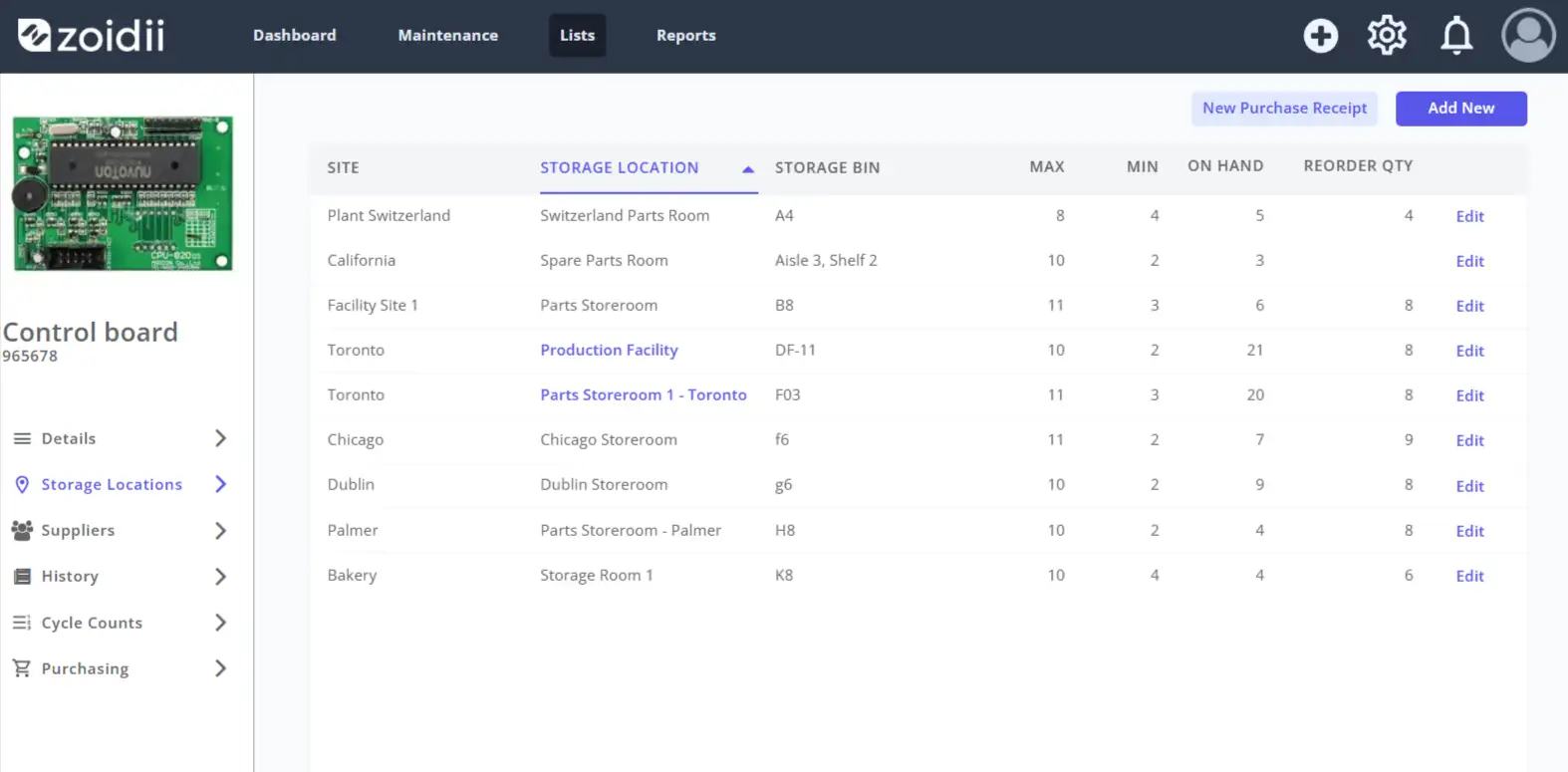
- Parts inventory with quantities, locations, and reorder alerts
- Mobile access for technicians, including offline capability
- Basic reporting on work orders, asset costs, and PM compliance
- User permissions to control access by role
Nice-to-have features depending on your situation:
- Barcode or QR code scanning for asset identification
- Integration APIs for connecting to ERP, accounting, or IoT systems
- Advanced analytics with customizable dashboards
- Predictive maintenance capabilities using sensor data
- Multi-site management with centralized oversight
- Contractor and vendor portals for external coordination
- Document management for manuals, drawings, and procedures
Common Use Cases by Industry
Manufacturing facilities typically focus on maximizing equipment uptime and minimizing unplanned downtime. A CMMS tracks Overall Equipment Effectiveness components, schedules changeover maintenance during planned production gaps, and helps identify chronic equipment problems before they cause line stoppages. Automotive plants, food processors, and pharmaceutical manufacturers all rely heavily on CMMS platforms, though regulatory requirements vary significantly.
Facility management presents different priorities. Building managers use CMMS to coordinate HVAC maintenance, track tenant service requests, manage janitorial schedules, and maintain compliance with fire safety and elevator inspection requirements. Universities, hospitals, and commercial property managers fall into this category.
Fleet operations leverage CMMS for vehicle maintenance scheduling based on mileage or engine hours. Trucking companies, municipal bus systems, and delivery services use the software to ensure vehicles receive timely service while minimizing time out of operation.
Healthcare organizations face unique regulatory pressures. Medical equipment requires documented maintenance histories, calibration records, and compliance with FDA and Joint Commission requirements. A CMMS configured for healthcare must support these audit needs.
Utilities and infrastructure operators manage geographically dispersed assets like pipelines, substations, and treatment facilities. Their CMMS implementations often integrate with GIS systems and SCADA networks to coordinate maintenance across vast service territories.
Cloud vs On-Premise CMMS (and Hybrid Options)
The deployment decision shapes your total cost structure, IT requirements, and operational flexibility for years to come.
Cloud-based CMMS runs on vendor-managed servers accessed through web browsers. You pay subscription fees, typically monthly or annually, based on user count or asset volume. Updates happen automatically, and the vendor handles security patches, backups, and infrastructure maintenance. Implementation timelines are shorter since there's no server hardware to procure and configure.
On-premise deployment means installing the software on servers you own and manage. You purchase perpetual licenses upfront, then pay annual maintenance fees for updates and support. Your IT team handles backups, security, and infrastructure. This approach offers more control over data location and system customization but requires internal technical expertise.
Hybrid models have emerged as organizations seek a middle ground. Some vendors offer private cloud deployments where the software runs on dedicated infrastructure rather than shared multi-tenant environments. Others support on-premise installations that sync with cloud-based mobile applications.
The cloud versus on-premise debate has largely settled in favor of cloud for most organizations. The economics typically favor subscription models unless you have unusual security requirements, unreliable internet connectivity, or existing infrastructure that makes on-premise deployment cost-effective. Even traditionally conservative industries like defense contractors and financial services have increasingly moved maintenance systems to approved cloud environments.
CMMS Pricing Models and True Total Cost of Ownership
Vendor pricing structures vary considerably, making apples-to-apples comparisons challenging.
Per-user pricing charges are based on the number of people accessing the system. Costs range from $30 to $200 or more per user monthly, depending on feature tiers and vendor positioning. This model works well when you have a defined user base, but it can become expensive as adoption grows.
Per-asset pricing scales with the number of equipment records in your system. This approach benefits organizations with many assets but few users, though it can penalize comprehensive asset tracking.
Tiered pricing bundles features into packages, with basic tiers offering core functionality and premium tiers adding advanced analytics, integrations, or unlimited users. Watch for essential features locked behind expensive tiers.
Beyond subscription or license fees, factor in implementation costs. Vendor professional services for configuration and training typically run $5,000 to $50,000 or more, depending on complexity. Data migration from legacy systems requires effort, even if you handle it internally. Customization and integration work add cost if standard configurations don't meet your needs.
Ongoing costs include annual maintenance fees for on-premise systems, typically 18-22% of license cost. Training expenses continue as employees turn over. Internal IT support time accumulates regardless of deployment model.
A realistic total cost of ownership calculation over five years often reveals that the initial software price represents only 30-50% of actual spending.
How to Choose CMMS Software: A Step-by-Step Process
Start by documenting your requirements before contacting vendors. What problems are you trying to solve? What does success look like in 12 months? Which features are non-negotiable versus desirable? Understanding your needs prevents vendors from steering conversations toward their strengths rather than your priorities.
Identify stakeholders and involve them early. Maintenance technicians, supervisors, planners, inventory managers, and finance representatives all have legitimate perspectives. A system that works beautifully for management reporting but frustrates daily users will fail regardless of its technical capabilities.
Create a shortlist of three to five vendors based on initial research. Industry publications, peer recommendations, and analyst reports help narrow the field. Avoid the trap of evaluating too many options, which leads to decision paralysis.
Request demonstrations tailored to your scenarios. Provide vendors with realistic use cases and ask them to show how their system handles your actual workflows. Generic demos showcase ideal conditions; custom scenarios reveal limitations.
Conduct reference checks with organizations similar to yours. Ask about implementation challenges, ongoing support quality, and whether the system delivered expected benefits. Vendors will provide their happiest customers, so dig deeper with specific questions about pain points.
Negotiate contracts carefully. Multi-year commitments often unlock discounts but reduce flexibility. Understand terms around price increases, data ownership, and exit provisions.
CMMS Implementation Roadmap (90 Days to 6 Months)
Successful implementations follow a predictable arc. Rushing through phases creates technical debt that haunts you for years.
Days 1-30: Foundation - Finalize project scope and success criteria. Assign a dedicated project manager and identify key users who will become system champions. Complete vendor kickoff and establish communication rhythms. Begin documenting current processes and gathering data for migration.
Days 31-60: Configuration - Build your asset hierarchy and naming conventions. Configure work order types, priority levels, and workflow rules. Set up user roles and permissions. Import or create asset records, starting with critical equipment. Configure preventive maintenance schedules for high-priority assets.
Days 61-90: Testing and Training - Conduct user acceptance testing with real scenarios. Train initial user groups, focusing on daily workflows rather than every feature. Pilot the system with a limited scope, perhaps one facility or department. Gather feedback and adjust configurations.
Days 91-180: Rollout and Stabilization - Expand to additional users and locations in planned phases. Monitor adoption metrics and address resistance promptly. Refine processes based on real-world usage. Begin tracking key performance indicators to demonstrate value.
The timeline extends for larger organizations or complex environments. A multi-site manufacturer with thousands of assets and hundreds of users might need 12-18 months for full deployment. Smaller operations with straightforward requirements can achieve functional implementation in 60-90 days.
Data Migration, Asset Hierarchies, and Naming Conventions
Data migration deserves more attention than most organizations give it. Garbage in, garbage out applies forcefully here. Migrating messy data from legacy systems or spreadsheets perpetuates problems in a new environment.
Before migration, audit existing data quality. How complete are asset records? How accurate is the maintenance history? What percentage of equipment has proper identification numbers? Cleaning data before migration costs less than fixing it afterward.
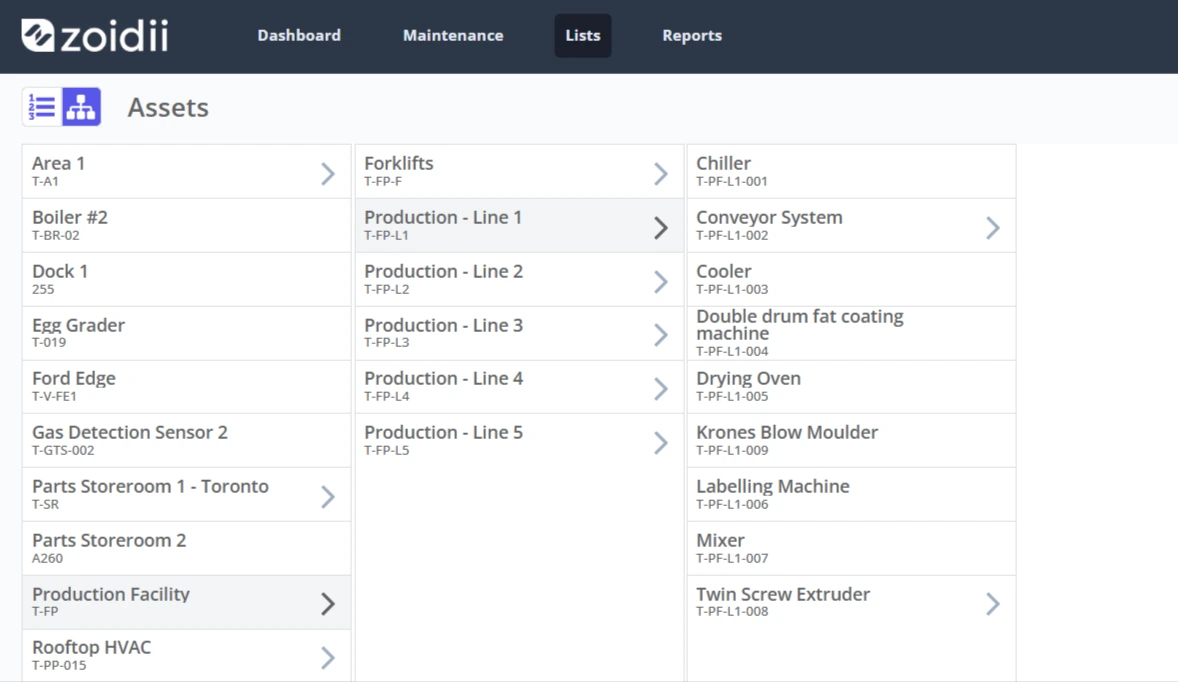
Asset hierarchies structure how equipment relates to locations and parent systems. A typical hierarchy might flow from site to building to system to equipment to component. The right structure depends on how you need to analyze data and assign work. Manufacturing plants often organize by production line, while facilities teams prefer building-centric hierarchies.
Naming conventions seem trivial until inconsistency creates chaos. Establish standards for asset IDs, work order numbers, and parts identification before entering data. Document the conventions and enforce them consistently. A pump might be identified as "P-101" in one system, "Pump 101" in another, and "Centrifugal Pump - Building A" in a third. Standardization prevents this fragmentation. Here is the ultimate guide to asset naming conventions.
Consider what historical data actually matters. Migrating ten years of work order history sounds thorough, but it may not justify the effort. Recent maintenance records, open work orders, and active PM schedules typically warrant migration. Older historical data might be archived for reference without importing into the new system.
Preventive Maintenance Optimization (Templates That Work)
Preventive maintenance programs fail when they become checkbox exercises disconnected from equipment needs. A CMMS enables sophisticated PM management, but the software only executes what you design.
Effective PM tasks specify what to do, not just that something should be done. "Inspect pump" tells a technician almost nothing. "Check pump bearing temperature with infrared thermometer, record reading, investigate if above 180°F" provides actionable direction.
Build PM templates around equipment criticality. Critical assets warrant more frequent inspection and comprehensive task lists. Non-critical equipment can tolerate longer intervals and simpler procedures. Applying the same PM intensity everywhere wastes resources.
Incorporate manufacturer recommendations as a starting point, not a final answer. OEM guidance often errs toward conservative intervals that sell more parts and service. Adjust based on your operating conditions, failure history, and risk tolerance.
Elements of effective PM templates:
- Clear task descriptions with acceptance criteria - Estimated duration for scheduling purposes - Required parts, tools, and safety equipment - Reference documents like procedures or drawings - Inspection points with measurement ranges - Failure codes for common findings
Review PM effectiveness periodically. If equipment still fails frequently despite regular preventive maintenance, the PM program isn't addressing actual failure modes. If PMs never find problems, intervals might be too short. Use CMMS data to optimize over time.
Bonus: 5 Steps to Design a Preventive Maintenance Plan
Work Order Best Practices That Stick
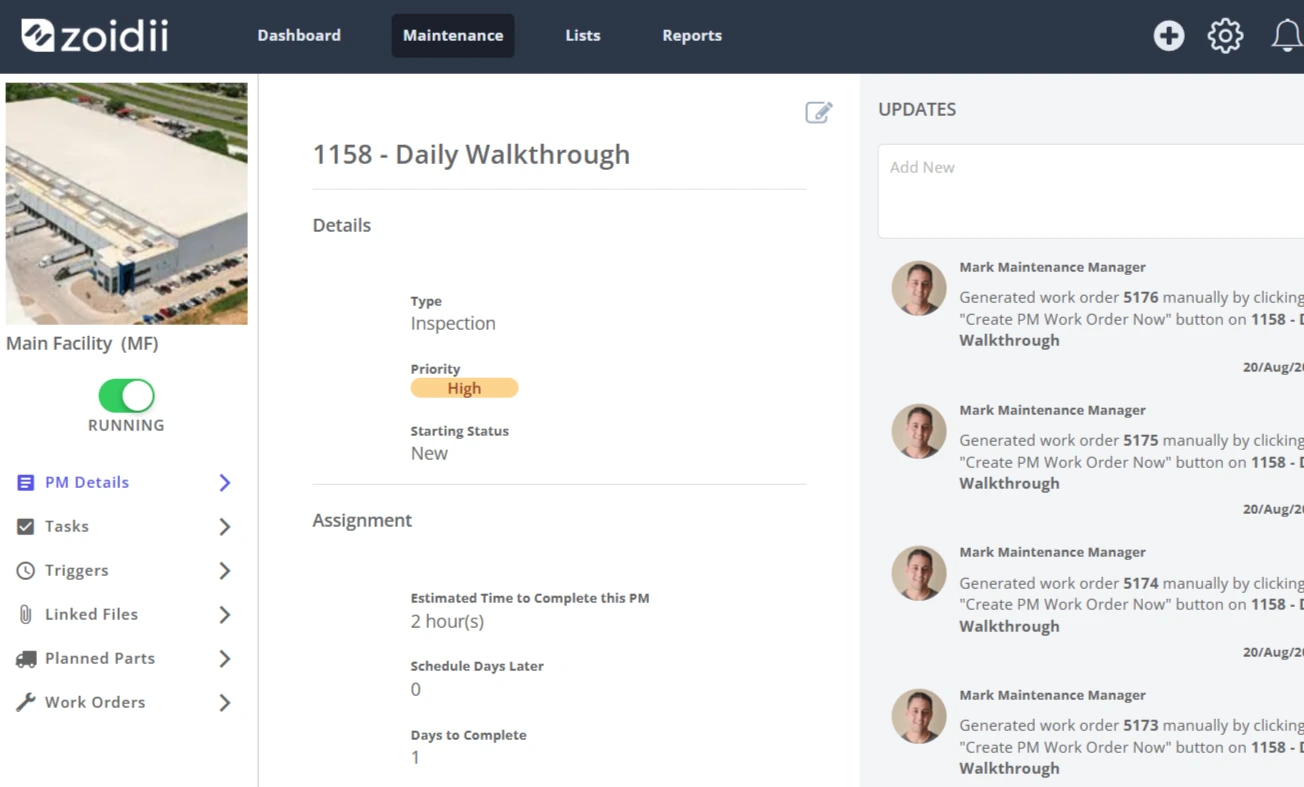
Work orders capture the transactional reality of maintenance operations. Sloppy work order practices undermine everything else the CMMS tries to accomplish.
Require meaningful descriptions when work orders are created. "Fix machine" provides no useful information. "Conveyor belt tracking off-center, product falling onto floor at station 12" gives technicians context before they arrive.
Standardize priority levels and enforce their meaning. If everything is marked urgent, nothing is actually prioritized. Define what each priority level means in terms of response time, and hold people accountable.
Close work orders completely. Partial information defeats the purpose of tracking. Require technicians to record actual time spent, parts used, work performed, and any follow-up needed. This discipline feels burdensome initially, but becomes a habit with consistent enforcement.
Use failure codes consistently. Standardized codes enable analysis across many work orders to identify patterns. "Bearing failure" appearing on 15 work orders for similar pumps suggests a systemic issue worth investigating. Free-text descriptions alone make this analysis nearly impossible.
Attach relevant documentation. Photos of equipment conditions, markup drawings showing problem locations, or scanned inspection forms add context that text descriptions miss. Modern mobile CMMS apps make this easy.
Be sure to map out your work order process. Use this guide as a starting point.
Security, Permissions, and Compliance Considerations
Access control protects data integrity and supports compliance requirements. Not everyone needs access to everything.
Role-based permissions assign capabilities based on job function. Technicians might create and update work orders, but not delete assets or modify PM schedules. Supervisors gain additional authority. Administrators control system configuration. Define roles that match your organizational structure.
Audit trails document who did what and when. Regulated industries require this traceability. Even without regulatory mandates, audit logs help investigate discrepancies and support continuous improvement.
Data retention policies determine how long records persist. Some industries mandate specific retention periods for maintenance documentation. Configure your CMMS to meet these requirements and establish processes for archiving or purging data appropriately.
Integration security matters when connecting CMMS to other systems. APIs should use authentication and encryption. Review vendor security practices, including their certifications, penetration testing, and incident response procedures.
For organizations subject to specific regulations, verify that your CMMS supports compliance needs. FDA 21 CFR Part 11 requirements for electronic records affect pharmaceutical and medical device manufacturers. OSHA process safety management rules apply to facilities handling hazardous materials. ISO 55000 asset management standards influence how some organizations structure their maintenance programs.
Building the Business Case: ROI, Payback, and Cost Avoidance
Justifying CMMS investment requires translating maintenance improvements into financial terms that executives understand.
Quantify current state costs before projecting benefits. What do you spend annually on maintenance labor, parts, and contractors? How much unplanned downtime occurs, and what does each hour cost in lost production or revenue? What emergency expediting fees do you pay for rush parts orders? Baseline metrics make improvement measurable.
Common benefit categories:
Reduced downtime translates directly to production value. If unplanned downtime costs $5,000 per hour and better PM compliance reduces downtime by 100 hours annually, that's $500,000 in avoided losses.
Labor efficiency gains come from reduced travel time, better planning, and less rework. Increasing wrench time from 25% to 35% effectively adds capacity without hiring. Here are 6 ways to increase wrench time with your maintenance team.
Inventory optimization reduces carrying costs and obsolescence. Better visibility into parts usage enables lower stock levels without increased stockout risk.
Extended asset life defers capital replacement. If improved maintenance extends the equipment's useful life by two years, the deferred replacement cost has present value.
Energy savings from properly maintained equipment accumulate steadily. A well-maintained HVAC system consumes less energy than one with dirty filters and failing components.
Calculate the payback period by dividing the implementation cost by the annual benefits. Many organizations achieve payback within 12-18 months, with ongoing benefits continuing thereafter.
Bonus: Easily calculate ROI with Zoidii's ROI calculator.
Change Management and Training for High Adoption
Technology implementations fail more often due to people problems than technical ones. Users who resist the new system or lack proficiency undermine potential benefits.
Communicate the "why" before the "how." People accept change more readily when they understand the reasoning. Explain what problems the CMMS solves and how it benefits users specifically, not just the organization abstractly.
Identify champions within the maintenance team. Peer influence matters more than management mandates. When respected technicians embrace the system, others follow.
Design training around actual job tasks, not software features. Technicians need to know how to receive assignments, record their work, and find equipment information. They don't need comprehensive tours of administrative functions they'll never use.
Provide multiple training formats. Some people learn from classroom instruction, others from hands-on practice, and others from video tutorials they can review repeatedly. Offering options increases effectiveness.
Plan for ongoing support after go-live. Questions and problems arise during real use that training didn't anticipate. Accessible help resources, whether internal experts or vendor support, prevent frustration from derailing adoption.
Monitor usage metrics and address gaps proactively. If certain users or locations show low activity, investigate why. Resistance might indicate legitimate usability concerns worth addressing.
Common CMMS Pitfalls (and How to Avoid Them)
Overcomplicating the initial configuration. The temptation to build elaborate workflows, capture extensive data fields, and automate everything creates systems too complex to use. Start simpler than you think necessary. Add complexity only when clear needs emerge.
Neglecting data quality. Incomplete asset records, inconsistent naming, and missing maintenance histories limit system value. Invest in data cleanup before and during implementation.
Insufficient training and support. Brief training sessions followed by abandonment guarantee low adoption. Ongoing coaching and accessible help resources sustain usage.
Treating implementation as an IT project. CMMS success depends on maintenance process improvement, not just software deployment. Operations leadership must own the initiative, with IT providing support.
Ignoring mobile needs. Technicians work in the field, not at desks. If mobile access is clunky or unavailable, they'll revert to paper or memory.
Failing to enforce usage. Optional systems become unused systems. Management must require CMMS usage for work order processing, not accept workarounds.
Setting unrealistic timelines. Rushing implementation creates shortcuts that haunt you later. Allow adequate time for proper configuration, data preparation, and training.
Not measuring outcomes. Without baseline metrics and ongoing tracking, you can't demonstrate value or identify improvement opportunities.
Frequently Asked Questions
How long does CMMS implementation typically take? Small organizations with straightforward needs can achieve basic functionality in 60-90 days. Mid-sized companies usually need 4-6 months for full deployment. Large enterprises with multiple sites and complex requirements often require 12-18 months.
What's a realistic budget for CMMS software? Cloud subscriptions range from $30-200 per user monthly. Implementation services add $5,000-50,000 or more. Plan for total first-year costs of $15,000-100,000 for small to mid-sized organizations, significantly more for enterprises.
Can we implement CMMS without dedicated IT support? Cloud-based systems minimize IT requirements, but you'll still need someone to manage user accounts, configure settings, and troubleshoot issues. Smaller organizations often assign these tasks to a maintenance supervisor or administrator.
How do we get technicians actually to use the system? Combine clear expectations from management, training focused on daily tasks, mobile access that's genuinely convenient, and visible benefits for users themselves. Address resistance directly rather than hoping it resolves naturally.
Should we migrate data from our old system? Migrate active assets, open work orders, and recent maintenance history. Older historical data often isn't worth the migration effort. Clean and standardize data before importing.
What integrations matter most? Accounting or ERP integration for cost tracking ranks highest for most organizations. IoT sensor integration matters for organizations pursuing condition-based maintenance. Single sign-on simplifies user management.
Glossary of CMMS Terms
Asset: Any equipment, facility, or item tracked in the CMMS for maintenance purposes.
Corrective Maintenance: Repairs are performed after equipment failure or degradation is detected.
Downtime: A period when equipment is unavailable for production due to failure or maintenance.
Failure Code: Standardized classification describing why equipment failed or required repair.
Mean Time Between Failures (MTBF): Average operating time between equipment failures.
Mean Time To Repair (MTTR): Average time required to restore failed equipment to operation.
Preventive Maintenance (PM): Scheduled maintenance performed to prevent failures before they occur.
Predictive Maintenance (PdM): Maintenance triggered by equipment condition indicators rather than fixed schedules.
Work Order: Document authorizing and tracking a specific maintenance task or repair.
Wrench Time: Percentage of technician hours spent performing actual maintenance work versus travel, waiting, or administrative tasks.
Asset Hierarchy: Organizational structure showing relationships between locations, systems, and equipment.
PM Compliance: Percentage of scheduled preventive maintenance tasks completed on time.
Backlog: Accumulated maintenance work orders awaiting completion.
Criticality: Rating indicating equipment importance to operations, used for prioritization.
Final Thoughts
Selecting and implementing CMMS software represents a significant commitment, but the payoff justifies the investment for organizations serious about maintenance improvement. The technology itself matters less than how you use it. A basic system used consistently outperforms sophisticated software gathering dust.
Start with clear objectives tied to business outcomes. Choose software that fits your actual needs rather than chasing feature lists. Invest adequately in implementation, especially data quality and user training. Enforce consistent usage from day one. Measure results and adjust based on what the data reveals.
The organizations that extract maximum value from CMMS share common traits: leadership commitment, realistic expectations, disciplined execution, and patience for results that compound over time. Maintenance transformation doesn't happen overnight, but it does happen with sustained effort and the right tools.
Your maintenance operation holds significant untapped potential. Equipment runs longer with proper care. Technicians accomplish more with better information. Costs decline when reactive emergencies give way to planned activities. A well-implemented CMMS unlocks these possibilities, turning maintenance from a cost center into a competitive advantage.



